Database Architecture for Humans: The 5 Technical Concepts That Explain Why Your Data Keeps Breaking
Article by Kyle Keith, 30 January 2026
Most nonprofit data problems trace back to a handful of database concepts: primary keys, foreign keys, schemas, ETL and normalization. Here is each one in plain words, what breaks without it, and the question to ask before you sign with a vendor.
First published on LinkedIn on 30 January 2026. Edited for this site on 6 November 2026: every number links its source.
The Nonprofit Data Architecture Series
Here's an example.
She started the job on a Monday. By Friday, she understood why her predecessor had left.
The new development director had inherited a fundraising operation that looked healthy on paper: 45,000 donor records, a CRM that cost $30,000 a year, and a data analyst who'd been there for seven years.
Then the data analyst gave two weeks' notice.
“Before you go,” she asked, “can you show me how the year-end appeal list gets built?”
What followed was a three-hour tour through a system held together with digital duct tape. The appeal list started in the CRM, got exported to Excel where “David's formula” cleaned the addresses, moved to another spreadsheet where someone manually removed deceased donors from a list that finance maintained separately, then went to a third spreadsheet where major donor exclusions happened based on a Word document that the previous director kept on her desktop.
“What's David's formula?” she asked.
“David left four years ago. Nobody's touched it. It just works.”
“And the deceased donor list. How does finance know who's deceased?”
“Mail returns, mostly. Someone updates it when they remember.”
“What happens if they forget?”
Long pause. “We've had some awkward phone calls.”
This isn't a technology problem. This is an architecture problem. And until you understand five specific concepts, you'll keep inheriting systems like this one, or worse, building them yourself.
For: anyone who's been told “it's complicated” and left it at that
The Building Analogy
Think of your database like a building. You can have beautiful furniture (dashboards), expensive appliances (integrations), and a talented decorator (your data person). But if the foundation has cracks, the plumbing doesn't connect, and nobody has the blueprints, you don't have a building. You have an expensive problem.
Database architecture is the blueprint. It answers questions like:
Where does each piece of information live?
How do different pieces of information connect to each other?
What rules prevent bad data from entering?
What happens when someone needs to find something?
Most nonprofits never see this blueprint. They see the furniture. They interact with screens and reports and exports. When something breaks, they call someone who “knows the system.”
When that person leaves, the knowledge leaves with them.
In my experience, this is why CRM implementations so often fail to meet their objectives. Not because the technology is bad, but because nobody designed the foundation properly, or the people who did are long gone.
Why Fundraisers Need to Understand This
You don't need to become a database administrator. But you do need to understand enough to:
Recognize when a vendor is oversimplifying or overcomplicating
Ask the right questions before signing a contract
Understand why “simple” requests sometimes take weeks
Stop accepting “it's complicated” as an answer
Evaluate whether a proposed solution will actually solve your problem
The five concepts that follow aren't comprehensive. They're the specific concepts that explain a lot of the data problems nonprofits encounter. Master these, and you'll understand more about your data infrastructure than most people who work with it daily.
Concept 1: Primary Keys (Why Your Records Get Lost)
For: anyone who's ever searched for a donor and found three records
The Simple Version
A primary key is a unique identifier that guarantees you can find exactly one record. Think of it like a Social Security Number for your data.
For example, when you search for “John Smith” in your CRM, you might find twelve matches. But if you search for donor ID “D-2024-0847,” you find exactly one person. That donor ID is a primary key.
Why This Matters
Every table in a well-designed database has a primary key. Your contacts table has a contact_id. Your donations table has a donation_id. Your events table has an event_id. No two records in the same table can share the same primary key. Ever.
This sounds obvious until you see what happens without it.
After switching CRMs, John 3:16 Mission cleaned up more than 3,000 duplicate records. Every one of those duplicates can split a donor's giving history and hide a cultivation opportunity, because that donor's relationship with the organization is scattered across more than one record.
The consequences compound:
Duplicate records mean you spend more money sending multiple mailings to the same person while donors question your competence
Gift totals split across duplicate records hide potential major donors whose cumulative giving qualifies them for higher-touch cultivation
Year-end tax acknowledgment letters become unreliable
Donor retention reports lose accuracy because you're counting the same person multiple times
How Platforms Handle This Differently
Major CRMs take distinct approaches to unique identification:
CiviCRM gives every table an auto-increment id column, and columns that point to another table are named after that table with “_id” on the end (so address_format_id points to civicrm_address_format.id). The schema is documented in CiviCRM's developer guide, but working with it requires technical understanding.
When evaluating any data system, ask: “How does this system guarantee I can find exactly one record when I need it?”
If the answer involves “well, we match on name and address,” you're looking at a system that will create duplicates. Name-and-address matching is identity resolution (covered in Article 2). Primary keys are different. They're assigned by the system, they never change, and they're never shared.
What Breaks Without It
Duplicate records multiply (in the example above, your 45,000 donors might really be 31,000)
Donation history gets split across records
Communication preferences get lost in merges
Reports overcount or undercount depending on which duplicate gets queried
Staff waste hours hunting for “the right” record
Concept 2: Foreign Keys (Why Your Systems Can't Talk)
For: anyone who's asked “why can't we just connect these two systems?”
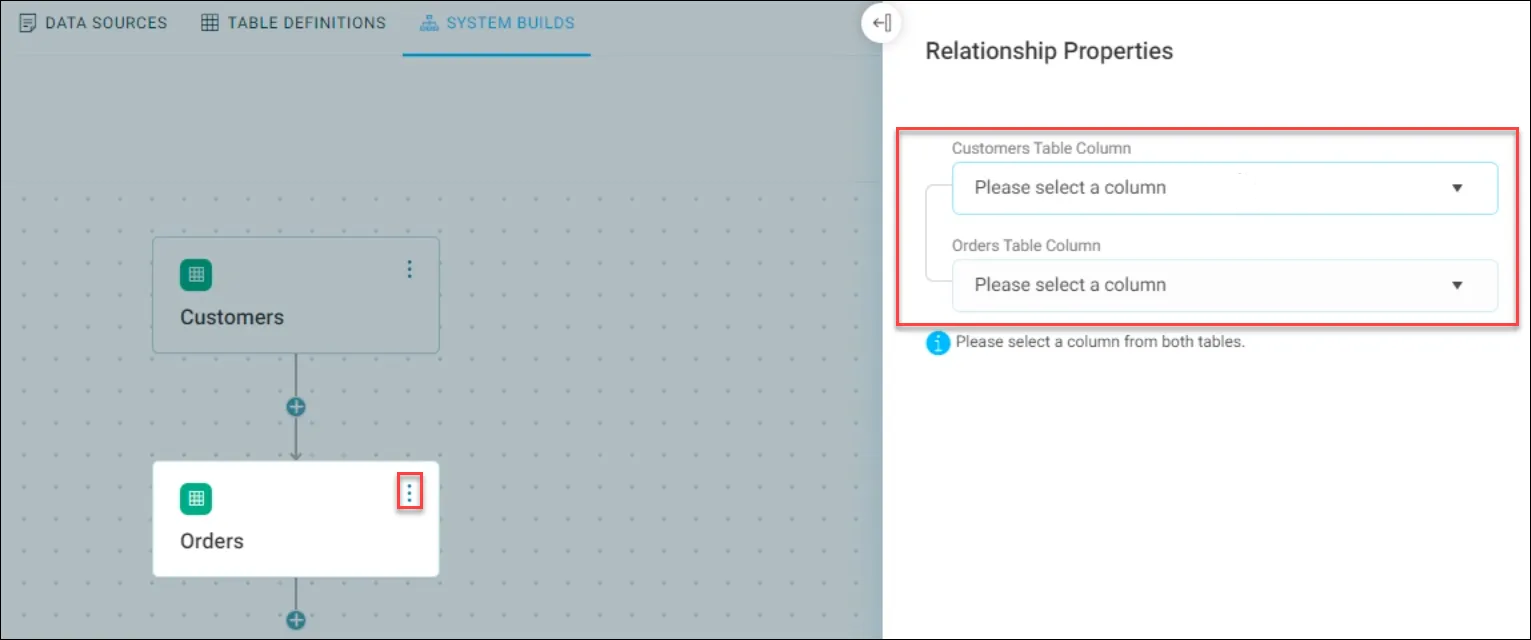
Defining a system This is where Orbit asks which column in one table matches which column in another. It shows the join a team has to define for two systems to talk.
The Simple Version
A foreign key is a reference from one table to another. It's how your database knows that, for example, donation #4,892 belongs to contact #2,341.
If primary keys are like Social Security Numbers, foreign keys are like the line on your tax return that says “enter your SSN here.” They point from one record to another record's primary key, creating the connections that make data meaningful.
Why This Matters
When a donor gives online, your donation platform creates a gift record. That record needs to connect to the donor's contact record in your CRM. The connection happens through a foreign key: the donation record contains a contact_id that points to the contact record.
Without that connection, you have an orphan donation. Money came in, but it's not attached to anyone. Your finance system shows revenue. Your CRM shows nothing. Your development director asks “who gave this gift?” and nobody knows.
Attribution: The Most Complex Foreign Key Challenge
Nonprofit gift attribution involves multiple simultaneous relationships, each requiring proper foreign key connections:
Hard credit goes to the legal donor, answering “whose check was it?” This is used for recognition levels, tax receipts, and official acknowledgment. Only one entity receives hard credit for any gift.
Soft credit recognizes someone who influenced or is associated with a contribution but didn't make it directly. The key point: for example, a single $150 gift, soft-credited to the donor's spouse and to the solicitor who asked, shows $300 in soft credit, while only $150 is actually deposited. This isn't double-counting for financial purposes; it's relationship tracking.
Solicitor credit tracks which fundraiser or board member helped secure the gift, essential for “give or get” requirements and performance evaluation.
Household giving automatically credits spouses for all household gifts, enabling family-level giving analysis and recognition.
Salesforce Example
In Salesforce NPSP, a donation (Opportunity) connects to a donor (Contact) through the Opportunity Contact Role. This isn't just a one-to-one link. A single donation can have multiple contacts attached:
The person who wrote the check (primary contact, hard credit)
Their spouse (household member, soft credit)
The board member who solicited the gift (solicitor credit)
Each of these relationships is a foreign key pointing back to the Contact record. This is what enables reports like “show me all giving associated with Board Member Sarah Chen” even when Sarah herself never wrote a check.
When foreign key relationships fail, orphaned records proliferate: donations without proper constituent linkage, events without attendee records, communications that don't trace back to contacts. Duplicates start at data entry. In a study at Johns Hopkins Hospital, 92% of the errors that resulted in duplicate records occurred during inpatient registration, and errors like these compound when multiple applications lack synchronization.
The result? For example, you build a list of gala attendees and can't match 30% of them to donor records. You pull a report of online donors and find hundreds of gifts attached to “Unknown Contact.” You try to identify which email subscribers have also donated and get three different numbers depending on which system you query.
The Architecture Question
When evaluating integrations, ask: “What identifier connects records across these systems?”
This is where many integrations fail. Your donation platform uses email address as its identifier. Your CRM uses an auto-generated contact ID. Your event system uses a combination of name and phone number. These systems don't share a common key. Without a unified identifier strategy, you're building on sand.
What Breaks Without It
Gift records sit unattached to any donor
Multi-channel journeys can't be tracked (did the email subscriber become a donor?)
Household giving can't be calculated
Solicitor credit can't be assigned
Reports show different numbers depending on which system you query
Concept 3: Schemas (Why Nobody Understands the Data Model)
For: anyone who's asked “where does this information live?” and gotten three different answers
The Simple Version
A schema is the blueprint for your database. It defines what tables exist, what columns each table contains, how tables relate to each other, and what rules govern data entry.
Think of it like the architectural plans for a building. The plans show where every room is, what connects to what, where the plumbing runs, and what load each beam can bear. Without plans, you can still build a structure. But you'll discover problems only when walls start cracking.
Industry Standards Exist
You don't have to invent your schema from scratch. Industry frameworks provide tested blueprints:
CASE Global Reporting Standards (Council for Advancement and Support of Education) represent the industry standard for educational advancement. They define gift counting rules, pledge structures, campaign reporting categories, and soft credit allocations. CASE distinguishes between “funds received” and “new funds committed.” If you're in higher education, these aren't optional; they're how your peers measure success.
Here's an example of how it can unfold. Your database administrator built a system five years ago. She understood how the 47 custom fields connected, which ones were still active, and why “Appeal Code 3” meant something different than “Appeal Code 3B.” She documented none of it because she planned to stay.
Then she got a better job offer.
Now you're staring at a schema nobody understands. The new CRM vendor wants $15,000 for a “data audit” just to figure out what you have. Your board wants a migration to a modern platform, but every consultant you talk to warns that migrations fail when the source schema isn't documented. You can't move forward. You can't explain what you're moving from.
Meanwhile, your data keeps decaying, at an average rate of 30% per year. Donors change addresses. Email addresses bounce. Phone numbers disconnect. Nearly a third of your database becomes unreliable every year while you're stuck trying to reverse-engineer decisions someone made half a decade ago.
In my experience, this is why so many CRM implementations fail. Not because the new technology is bad, but because organizations can't cleanly extract themselves from undocumented systems they no longer understand.
Their solution wasn't just better reports. They had to redesign the schema, specifically the way income was categorized and how it linked to finance processes. Working with their Apteco partner Wood for Trees, they created a new coding structure, then did something remarkable: using FastStats, they recategorized all historic income, “writing off more than a decade of data debt.”
The result: over 30 Orbit income dashboards, the ability to look back at past activity, and a data foundation that supported their new 10-year fundraising strategy. As their head of data, digital and direct marketing put it: “It's quite jaw dropping what has been achieved by this team.”
That transformation was only possible because they understood what a schema was, recognized theirs was broken, and committed to fixing it properly with expert help.
The Architecture Question
Ask: “Can you show me a diagram of how our data is structured?”
If the answer is “nobody's ever documented that,” you have a problem. Not because documentation is bureaucracy, but because undocumented schemas become unmaintainable. The system becomes hostage to whoever happens to remember how it works.
Schema documentation should include:
A data dictionary (field definitions, data types, business rules)
Entity relationship diagrams showing how tables connect
Data entry policies specifying what goes where
Governance frameworks specifying data ownership and access permissions
What Breaks Without It
New staff can't understand the system without months of shadowing
Simple questions like “how many donors gave to both the gala and the annual fund?” become research projects
Data migrations fail because nobody maps old structure to new structure properly
Integrations break in unexpected ways because developers don't understand relationships
The organization loses years of institutional knowledge when key staff leave
Concept 4: ETL (Why Integrations Break at 2am)
For: anyone who's been told their data sync “just stopped working”
The Simple Version
ETL stands for Extract, Transform, Load. It's the process of moving data from one system to another.
Extract: Pull data from the source system
Transform: Clean, format, and restructure the data for the destination
Load: Insert the data into the destination system
Think of it like moving mail between post offices. You extract mail from one location, transform it by sorting and organizing by destination, then load it onto trucks for delivery.
Why This Matters
Every integration between systems involves ETL, whether you see it or not. When your donation platform syncs with your CRM overnight, an ETL process extracts gifts from the platform, transforms them into the format your CRM expects, and loads them into your database.
When that sync “just stops working,” one of three things broke:
The Extract failed (source system changed something or became unavailable)
The Transform failed (data didn't match expected format, like a field that was supposed to contain numbers now contains text)
The Load failed (destination system rejected the data, often because of foreign key violations: the data references records that don't exist)
Real-Time vs. Batch
Best practices distinguish between real-time and batch processing based on use case.
Donation acknowledgments should go out within minutes (ideally instantly)
CRM-to-email synchronization usually runs every few minutes
Financial reconciliation can run as a daily batch
Common ETL Failure Patterns
Many nonprofits use several applications to manage constituent data. Each connection point is a potential failure:
API rate limits: Platforms cap how many requests an integration can make. Stripe, for one, returns HTTP 429 errors when you exceed its limits and recommends retrying on an exponential backoff schedule. Hit these limits during a giving day surge and your integrations stop mid-campaign.
Field mapping errors: Native integrations often have limited customization, causing data to write to wrong fields or require manual reconciliation. The donation amount ends up in a notes field. The campaign code gets truncated. The email address overwrites the phone number.
Duplicate creation: Remember that duplicates start at registration and data entry. When multiple applications lack synchronization, each creates its own version of the same donor.
Silent failures: Many nonprofit integrations lack monitoring. For example, the sync fails at 2am, nobody gets notified, and you discover three weeks later during reconciliation that you're missing 200 donations.
Integration Tools for Nonprofits
The market offers options across the complexity spectrum:
No-code solutions: Zapier and Make (formerly Integromat). In my experience, these work for simple, point-to-point connections but struggle with complex transformation logic.
Apteco Connect takes a different approach: rather than point-to-point integration, it creates a consolidated data layer that fuses information from your CRM, donation platform, email system, and other sources into a unified view, with pre-built nonprofit schemas that handle the transformation logic so you don't have to build it yourself.
Platform-native: Each CRM offers its own integration marketplace with varying quality and maintenance.
The Architecture Question
Ask: “What ETL processes move data between our systems, what time do they run, and what happens when they fail?”
If nobody can answer this question, you have integrations that will fail silently. The best-architected systems include monitoring and alerting. When ETL fails, someone gets notified immediately. Many nonprofit systems lack this entirely.
What Breaks Without It
Donations appear in your payment processor but never reach your CRM
Duplicates multiply when partial syncs create incomplete records
Reports become unreliable because data timing varies between systems
Reconciliation consumes hours every month
Staff develop “workarounds” (manual spreadsheets) that create their own data quality problems
Concept 5: Normalization (Why “Just Add a Column” Creates Chaos)
For: anyone who's been asked to store new information and defaulted to adding another field
The Simple Version
Normalization is the principle that each piece of information should be stored exactly once, in exactly one place.
When you want to update a donor's address, you should update it in one place, and every report, export, and communication should reflect that change automatically. That's normalized data.
When you have to update the address in your CRM, then in your email system, then in your direct mail spreadsheet, then in the event registration system, that's denormalized data. The same information lives in multiple places, and they'll inevitably fall out of sync.
The Trade-Off
Normalization organizes data into separate tables with single sources of truth. This means fast writes, high data integrity, but slower reads requiring complex joins across tables.
Denormalization reintroduces redundancy for faster reads. Simpler queries, but risk of update anomalies when the same information needs changing in multiple places.
The fundamental trade-off: fast writes and slow reads with normalization versus slow writes and fast reads with denormalization.
For nonprofits, this manifests in custom field decisions.
The Temptation to “Just Add a Column”
The pressure to add custom fields is constant:
“We need to track which donors came to the gala.” Add a column.
“We need to track which gala year.” Add another column.
“We need to track what table they sat at.” Another column.
“And who invited them.” Another column.
“For each year.” Four more columns per year.
For example, within three galas, your contact record has 12 new columns (four for each gala), most of which are empty for most donors. Your database has become a sparse, confusing mess where finding information requires knowing which of 200 columns might contain it.
Platform Approaches Vary Dramatically
Salesforce NPSP offers extreme flexibility through custom objects, fields, workflows, and automations. In my experience, that flexibility needs discipline.
Raiser's Edge NXT, in my experience, is more rigid, with an Attributes system for customization.
Bloomerang, in my experience, keeps customization limited. The platform trades flexibility for usability, making the normalization decisions for you.
Little Green Light, in my experience, offers a middle path: straightforward custom fields, with clear guidance on when to use them.
Apteco sidesteps the dilemma entirely. Instead of asking you to make normalization decisions inside your CRM (where mistakes compound over years), Apteco creates a properly normalized data layer on top of your existing systems. Your CRM can remain messy. Apteco's pre-built nonprofit schemas organize the data correctly when it's pulled together for analysis, segmentation, and campaign execution. You get the benefits of proper architecture without having to rebuild your source systems.
The Cost of Field Sprawl
Too many custom fields make a system hard to use, and the costs compound:
Reporting complexity increases exponentially
User confusion leads to inconsistent data entry
Migration becomes a nightmare when you can't explain what 200 custom fields mean
Performance degrades as queries span more tables
New staff face an incomprehensible interface
The Normalized Alternative
Instead of adding gala columns to the contact record, create a separate Event Attendance table with its own records. Each attendance record connects to a contact via foreign key, stores the event details (which gala, which year, which table, who invited), and keeps contact records clean.
Your contact record stays simple. Attendance history lives where it belongs. Reports can aggregate across years without hunting through dozens of columns.
The Architecture Question
Ask: “When we need to store a new type of information, what's the process for deciding where it goes?”
If the answer is “we usually just add a custom field,” you're accumulating data debt. Every added column makes the database harder to understand, query, and maintain. Eventually, you end up staring at a contact record with 300 fields, unable to determine which ones matter.
What Breaks Without It
The same information gets stored in multiple places and conflicts
Address updates don't propagate to all systems
Custom fields multiply until nobody remembers what they're for
Reports pull from different sources and show different numbers
Data entry staff have to fill in the same information in multiple places
What This Means for Nonprofits
These five concepts explain most data infrastructure problems:
When you can't find a donor's complete history: Your primary keys weren't maintained during a system migration. One donor became three records. Their history is split across fragments.
When systems don't sync correctly: Your foreign keys don't align. The donation platform and CRM use different identifiers. The integration does its best to match on name and email, but say 15% of records never connect.
When nobody can explain the data model: Your schema was never documented. The person who designed it left. The person who maintained it left. Now it's institutional archaeology.
When integrations mysteriously break: Your ETL processes lack monitoring. A field format changed upstream, the transform broke, and nobody noticed for three weeks.
When your contact records have 300 fields: Normalization was abandoned in favor of expediency. Every new tracking requirement got a new column. Now the database is unmaintainable.
The Platform Complexity Spectrum
Nonprofit CRMs take very different approaches to these architectural challenges:
Blackbaud Raiser's Edge NXT: An industry standard with deep functionality, but in my experience, working between its web view and the older database view confuses users.
CiviCRM:Open source, and you choose where it's hosted. Hosting it yourself is, in CiviCRM's own words, for “experts only!”, and in my experience it needs PHP/MySQL expertise and relies on community-based support.
In my experience, the expertise each one requires, from highest to lowest: Salesforce → CiviCRM → Blackbaud RE NXT → DonorPerfect → Virtuous → Little Green Light → Bloomerang.
The Third Path: Done-For-You Architecture
For organizations that shouldn't have to become database experts, consolidated insight layers represent a third path between enterprise complexity and turnkey limitations.
This is why we built Apteco Mission.
Rather than asking fundraisers to master primary keys, foreign keys, schemas, ETL, and normalization, Apteco Mission provides pre-built nonprofit data architecture that handles these decisions correctly from day one:
Data fusion from multiple sources: Bringing together all your key data from different tools and sources into a single location. Instead of building and maintaining ETL pipelines, the platform handles the transformation and loading for you.
Pre-built nonprofit schemas: Rather than requiring organizations to architect their own data models (or pay consultants to do it), Apteco Mission uses pre-built nonprofit schemas based on over 35 years of Apteco working with charities. The decisions about how to structure donations, campaigns, events, and communications have already been made correctly.
Automated identity resolution: The platform creates unified constituent profiles with built-in identity resolution, handling the primary key and foreign key relationships that create duplicate nightmares when done manually.
Knowledge that survives turnover: Because the architecture is standardized and documented, it doesn't depend on any single person's memory. When staff leave, the system remains intelligible. Staff turnover doesn't send your data infrastructure back to square one.
Apteco's FastStats and PeopleStage are crucial for NSPCC's supporter experience communications, enabling tailored, automated journeys for various activities including donation acknowledgements, event stewardship, and fundraising campaigns. ... Through FastStats and PeopleStage, we can streamline supporter relationship management, supporting millions in fundraising while minimising resource use through sophisticated automation.
What to Demand
Whether you're evaluating new technology or auditing existing systems, these concepts give you a framework for questions:
Primary keys: “How does this system uniquely identify records, and what prevents duplicates?”
Foreign keys: “How do records in different tables/systems connect, and what happens to orphaned records?”
Schema: “Can you show me documentation of the data model? What industry standards does it follow?”
ETL: “What processes move data between systems, when do they run, and how are failures monitored?”
Normalization: “What's the philosophy on custom fields vs. related tables? How do you prevent field sprawl?”
If vendors can't answer these questions clearly, they're selling furniture without a foundation. If your current team can't answer them, you have undocumented architecture that will eventually fail.
Self-Assessment: Where Does Your Organization Stand?
Score yourself on each question (1 = Not at all, 5 = Completely):
If your most technically knowledgeable data person left tomorrow, could someone else explain how your systems work?
Can you show a new employee a diagram of how your different systems connect?
When data syncs between systems fail, does someone get alerted automatically?
If you need to find a specific donor, do you consistently find exactly one record (not multiple)?
When someone asks where a specific piece of information is stored, is there one clear answer?
Do you have documentation for what happens to data when it moves between systems?
Scoring:
24-30: Strong foundation. Focus on fine-tuning.
17-23: Gaps exist. Prioritize documentation and monitoring.
10-16: Significant risk. Architecture knowledge is concentrated in too few people.
6-9: Crisis potential. A single departure could destabilize data operations.
Understanding these concepts is the first step. The next articles in this series cover where data integration actually happens: your CRM, your website, your donation processing, and your events and volunteer systems.
Each of those articles will build on the architectural concepts here. Primary keys will explain why two systems show different donor counts. Foreign keys will explain why campaign attribution breaks. Schemas will explain why “simple” reports become complex projects. ETL will explain why integrations that worked for years suddenly stop. Normalization will explain why some CRMs feel intuitive while others feel like finding your way through a maze.
The goal isn't to make you a database administrator. It's to give you enough understanding to ask the right questions, evaluate solutions properly, and stop accepting “it's complicated” as an answer.
Your data infrastructure is the foundation of everything your team does. You deserve to understand it. And you deserve solutions designed so you don't have to become an expert to benefit from expert-level architecture.
About This Series
This series is part of the Apteco Mission launch: a consolidated insight platform built specifically for small-to-medium nonprofits who've been underserved by enterprise solutions.
We designed Apteco Mission for organizations that need enterprise-level donor insight without the enterprise-level implementation timeline, budget, or technical requirements. Pre-built nonprofit data schemas. Dashboards designed for fundraisers. Time to value measured in weeks, not years.
If you're tired of being told the only options are expensive enterprise implementations or DIY spreadsheet heroics, we built this for you.
This article is part of “The Nonprofit Data Architecture Series,” exploring how nonprofits can build data infrastructure that enables personalized stewardship, accurate reporting, and mission-focused decision making.
Next: Article 4: CRM Integration Strategies. Why your CRM is a system of record, not a system of insight, and what that means for your data strategy.