
Apteco Learn Mission Schedule Time with an Apteco Architect Play with a Live System

How your data gets in

Stop 4 of 58 · about 10 minutes

How does a name on a sign-in sheet become part of one record? A guest comes to your spring walk. The ticketing tool has her name. The sign-in sheet has her initials. The giving platform has her email, because she sponsored a friend. Three places, one person, and the CRM never learned she came.
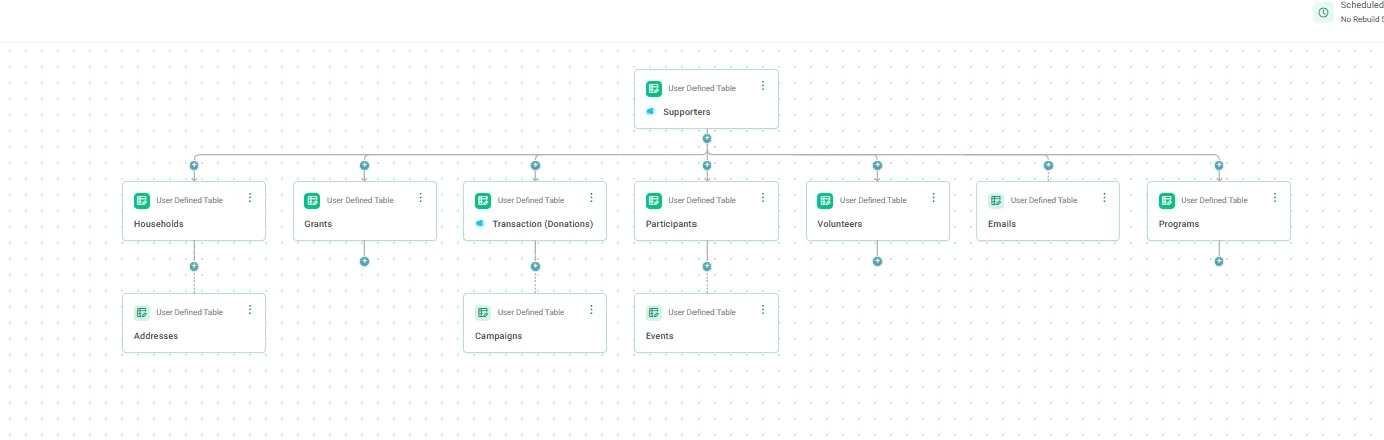
A demo charity's system in Connect: each place its data lives is a table (gifts, events, volunteers, grants, emails and more), and every table joins to one Supporters record.
A demo charity's system in Connect: each place its data lives is a table (gifts, events, volunteers, grants, emails and more), and every table joins to one Supporters record. Open full size

Sample charity: the people and numbers in these screens are made up, so the picture shows the tool, not a result.

The lesson

Apteco Connect is where your data comes into Mission. Your Apteco team sets it up with you during your build. What can come in?

  • Anything in rows and columns: if it fits in a table, Mission can bring it in. Your Apteco team handles how it connects.
  • Your CRM: whichever one you use.
  • Your other tools: the giving platform, the ticketing tool, the volunteer app.
  • Your spreadsheets: the event list, the grants tracker, the list a coordinator keeps.
  • One person, one record: Mission spots the same person in every place and joins them up. Her gifts, her walk and her volunteer hours sit on one record, and it stays fresh as new data comes in.

The Field Guide shows, for each CRM, which of its fields map to which Mission field.

Watch this stop · about a minute

Your turn, in Your notes, then the Field Guide

  1. List every place your supporter data lives: the CRM, the giving platform, the ticketing tool, the volunteer app, and every spreadsheet.
  2. Next to each one, note whether it sits in rows and columns. If it does, it can come in.
  3. In the Field Guide, open Filter by your CRM and switch yours on. Read what it covers and where its gaps are.

Quick check

Which of these can Mission bring in?
  • Only data from a short list of CRMs
  • Anything in rows and columns: your CRM, your other tools, your spreadsheets
  • Only what you type in by hand

Answer: Anything in rows and columns: your CRM, your other tools, your spreadsheets

A supporter is in your CRM, your ticketing tool and a volunteer spreadsheet. What does Mission do?
  • Keeps three separate records
  • Joins them into one record for that person
  • Keeps only the CRM one

Answer: Joins them into one record for that person

Need a hint?

If it fits in rows and columns, it can come in. Mission joins each person into one record.

Why it matters

Every supporter shows up as one whole person, so nobody is thanked twice or forgotten once.

Read on

Read more in the Apteco Help Hub

Learn Mission is a free course. You read a little, do it yourself, then answer one quick check. Orin, the assistant in Orbit, walks with you. Your progress stays in your browser.

Do this stop yourself

It is stop 4 of 58. Open it in the course, or start from the beginning.

Open this stop in the course