Apteco Learn Mission Schedule Time with an Apteco Architect Play with a Live System

Sign in to Orbit, meet Orin

Stop 2 of 58 · about 6 minutes

Where is everything, and who do you ask when you get stuck? Your login details are in an email from Apteco. Check spam. It is often spam.

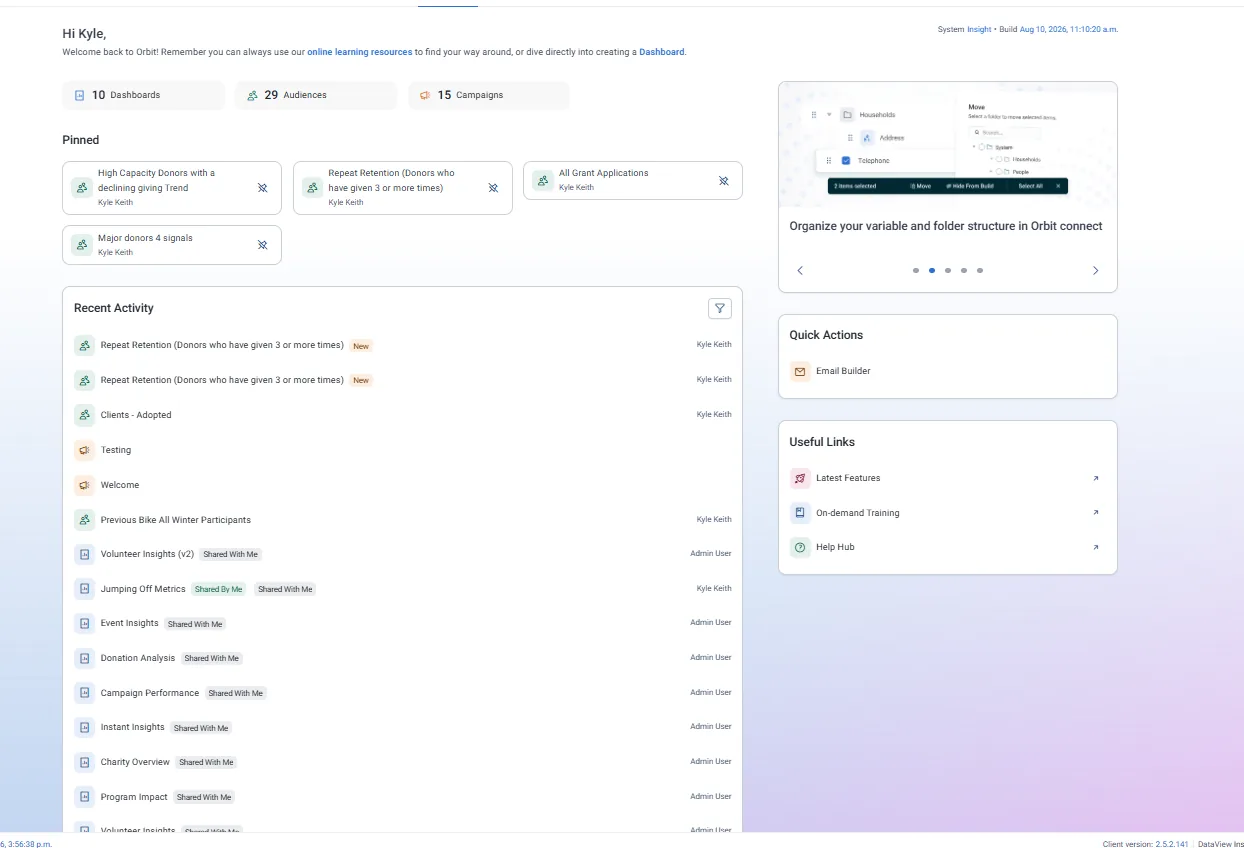
The Orbit home page on a demo charity's system: Dashboards, Audiences and Campaigns across the top, pinned items and recent activity below. This one has 10 dashboards, 29 audiences and 15 campaigns.
The Orbit home page on a demo charity's system: Dashboards, Audiences and Campaigns across the top, pinned items and recent activity below. This one has 10 dashboards, 29 audiences and 15 campaigns. Open full size

Sample charity: the people and numbers in these screens are made up, so the picture shows the tool, not a result.

The lesson

Orbit opens on a homepage with Dashboards, Audiences and Campaigns across the top.

Orin is the AI chat assistant built into Orbit. You open it from the Orin icon at the bottom left of the screen, from anywhere in Orbit, and type a question. It answers in whatever language you write in.

Three things to know before you lean on it:

  • Your system administrator has to switch Orin on first (a feature switch under Application Settings). If you don't see the icon, ask them.
  • You get a set number of messages a day. The count shows in the Orin window and resets at midnight UTC.
  • Orin does three kinds of things: the knowledge guide (questions about how Orbit works), the data navigator (questions about your own system) and the solution builder (it builds audiences for you). More on each as we go.

Orin keeps your data in your Apteco environment. Your message and some system metadata go to the model; individual records do not, unless you type them in. So never put a supporter's name in a question.

Watch this stop · about a minute

More of it in Orbit

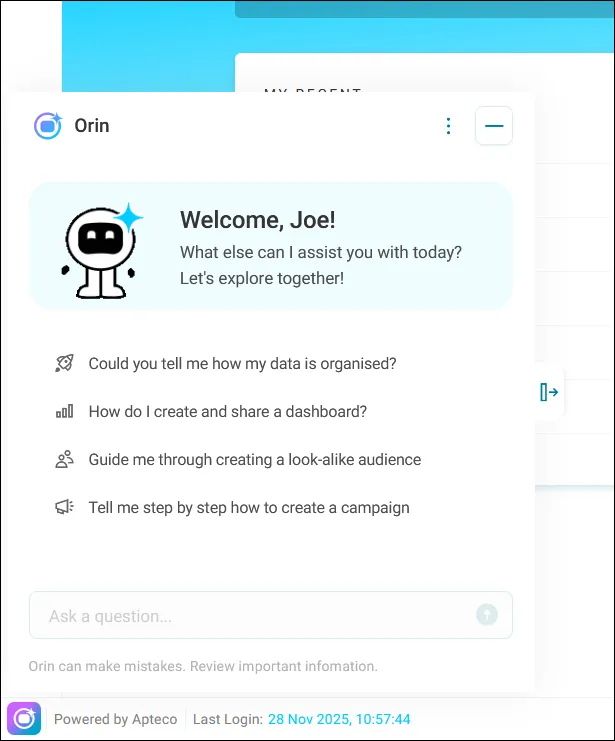
The Orin window, with the questions Apteco suggests you start with.
The Orin window, with the questions Apteco suggests you start with. Help Hub: Orin

Your turn, in Orbit

  1. Open a second browser window beside this one and sign in to Orbit. No system yet? Open the practice system instead.
  2. Bookmark the sign-in page.
  3. Find the Orin icon at the bottom left. If it isn't there, note that Orin isn't switched on for you yet.

Quick check

Where do you open Orin?
  • The icon at the bottom left of the screen
  • A separate website
  • Only from the Audiences page

Answer: The icon at the bottom left of the screen

You want to ask Orin about one supporter. What's the rule?
  • Type their full name so Orin can look them up
  • Never type a supporter's name or personal details into Orin
  • Only on Fridays

Answer: Never type a supporter's name or personal details into Orin

Need a hint?

Bottom left, from anywhere in Orbit. Ask about groups and settings, never about a named person.

Why it matters

When Orbit is one click away, so is the answer to "how are our supporters doing?"

Learn Mission is a free course. You read a little, do it yourself, then answer one quick check. Orin, the assistant in Orbit, walks with you. Your progress stays in your browser.

Do this stop yourself

It is stop 2 of 58. Open it in the course, or start from the beginning.

Open this stop in the course