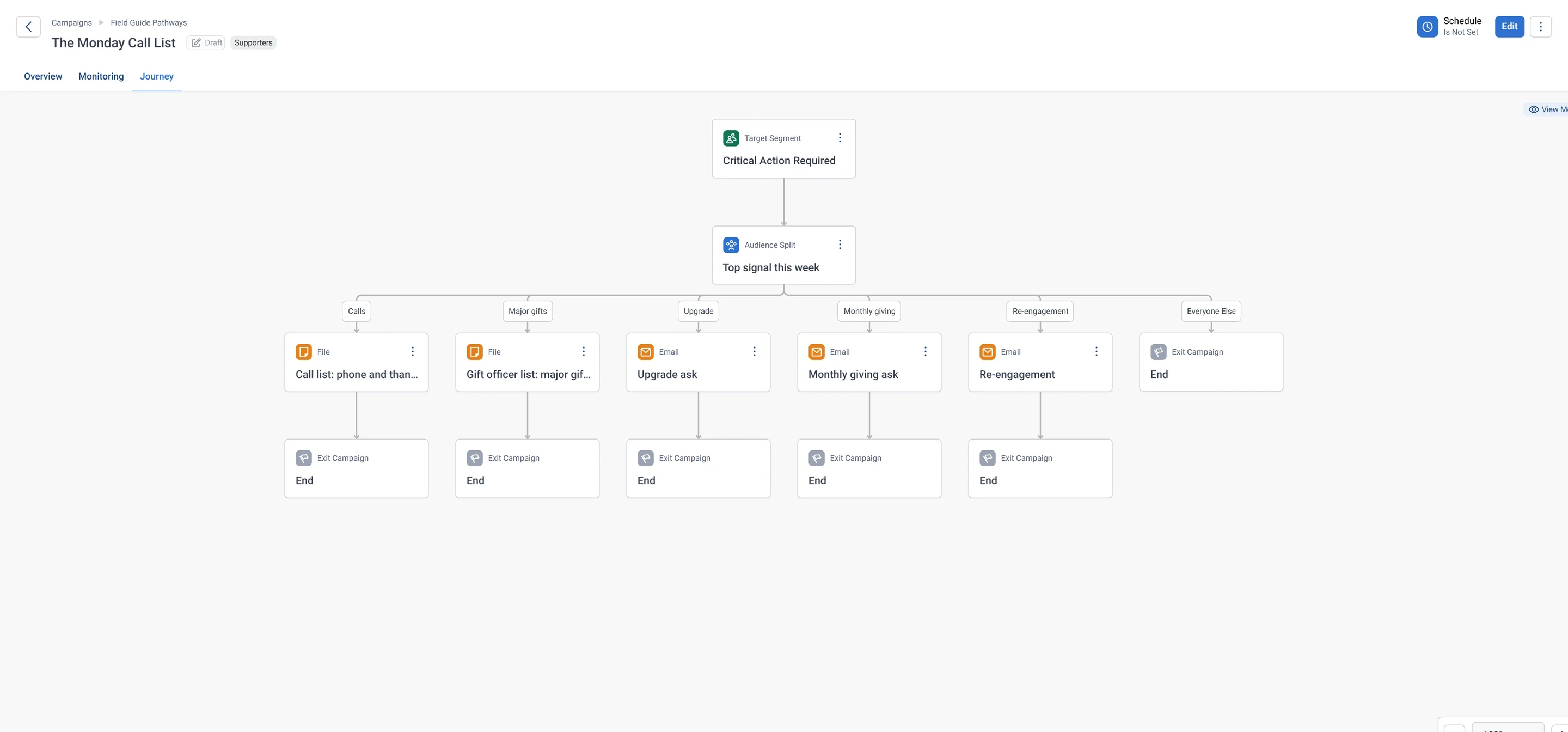
Apteco Mission sits underneath your CRM and joins it with the other places supporters show up, into one record per person. Its Monday call list pathway puts events, volunteer hours and campaigns on the same line, and the page says what came of a major gift conversation is written back onto the record. So a workflow can start from more than the CRM holds. Now the setup.
Start small, and in order, so nobody's day changes all at once. First, agree on a short list of activity types, like call, meeting, email, letter and event, and write down what each one means. Next, make logging them part of everyday work. Only then build workflows, starting with the few that protect gifts: a thank-you, a welcome for new donors, and a task when a regular donor goes quiet. Test each one on a handful of records before you turn it on for everyone.
Decide what an activity is. Most donor CRMs log each contact as an entry on the donor's record. Bloomerang calls these interactions, each with a date, channel, purpose and subject. Neon CRM's workflows can log activities and tag records for you. Whatever the name, agree on your own short list of channels and purposes. If two people log the same call two different ways, your reports won't add up.
Map the old history. Your old system had its own codes for calls, notes and moves. Before the move, match each old code to one new activity type, or decide to keep it only as a note. Bring across open tasks and next steps for your top donors first. A gift officer can live without an old note. They can't lose this week's follow-up.
Make logging easy. The fewer clicks, the more gets logged. Use what the system records for you. Bloomerang, for example, adds an interaction on its own when you send a mass email or letter, or when you Bcc an email to the CRM. Ask your new vendor what logs itself and what staff must add. Then check once a week that the big ones, like calls and meetings with major donors, are there.
Build workflows in three parts. Neon One's workflow guide breaks each workflow into a trigger (what starts it), a target (who it is for) and actions (an email, a letter or a task). Its examples include a lapsed donor email series, giving milestone recognition and a recurring donor upgrade. DonorPerfect's SmartActions can assign a task when a new donor arrives, like sending a welcome package. Other CRMs use the same idea under different names.
Start with the few that matter. Pick the workflows that protect gifts first: a prompt thank-you, a welcome for new donors, an alert when a monthly card fails, and a task when a regular donor goes quiet. Neon's own page describes reminders and tasks for staff when someone's giving drops. Test each workflow on a few records. Check who it reaches and what it sends. Then turn it on, and look at it again after a month.
What a CRM workflow cannot see. A CRM workflow only sees what the CRM holds. Per the Monday call list page, signals that say call this person this week are often split up: gifts in the CRM, attendance in ticketing, hours in a spreadsheet. A donor who looks quiet in the CRM may still be showing up. Mission joins those places beside your CRM, and does not replace it (our answer).