Apteco Mission Field Guide Schedule Time with an Apteco Architect Play with a Live System

Channel Effectiveness

7 steps · Email, Shared modules

Which channels win the first gift, and which keep supporters giving, side by side, every month.
Watch the pathway · about a minute
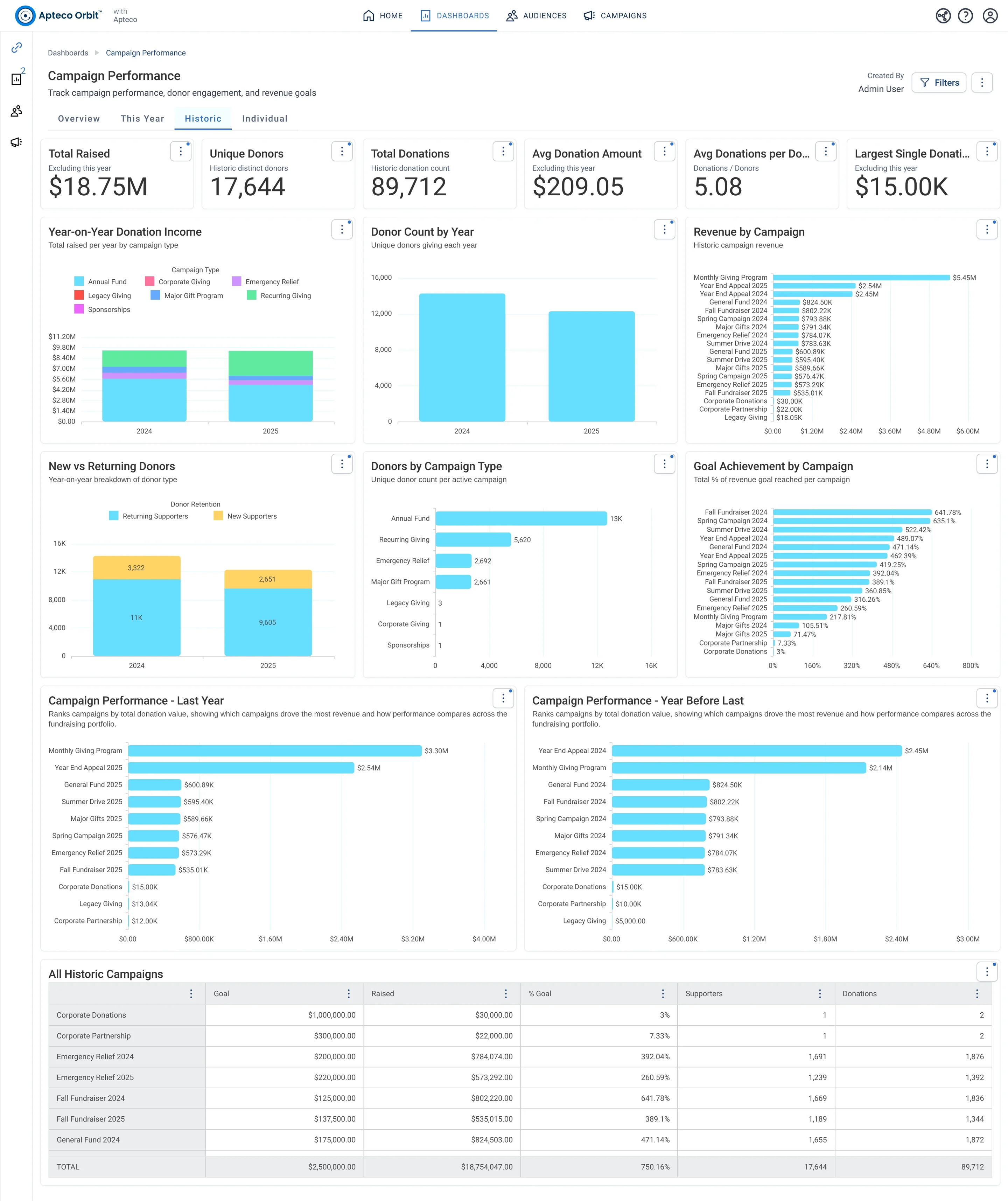
Campaign Performance · Historic, in Apteco Orbit: The Historic tab, with headline cards across the top, a bar chart comparing past years and a ranked list of campaigns against their goals.
Campaign Performance · Historic The Historic tab, with headline cards across the top, a bar chart comparing past years and a ranked list of campaigns against their goals. A fundraiser uses it to see which past campaigns worked best before planning next year.

Sample charity: the people and numbers in these screens are made up, so the picture shows the tool, not a result.
The problem it solves

Budget follows the channels that keep supporters.

Why your CRM misses this. Email results stay in the email platform, ad results in the ad platforms and gifts in the CRM. Without a source on each gift, nobody can say which channel brings supporters who stay.

Data

1 of its 3 sources usually sit outside the CRM

Signals

it reads 7 of them

Reach

2 channels: email, shared modules

Journey

7 steps, start to finish

Connect: the data it draws on

Mission joins these into one record per person, beside your CRM.

Sources

Analyze: who it finds

  • Second Donation Within 90 Days Did this supporter give a second time soon after their first gift? Give these quick converters immediate stewardship, since they are the most likely to stay.
  • Donation Value First 12 Months How much did this supporter give in their first year with us? Compare donors by the year they started, to see which channels bring the highest early value.
  • Number Of Campaigns How many different campaigns has this supporter given to? Treat donors who respond to many campaigns as more engaged and maybe ready for deeper cultivation.
  • Campaign Type A field from Campaigns.
  • Donation Source A field from Donations.
  • Payment Method A field from Donations.
  • Contribution Page ID A field from Donations.

Dashboard: Campaign Performance

Activate: the journey

Each step names when it happens and the channel it uses. Under the steps is the campaign as it is built in Orbit, in 2 parts. Read them in order. Then how the A/B test, the communication history and the objective are set up.

  1. Every campaign

    Journey logic

    Communication history is recorded, so every send is tied to the person who got it.

  2. Every campaign

    Goal and objectives

    Each message carries objectives that count the gifts and revenue it brought in, inside a response window you set for each person.

  3. Every email

    Email

    Subject lines and content are A/B tested on a sample before the full send.

  4. Every send

    Cost and ROI

    Channel costs are counted on every send. The campaign Overview shows how costs split across channel types.

  5. Monthly

    Shared module

    Response, gifts, revenue and cost by channel and campaign type, side by side.

  6. Quarterly

    Shared module

    Second-gift rate and first-year value by the channel that brought each supporter in.

  7. Next campaign

    Journey logic

    The channel mix shifts toward what keeps supporters, not just what wins the first gift.

  • Tracking and reporting modules open straight from each published campaign, with cost, revenue and ROI already on them.

The campaign in Orbit

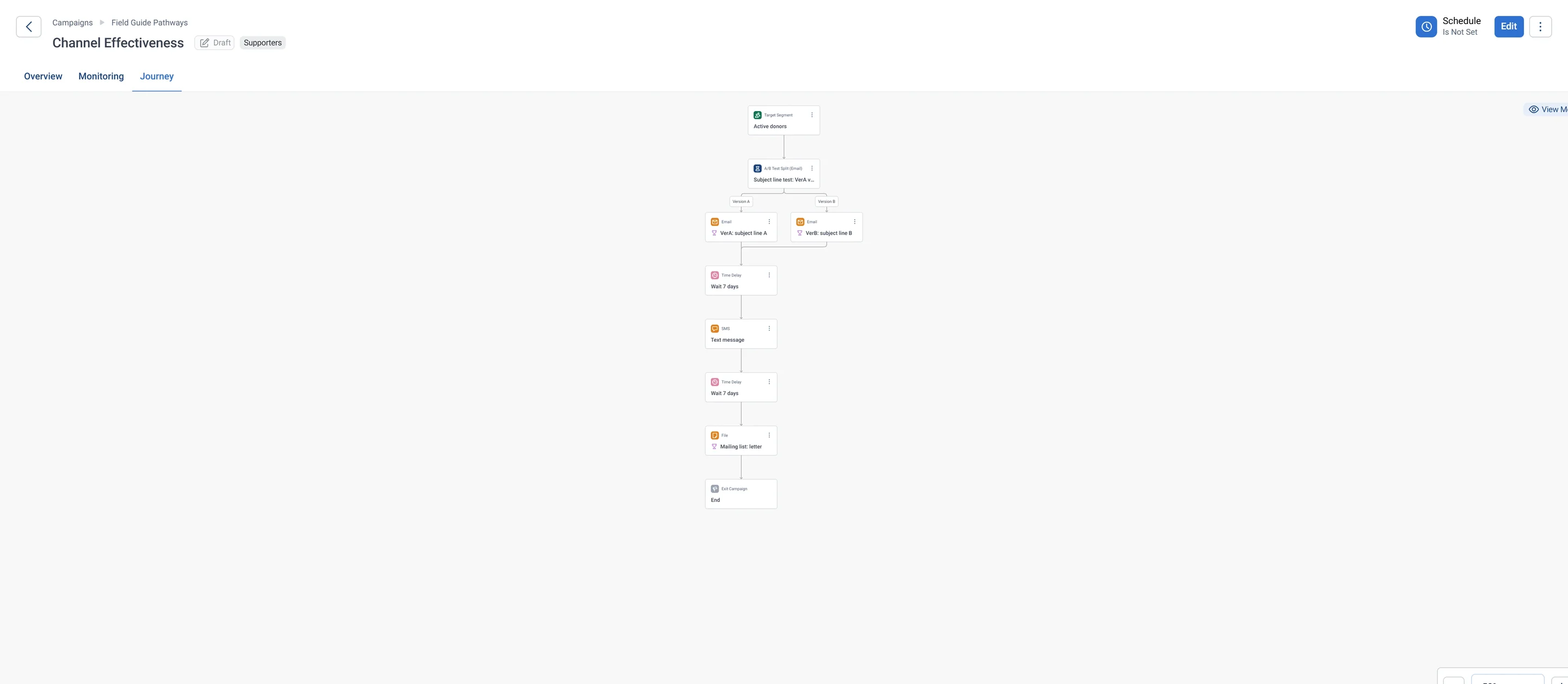
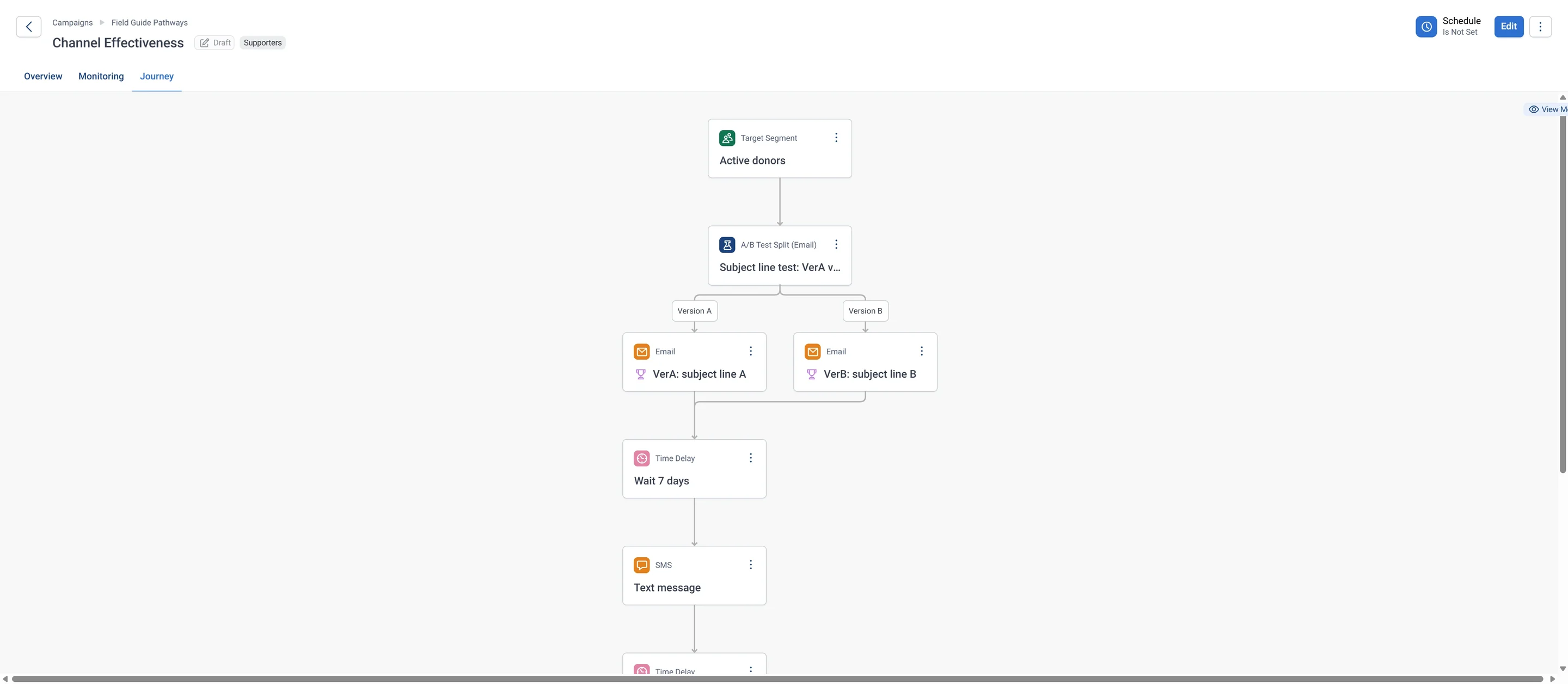
Channel Effectiveness · journey, part 1 of 2, in Apteco Orbit: The top of the journey: active donors enter a subject line test, VerA: subject line A or VerB: subject line B, then a wait and the Text message.
Channel Effectiveness · journey, part 1 of 2 The top of the journey: active donors enter a subject line test, VerA: subject line A or VerB: subject line B, then a wait and the Text message. The trophies mean each email has an objective to measure.
Channel Effectiveness · journey, part 2 of 2, in Apteco Orbit: The bottom of the journey: after the text, another wait, then the Mailing list: letter step for a printed letter, and the end.
Channel Effectiveness · journey, part 2 of 2 The bottom of the journey: after the text, another wait, then the Mailing list: letter step for a printed letter, and the end. Every donor gets the same ask by email, text and post.
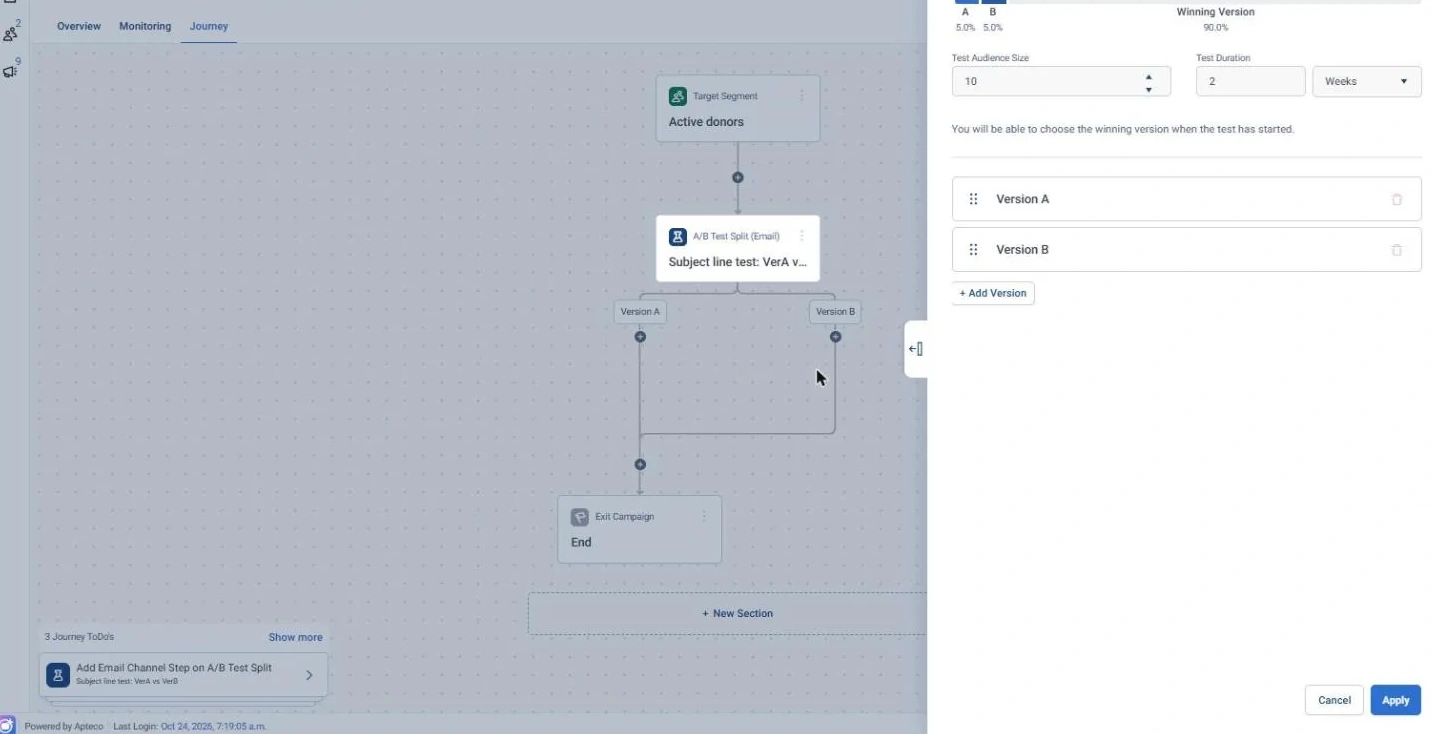
Channel Effectiveness · A/B test, in Apteco Orbit: The A/B test settings: a small slice gets version A, another small slice gets version B, and the winner goes to everyone else after a two-week test.
Channel Effectiveness · A/B test The A/B test settings: a small slice gets version A, another small slice gets version B, and the winner goes to everyone else after a two-week test. The fundraiser picks the winner once the test has started.
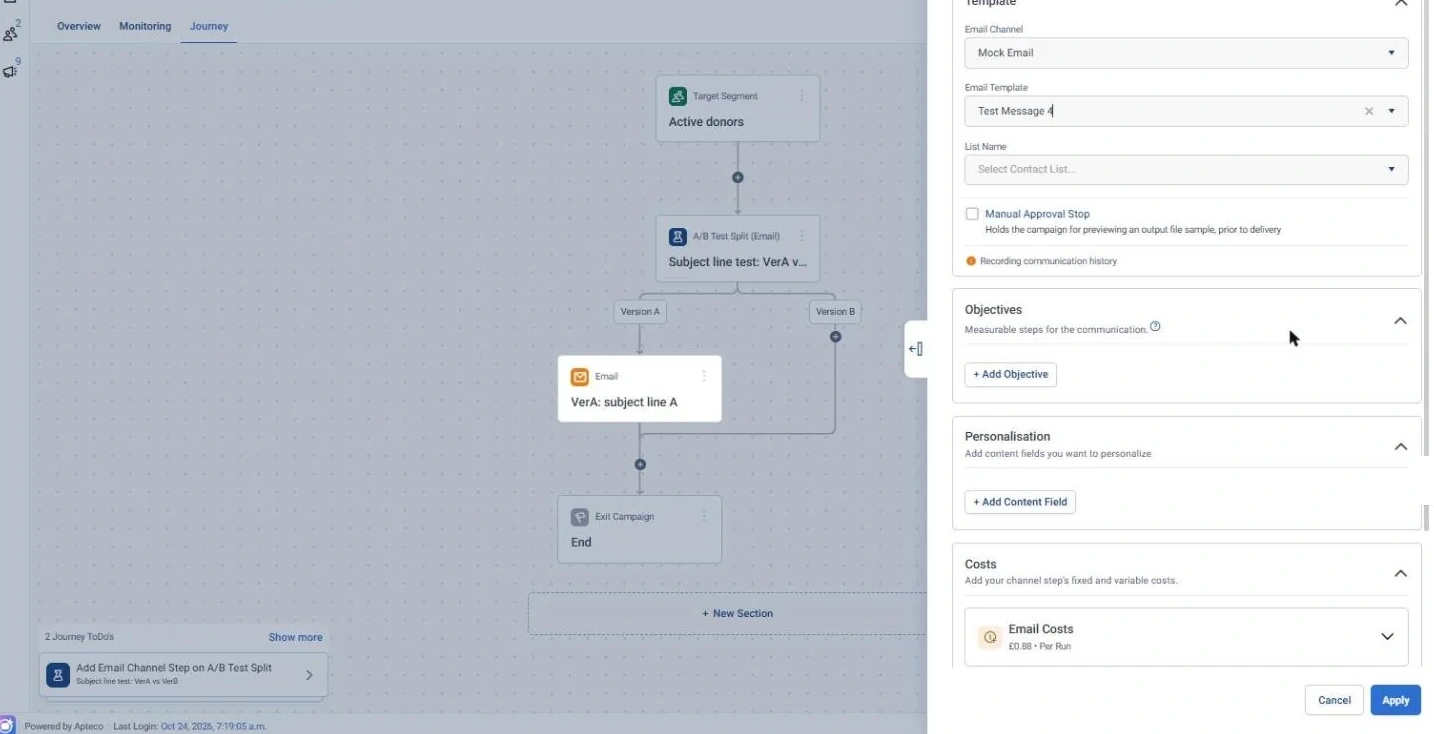
Channel Effectiveness · Communication history, in Apteco Orbit: The VerA email settings, with Recording communication history under the template.
Channel Effectiveness · Communication history The VerA email settings, with Recording communication history under the template. A record of who got which email is always kept, with no switch to turn it off.
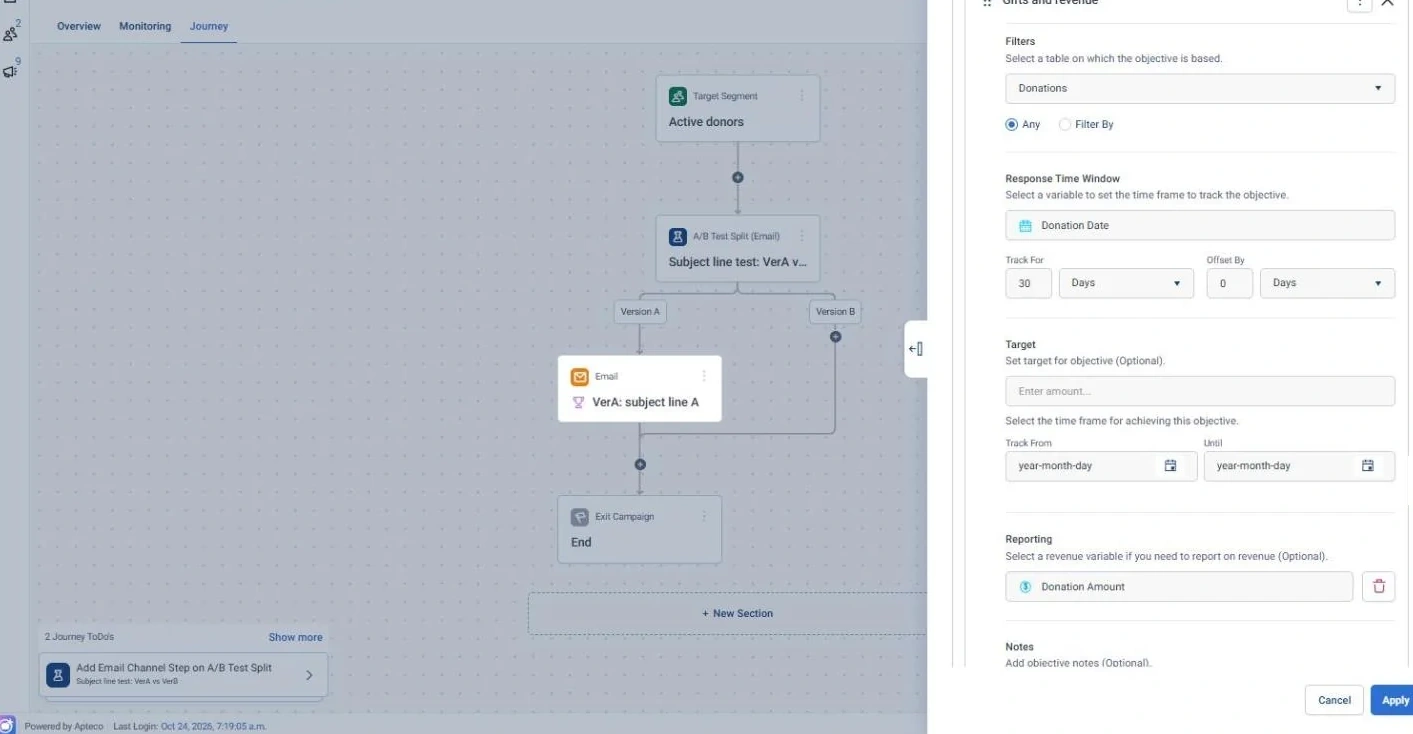
Channel Effectiveness · Objective, in Apteco Orbit: The objective on the VerA email: it counts gifts in the month after the email by Donation Date and adds up Donation Amount as money raised.
Channel Effectiveness · Objective The objective on the VerA email: it counts gifts in the month after the email by Donation Date and adds up Donation Amount as money raised. VerB and the letter use the same window, so the channels compare fairly.

Learn: what flows back

Every campaign adds to the comparison, so the channel mix is decided by your own results instead of last year’s habits.

Results land on the same supporter record, so the next run starts from what just happened.

Where you see it in Orbit

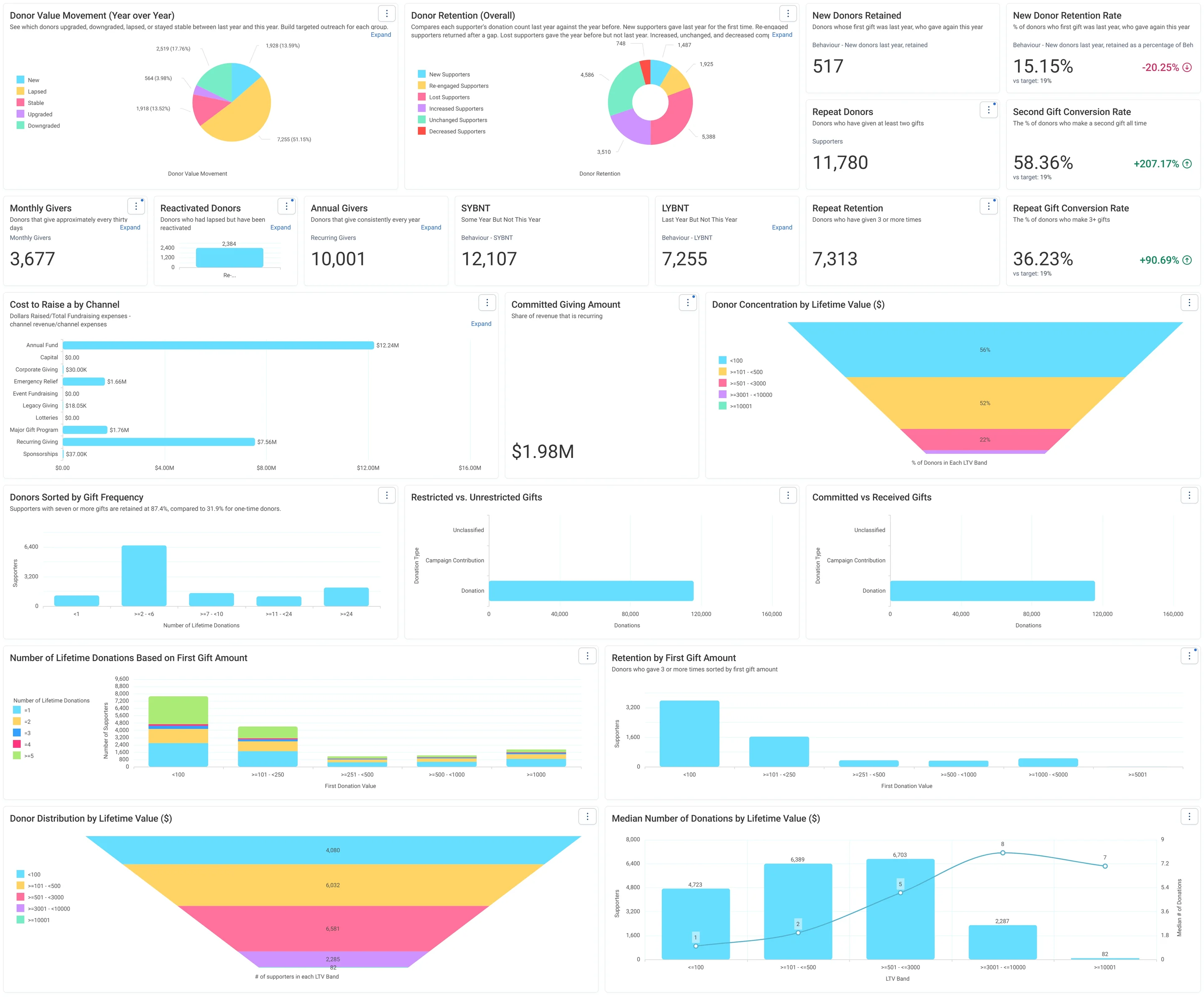
Jumping Off Metrics · Donor Health - Board Report, in Apteco Orbit: The Donor Health - Board Report tab, with cards on new, repeat and regular donors, charts of retention, value changes and cost to raise a dollar.
Jumping Off Metrics · Donor Health - Board Report The Donor Health - Board Report tab, with cards on new, repeat and regular donors, charts of retention, value changes and cost to raise a dollar. A board sees whether the charity is keeping its donors and where to focus.
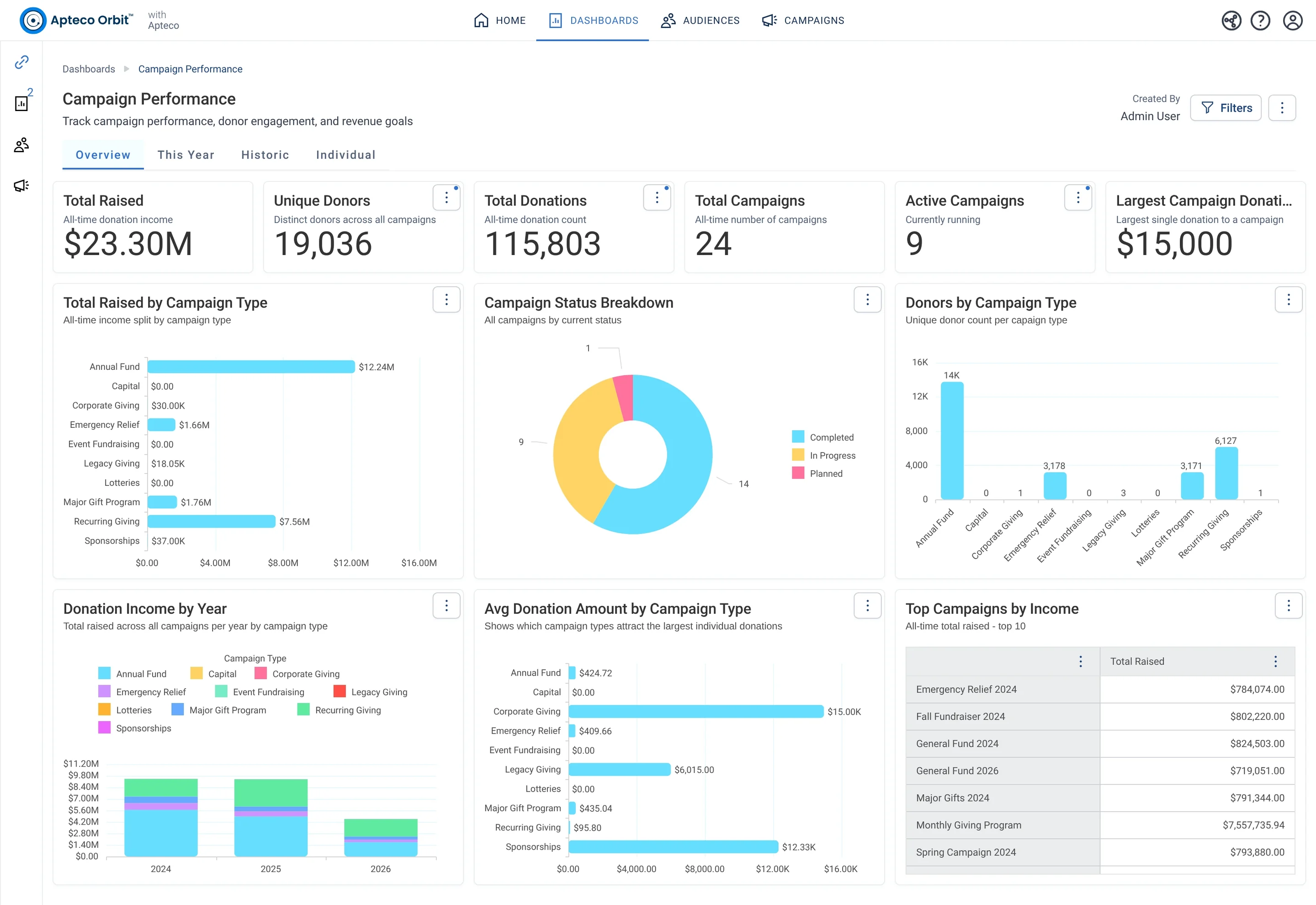
Campaign Performance · Overview, in Apteco Orbit: The Overview tab, with headline cards for all campaigns ever, charts splitting money and donors by campaign type, and a top campaigns table.
Campaign Performance · Overview The Overview tab, with headline cards for all campaigns ever, charts splitting money and donors by campaign type, and a top campaigns table. A fundraiser or board member sees which kinds of campaigns bring in the most money and donors.
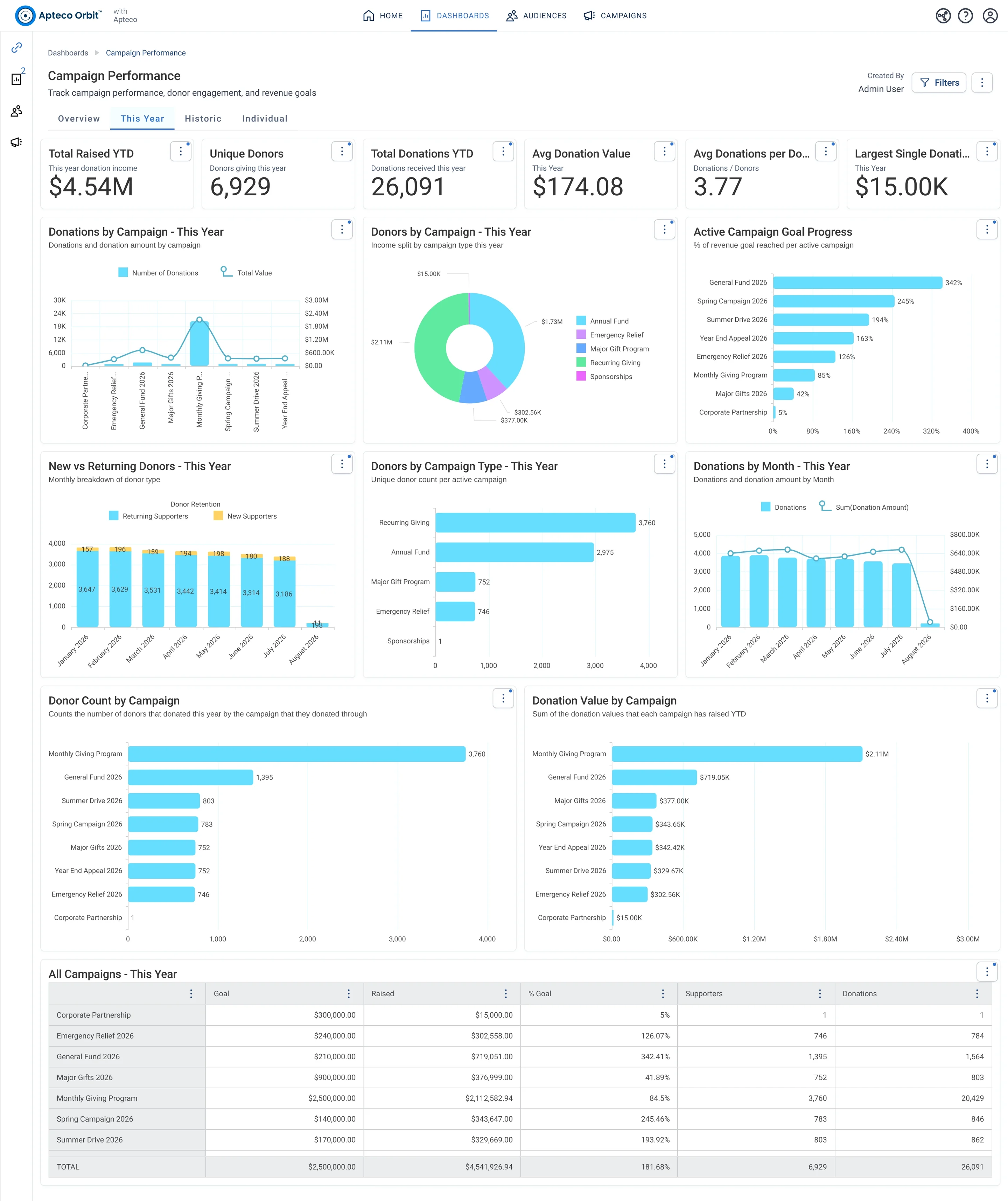
Campaign Performance · This Year, in Apteco Orbit: The This Year tab, with headline cards for the year so far, bars showing each campaign against its goal, and new and returning donors by month.
Campaign Performance · This Year The This Year tab, with headline cards for the year so far, bars showing each campaign against its goal, and new and returning donors by month. A fundraiser checks which campaigns are ahead of or behind their goals this year.

Questions people ask

What problem does Channel Effectiveness solve?

Budget follows the channels that keep supporters. Which channels win the first gift, and which keep supporters giving, side by side, every month.

Which data does it need?

Donations: supporter ID, gift amount, gift date, source or UTM code, payment method, online donation page; Campaigns: type and goal revenue; Orbit campaigns: sends, opens, clicks, bounces and channel costs

Why can't my CRM do this on its own?

Email results stay in the email platform, ad results in the ad platforms and gifts in the CRM. Without a source on each gift, nobody can say which channel brings supporters who stay.

Which channels does it use?

Email, Shared modules. Every campaign: Journey logic Then Every campaign: Goal and objectives Then Every email: Email Then Every send: Cost and ROI.

Who runs it?

Leadership.

Every pathway in the Field Guide runs on Apteco Mission, beside your CRM.

See it with your own data

An Apteco Architect walks you through this pathway on your own data.

Schedule Time with an Apteco Architect