Apteco Mission Field Guide Schedule Time with an Apteco Architect Play with a Live System

The Dynamic Ask Appeal

6 steps · Email, Direct mail, SMS, Google, Meta

Every supporter sees an ask built from their own giving history, in every channel at once.
Watch the pathway · about a minute
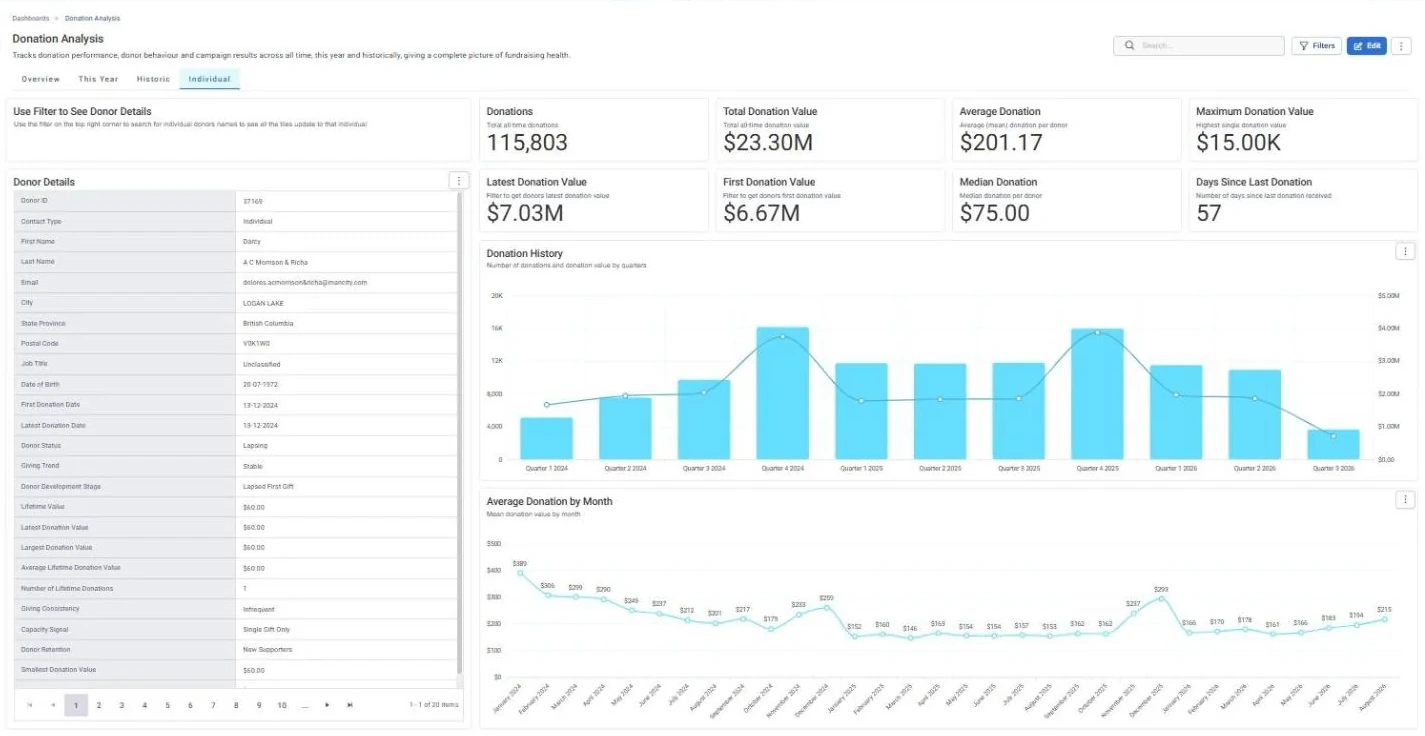
Donation Analysis · Individual, in Apteco Orbit: The Individual tab, with a Donor Details card for one supporter beside totals for all giving, gifts by quarter and average gift by month.
Donation Analysis · Individual The Individual tab, with a Donor Details card for one supporter beside totals for all giving, gifts by quarter and average gift by month. A fundraiser filters to one donor and reads their giving story before a call or visit.

Sample charity: the people and numbers in these screens are made up, so the picture shows the tool, not a result.
The problem it solves

The right ask for every person.

Why your CRM misses this. A personal ask needs the whole giving history. When gifts come in through several giving platforms, or older gifts sit in the finance system from before the current CRM, the ask is set from part of the record.

Data

2 of its 3 sources usually sit outside the CRM

Signals

it reads 5 of them

Reach

5 channels: email, direct mail, sms and more

Journey

6 steps, start to finish

Connect: the data it draws on

Mission joins these into one record per person, beside your CRM.

Sources

Analyze: who it finds

  • Latest Donation Value How much did this supporter give last time? Compare it with the donor's history, alongside Giving Trend, to spot giving that is climbing or falling.
  • Average Lifetime Donation Value What does this supporter usually give per gift? Set each appeal's suggested amounts from it, so bigger givers see bigger asks than smaller givers.
  • Largest Donation Value What is the biggest single gift this supporter has ever made? When the latest gift is far below this peak, send a targeted upgrade ask.
  • Giving Trend Is this supporter's latest gift bigger, smaller, or about the same as their usual gift? Talk upgrades with donors trending up, and call donors trending down before they lapse.
  • Capacity Signal Has this supporter given much more in the past than they gave last time? Build an upgrade appeal around High Capacity donors, who have shown they can give more.

Activate: the journey

Each step names when it happens and the channel it uses. Under the steps is the campaign as it is built in Orbit, in 4 parts. Read them in order.

  1. Setup

    Journey logic

    Ask bands are set from each supporter’s latest, average and largest gift.

  2. Setup

    Goal and objectives

    The appeal gets a campaign goal: total raised against your target by a set date. Each email and text also counts the gifts and revenue it brought in.

  3. Day 0

    Email

    Each email shows a personal ask, filled in automatically.

  4. Day 0

    Direct mail

    Printed appeals carry the same personal amounts.

  5. Day 7

    SMS

    A split on the gift objective: givers get a thank-you, everyone else gets a short text with a link to give.

  6. Day 14

    Google + Meta Ads

    Still no gift: the appeal story appears in Google and Meta ads. Anyone who gives is excluded.

  • Trending Up supporters get a stretch ask. Downgraded supporters get a gentler one.
  • Exit: a gift ends the journey everywhere, ads included.

The campaign in Orbit

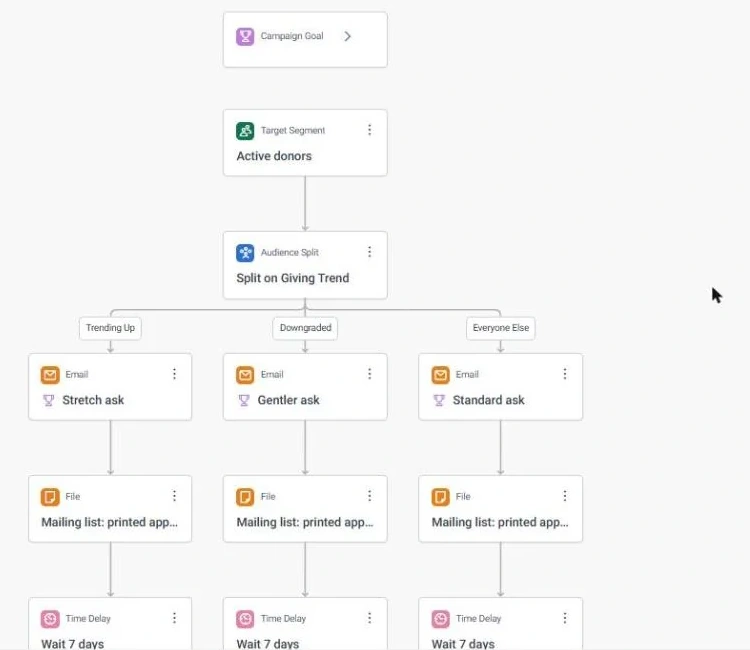
The Dynamic Ask Appeal · journey, part 1 of 4, in Apteco Orbit: The top of the journey: the goal box, then a split of active donors into Trending Up, Downgraded and everyone else, each with a Stretch ask, Gentler ask or Standard ask email.
The Dynamic Ask Appeal · journey, part 1 of 4 The top of the journey: the goal box, then a split of active donors into Trending Up, Downgraded and everyone else, each with a Stretch ask, Gentler ask or Standard ask email. Each donor gets an ask that fits.
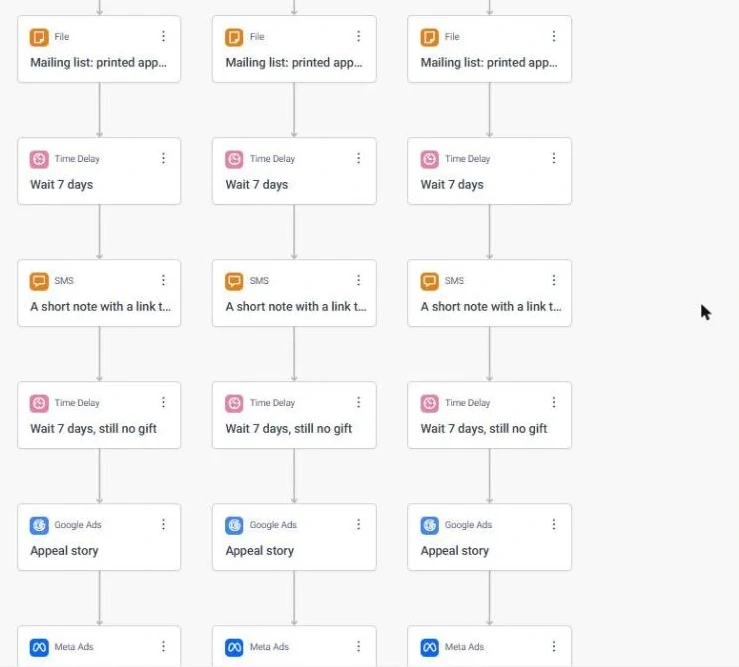
The Dynamic Ask Appeal · journey, part 2 of 4, in Apteco Orbit: The middle of the journey: each group waits, gets the A short note with a link to give text, waits again, then sees a Google ad with the appeal story.
The Dynamic Ask Appeal · journey, part 2 of 4 The middle of the journey: each group waits, gets the A short note with a link to give text, waits again, then sees a Google ad with the appeal story. Each nudge reaches only people who have not given yet.
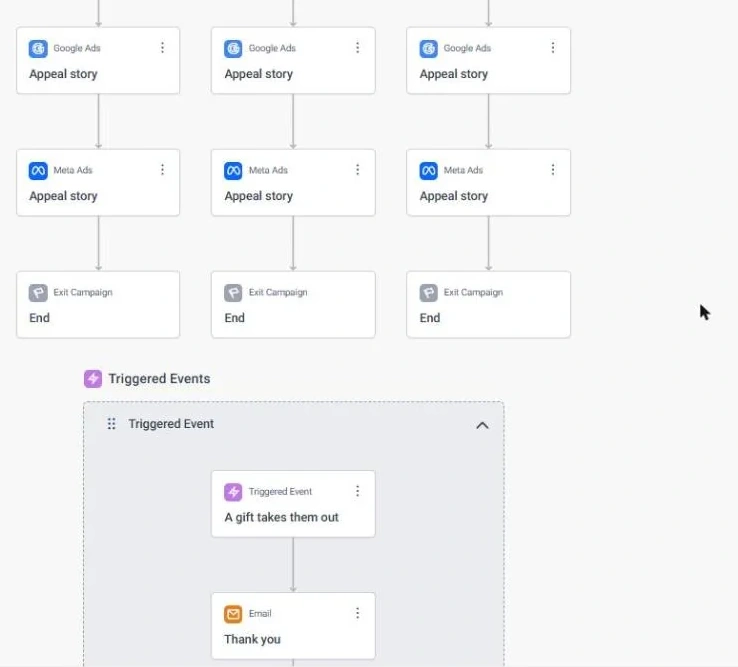
The Dynamic Ask Appeal · journey, part 3 of 4, in Apteco Orbit: The lower part of the journey: each group sees a Meta ad with the appeal story, then the journey ends, and the A gift takes them out box starts below.
The Dynamic Ask Appeal · journey, part 3 of 4 The lower part of the journey: each group sees a Meta ad with the appeal story, then the journey ends, and the A gift takes them out box starts below. The appeal story follows people into their social feeds.
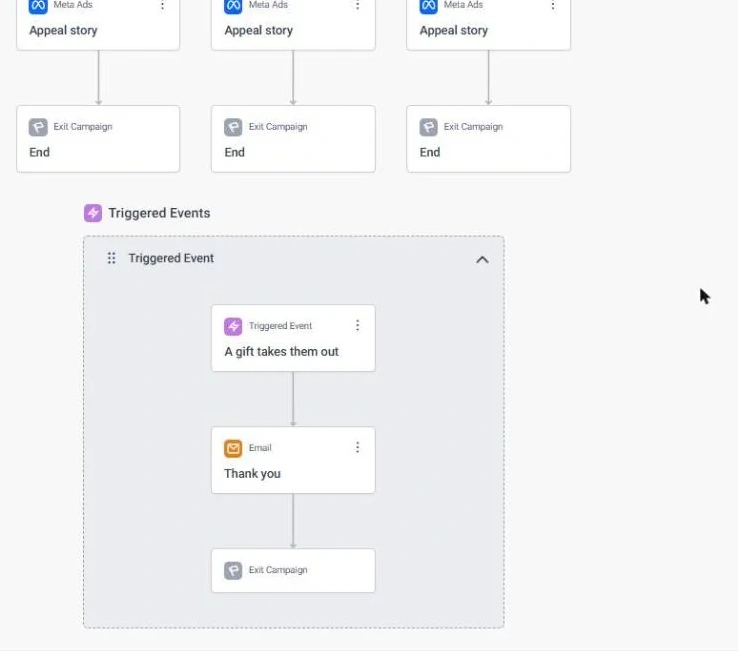
The Dynamic Ask Appeal · journey, part 4 of 4, in Apteco Orbit: The bottom of the journey: the A gift takes them out rule, which sends a Thank you email and removes the giver from every other step, ads included.
The Dynamic Ask Appeal · journey, part 4 of 4 The bottom of the journey: the A gift takes them out rule, which sends a Thank you email and removes the giver from every other step, ads included. Donors are thanked, not asked again.

Learn: what flows back

The goal shows On Track or At Risk while the appeal is live. Every response shows which ask level worked for which kind of supporter, so the ask bands get sharper with each appeal.

Results land on the same supporter record, so the next run starts from what just happened.

Proven. A personalised ask amount for every supporter, from a regression model scaled across campaigns, showed higher response than the control group. See a similar use case

Where you see it in Orbit

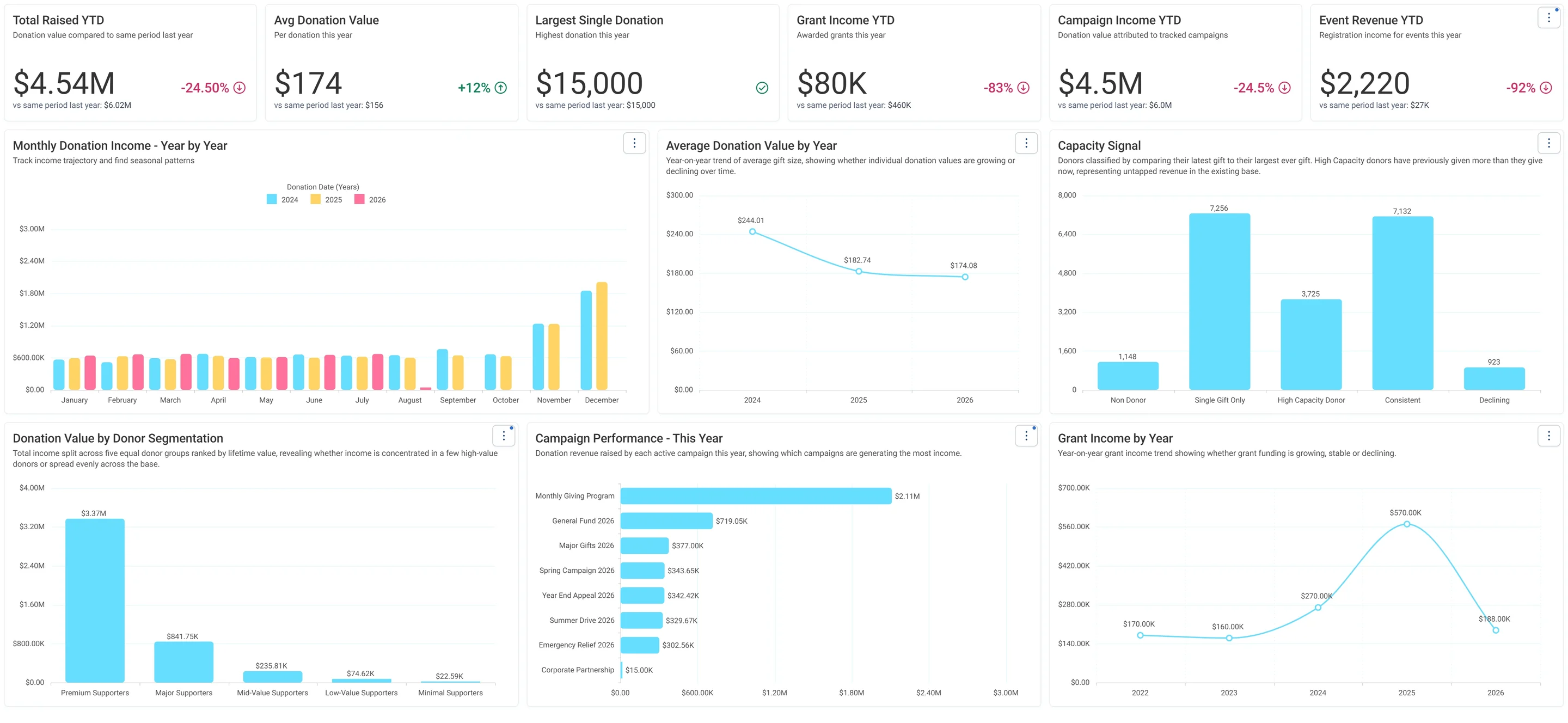
Charity Overview · Fundraising, in Apteco Orbit: The Fundraising tab, with cards comparing this year's income with last year's, then charts of income by month, a Capacity Signal and income by donor group.
Charity Overview · Fundraising The Fundraising tab, with cards comparing this year's income with last year's, then charts of income by month, a Capacity Signal and income by donor group. A fundraiser spots where income is down and which donors could give more.
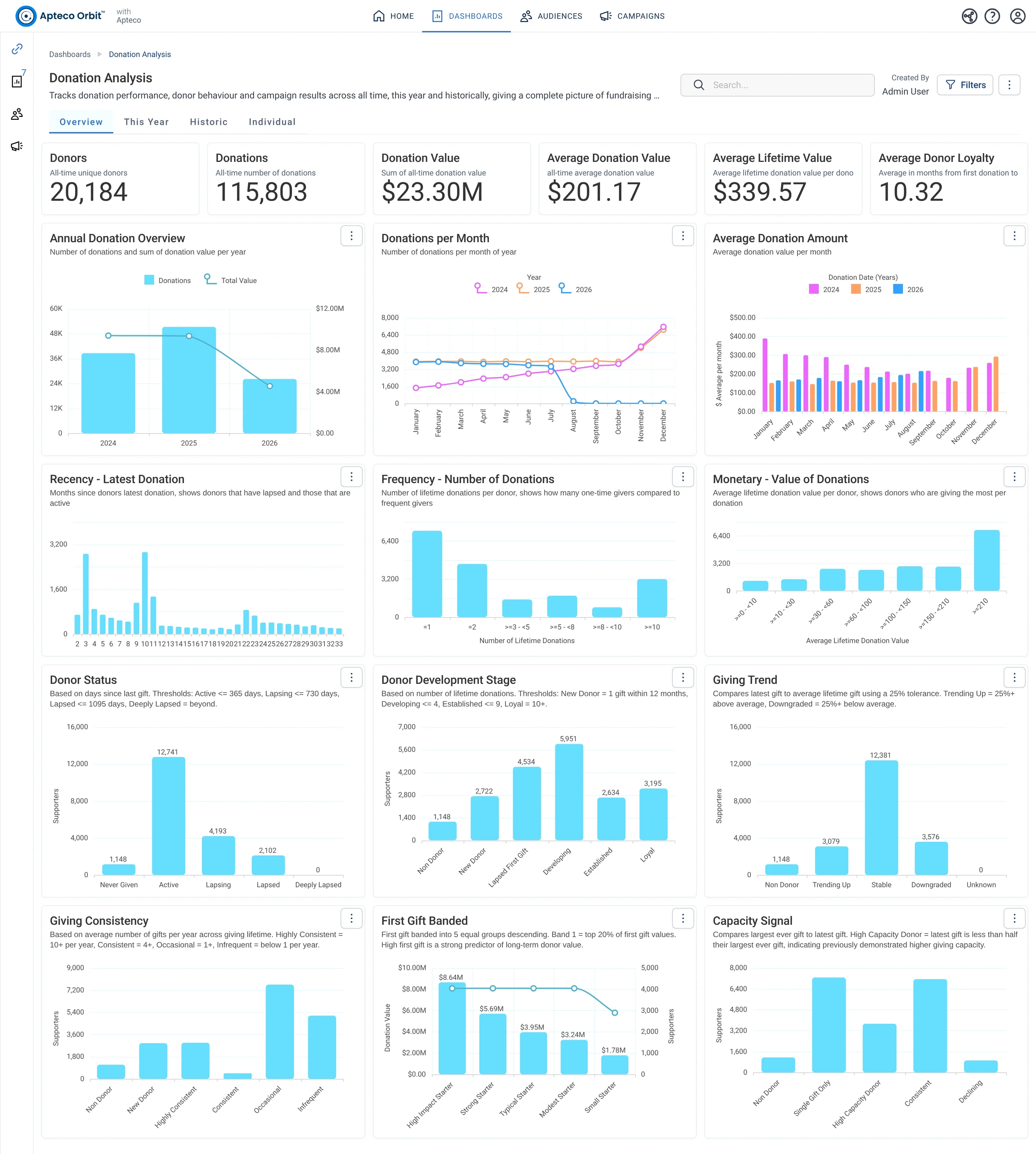
Donation Analysis · Overview, in Apteco Orbit: The Overview tab, with lifetime giving cards above a grid of charts on when donors last gave, how often, how much, and their status and stage.
Donation Analysis · Overview The Overview tab, with lifetime giving cards above a grid of charts on when donors last gave, how often, how much, and their status and stage. A fundraiser uses it to understand the donor base and pick groups to contact.
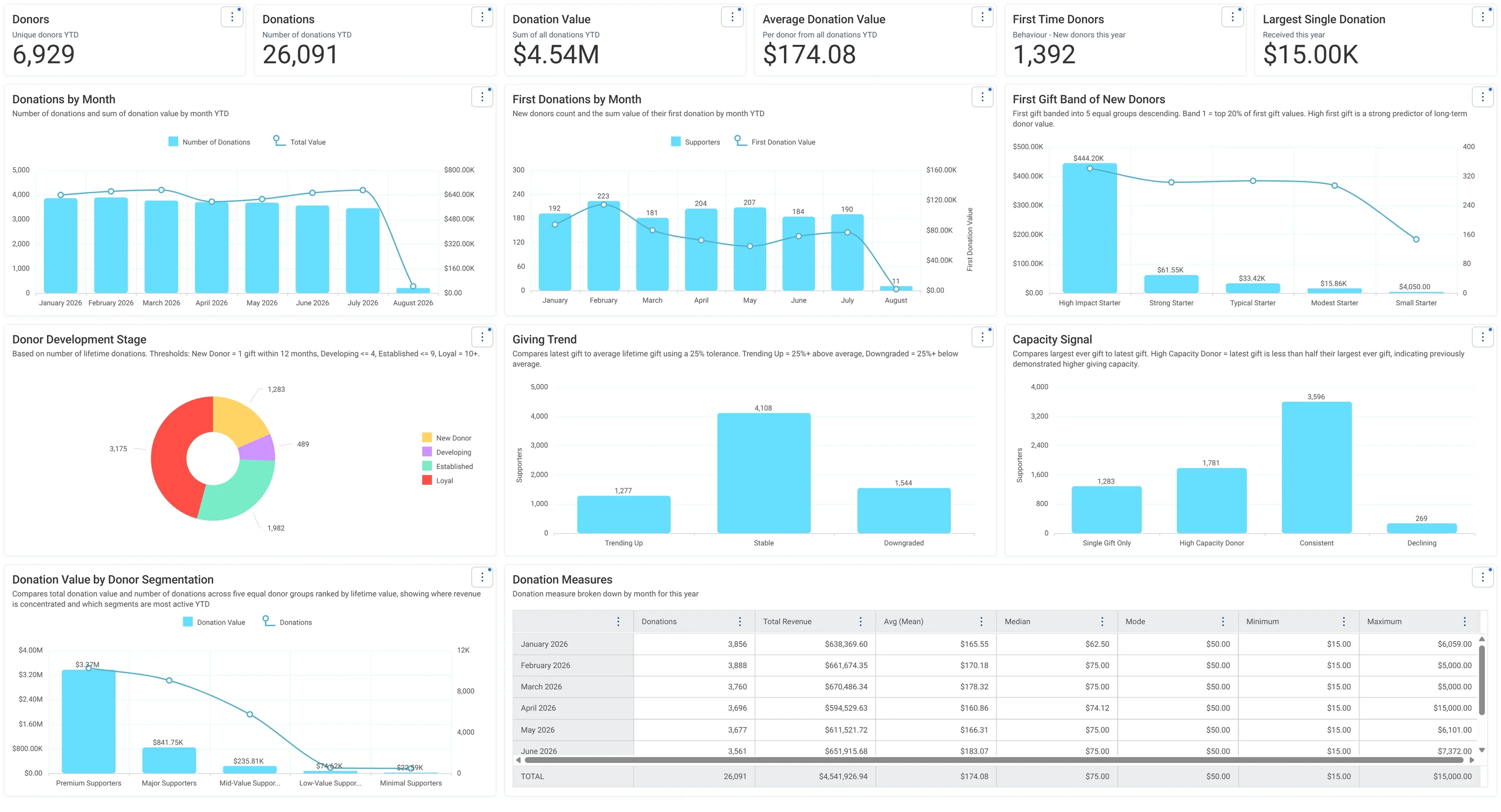
Donation Analysis · This Year, in Apteco Orbit: The This Year tab, with cards for giving so far, charts of gifts and new donors by month, first-gift size and a Capacity Signal, and a monthly table.
Donation Analysis · This Year The This Year tab, with cards for giving so far, charts of gifts and new donors by month, first-gift size and a Capacity Signal, and a monthly table. A fundraiser tracks this year's giving month by month and welcomes newcomers.

Questions people ask

What problem does The Dynamic Ask Appeal solve?

The right ask for every person. Every supporter sees an ask built from their own giving history, in every channel at once.

Which data does it need?

Donations: supporter ID, gift amount, gift date; Addresses: postal address for mail; Emails: email address

Why can't my CRM do this on its own?

A personal ask needs the whole giving history. When gifts come in through several giving platforms, or older gifts sit in the finance system from before the current CRM, the ask is set from part of the record.

Which channels does it use?

Email, Direct mail, SMS, Google, Meta. Setup: Journey logic Then Setup: Goal and objectives Then Day 0: Email Then Day 0: Direct mail.

Who runs it?

Fundraising.

Every pathway in the Field Guide runs on Apteco Mission, beside your CRM.

See it with your own data

An Apteco Architect walks you through this pathway on your own data.

Schedule Time with an Apteco Architect