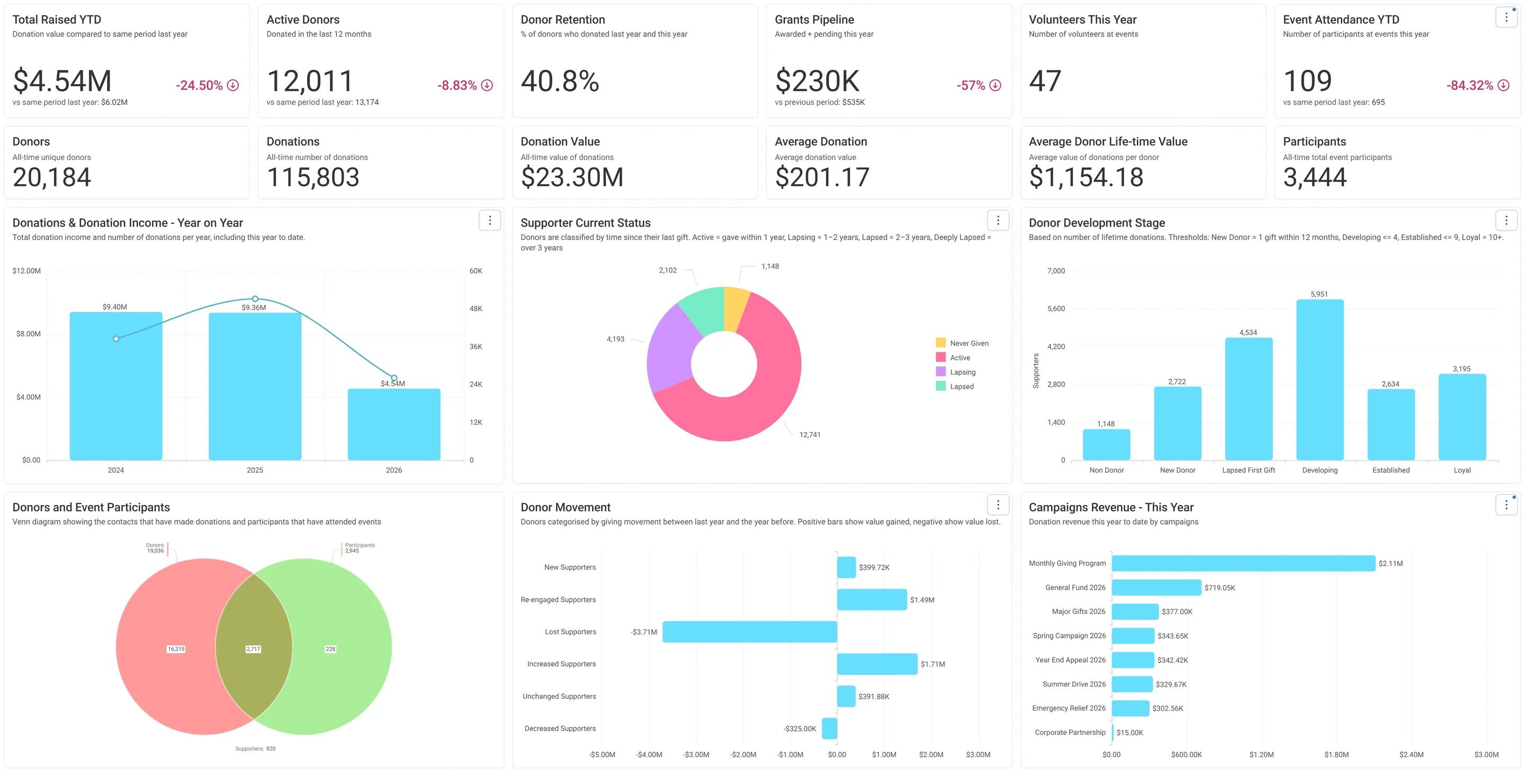
Apteco Mission does not post gifts to a ledger and does not replace your CRM. It takes the data from your CRM and other places and shows the fundraising numbers a board needs. Part of the pain behind this question is the monthly rebuild of those numbers. The Charity Overview dashboard keeps board numbers on three tabs, each set against last year, where they were often rebuilt by hand from the CRM, a grants sheet and staff counts. Now the accounting link itself.
Only if the accounting link is worth a full CRM move. If you use Financial Edge NXT, Raiser's Edge NXT can send gift batches straight to it, and that saves typing. But moving your CRM means moving every donor's history, retraining your team and changing your forms and receipts. So first measure what the manual step costs you today. Then try a lighter fix, like a monthly import. Move only if the link still wins after that.
What "works with accounting" means. Your CRM holds each gift and who gave it. Your accounting system holds totals by account. The link takes a batch of gifts, adds them up by fund and account, and posts them as one journal entry. It saves typing. It doesn't replace the monthly check that both systems show the same totals.
What the Blackbaud link does. Blackbaud's help says Raiser's Edge NXT can send the posting batch directly to Financial Edge NXT, where it is approved and posted. A batch can show "Posted with exceptions", which means some gifts didn't post. Its posting steps say you post one batch at a time, and each run is limited to 500 gifts. So you still check the totals.
What DonorPerfect offers. DonorPerfect's integrations page lists QuickBooks, QuickBooks Online and Sage Intacct Fundraising for accounting. Its QuickBooks page says it sends only the financial data accounting needs, and links gifts to QuickBooks classes, bank accounts and income accounts. If your ledger is something else, ask DonorPerfect support what export it offers for it.
Try a lighter fix first. If your ledger is Financial Edge NXT, Blackbaud's help describes an Excel add-in that turns a spreadsheet into a new journal entry batch. So a monthly gift report by fund, from your CRM, can go in as one batch. Ask your finance team if that is enough.
Then decide with real numbers. Time the manual step for one month. Count the errors. Ask finance exactly what they need: fund codes, deposit dates, fees, or gift detail. Get a quote for the move, the new license and the training. If the link saves more than the move costs, move.
Whichever CRM you keep. Mission sits underneath it, so the fundraising picture does not depend on which CRM you keep. Per this page it joins your CRM and other places into one record per person. If you would rather replace your CRM, Apteco hosts CiviCRM, per this page.