Apteco Mission Field Guide Schedule Time with an Apteco Architect Play with a Live System

Charity Overview

Dashboard in Apteco Orbit · 3 tabs · 26 insights

What does each tab of Charity Overview tell you, and which tile do you read first? When every number has a known home, the board meeting stops being a hunt and starts being a conversation.

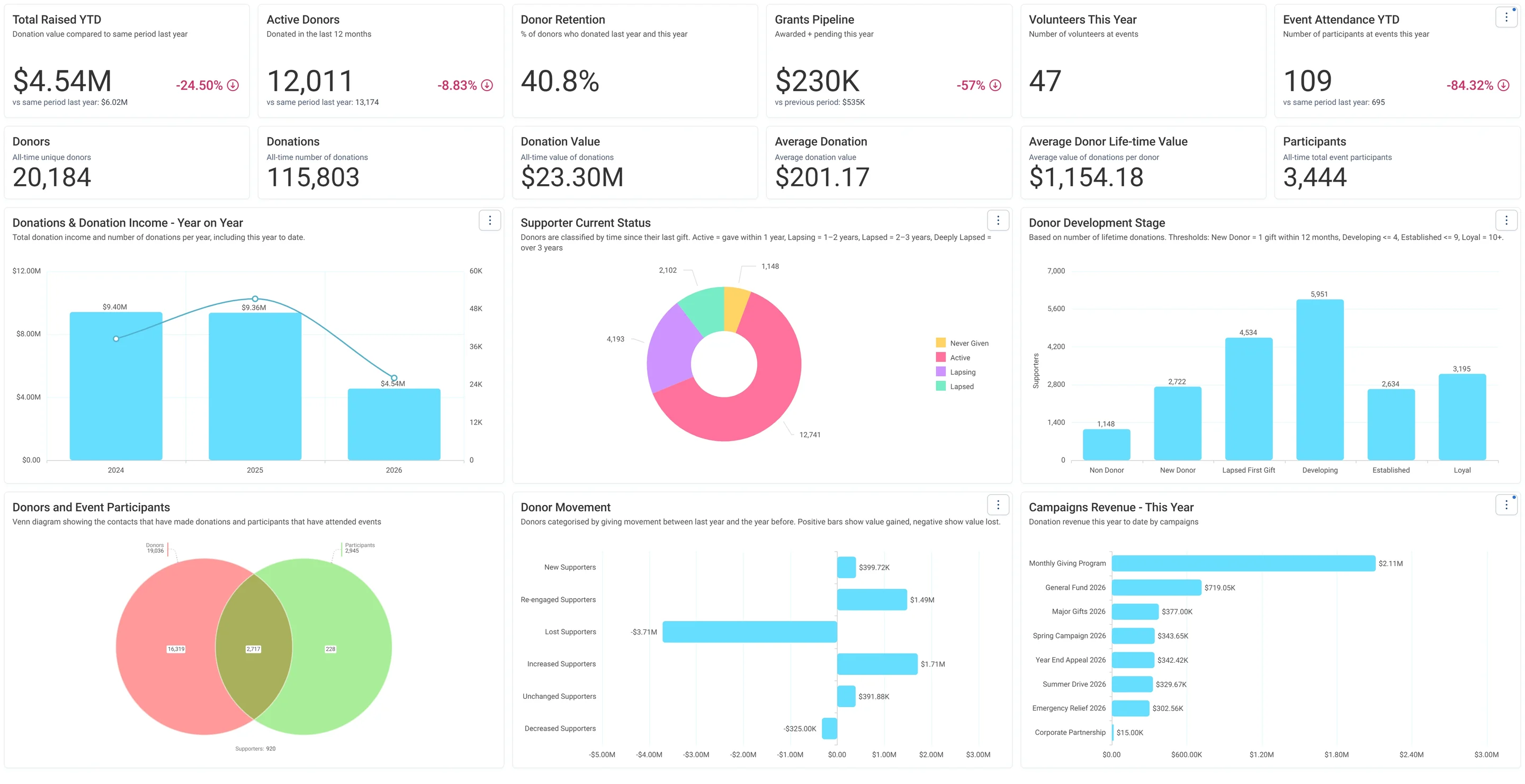
Charity Overview · Summary, in Apteco Orbit: The Summary tab, with headline cards across the top, then charts of giving by year, donor status, donor stages and campaign income.
Charity Overview · Summary The Summary tab, with headline cards across the top, then charts of giving by year, donor status, donor stages and campaign income. A board reads it as a quick health check of the whole charity before a meeting.
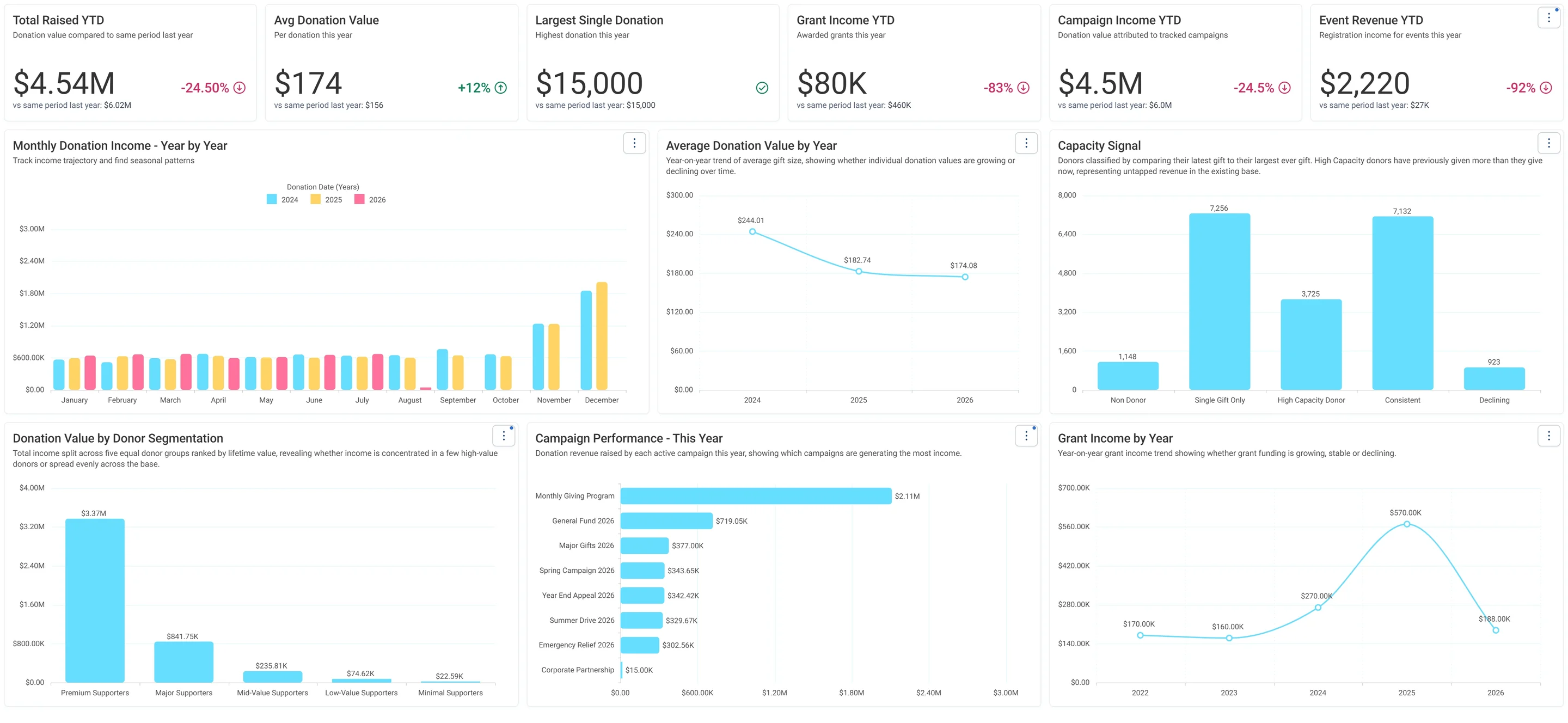
Charity Overview · Fundraising, in Apteco Orbit: The Fundraising tab, with cards comparing this year's income with last year's, then charts of income by month, a Capacity Signal and income by donor group.
Charity Overview · Fundraising The Fundraising tab, with cards comparing this year's income with last year's, then charts of income by month, a Capacity Signal and income by donor group. A fundraiser spots where income is down and which donors could give more.
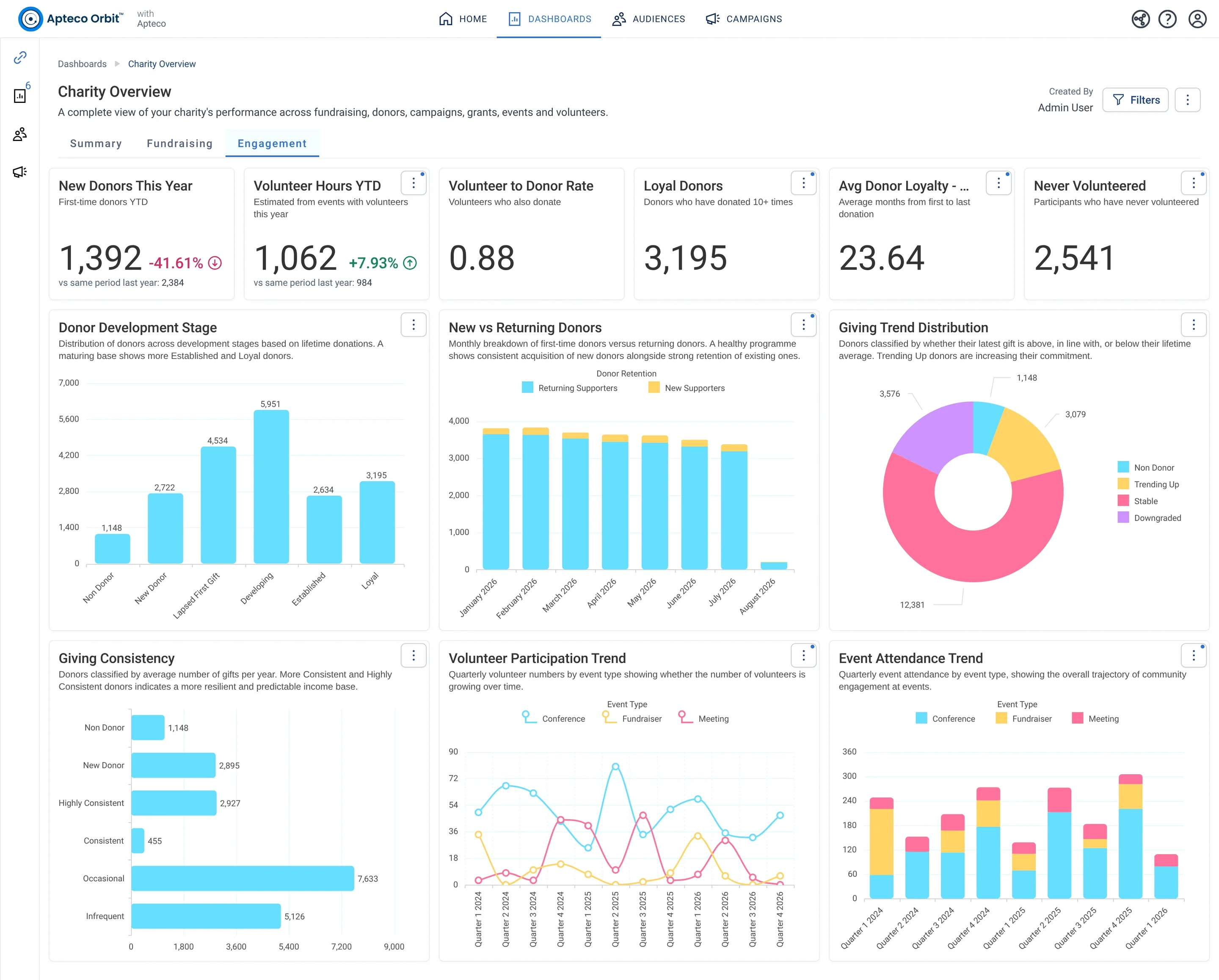
Charity Overview · Engagement, in Apteco Orbit: The Engagement tab, with cards on new donors, volunteers and loyal givers, then charts of donor stages, giving trends and volunteer activity by quarter.
Charity Overview · Engagement The Engagement tab, with cards on new donors, volunteers and loyal givers, then charts of donor stages, giving trends and volunteer activity by quarter. A fundraiser sees who is getting closer to the cause and who is drifting away.
Sample charity: the people and numbers in these screens are made up, so the picture shows the tool, not a result.

What it answers

Charity Overview has three tabs. Each starts with a row of number cards, then charts.

3

tabs, each with its own cards and charts

26

insights Orbit works out for it

5

tables it reads: Campaigns, Donations, Grants, Participants, Volunteers

1

pathway uses it

What it is built from

Every insight is worked out by Orbit for every supporter. Click one to read it in the Field Guide.

Insights

Fields from your data

Which CRMs can feed it

The Field Guide maps every insight to the fields each CRM keeps. This is how many of this dashboard's insights each one can build.

Filter the Field Guide by your CRM

Pathways that use it

Each pathway reads this dashboard's numbers, then acts on them.

Learn to use it

Read Summary first, top row only, and note what moved against last year. Then open the tab that explains the move: a money question goes to Fundraising, a people question to Engagement. Anything you want to act on, you take to an audience in Part 4. Share it with the board as Viewers, and export the tabs you need as PDF for the minutes.

Learn Mission: Charity Overview, tab by tab

Watch the lesson · about a minute

Questions people ask

What does the Charity Overview dashboard show?

Charity Overview has three tabs. Each starts with a row of number cards, then charts.

Which data does it need?

Campaign Name, Donation Amount, Donation Date, Event Start Date, Event Type, Amount Granted, Grant Amount Total, Grant Application Received Date, Grant Decision Date, Grant Money Transfer Date, Attendance Status, Event Fee, Role at Event, Timesheet Date Worked.

Which CRMs does it work with?

How many of its 26 insights each CRM's data can build, by the Field Guide's mapping: Raiser's Edge NXT: 23 of 26; Salesforce NPSP: 23 of 26; Salesforce Nonprofit Cloud: 25 of 26; DonorPerfect: 22 of 26; Bloomerang: 22 of 26; Little Green Light: 25 of 26; CiviCRM: 26 of 26; HubSpot: 23 of 26; Givebutter: 22 of 26.

How do I use it?

Read Summary first, top row only, and note what moved against last year. Then open the tab that explains the move: a money question goes to Fundraising, a people question to Engagement. Anything you want to act on, you take to an audience in Part 4. Share it with the board as Viewers, and export the tabs you need as PDF for the minutes.

How do I get the Charity Overview dashboard?

Send a request with the form on this page. An Apteco Architect gets in touch to set it up with you. To learn it first, open the course stop.

Request this dashboard

Tell us who you are and what you need. An Apteco Architect gets your request and gets in touch to set it up with you.

Clients, partners and Apteco offices are all welcome.

We use what you send only to reply to you. Privacy