Apteco Mission Field Guide Schedule Time with an Apteco Architect Play with a Live System

The Board Pack That Builds Itself

5 steps · Shared modules, Email, Forms

The numbers your board asks for, gathered from every system and ready before every meeting.
Watch the pathway · about a minute
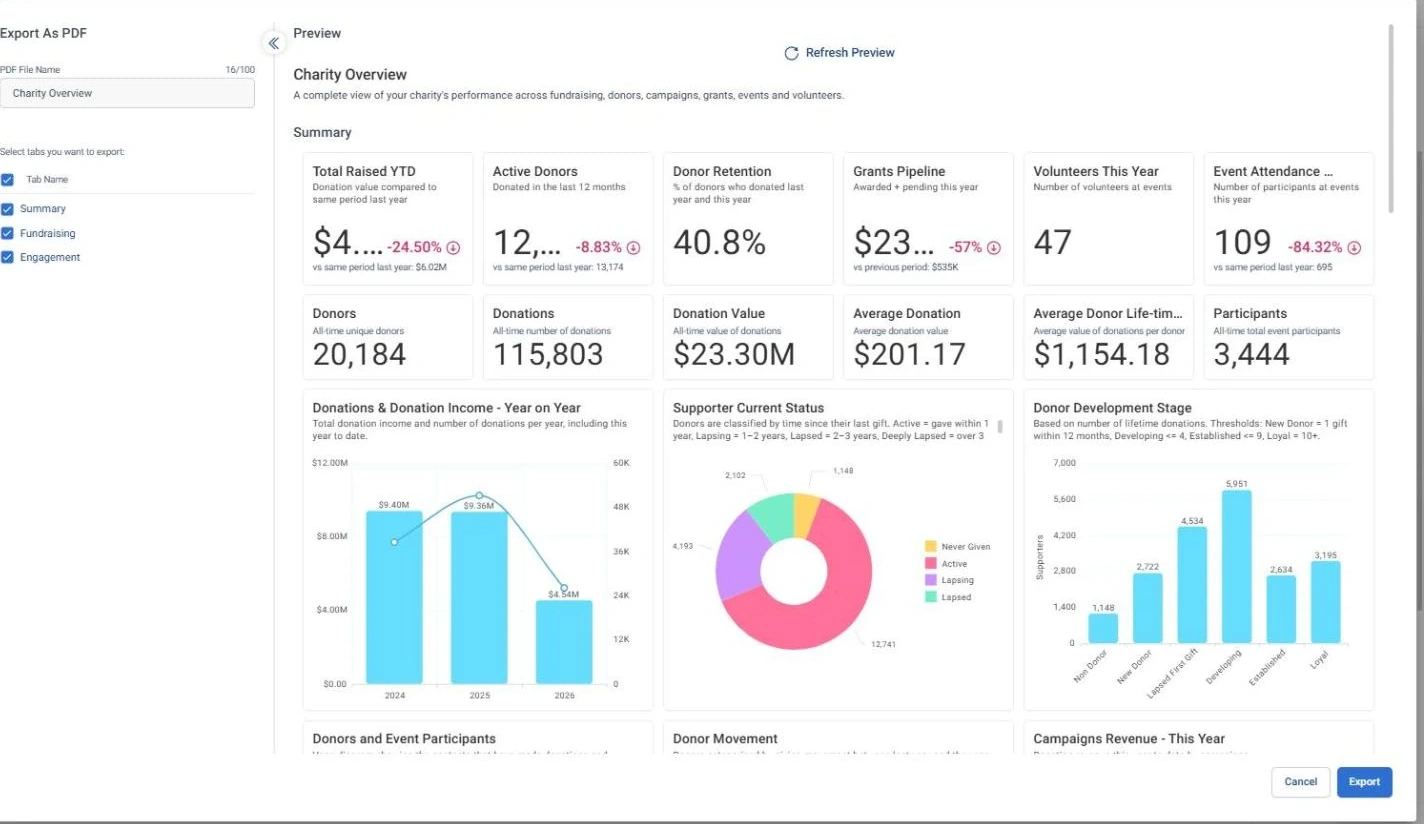
The Board Pack That Builds Itself · Export as PDF, in Apteco Orbit: The Export as PDF box for the Charity Overview dashboard, with the Summary, Fundraising and Engagement tabs ticked.
The Board Pack That Builds Itself · Export as PDF The Export as PDF box for the Charity Overview dashboard, with the Summary, Fundraising and Engagement tabs ticked. A coordinator turns the board pack into a PDF in a few clicks, with no copying and pasting.

Sample charity: the people and numbers in these screens are made up, so the picture shows the tool, not a result.
The problem it solves

Board-ready numbers before every meeting.

Why your CRM misses this. Board numbers are often rebuilt by hand before each meeting, from the CRM, the finance system, a grants spreadsheet and a coordinator’s own counts. Some CRMs only report one month at a time, so a year-on-year comparison becomes a manual job.

Data

4 of its 5 sources usually sit outside the CRM

Signals

it reads 6 of them

Reach

3 channels: shared modules, email, forms

Journey

5 steps, start to finish

Connect: the data it draws on

Mission joins these into one record per person, beside your CRM.

Sources

Analyze: who it finds

  • Donation Value Same Period Last Year How much had this supporter given by this same date last year? Use it in any module for the fairest year-over-year comparison, free of seasonal timing.
  • Donor Movement Did each supporter give more, less, the same, or stop, compared with the year before? Use it for the board's donor movement chart: new, re-engaged, up, same, down, lost.
  • Retained donors A list Orbit keeps up to date by itself: people who gave last year and have given again this year. Donor retention is this audience divided by Gave last year. Divide by last year's donors, not this year's.
  • Donor Status Is this supporter active, lapsing, lapsed, deeply lapsed, or someone who never gave? Sort any report by Donor Status, and start year-end appeals and re-engagement campaigns from it.
  • Total Amount Granted How much has this funder granted us in total? Rank funders by total giving to decide where stewardship goes first.
  • Total Volunteer Hours How many hours has this supporter volunteered in total? Report volunteer hours for impact stories and grant applications that ask for them.

Dashboard: Charity Overview

Activate: what happens

Each step names when it happens and the channel it uses.

  1. Every refresh

    Shared module

    Every module updates from the latest data. Nobody rebuilds a spreadsheet.

  2. 2 weeks before

    Shared module

    The board pack is shared with the board as a group, view only.

  3. 1 week before

    Email + form

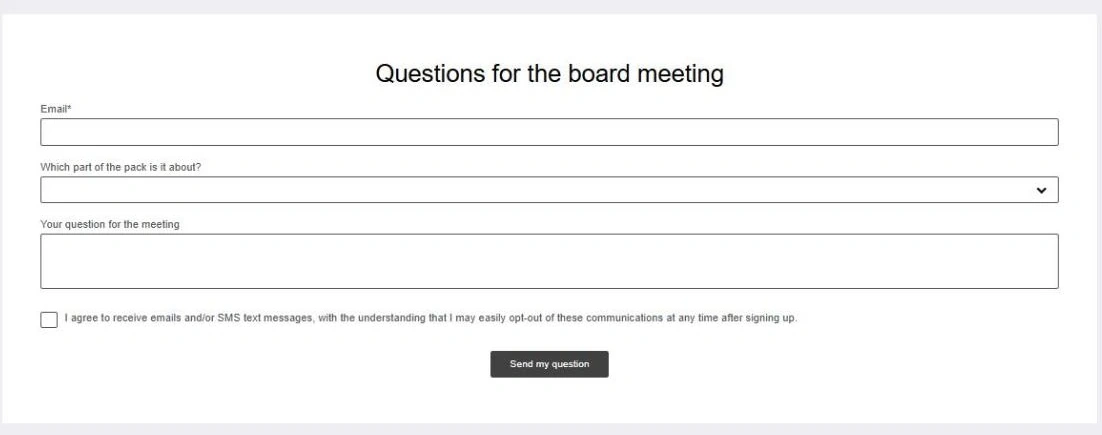
    Board members send their questions ahead of the meeting through a short form.

  4. The meeting

    Shared module

    Everyone looks at the same live numbers, on a laptop, tablet or phone.

  5. After

    Shared module

    The pack is exported as a PDF for the minutes, with just the tabs you choose.

  • Every board member can have their own Viewer login.

The campaign in Orbit

The Board Pack That Builds Itself · 'Questions for the board meeting' form, in Apteco Orbit: A draft form called Questions for the board meeting: board members give their email, pick the part of the pack their question is about, and type…
The Board Pack That Builds Itself · 'Questions for the board meeting' form A draft form called Questions for the board meeting: board members give their email, pick the part of the pack their question is about, and type the question. Staff can prepare answers before the meeting.

Learn: what flows back

Questions from the form shape the next pack. Same Period Last Year keeps every comparison fair, whatever month the meeting falls in. Donor retention is Retained donors divided by everyone who gave last year, so the rate means what it says.

Results land on the same supporter record, so the next run starts from what just happened.

Proven. Income reports used to arrive once a month and the numbers didn't line up. Now leadership has more than 30 live income views in Orbit, with more than a decade of income history recoded. See a similar use case

Where you see it in Orbit

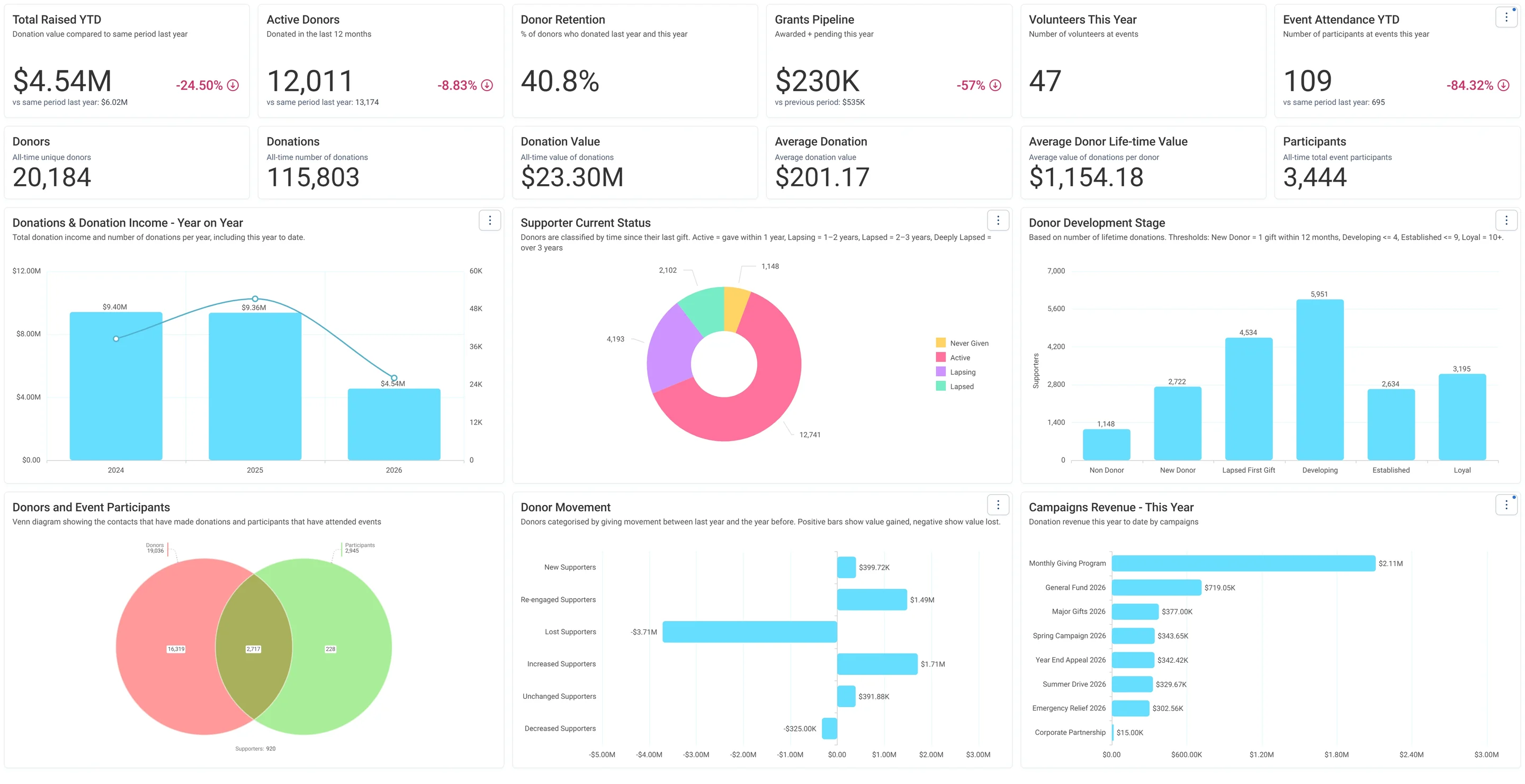
Charity Overview · Summary, in Apteco Orbit: The Summary tab, with headline cards across the top, then charts of giving by year, donor status, donor stages and campaign income.
Charity Overview · Summary The Summary tab, with headline cards across the top, then charts of giving by year, donor status, donor stages and campaign income. A board reads it as a quick health check of the whole charity before a meeting.
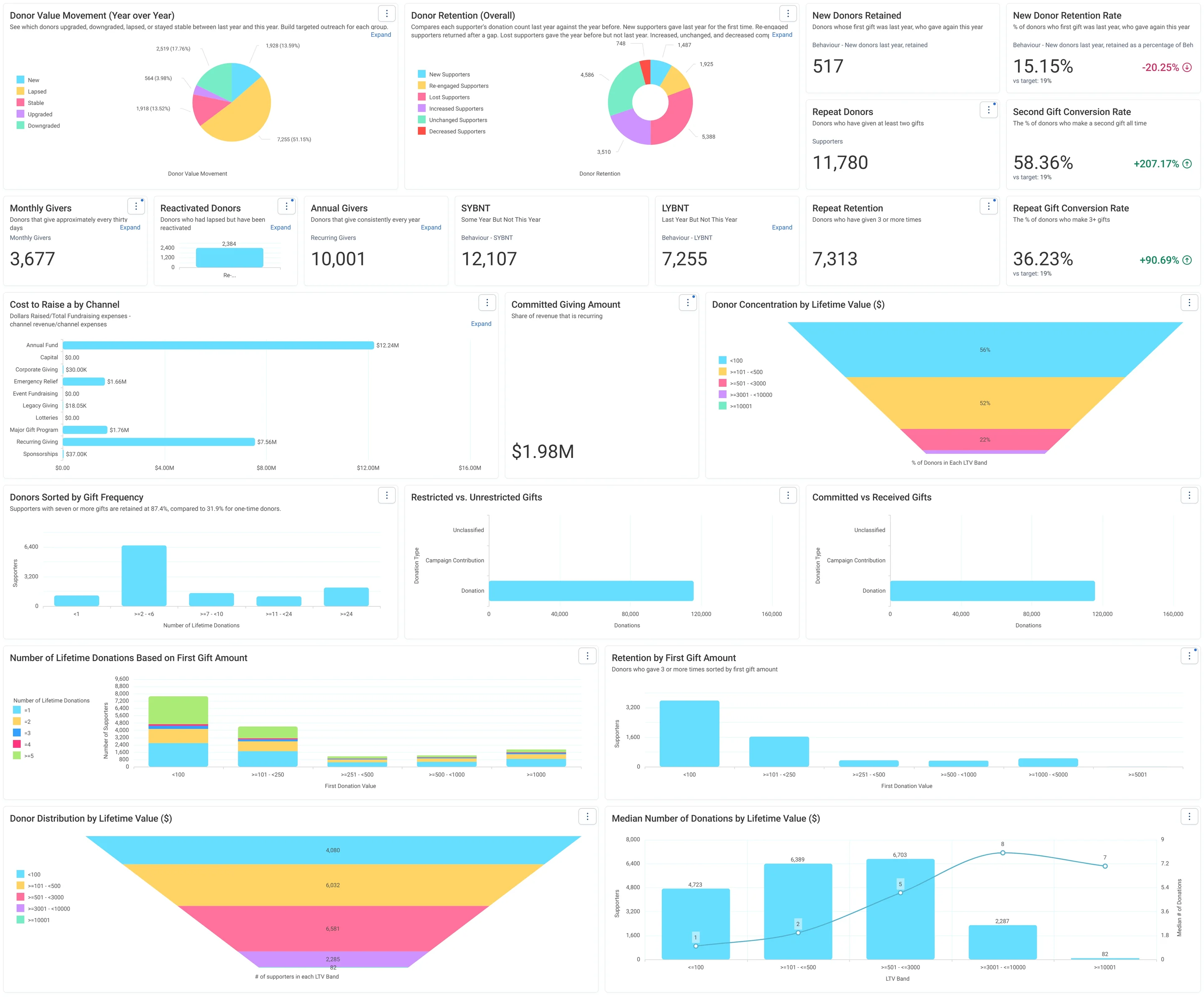
Jumping Off Metrics · Donor Health - Board Report, in Apteco Orbit: The Donor Health - Board Report tab, with cards on new, repeat and regular donors, charts of retention, value changes and cost to raise a dollar.
Jumping Off Metrics · Donor Health - Board Report The Donor Health - Board Report tab, with cards on new, repeat and regular donors, charts of retention, value changes and cost to raise a dollar. A board sees whether the charity is keeping its donors and where to focus.
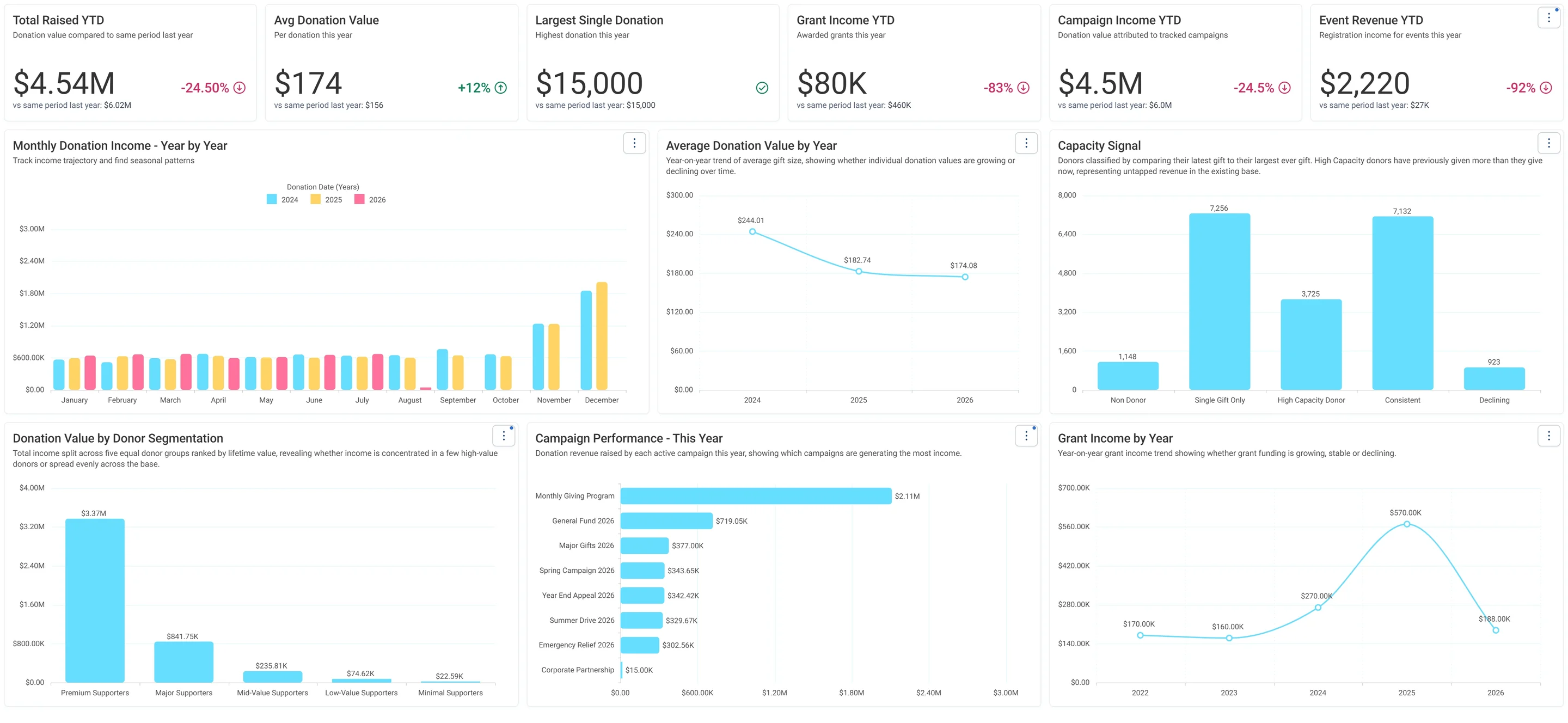
Charity Overview · Fundraising, in Apteco Orbit: The Fundraising tab, with cards comparing this year's income with last year's, then charts of income by month, a Capacity Signal and income by donor group.
Charity Overview · Fundraising The Fundraising tab, with cards comparing this year's income with last year's, then charts of income by month, a Capacity Signal and income by donor group. A fundraiser spots where income is down and which donors could give more.
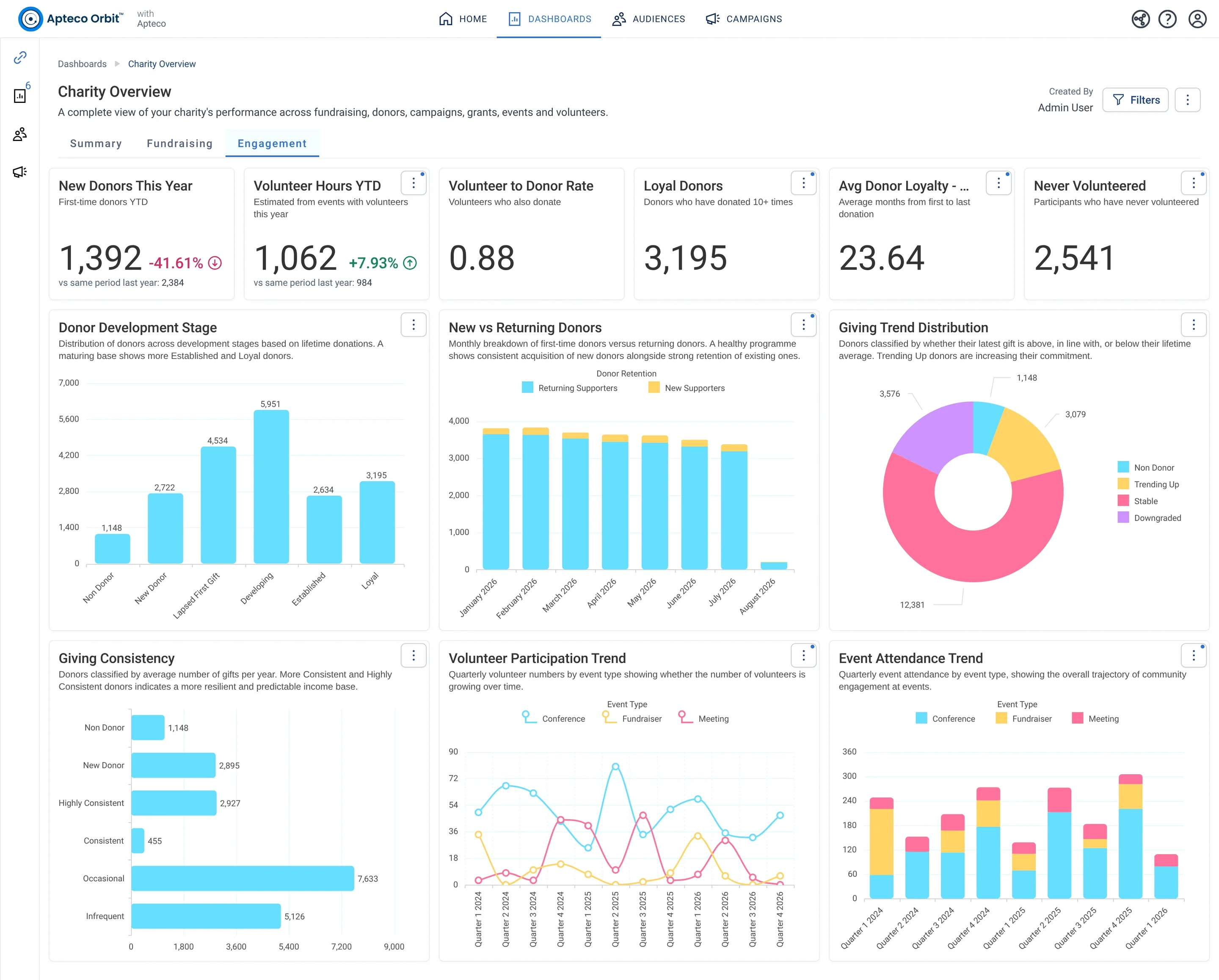
Charity Overview · Engagement, in Apteco Orbit: The Engagement tab, with cards on new donors, volunteers and loyal givers, then charts of donor stages, giving trends and volunteer activity by quarter.
Charity Overview · Engagement The Engagement tab, with cards on new donors, volunteers and loyal givers, then charts of donor stages, giving trends and volunteer activity by quarter. A fundraiser sees who is getting closer to the cause and who is drifting away.

Questions people ask

What problem does The Board Pack That Builds Itself solve?

Board-ready numbers before every meeting. The numbers your board asks for, gathered from every system and ready before every meeting.

Which data does it need?

Donations: gift amount, gift date, campaign; Grants: amounts granted, decision and payment dates; Participants: events and attendance; Volunteer timesheets: hours worked; Campaigns: goal revenue

Why can't my CRM do this on its own?

Board numbers are often rebuilt by hand before each meeting, from the CRM, the finance system, a grants spreadsheet and a coordinator’s own counts. Some CRMs only report one month at a time, so a year-on-year comparison becomes a manual job.

Which channels does it use?

Shared modules, Email, Forms. Every refresh: Shared module Then 2 weeks before: Shared module Then 1 week before: Email + form Then The meeting: Shared module.

Who runs it?

Finance and board.

Every pathway in the Field Guide runs on Apteco Mission, beside your CRM.

See it with your own data

An Apteco Architect walks you through this pathway on your own data.

Schedule Time with an Apteco Architect