Apteco Mission Field Guide Schedule Time with an Apteco Architect Play with a Live System

Clean and Considerate Communications

6 steps · Shared modules, Email, Forms, SMS

Every message respects each person’s wishes and reaches a real inbox, across every channel and every team.
Watch the pathway · about a minute
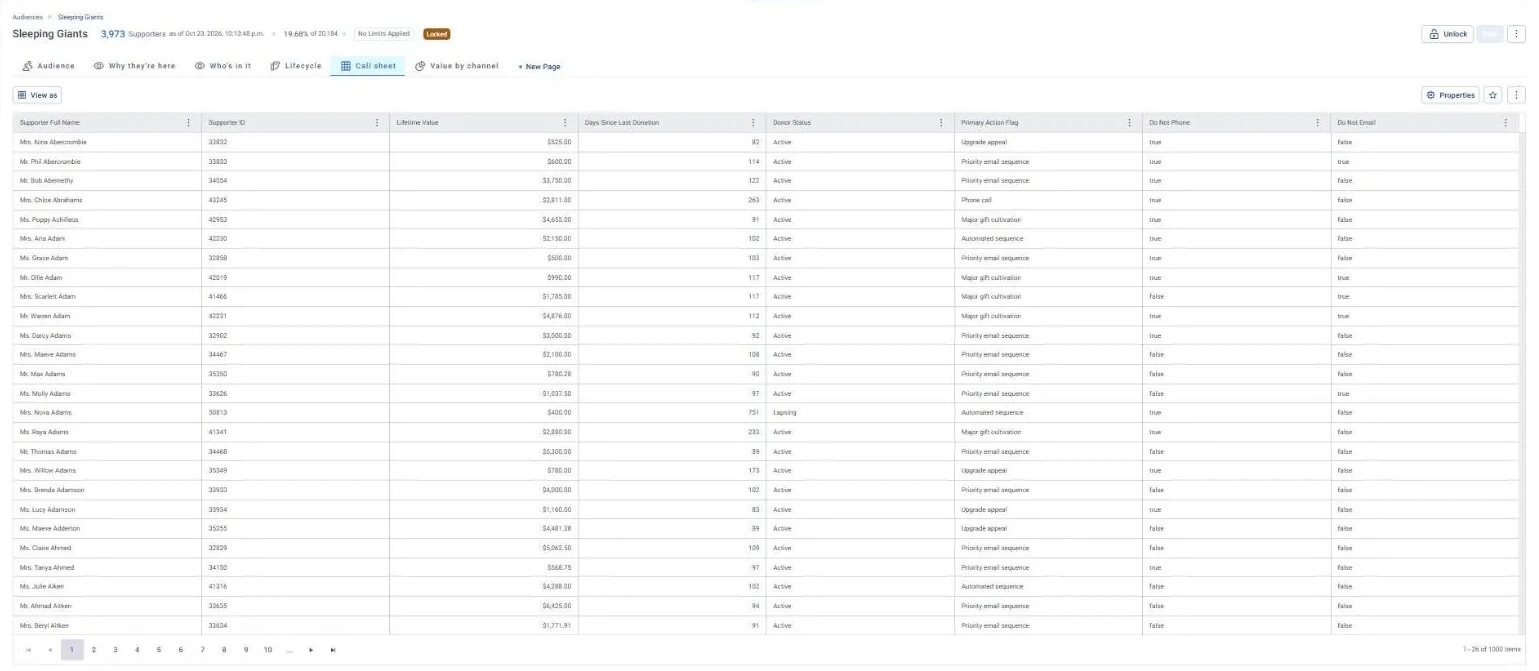
Sleeping Giants · Call sheet, in Apteco Orbit: The Call sheet tab: names, lifetime value, days since last gift, a suggested next step and contact flags.
Sleeping Giants · Call sheet The Call sheet tab: names, lifetime value, days since last gift, a suggested next step and contact flags. Major-gift staff work down the list and skip anyone who asked not to be contacted.

Sample charity: the people and numbers in these screens are made up, so the picture shows the tool, not a result.
The problem it solves

No message to anyone who opted out.

Why your CRM misses this. Contact preferences end up in several places: the CRM, the email platform, sometimes a membership or events system, and the contact counts often don’t match. An opt-out recorded in one doesn’t reach the others on its own.

Data

1 of its 4 sources usually sit outside the CRM

Signals

it reads 6 of them

Reach

4 channels: shared modules, email, forms and more

Journey

6 steps, start to finish

Connect: the data it draws on

Mission joins these into one record per person, beside your CRM.

Sources

Analyze: what it checks

  • Is Deceased A field from Supporters.
  • Is Opt Out A field from Supporters.
  • Do Not Email A field from Supporters.
  • Do Not SMS A field from Supporters.
  • Email On Hold A field from Emails.
  • Household Name A field from Households.

Activate: what happens

Each step names when it happens and the channel it uses. Under the steps is the campaign as it is built in Orbit, in 2 parts. Read them in order. Then how the 'Can we contact them?' split and the 'Bounced or unsubscribed?' split are set up.

  1. Every send

    Journey logic

    An audience split removes deceased, opted-out and do-not-contact supporters before anything goes out.

  2. Every send

    Journey logic

    Bounces are handled first, then unsubscribes, before any follow-up.

  3. Every send

    Journey logic

    One record per person, so nobody gets the same email twice from two teams.

  4. Weekly

    Shared module

    Email addresses on hold are listed for your team to fix.

  5. Quarterly

    Email + form

    A preference check-in: which channels, and how often.

  6. On send

    SMS

    Invalid mobile numbers found on a send are flagged for exclusion.

  • Households can get one printed piece instead of one each.

The campaign in Orbit

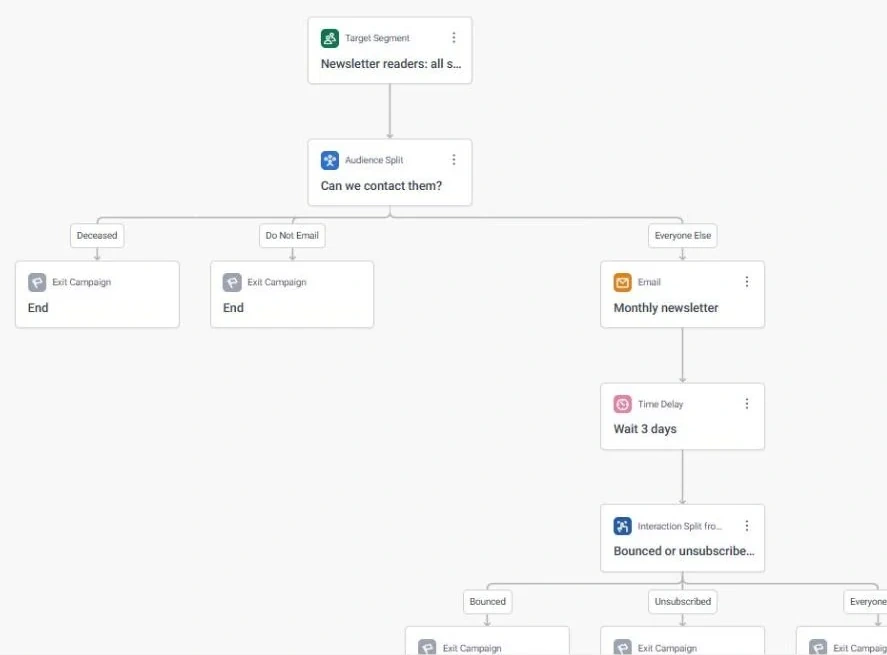
Clean and Considerate Communications · journey, part 1 of 2, in Apteco Orbit: The start of the journey: the Can we contact them?
Clean and Considerate Communications · journey, part 1 of 2 The start of the journey: the Can we contact them? check sends people who died or are marked Do Not Email to the end, and everyone else gets the Monthly newsletter email. Only people the charity may contact get it.
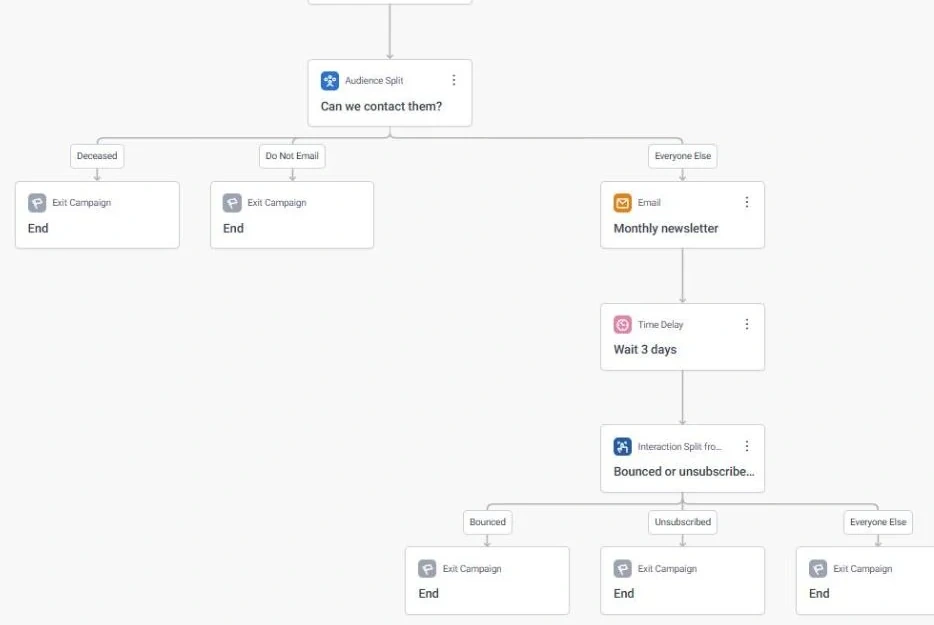
Clean and Considerate Communications · journey, part 2 of 2, in Apteco Orbit: The rest of the journey: a three-day wait after the newsletter, then the Bounced or unsubscribed?
Clean and Considerate Communications · journey, part 2 of 2 The rest of the journey: a three-day wait after the newsletter, then the Bounced or unsubscribed? check sends anyone whose email bounced or who unsubscribed to the end. Those people are not contacted again.
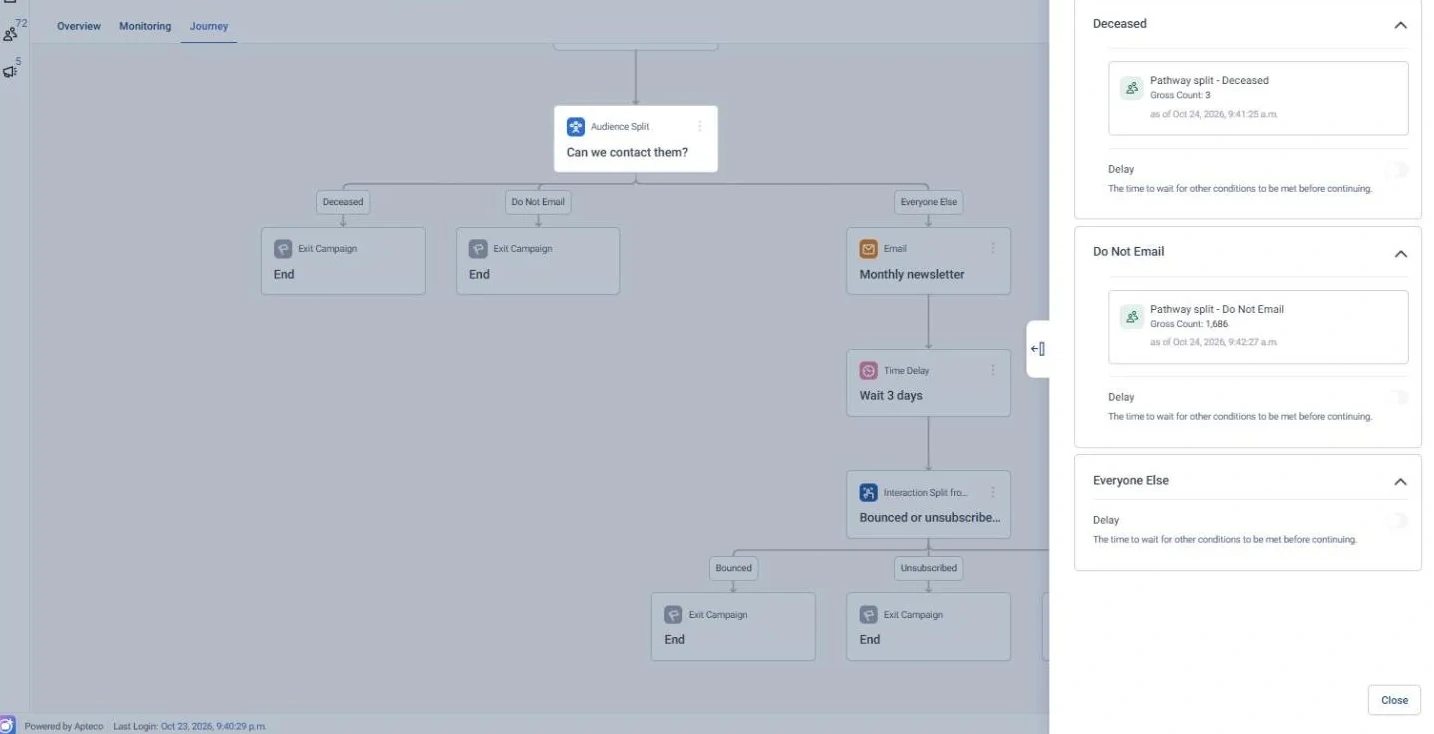
Clean and Considerate Communications · 'Can we contact them?' split, in Apteco Orbit: The settings for the Can we contact them?
Clean and Considerate Communications · 'Can we contact them?' split The settings for the Can we contact them? split: people marked Deceased or Do Not Email are taken out before anything is sent. The charity never writes to someone who has died or said no to email.
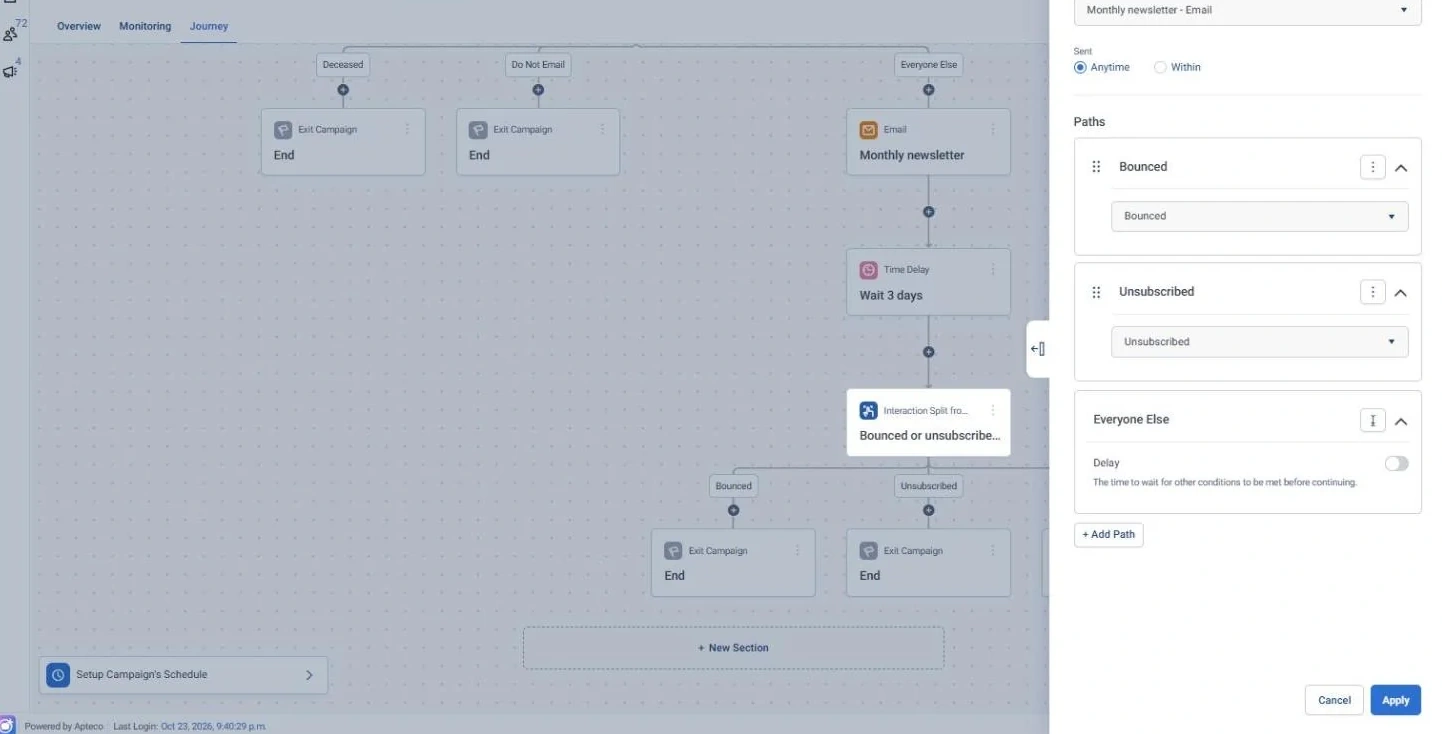
Clean and Considerate Communications · 'Bounced or unsubscribed?' split, in Apteco Orbit: The settings for the Bounced or unsubscribed?
Clean and Considerate Communications · 'Bounced or unsubscribed?' split The settings for the Bounced or unsubscribed? split: it looks at the Monthly newsletter email and sends anyone who bounced or unsubscribed out of the journey. The next message only goes to people who can get it and want it.

Learn: what flows back

Preference answers and corrections land back on the supporter record, so every journey in every team uses them.

Results land on the same supporter record, so the next run starts from what just happened.

Proven. VSO’s pilot SMS campaign, part of its 2025 Summer Appeal, delivered a positive return and did valuable data cleansing. See a similar use case

Where you see it in Orbit

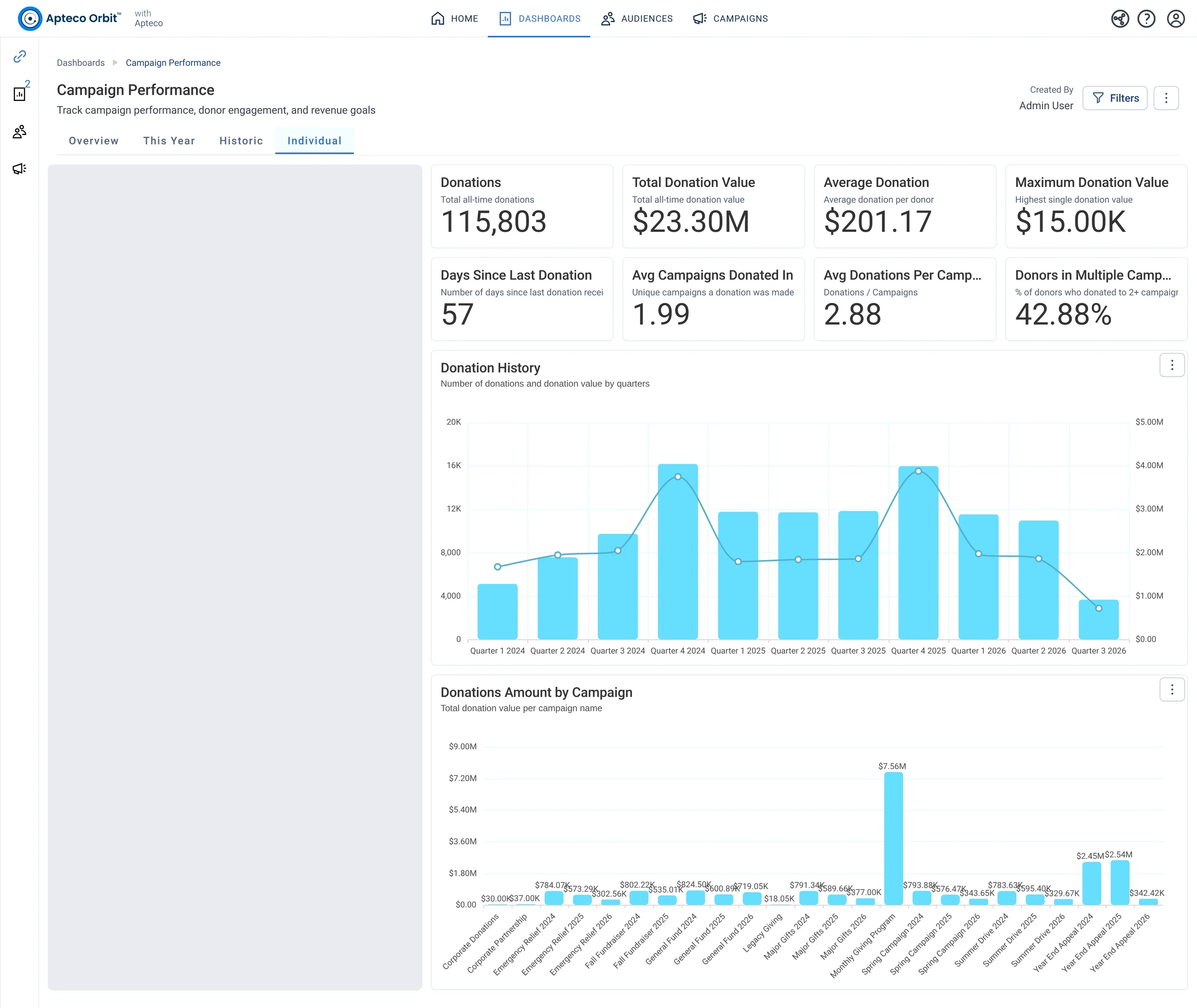
Campaign Performance · Individual, in Apteco Orbit: The Individual tab, with a Donor Details card for one supporter beside totals for all giving, gifts by quarter and income by campaign.
Campaign Performance · Individual The Individual tab, with a Donor Details card for one supporter beside totals for all giving, gifts by quarter and income by campaign. A fundraiser looks up a donor before a call and sees how they fit the bigger picture.
Lapse Prevention · Call sheet, in Apteco Orbit: The Call sheet tab: names, lifetime value, days since last gift, donor status and next step, mostly Priority email sequence.
Lapse Prevention · Call sheet The Call sheet tab: names, lifetime value, days since last gift, donor status and next step, mostly Priority email sequence. Staff reach out before these donors stop giving, skipping anyone who asked not to be contacted that way.
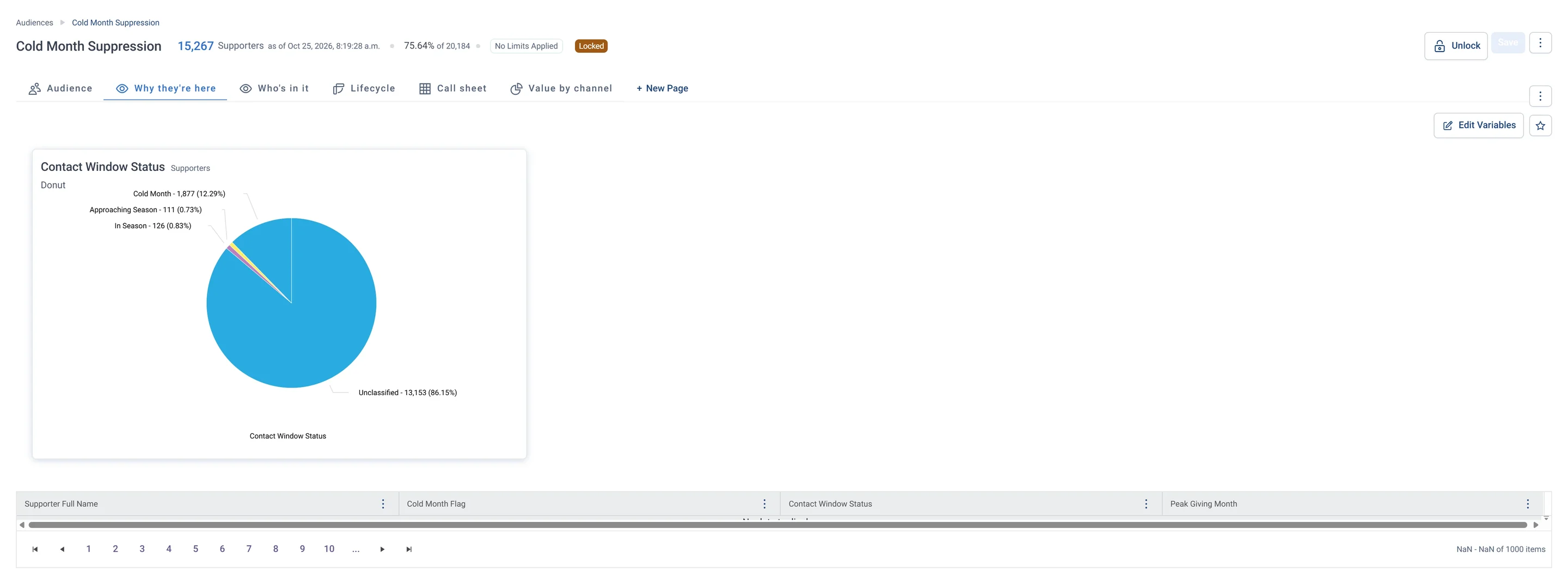
Cold Month Suppression · Why they're here, in Apteco Orbit: The Why they're here tab: a Contact Window Status donut, mostly Unclassified, and a table of each person's contact window and peak giving month.
Cold Month Suppression · Why they're here The Why they're here tab: a Contact Window Status donut, mostly Unclassified, and a table of each person's contact window and peak giving month. Fundraisers hold these people back now and reach them when their giving season comes.

Questions people ask

What problem does Clean and Considerate Communications solve?

No message to anyone who opted out. Every message respects each person’s wishes and reaches a real inbox, across every channel and every team.

Which data does it need?

Supporters: do not email, mail, phone or SMS; opt out; deceased; Emails: on hold, hold date, primary; Addresses: primary address; Households: who lives together

Why can't my CRM do this on its own?

Contact preferences end up in several places: the CRM, the email platform, sometimes a membership or events system, and the contact counts often don’t match. An opt-out recorded in one doesn’t reach the others on its own.

Which channels does it use?

Shared modules, Email, Forms, SMS. Every send: Journey logic Then Every send: Journey logic Then Every send: Journey logic Then Weekly: Shared module.

Who runs it?

Communications.

Every pathway in the Field Guide runs on Apteco Mission, beside your CRM.

See it with your own data

An Apteco Architect walks you through this pathway on your own data.

Schedule Time with an Apteco Architect