Apteco Mission Field Guide Schedule Time with an Apteco Architect Play with a Live System

Volunteer Appreciation and Drift

6 steps · Email, Direct mail, SMS, Phone

Thank volunteers at the moments that matter, and notice when someone starts to drift before they are gone.
Watch the pathway · about a minute
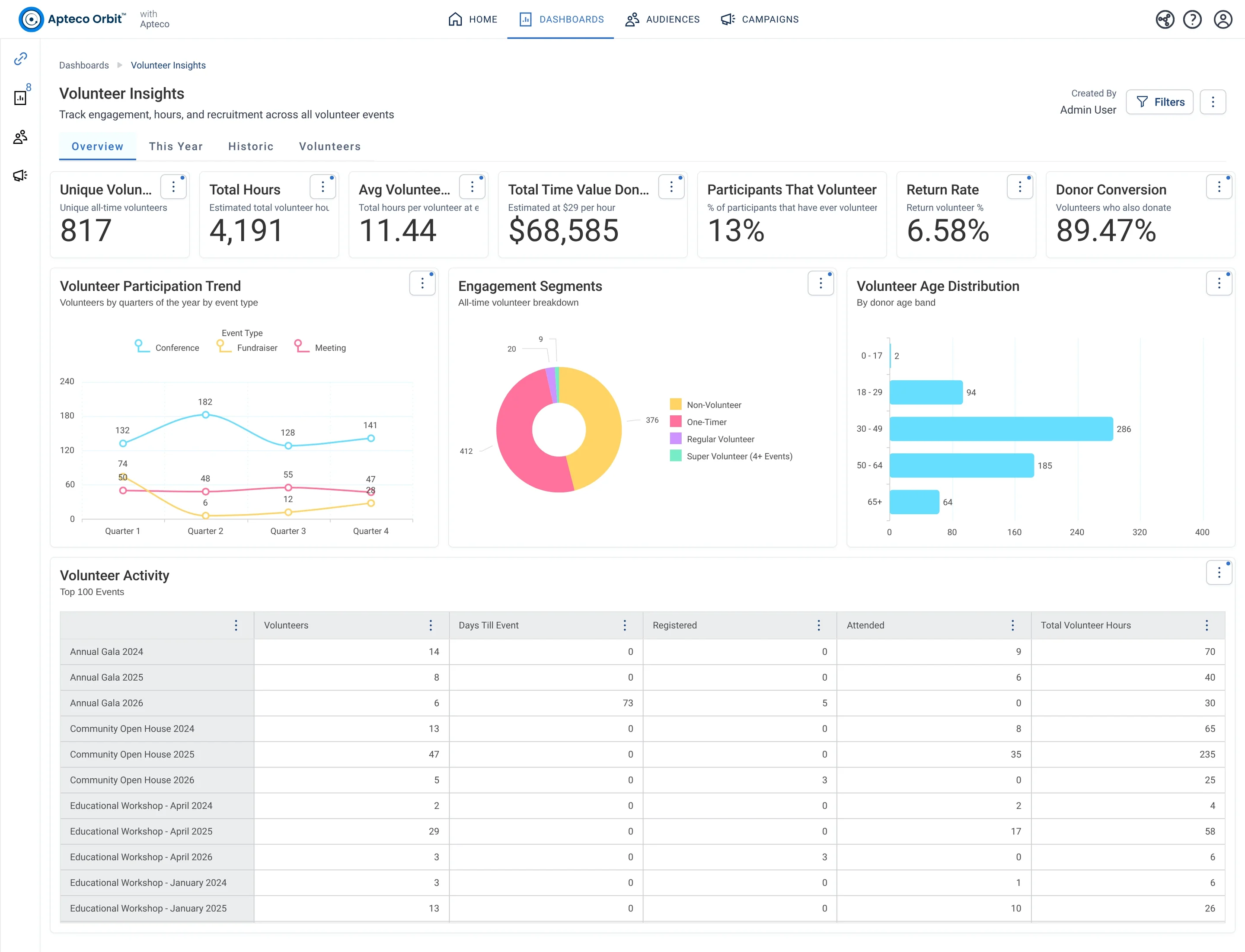
Volunteer Insights · Overview, in Apteco Orbit: The Overview tab, with cards on volunteers who return and also give, then charts of volunteer groups, a circle diagram of donors who volunteer, and ages.
Volunteer Insights · Overview The Overview tab, with cards on volunteers who return and also give, then charts of volunteer groups, a circle diagram of donors who volunteer, and ages. A volunteer manager plans how to keep volunteers coming back and giving.

Sample charity: the people and numbers in these screens are made up, so the picture shows the tool, not a result.
The problem it solves

Drifting volunteers noticed in time.

Why your CRM misses this. Volunteer hours often sit in a volunteer platform, a coordinator’s spreadsheet or a paper sign-in sheet. The CRM sees gifts, not shifts, so nobody is told when a regular volunteer stops coming.

Data

4 of its 4 sources usually sit outside the CRM

Signals

it reads 6 of them

Reach

4 channels: email, direct mail, sms and more

Journey

6 steps, start to finish

Connect: the data it draws on

Mission joins these into one record per person, beside your CRM.

Sources

Analyze: who it finds

  • First Volunteered This Year Did this supporter volunteer for the first time this year? Put new volunteers into a welcome sequence, since first-year volunteers need different messages than veterans.
  • Total Volunteer Hours How many hours has this supporter volunteered in total? Report volunteer hours for impact stories and grant applications that ask for them.
  • Volunteer Engagement Tier How active a volunteer is this supporter? Group volunteers by activity for recognition, with personal outreach for your most active ones.
  • Volunteers lapsing A list Orbit keeps up to date by itself: people with a timesheet last year but none yet this year. Call them before the next event. It and Volunteered this year and last year add up to everyone who volunteered last year.
  • Volunteered this year A list Orbit keeps up to date by itself: people with at least one timesheet this year. Your volunteers this year, counted as people. Someone with ten shifts counts once.
  • Volunteer Donor Status Does this supporter volunteer, give, do both, or neither? See which volunteers also give, and build campaigns that turn volunteers into donors.

Dashboard: Volunteers

Audience: Lapsing Volunteers Who Still Give

Supporters who stopped volunteering but still give. Something changed in their availability, not their commitment.

What to do: Check in personally. Ask if everything is okay and offer lighter ways to volunteer.

Read the audience, tab by tab

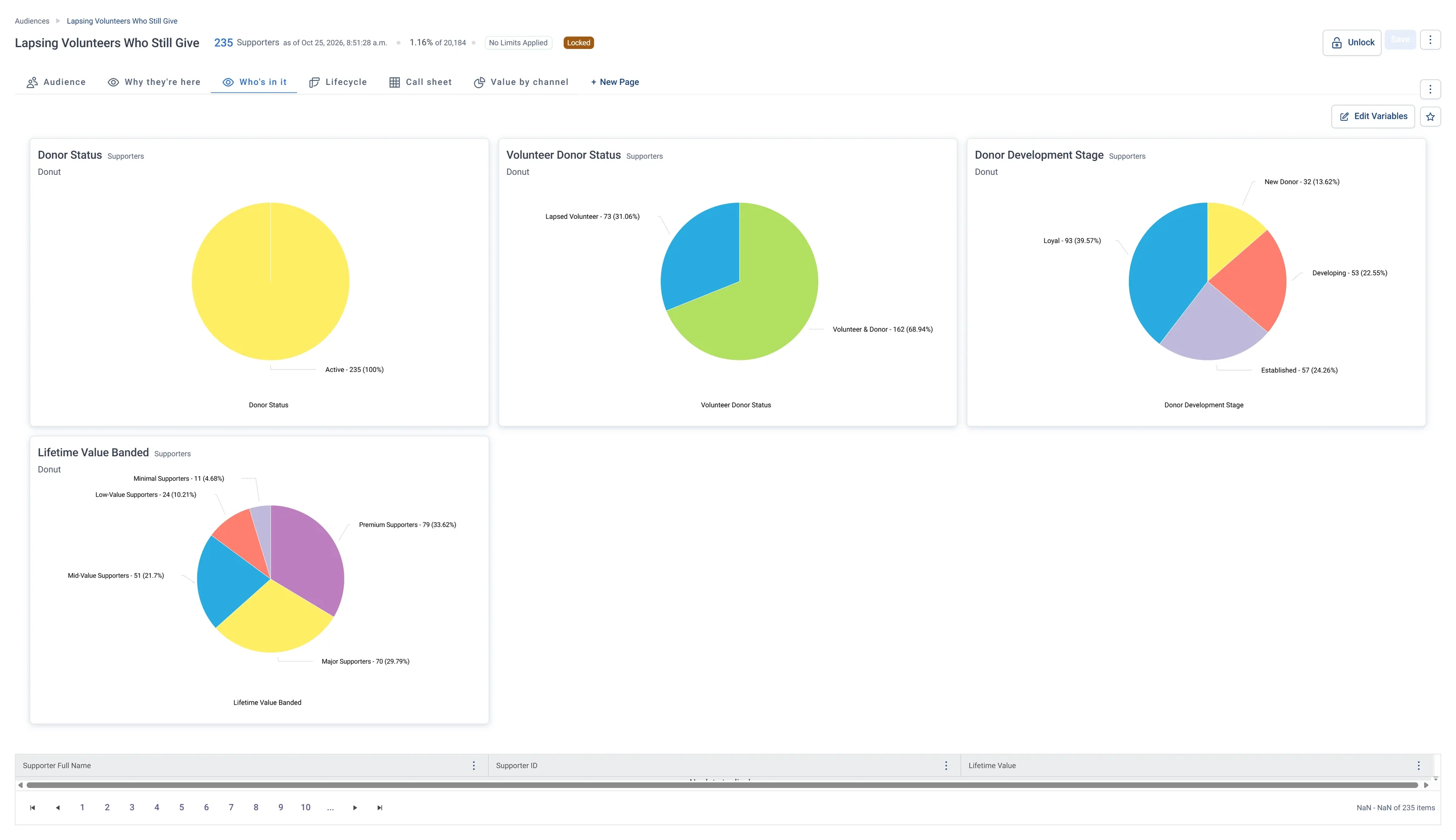
Lapsing Volunteers Who Still Give · Who's in it, in Apteco Orbit: The Who's in it tab: donuts of donor status, all Active, plus volunteering, stage and value band, mostly Loyal and in the top bands.
Lapsing Volunteers Who Still Give · Who's in it The Who's in it tab: donuts of donor status, all Active, plus volunteering, stage and value band, mostly Loyal and in the top bands. These are mostly loyal, higher-value givers.

Activate: what happens

Each step names when it happens and the channel it uses. Under the steps is the campaign as it is built in Orbit, in 2 parts. Read them in order.

  1. First shift

    Email

    A welcome and a thank-you after their first shift of the year.

  2. Milestones

    Email

    Crossing an hours milestone you set triggers a personal thank-you that names their total.

  3. Year end

    Direct mail

    Your most engaged volunteers get a printed thank-you card.

  4. Drift

    Email

    Volunteered last year but not yet this year: new opportunities that fit around their life.

  5. Drift + 2 weeks

    SMS

    No reply: a short, personal text.

  6. Drift + 4 weeks

    Call list

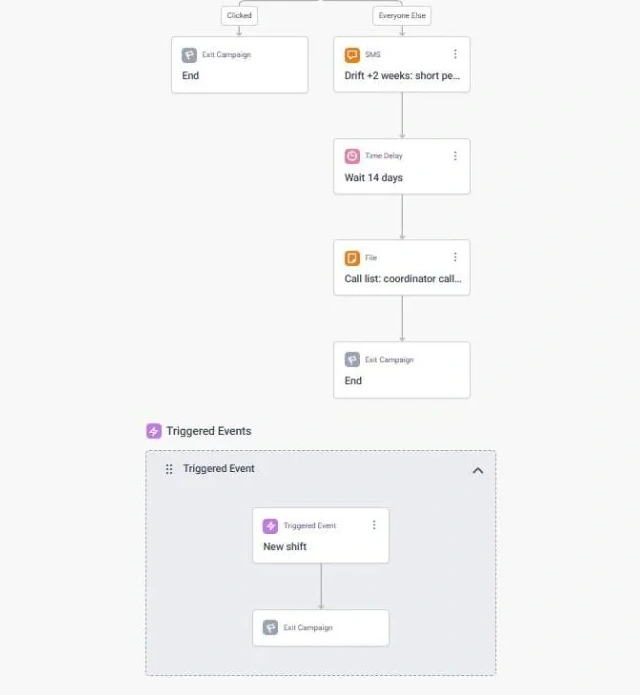
    Those with the most hours get a call from the volunteer coordinator.

  • Exit: a new shift takes them out of the drift path.
  • Volunteers who also give are thanked for both. This journey never makes a fundraising ask.

The campaign in Orbit

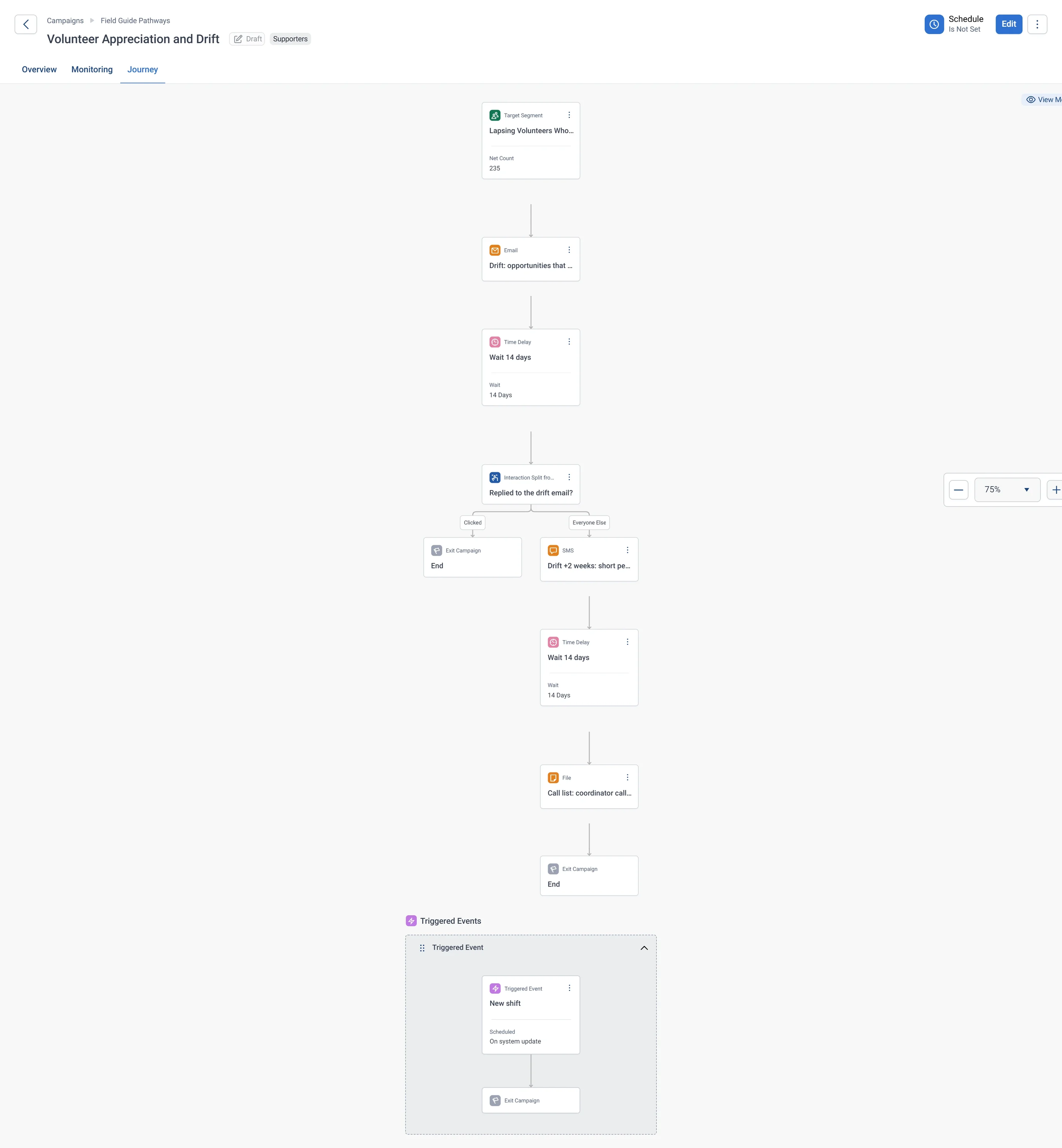
Volunteer Appreciation and Drift · journey, part 1 of 2, in Apteco Orbit: The first half of the journey: the Lapsing Volunteers Who Still Give audience gets an email of fitting opportunities, waits, then a reply check sends the rest to a…
Volunteer Appreciation and Drift · journey, part 1 of 2 The first half of the journey: the Lapsing Volunteers Who Still Give audience gets an email of fitting opportunities, waits, then a reply check sends the rest to a short personal text. It reaches drifting volunteers gently and personally.
Volunteer Appreciation and Drift · journey, part 2 of 2, in Apteco Orbit: The second half of the journey: the wait after the text, the call list for the volunteer coordinator, the exit, and the New shift Triggered Event below.
Volunteer Appreciation and Drift · journey, part 2 of 2 The second half of the journey: the wait after the text, the call list for the volunteer coordinator, the exit, and the New shift Triggered Event below. The journey stops when a volunteer comes back.

Learn: what flows back

When a new shift comes in, it takes that person out of Volunteers lapsing. Volunteered this year and last year, divided by Volunteered last year, shows how many volunteers you kept from one year to the next.

Results land on the same supporter record, so the next run starts from what just happened.

Questions people ask

What problem does Volunteer Appreciation and Drift solve?

Drifting volunteers noticed in time. Thank volunteers at the moments that matter, and notice when someone starts to drift before they are gone.

Who does Volunteer Appreciation and Drift reach?

Lapsing Volunteers Who Still Give: Supporters who stopped volunteering but still give. Something changed in their availability, not their commitment.

Which data does it need?

Volunteer timesheets: dates and hours worked; Participants: events and roles; Donations: supporter ID, gift amount, gift date; Emails: email address

Why can't my CRM do this on its own?

Volunteer hours often sit in a volunteer platform, a coordinator’s spreadsheet or a paper sign-in sheet. The CRM sees gifts, not shifts, so nobody is told when a regular volunteer stops coming.

Which channels does it use?

Email, Direct mail, SMS, Phone. First shift: Email Then Milestones: Email Then Year end: Direct mail Then Drift: Email.

Who runs it?

Volunteers.

Every pathway in the Field Guide runs on Apteco Mission, beside your CRM.

See it with your own data

An Apteco Architect walks you through this pathway on your own data.

Schedule Time with an Apteco Architect