Apteco Mission Field Guide Schedule Time with an Apteco Architect Play with a Live System

Members Who Stopped Showing Up

7 steps · Phone, Email, SMS, Shared modules

Notice the members who have stopped coming, long before their renewal is due, and reach them while it still matters.

Watch the pathway · about a minute
Members stand-in: event regulars who stopped coming · Audience rules, part 1 of 2, in Apteco Orbit: The first half of the rules: the Includes box, which picks people who came to several events.
Members stand-in: event regulars who stopped coming · Audience rules, part 1 of 2 The first half of the rules: the Includes box, which picks people who came to several events. The second half takes out recent attendees, leaving regulars who quietly stopped showing up.

Sample charity: the people and numbers in these screens are made up, so the picture shows the tool, not a result.
The problem it solves

Quiet members noticed before renewal.

Why your CRM misses this. The membership platform handles signup, renewal and payment, and often tells the member their membership has lapsed without telling staff. Visits sit in admissions or on sign-in sheets, so a regular who stops coming isn’t noticed until renewal.

Data

5 of its 5 sources usually sit outside the CRM

Signals

it reads 7 of them

Reach

4 channels: phone, email, sms and more

Journey

7 steps, start to finish

Connect: the data it draws on

Mission joins these into one record per person, beside your CRM.

Sources

Analyze: who it finds

  • Last Event Attended When did this supporter last attend an event? Check it before a phone call or meeting as a quick note on their latest event.
  • Total Events Attended How many events has this supporter been part of? Measure event breadth alongside Total Hours At Events.
  • Donor Status Is this supporter active, lapsing, lapsed, deeply lapsed, or someone who never gave? Sort any report by Donor Status, and start year-end appeals and re-engagement campaigns from it.
  • Days Since Last Visit Built in Orbit for this pathway.
  • Usual Days Between Visits Built in Orbit for this pathway.
  • Visits This Membership Year Built in Orbit for this pathway.
  • Membership Renewal Date Built in Orbit for this pathway.

Activate: what happens

Each step names when it happens and the channel it uses. Under the steps is the campaign as it is built in Orbit, in 2 parts. Read them in order. Then how the 'Came to an event' trigger is set up.

  1. Every week

    Journey logic

    Each member’s usual gap between visits is worked out from their own check-ins. Anyone well past their normal rhythm is flagged.

  2. Flagged

    Call list

    Regulars who have gone quiet go to the staff who know them, as a check-in call list. The team hears about it, not just the member.

  3. Flagged + 1 week

    Email

    What’s new this month, with an invitation to the program or event they used to come to.

  4. 60 days before renewal

    Email

    Members with few visits this year get a reminder of what their membership includes, before the renewal notice arrives.

  5. Renewal due

    SMS + email

    A renewal reminder by text and email, sent from your side as well as the membership platform’s.

  6. Ongoing

    Email

    Members who visit more and more but have never given get a first invitation to support the cause.

  7. Monthly

    Shared module

    Membership numbers for the board: active, lapsing and renewed, with visits per member.

  • Exit: a visit or check-in takes a member out of the quiet path at the next refresh.
  • Visit rhythm and membership dates are built as custom variables and behaviours in Orbit from your membership and visits data.

The campaign in Orbit

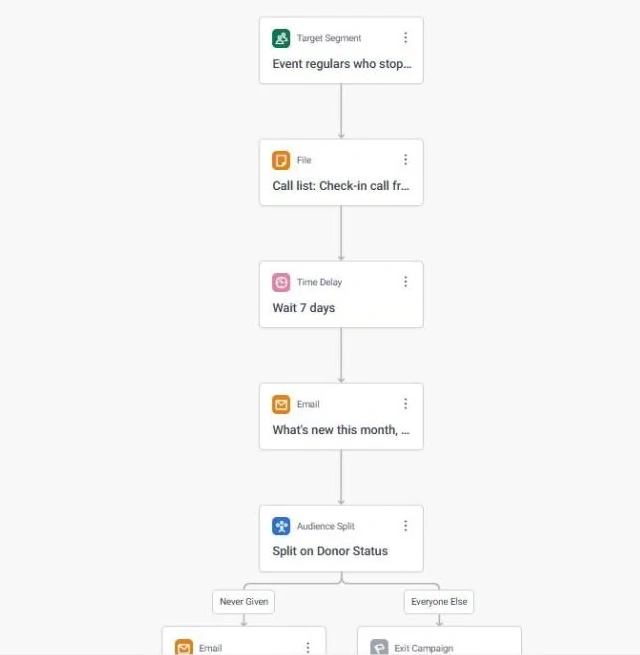
Members Who Stopped Showing Up · journey, part 1 of 2, in Apteco Orbit: The top half of the journey: the entry audience, the Check-in call from staff who know them call list, a wait, and the What's new this month email with an event…
Members Who Stopped Showing Up · journey, part 1 of 2 The top half of the journey: the entry audience, the Check-in call from staff who know them call list, a wait, and the What's new this month email with an event invitation. Lapsed members hear from someone they know first.
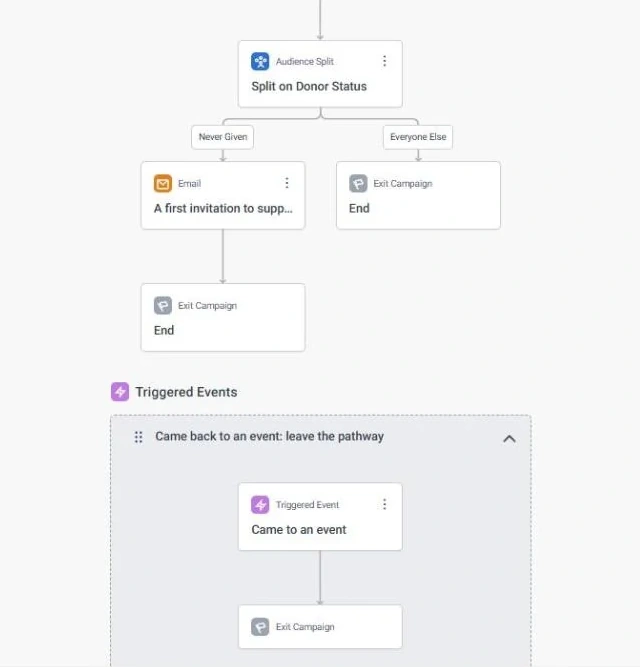
Members Who Stopped Showing Up · journey, part 2 of 2, in Apteco Orbit: The bottom half of the journey: the Donor Status split sends people who never gave to the A first invitation to support the cause email, everyone else ends, and the…
Members Who Stopped Showing Up · journey, part 2 of 2 The bottom half of the journey: the Donor Status split sends people who never gave to the A first invitation to support the cause email, everyone else ends, and the exit rule below. Members who come back leave the journey.
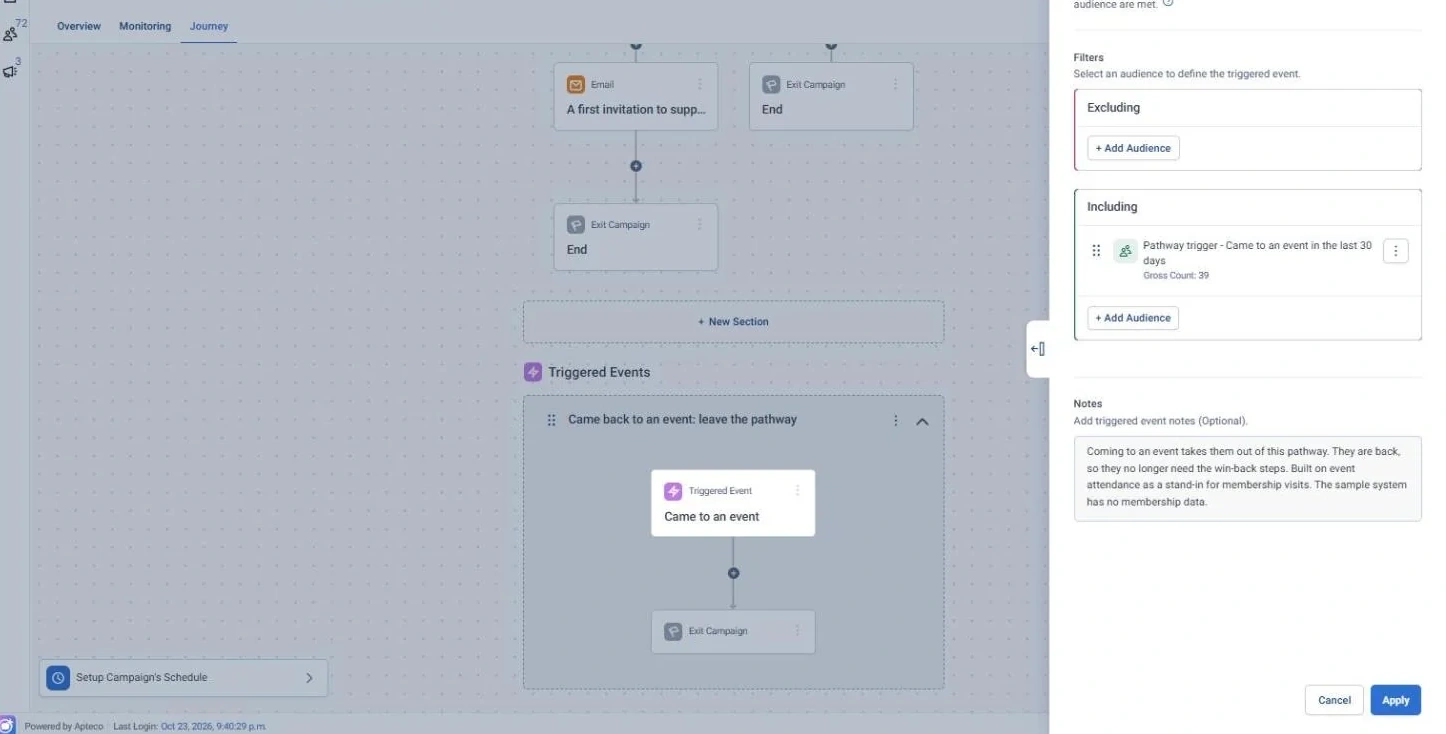
Members Who Stopped Showing Up · 'Came to an event' trigger, in Apteco Orbit: The settings for the Came to an event trigger: anyone who came to an event recently leaves the pathway.
Members Who Stopped Showing Up · 'Came to an event' trigger The settings for the Came to an event trigger: anyone who came to an event recently leaves the pathway. Members who are back stop getting messages meant for people who drifted.

Learn: what flows back

Every check-in resets Days Since Last Visit, so members who come back drop off the list on their own. Renewals and non-renewals feed straight into the board numbers.

Results land on the same supporter record, so the next run starts from what just happened.

Where you see it in Orbit

Members stand-in: event regulars who stopped coming · Audience rules, part 2 of 2, in Apteco Orbit: The second half of the rules: the Excludes box, which leaves out anyone who came to an event in the past year.
Members stand-in: event regulars who stopped coming · Audience rules, part 2 of 2 The second half of the rules: the Excludes box, which leaves out anyone who came to an event in the past year. That is how the list finds regulars who have stopped coming.
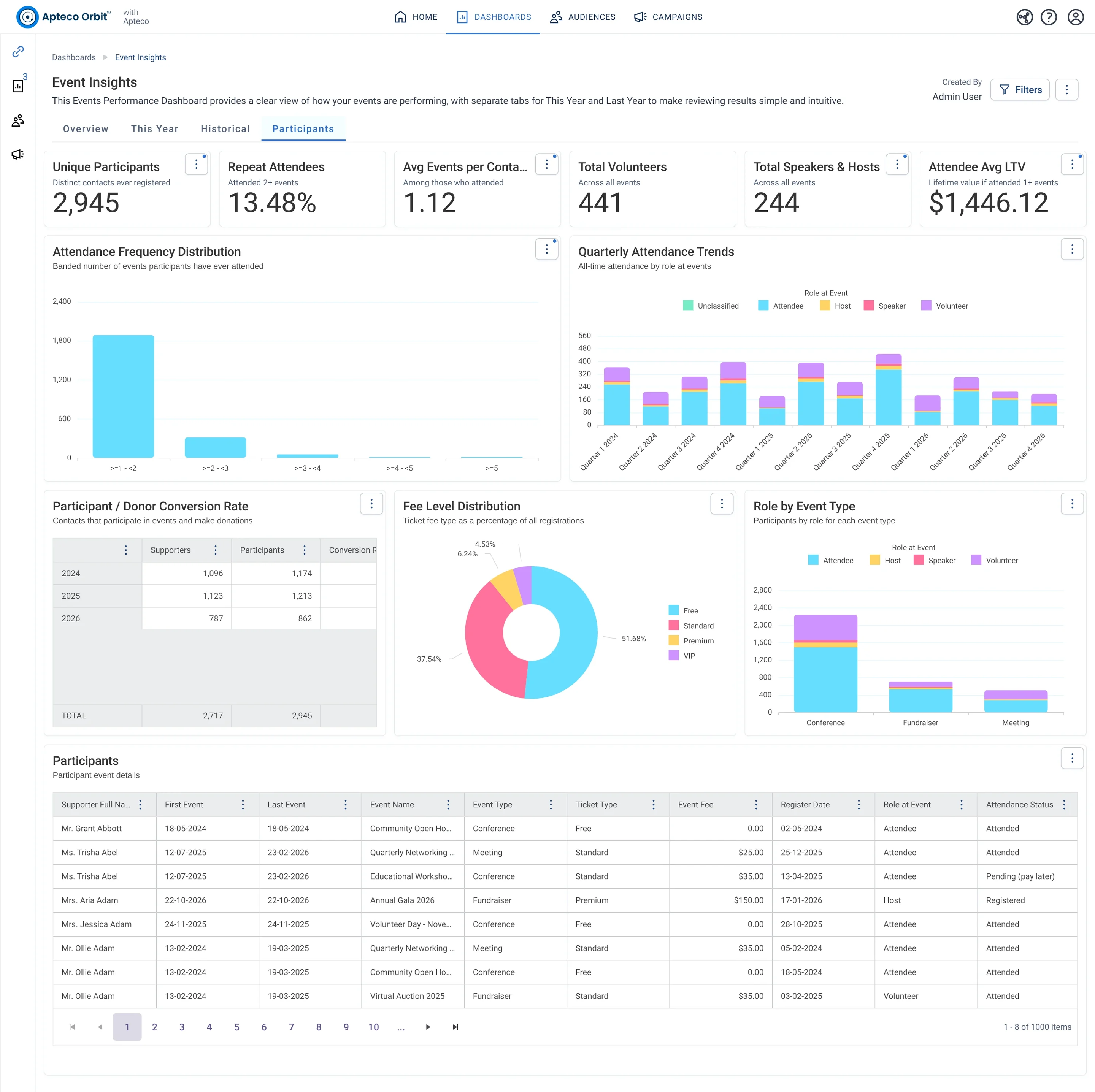
Event Insights · Participants, in Apteco Orbit: The Participants tab, with cards about event-goers, charts of how often they attend, their roles and ticket types, and a table of guests who also donate.
Event Insights · Participants The Participants tab, with cards about event-goers, charts of how often they attend, their roles and ticket types, and a table of guests who also donate. A fundraiser finds loyal event-goers and volunteers who could be asked to give more.
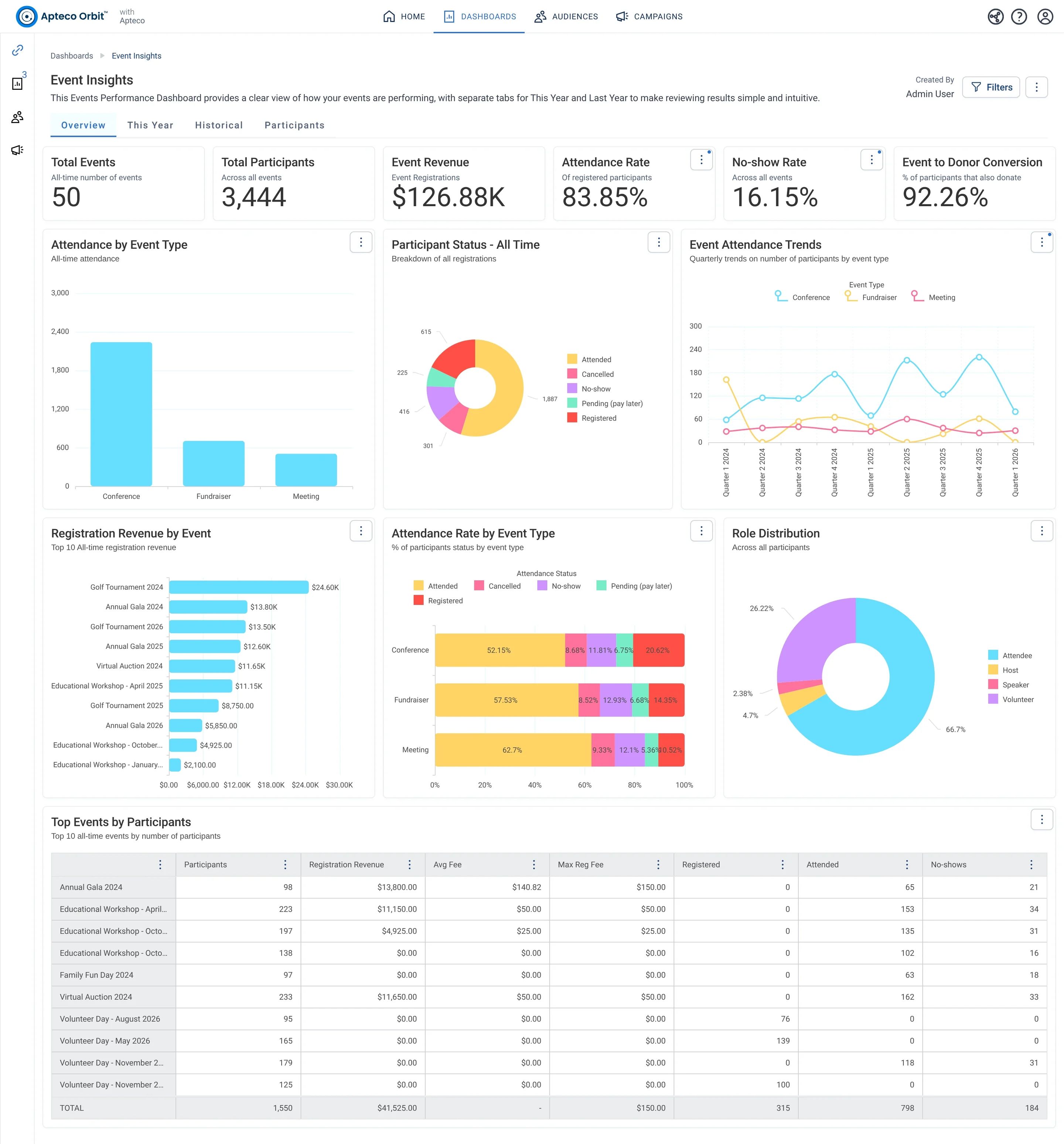
Event Insights · Overview, in Apteco Orbit: The Overview tab, with cards for all events ever, charts of attendance by event type, roles and revenue by event, and a top events table.
Event Insights · Overview The Overview tab, with cards for all events ever, charts of attendance by event type, roles and revenue by event, and a top events table. A board member sees which events draw people, earn money and turn guests into donors.

Questions people ask

What problem does Members Who Stopped Showing Up solve?

Quiet members noticed before renewal. Notice the members who have stopped coming, long before their renewal is due, and reach them while it still matters.

Which data does it need?

Memberships: membership type, join, renewal and expiry dates, status; Visits and check-ins: admission scans, class and program sign-ins; Participants: events attended; Donations: supporter ID, gift amount, gift date; Emails: email address

Why can't my CRM do this on its own?

The membership platform handles signup, renewal and payment, and often tells the member their membership has lapsed without telling staff. Visits sit in admissions or on sign-in sheets, so a regular who stops coming isn’t noticed until renewal.

Which channels does it use?

Phone, Email, SMS, Shared modules. Every week: Journey logic Then Flagged: Call list Then Flagged + 1 week: Email Then 60 days before renewal: Email.

Who runs it?

Membership.

Every pathway in the Field Guide runs on Apteco Mission, beside your CRM.

See it with your own data

An Apteco Architect walks you through this pathway on your own data.

Schedule Time with an Apteco Architect