Apteco Mission Field Guide Schedule Time with an Apteco Architect Play with a Live System

Funder Reporting and Stewardship

5 steps · Shared modules, Email, Phone, LinkedIn

Never miss a report deadline, and keep returning funders close between applications.

Watch the pathway · about a minute
Field Guide Audiences · Funders, in Apteco Orbit: The Funders tab, with audience tiles for grant work, Funders Due a Report and Returning Funders at Risk.
Field Guide Audiences · Funders The Funders tab, with audience tiles for grant work, Funders Due a Report and Returning Funders at Risk. A grants manager uses them to send reports on time and reach out to funders before they drift away.

Sample charity: the people and numbers in these screens are made up, so the picture shows the tool, not a result.
The problem it solves

No more missed funder reports.

Why your CRM misses this. Grant deadlines often live in a spreadsheet or a shared calendar that one person watches. When that person is away, a report deadline can slip past.

Data

2 of its 3 sources usually sit outside the CRM

Signals

it reads 7 of them

Reach

4 channels: shared modules, email, phone and more

Journey

5 steps, start to finish

Connect: the data it draws on

Mission joins these into one record per person, beside your CRM.

Sources

Analyze: who it finds

  • Grant Due Date - Past Flag Is this grant's report overdue? Pull a list of past-due grant reports for immediate follow-up.
  • Grant Report Received Count Has a report been sent in for this grant? Track which grants have reports in, and spot outstanding report deadlines.
  • Returning Funder Flag Has this funder given us more than one grant? Treat returning funders as your most reliable grant income.
  • Funder Retention Is this funder new this year, or have they funded us before? Separate new from returning funders in any module, as the grant version of donor retention.
  • Latest Grant Decision Date When did this funder last give us a decision? Pair it with Latest Grant Application Date to see how long decisions take.
  • Total Amount Granted How much has this funder granted us in total? Rank funders by total giving to decide where stewardship goes first.
  • Grant Due Date A field from Grants.

Dashboard: Grants

Audience: Returning Funders at Risk

Funders who have granted more than once but whose most recent application or decision was a long time ago. The relationship may be cooling.

What to do: Re-engage with an impact report from their last grant before you submit a new application.

Read the audience, tab by tab

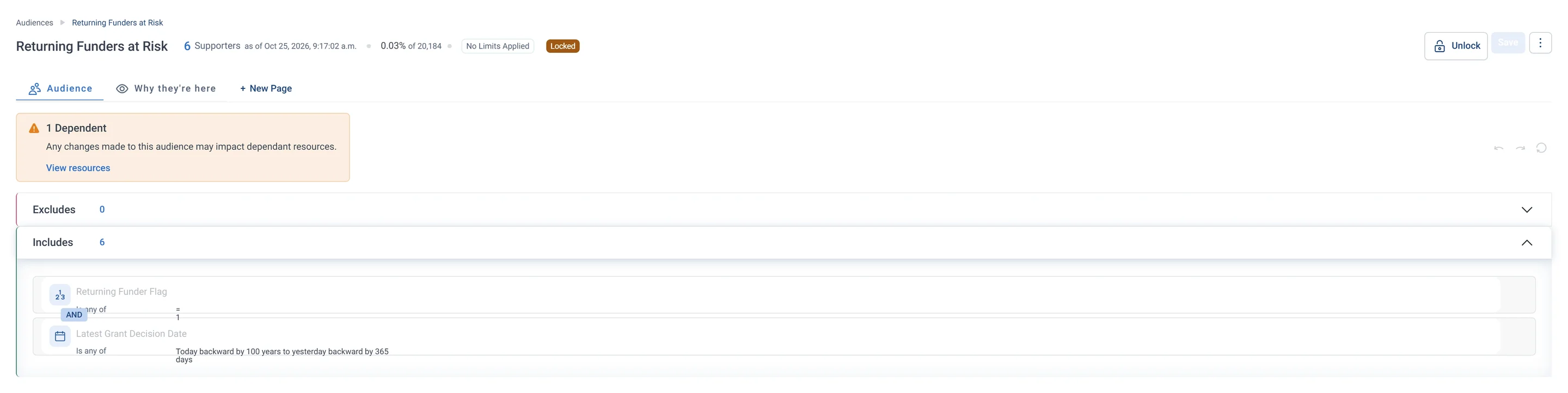
Returning Funders at Risk · Audience rules, in Apteco Orbit: The rules tab: two rules under Includes, Returning Funder Flag set and latest grant decision more than a year ago.
Returning Funders at Risk · Audience rules The rules tab: two rules under Includes, Returning Funder Flag set and latest grant decision more than a year ago. These past funders have gone quiet, so it is a good time to check in with them.

Activate: what happens

Each step names when it happens and the channel it uses. Under the steps is the campaign as it is built in Orbit.

  1. Monthly

    Shared module

    The Grants module lists every report coming due, and flags any that are past due without a report.

  2. After a decision

    Email

    A thank-you to the funder and what the grant will make possible.

  3. Mid-grant

    Email

    An impact update before the formal report is due.

  4. Before reapplying

    Call list

    Returning funders at risk get a relationship call and an impact report from their last grant.

  5. Ongoing

    LinkedIn Ads

    Staff at your funders see your impact stories on LinkedIn through company targeting.

  • Funder contacts get the same contact preference checks as everyone else.

The campaign in Orbit

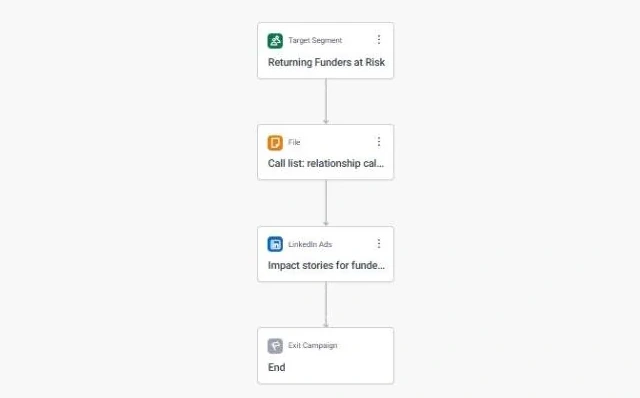
Funder Reporting and Stewardship · the whole journey, in Apteco Orbit: The whole journey for the Returning Funders at Risk audience: a call list for a relationship call and impact report, then LinkedIn ads with impact stories.
Funder Reporting and Stewardship · the whole journey The whole journey for the Returning Funders at Risk audience: a call list for a relationship call and impact report, then LinkedIn ads with impact stories. It keeps grant makers and other funders close so they renew their support.

Learn: what flows back

Recording a report as received clears the past-due flag at the next refresh. Funder Retention shows how many funders came back for another grant.

Results land on the same supporter record, so the next run starts from what just happened.

Where you see it in Orbit

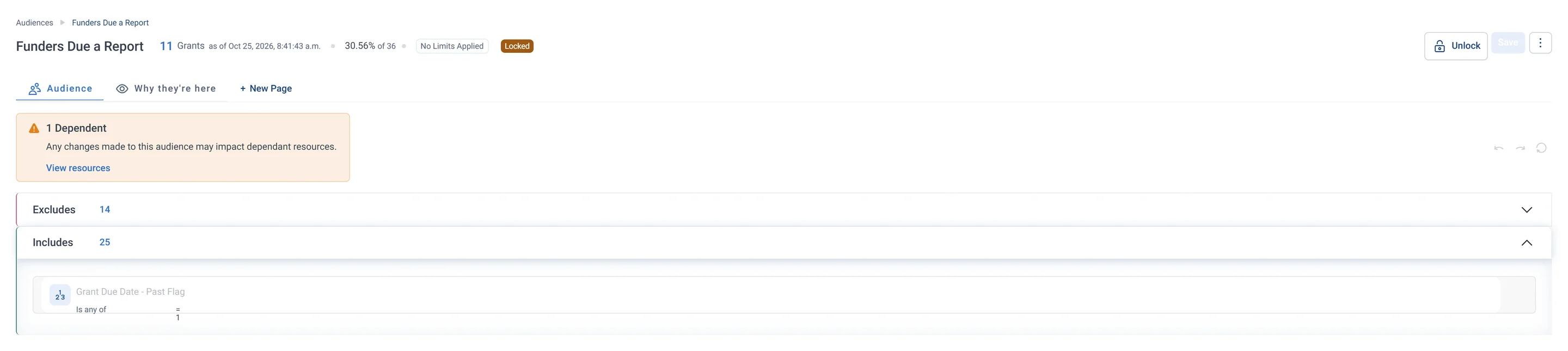
Funders Due a Report · Audience rules, part 1 of 2, in Apteco Orbit: The first half of the rules: the Includes box, which lets in every grant whose report due date has passed.
Funders Due a Report · Audience rules, part 1 of 2 The first half of the rules: the Includes box, which lets in every grant whose report due date has passed. The second half takes out grants whose report is already in, leaving a to-do list of overdue reports.

Questions people ask

What problem does Funder Reporting and Stewardship solve?

No more missed funder reports. Never miss a report deadline, and keep returning funders close between applications.

Who does Funder Reporting and Stewardship reach?

Returning Funders at Risk: Funders who have granted more than once but whose most recent application or decision was a long time ago. The relationship may be cooling.

Which data does it need?

Grants: due dates, amounts requested and granted, reports received, decision dates; Supporters: funder contacts and preferences; Emails: email address

Why can't my CRM do this on its own?

Grant deadlines often live in a spreadsheet or a shared calendar that one person watches. When that person is away, a report deadline can slip past.

Which channels does it use?

Shared modules, Email, Phone, LinkedIn. Monthly: Shared module Then After a decision: Email Then Mid-grant: Email Then Before reapplying: Call list.

Who runs it?

Grants.

Every pathway in the Field Guide runs on Apteco Mission, beside your CRM.

See it with your own data

An Apteco Architect walks you through this pathway on your own data.

Schedule Time with an Apteco Architect