Apteco Mission Field Guide Schedule Time with an Apteco Architect Play with a Live System

Jumping Off Metrics

Dashboard in Apteco Orbit · 5 tabs · 29 insights

What are the handful of numbers a board should watch every quarter? A board that watches six honest numbers every quarter asks better questions than one that gets a new slide deck each time.

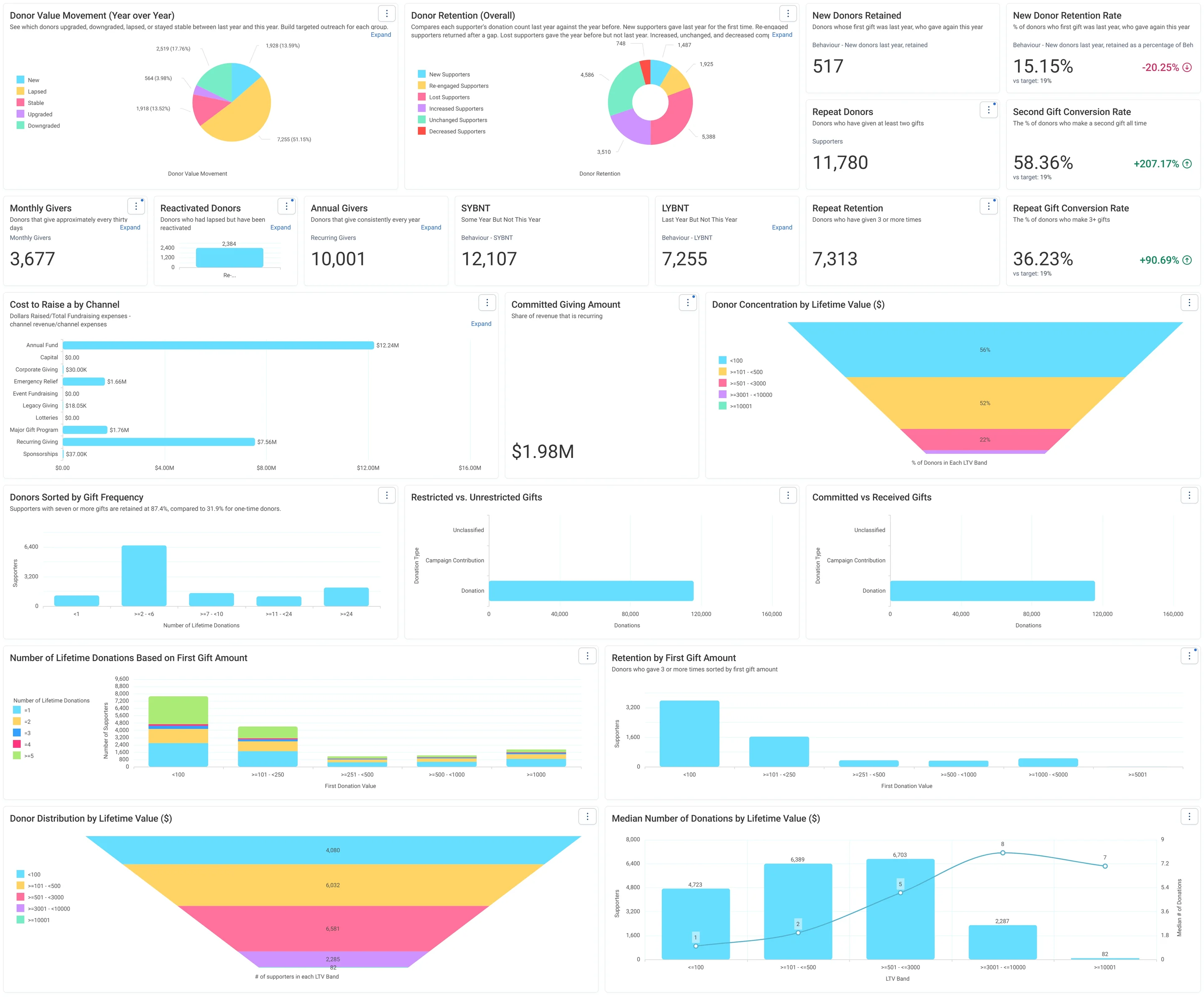
Jumping Off Metrics · Donor Health - Board Report, in Apteco Orbit: The Donor Health - Board Report tab, with cards on new, repeat and regular donors, charts of retention, value changes and cost to raise a dollar.
Jumping Off Metrics · Donor Health - Board Report The Donor Health - Board Report tab, with cards on new, repeat and regular donors, charts of retention, value changes and cost to raise a dollar. A board sees whether the charity is keeping its donors and where to focus.
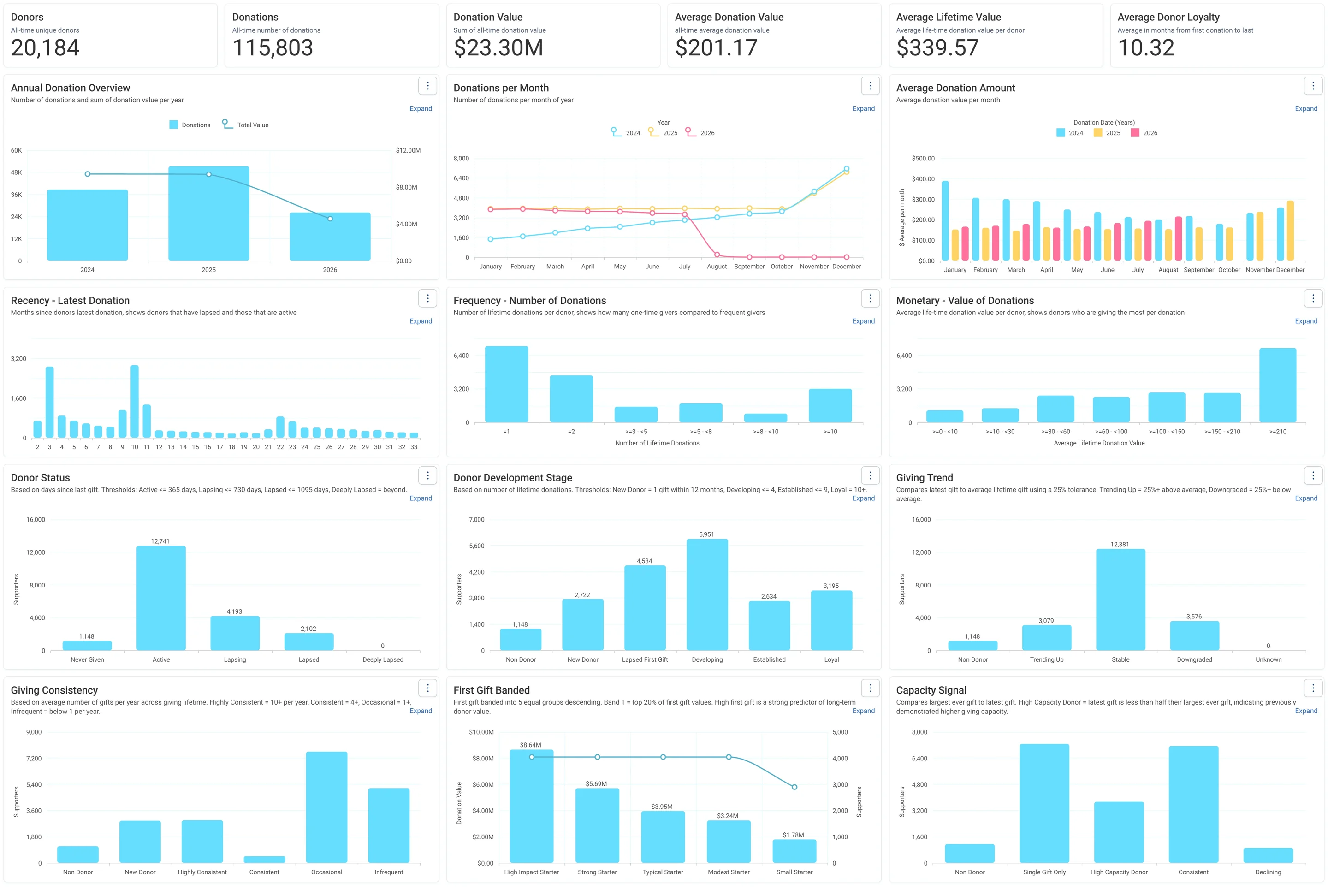
Jumping Off Metrics · Overview, in Apteco Orbit: The Overview tab, with lifetime giving cards above a grid of charts on when donors last gave, how often and how much, and their status.
Jumping Off Metrics · Overview The Overview tab, with lifetime giving cards above a grid of charts on when donors last gave, how often and how much, and their status. A fundraiser starts here to learn the donor base and choose who to contact.
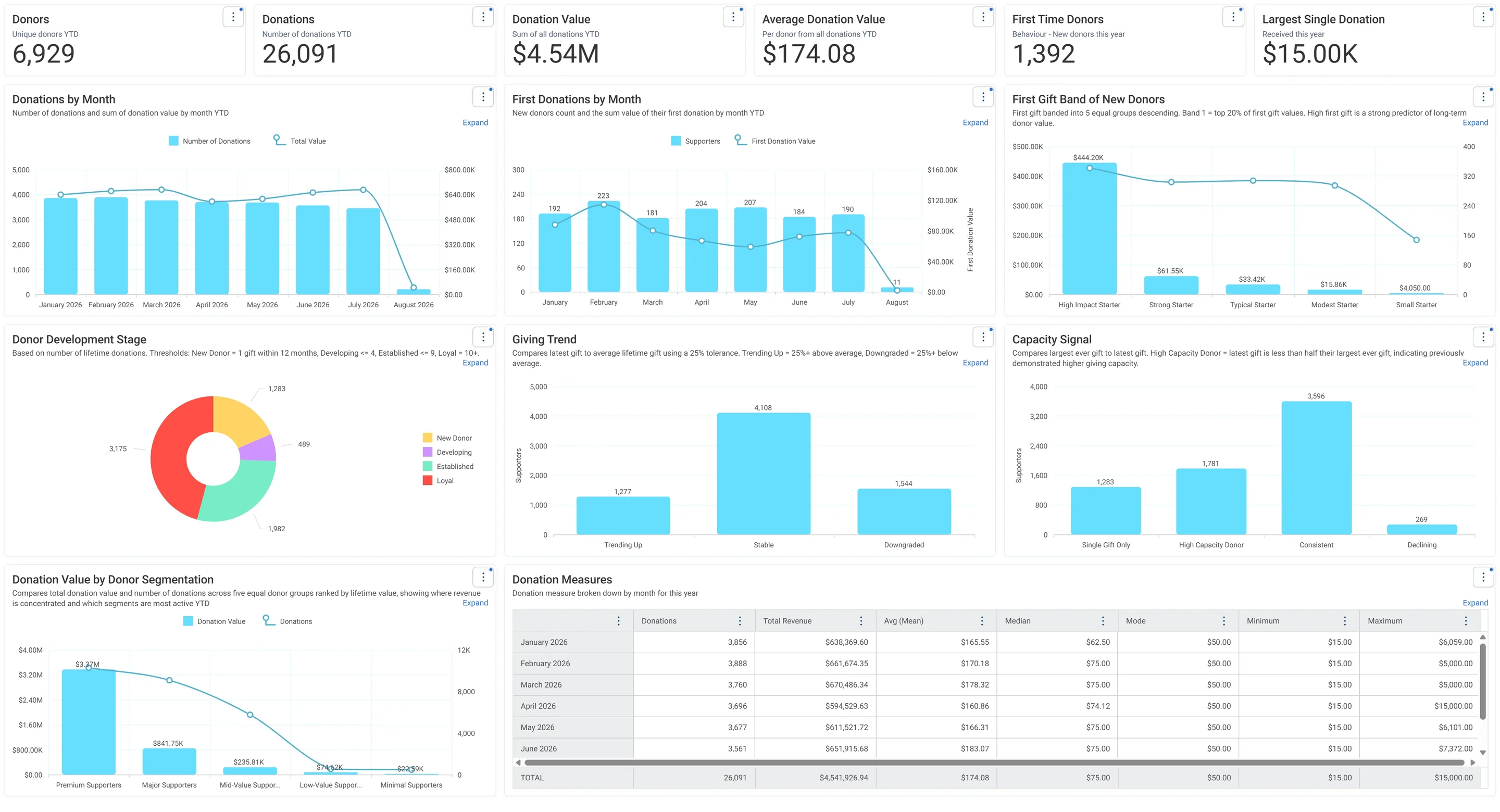
Jumping Off Metrics · Donations - This Year, in Apteco Orbit: The Donations - This Year tab, with cards for giving so far, charts of gifts and new donors by month, a Capacity Signal and a monthly table.
Jumping Off Metrics · Donations - This Year The Donations - This Year tab, with cards for giving so far, charts of gifts and new donors by month, a Capacity Signal and a monthly table. A fundraiser follows this year's giving month by month and welcomes new donors.
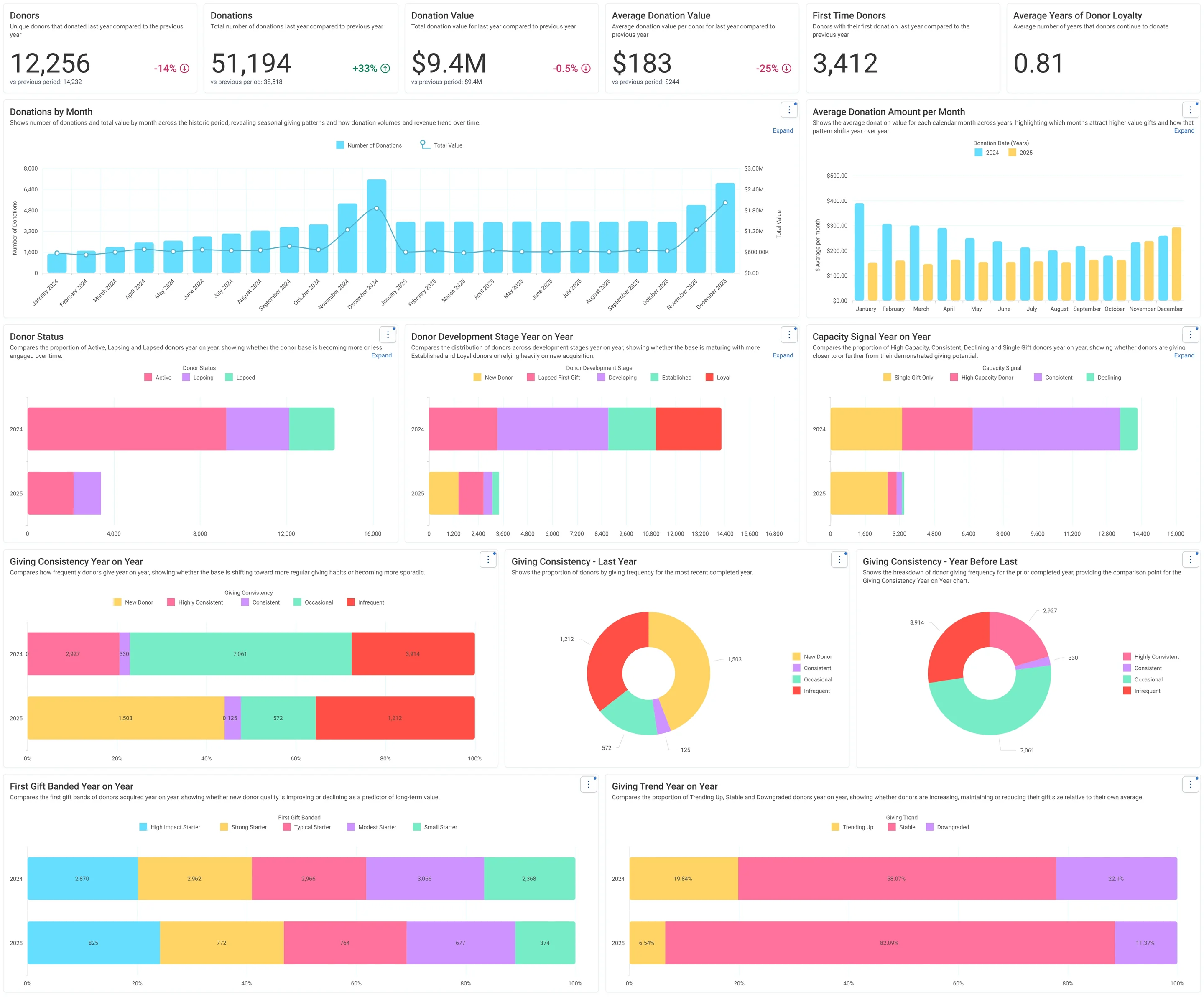
Jumping Off Metrics · Donations - Historic, in Apteco Orbit: The Donations - Historic tab, comparing last year with the year before through headline cards, monthly gift charts and paired bars for donor status, stages and giving habits.
Jumping Off Metrics · Donations - Historic The Donations - Historic tab, comparing last year with the year before through headline cards, monthly gift charts and paired bars for donor status, stages and giving habits. A board member sees how the donor base changed year on year.
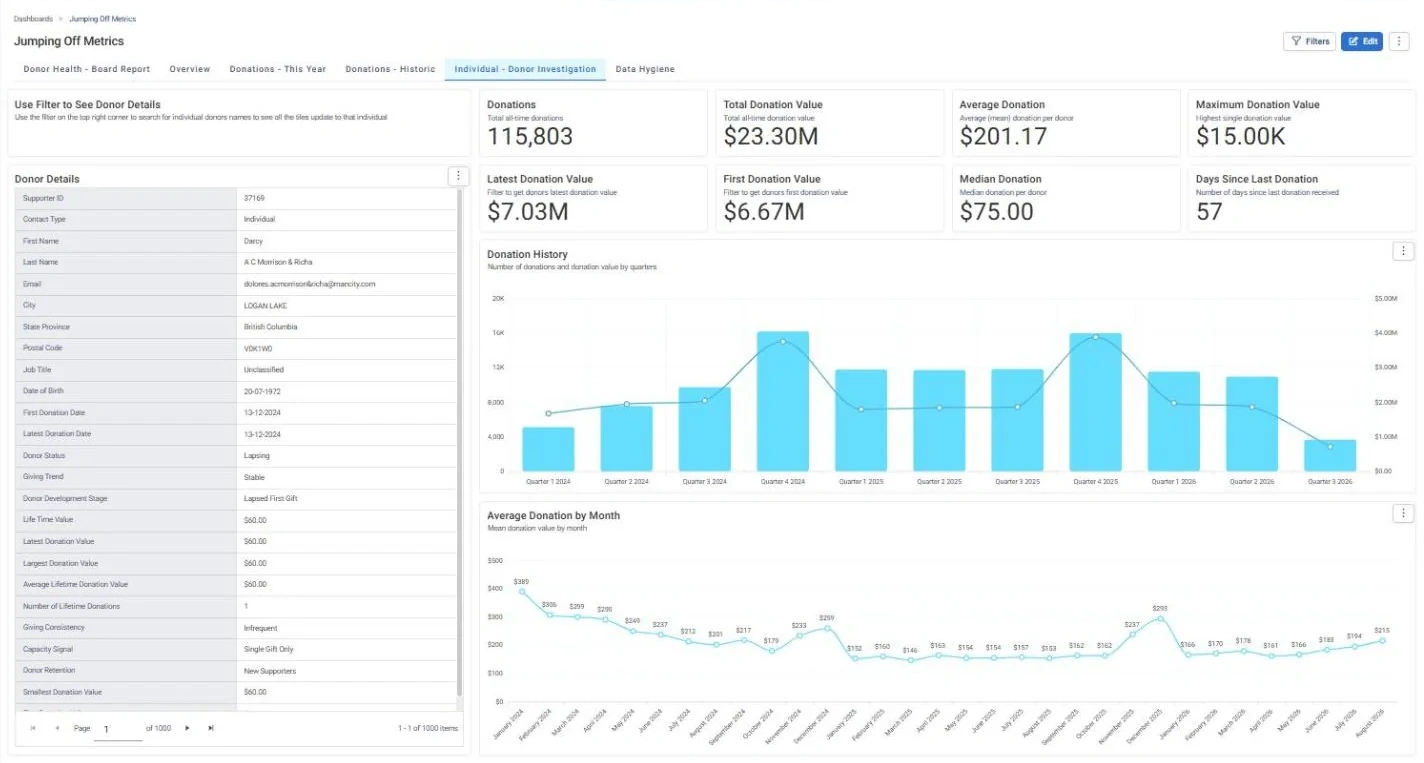
Jumping Off Metrics · Individual - Donor Investigation, in Apteco Orbit: The Individual - Donor Investigation tab, with a Donor Details card for one supporter beside totals for all giving, gifts by quarter and average gift by month.
Jumping Off Metrics · Individual - Donor Investigation The Individual - Donor Investigation tab, with a Donor Details card for one supporter beside totals for all giving, gifts by quarter and average gift by month. A fundraiser filters to one donor and reads their story before a call.

Sample charity: the people and numbers in these screens are made up, so the picture shows the tool, not a result.

What it answers

Jumping Off Metrics was built as a board report: retention, repeat giving, the second gift, lifetime value, and data hygiene. It is the dashboard a fundraising director opens before the quarterly meeting.

Jumping Off Metrics has six tabs.

5

tabs, each with its own cards and charts

29

insights Orbit works out for it

5

tables it reads: Addresses, Campaigns, Donations, Emails, Supporters

What it is built from

Every insight is worked out by Orbit for every supporter. Click one to read it in the Field Guide.

Insights

Fields from your data

Which CRMs can feed it

The Field Guide maps every insight to the fields each CRM keeps. This is how many of this dashboard's insights each one can build.

Filter the Field Guide by your CRM

Learn to use it

Each quarter, read the Board Report tab top to bottom and write one sentence per card. LYBNT is your lapse list: those people are an audience. Donor Retention (Overall) and Reactivated Donors come from Donor Movement, so read New and Re-engaged together, as in Part 2. Midway through a year, every "this year" rate covers part of a year: say so when you share it. Data Hygiene is for your data owner: every bar in Missing Fields is a field Connect could not fill, and a fix there improves every other dashboard.

Learn Mission: Jumping Off Metrics: the board report

Watch the lesson · about a minute

Questions people ask

What does the Jumping Off Metrics dashboard show?

Jumping Off Metrics was built as a board report: retention, repeat giving, the second gift, lifetime value, and data hygiene. It is the dashboard a fundraising director opens before the quarterly meeting.

Jumping Off Metrics has six tabs.

Which data does it need?

State Province, Postal Code, City, Email, Date of Birth, First Name, Supporter ID, Last Name, Campaign Type, Donation Source, Donation Amount, Donation Date, Donation Type, Contact Type, Job Title.

Which CRMs does it work with?

How many of its 29 insights each CRM's data can build, by the Field Guide's mapping: Raiser's Edge NXT: 29 of 29; Salesforce NPSP: 29 of 29; Salesforce Nonprofit Cloud: 29 of 29; DonorPerfect: 29 of 29; Bloomerang: 29 of 29; Little Green Light: 29 of 29; CiviCRM: 29 of 29; HubSpot: 29 of 29; Givebutter: 29 of 29.

How do I use it?

Each quarter, read the Board Report tab top to bottom and write one sentence per card. LYBNT is your lapse list: those people are an audience. Donor Retention (Overall) and Reactivated Donors come from Donor Movement, so read New and Re-engaged together, as in Part 2. Midway through a year, every "this year" rate covers part of a year: say so when you share it. Data Hygiene is for your data owner: every bar in Missing Fields is a field Connect could not fill, and a fix there improves every other dashboard.

How do I get the Jumping Off Metrics dashboard?

Send a request with the form on this page. An Apteco Architect gets in touch to set it up with you. To learn it first, open the course stop.

Request this dashboard

Tell us who you are and what you need. An Apteco Architect gets your request and gets in touch to set it up with you.

Clients, partners and Apteco offices are all welcome.

We use what you send only to reply to you. Privacy