
Apteco Mission Field Guide Schedule Time with an Apteco Architect Play with a Live System

Grant Tracking

Dashboard in Apteco Orbit · 5 insights

Which applications are out, what is likely to come in, and which funders stay with us? A grants pipeline the whole team can see, next to the donations it supports.
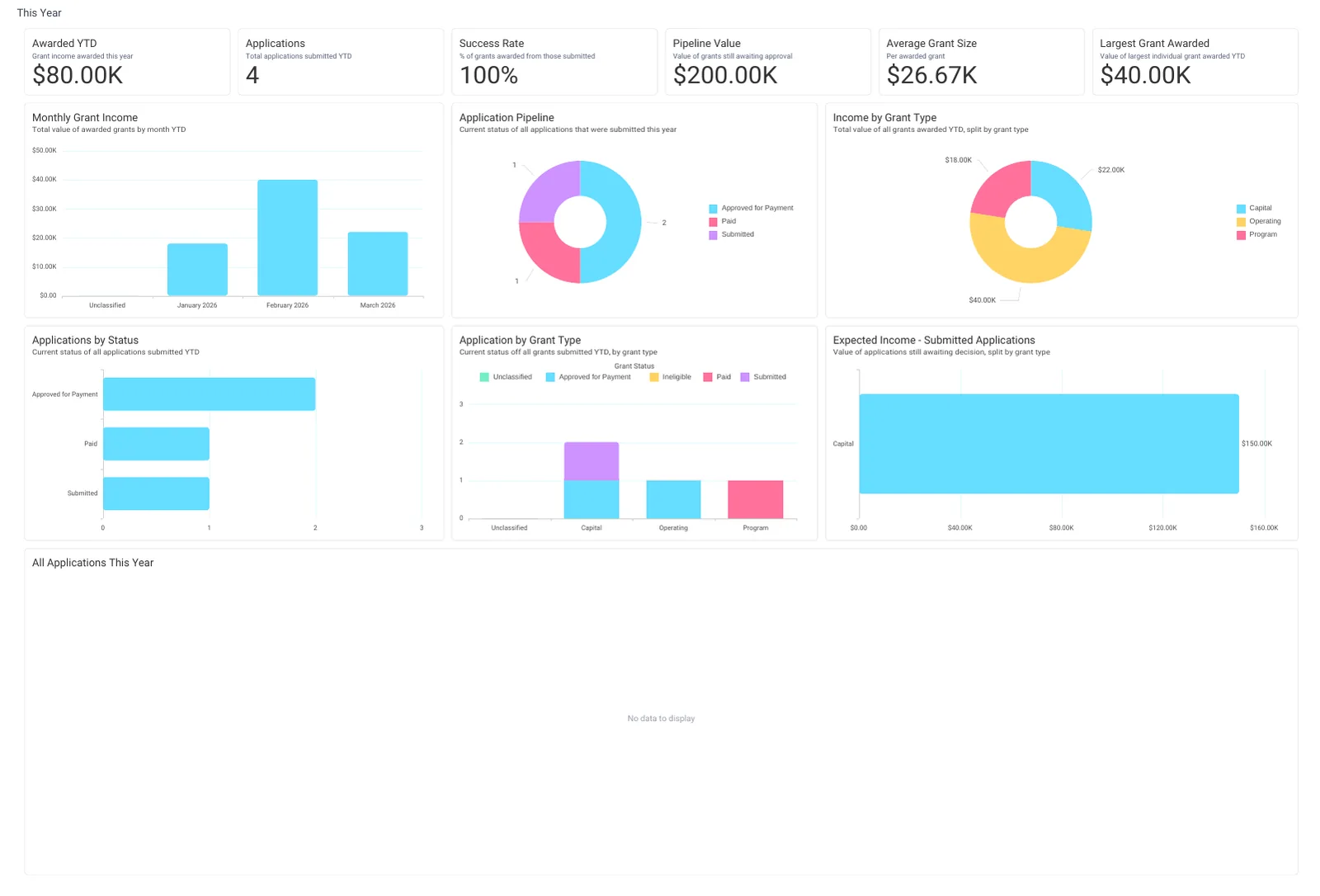
The This Year tab of Grant Tracking: Awarded YTD, Pipeline Value, Average Grant Size, the Application Pipeline, Expected Income from submitted applications, Monthly Grant Income and the applications table.
The This Year tab of Grant Tracking: Awarded YTD, Pipeline Value, Average Grant Size, the Application Pipeline, Expected Income from submitted applications, Monthly Grant Income and the applications table. Open full size
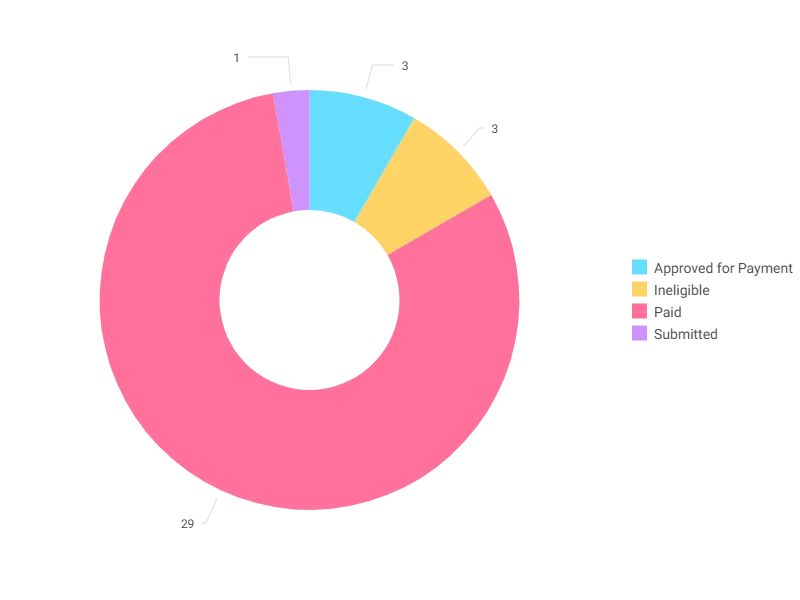
Grant Status Breakdown on the Grants tab: every grant by its current status. Filter to one funder to see their whole record.
Grant Status Breakdown on the Grants tab: every grant by its current status. Filter to one funder to see their whole record. Open full size

Sample charity: the people and numbers in these screens are made up, so the picture shows the tool, not a result.

What it answers

Grants often live in a spreadsheet owned by one person. When the grants table is in Mission, every application, decision and payment shows up beside the donations, on one dashboard.

Grant Tracking counts grants, not people.

5

insights Orbit works out for it

2

tables it reads: Grants, Supporters

1

pathway uses it

What it is built from

Every insight is worked out by Orbit for every supporter. Click one to read it in the Field Guide.

Insights

Fields from your data

Which CRMs can feed it

The Field Guide maps every insight to the fields each CRM keeps. This is how many of this dashboard's insights each one can build.

Filter the Field Guide by your CRM

Pathways that use it

Each pathway reads this dashboard's numbers, then acts on them.

Learn to use it

Monday: This Year, Application Pipeline and Reports Due. Quarterly: Historic, Funder Retention, to see which funders come back. Before a new application: Grants, Avg Days to Decision by Grant Type, so you plan the cash flow honestly.

Learn Mission: Grant Tracking

Watch the lesson · about a minute

Questions people ask

What does the Grant Tracking dashboard show?

Grants often live in a spreadsheet owned by one person. When the grants table is in Mission, every application, decision and payment shows up beside the donations, on one dashboard.

Grant Tracking counts grants, not people.

Which data does it need?

Amount Granted, Grant Amount Requested, Grant Amount Total, Grant Application Received Date, Grant Decision Date, Grant Due Date, Grant Money Transfer Date, Grant Report Received, Grant Status, Grant Type, Supporter Full Name, Grant Contact ID.

Which CRMs does it work with?

How many of its 5 insights each CRM's data can build, by the Field Guide's mapping: Raiser's Edge NXT: 5 of 5; Salesforce NPSP: 5 of 5; Salesforce Nonprofit Cloud: 0 of 5; DonorPerfect: 0 of 5; Bloomerang: 0 of 5; Little Green Light: 0 of 5; CiviCRM: 5 of 5; HubSpot: 0 of 5; Givebutter: 0 of 5.

How do I use it?

Monday: This Year, Application Pipeline and Reports Due. Quarterly: Historic, Funder Retention, to see which funders come back. Before a new application: Grants, Avg Days to Decision by Grant Type, so you plan the cash flow honestly.

How do I get the Grant Tracking dashboard?

Send a request with the form on this page. An Apteco Architect gets in touch to set it up with you. To learn it first, open the course stop.

Request this dashboard

Tell us who you are and what you need. An Apteco Architect gets your request and gets in touch to set it up with you.

Clients, partners and Apteco offices are all welcome.

We use what you send only to reply to you. Privacy