What share of last year's volunteers came back, and what share of this year's are new? Counts tell you how big the volunteer base is. Rates tell you whether it is growing or leaking.
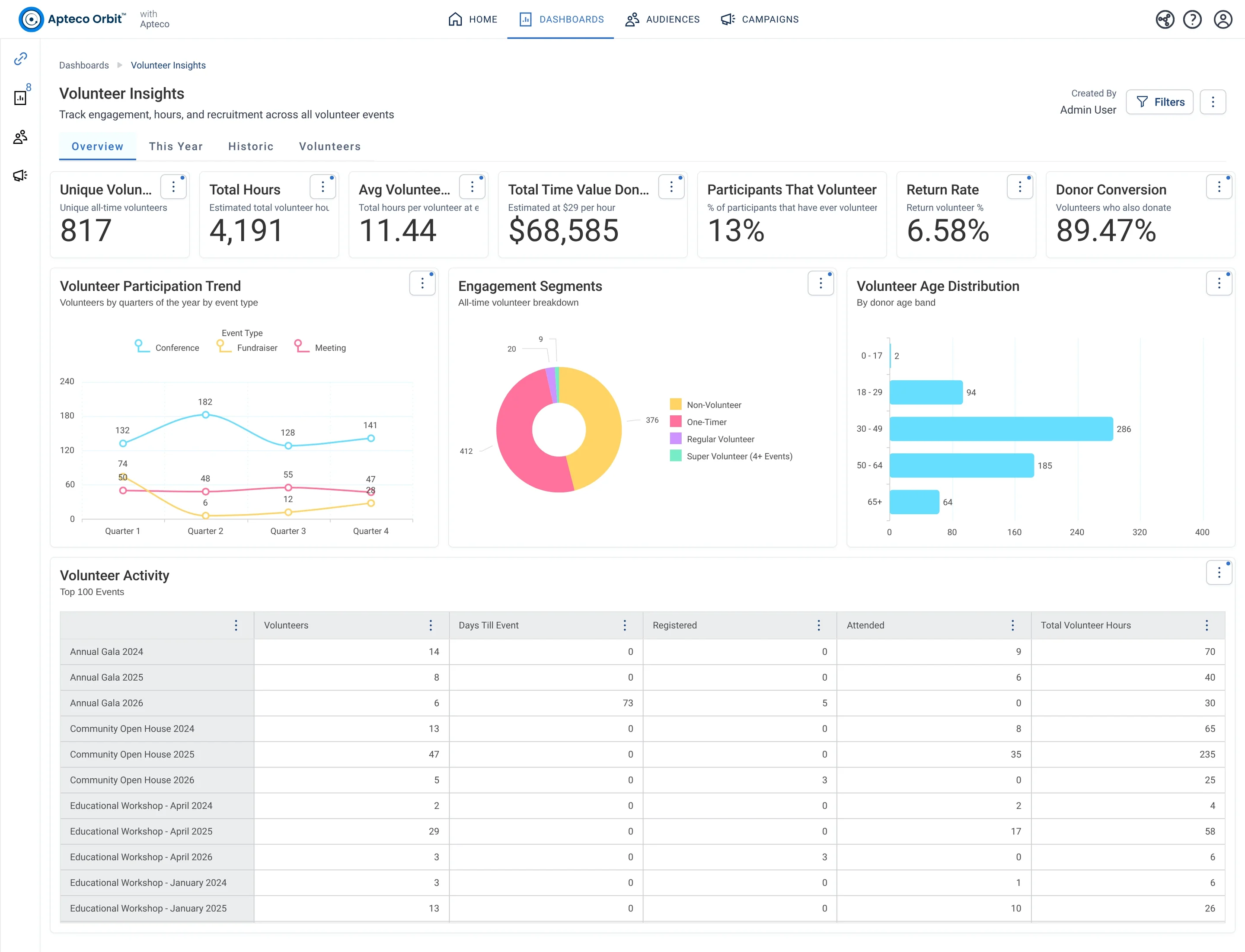
The Overview tab of Volunteer Insights (v2): Retention Rate and Recruitment Rate beside the counts, then Engagement Segments, the Volunteer and Donor Overlap, the age profile and activity over time. Open full size
Engagement Segments: Non-Volunteer, One-Timer, Regular Volunteer and Super Volunteer (4 or more events). Open full size
Sample charity: the people and numbers in these screens are made up, so the picture shows the tool, not a result.
What it answers
The second version of Volunteer Insights adds the rates a volunteer coordinator reports on: retention, recruitment, and how many stay for a second year. Both versions can live on one system.
Volunteer Insights (v2) keeps the four tabs and sharpens the cards.
Learn to use it
The two rates on Overview are the headline for a volunteer report: a low retention rate with a high recruitment rate means you are refilling a leaky bucket. The At-Risk / Lapsing card on Historic is a list of people to call before the next event. If a card reads oddly on a new system (a very low retention rate in the first year of data, for example), check how many years of volunteer history were loaded before you alarm anyone.
What does the Volunteer Insights (v2) dashboard show?
The second version of Volunteer Insights adds the rates a volunteer coordinator reports on: retention, recruitment, and how many stay for a second year. Both versions can live on one system.
Volunteer Insights (v2) keeps the four tabs and sharpens the cards.
How do I use it?
The two rates on Overview are the headline for a volunteer report: a low retention rate with a high recruitment rate means you are refilling a leaky bucket. The At-Risk / Lapsing card on Historic is a list of people to call before the next event. If a card reads oddly on a new system (a very low retention rate in the first year of data, for example), check how many years of volunteer history were loaded before you alarm anyone.
How do I get the Volunteer Insights (v2) dashboard?
Send a request with the form on this page. An Apteco Architect gets in touch to set it up with you. To learn it first, open the course stop.
Request this dashboard
Tell us who you are and what you need. An Apteco Architect gets your request and gets in touch to set it up with you.
Clients, partners and Apteco offices are all welcome.
We use what you send only to reply to you. Privacy