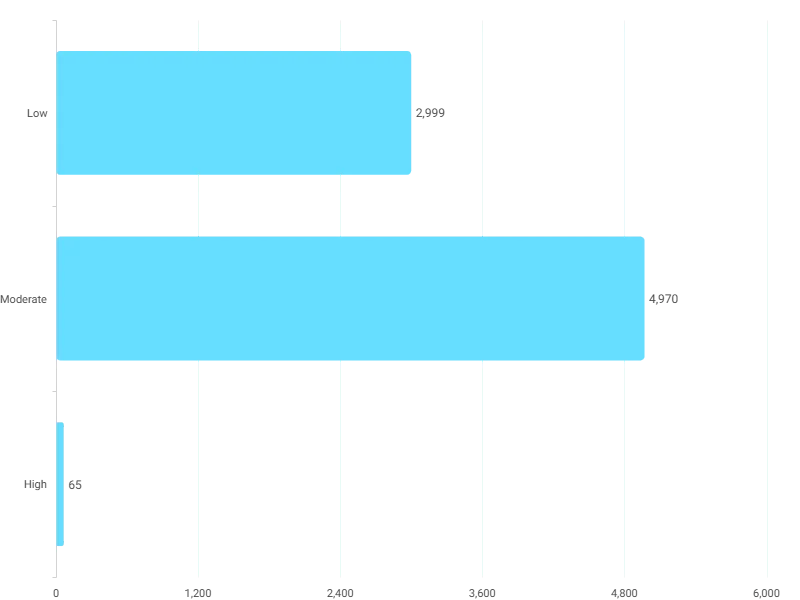
Action Score Distribution on the Action Clock tab: how many donors sit in each urgency band this week. Open full size
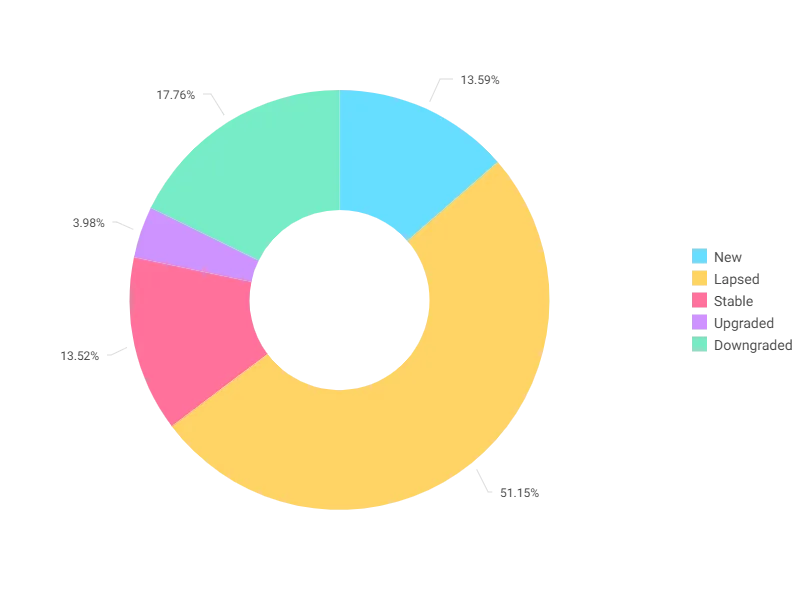
Donor Value Movement on the Waterfall tab: New, Lapsed, Stable, Upgraded and Downgraded, counted in donors. Open full size
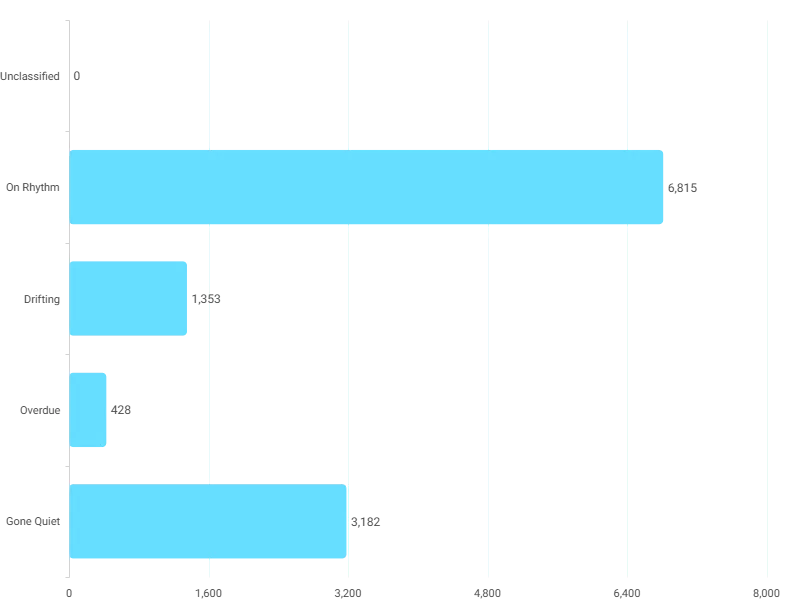
Rhythm Band Distribution on the Rhythm Reader tab: Drifting, Overdue and Gone Quiet, each against the person's own giving gap. Open full size
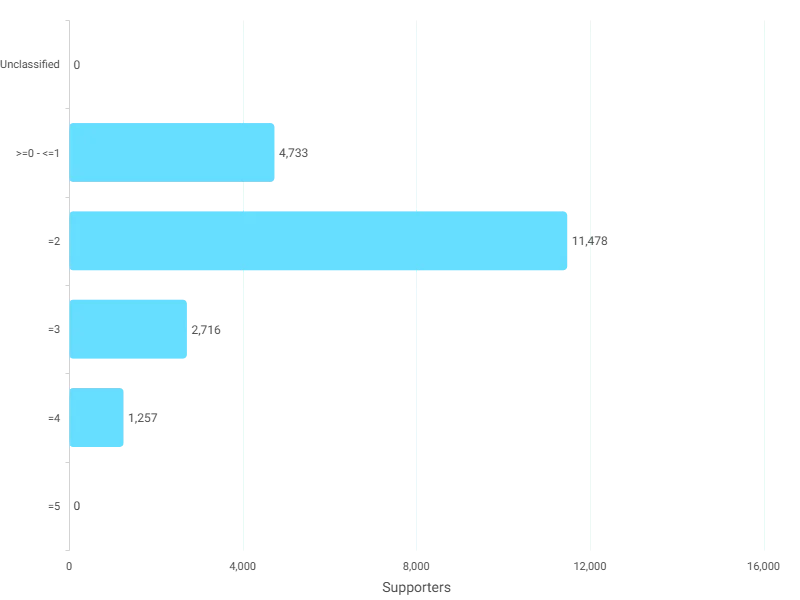
Sleeping Giant Score, 0 to 5. Everyone at 3 or more is a Sleeping Giant; 2 is the watch tier. Open full size
Sample charity: the people and numbers in these screens are made up, so the picture shows the tool, not a result.
What it answers
Most of the Field Guide's insights live on one dashboard. Instant Insights has twelve tabs, and each one is a question with a list of people under it. This stop covers the first six.
Instant Insights turns the Analyze part of this course into tabs you can act on. Each tab opens with a short text tile saying what it is for.
68
insights Orbit works out for it
2
tables it reads: Donations, Supporters
What it is built from
Every insight is worked out by Orbit for every supporter. Click one to read it in the Field Guide.
Insights
Days Between DonationsFor each donation, calculates how many days passed since the supporter's previous donation. Feeds into the Donor Median Interval Days calculation.
Donor Median Interval DaysFinds the median number of days between consecutive donations for each supporter. If a supporter gives every 30, 45, and 35 days apart, the median interval is 35 days. Understand each donor's personal giving rhythm. A donor with a 90-day median gives roughly quarterly. Use to time asks to land when the donor naturally gives.
Days Since Last DonationCounts the number of days between Latest Donation Date and today. The core recency metric. Use to trigger automated re-engagement sequences at 365, 545, and 730 days, or to prioritize phone outreach to recent lapsers.
Latest Donation DateTakes the most recent all donation dates across all of the supporter's donations. Quickly see who has given recently and who has gone quiet. Separate active donors from lapsed donors in any campaign list.
Donor Unique IdConverts the Supporter ID into a format Orbit can display in tables. Lets the supporter ID appear in tables in Orbit.
Rhythm Drift ScoreCompares how many days it has been since the last gift to how often the supporter normally gives. A score of 1.0 means right on schedule. Above 1.0 means overdue. Below 1.0 means they gave early. Identify donors who are overdue relative to their own pattern. A score above 1.5 means they're late. Prioritize outreach to drifting donors before they fully lapse.
Rhythm BandGroups supporters by how their giving timing compares to their personal rhythm: on time, starting to drift, or significantly overdue. Separate on-rhythm donors from those who are drifting or overdue in any module.
Donation MonthExtracts the month number (1-12) from the date. Feeds into the Peak Giving Month calculation.
Peak Giving MonthFinds the most common value for all do4TKJM9 across all of the supporter's donations. Time your asks to land in each donor's peak month. An appeal sent in someone's peak month converts at higher rates than one sent off-season.
Off Peak Donation FlagChecks whether this particular donation was made outside the supporter's usual peak giving month. Feeds into the Off Peak Giving Flag.
Off Peak Giving FlagFinds the largest all do4TKKIF across all of the supporter's donations. Identify donors who give outside their peak month. These supporters respond to asks year-round, making them good candidates for additional mid-year appeals.
Floor ScoreChecks whether the donor's smallest gift is within 20% of their largest gift. If yes, they give at a stable level. If not, there is a significant gap between their lowest and highest gifts. Find donors who give at a consistent level regardless of ask amount. These supporters have a stable giving floor and are reliable revenue you can forecast.
Donation YearExtracts the year from the date. Feeds into the Number of Giving Years calculation.
Number Of Giving YearsCounts the number of distinct values for all do4TKN4C across all of the supporter's donations. Count of distinct calendar years with at least one donation. Use to identify long-tenure supporters for legacy giving conversations and milestone recognition.
Tenure ScoreChecks whether the donor has given in 3 or more different calendar years. Identify long-tenure supporters (3+ giving years). These donors have demonstrated sustained commitment and are strong candidates for legacy giving conversations.
Momentum ScoreChecks whether the donor's most recent gift is at least 25% higher than their lifetime average. Spot donors whose giving is accelerating. A latest gift 25%+ above their average signals growing commitment and readiness for an upgrade conversation.
Strong Entry ScoreChecks whether the donor's very first gift was at or above their own lifetime average. Identify donors who entered at or above their own average. Strong entry predicts higher retention and lifetime value.
Sleeping Giant ScoreAdds together five yes-or-no checks: long tenure (3+ giving years), momentum (latest gift 25%+ above average), strong entry (first gift at or above average), off-peak giving (donated outside their peak month), and floor stability (smallest gift within 20% of largest). Each yes adds 1 point. Maximum score is 5. Your upgrade prospect list. Donors scoring 3+ out of 5 have multiple signals of untapped capacity. Build a personal outreach plan for your Sleeping Giants.
Sleeping Giant FlagLabels supporters as Low, Medium, High, or Very High potential Sleeping Giants based on their score. Pull a list of High or Very High potential Sleeping Giants for your major gift officer or stewardship team.
Predicted Days To LapseTakes each supporter's personal giving rhythm, sets a boundary at 2.5 times that rhythm, and counts how many days are left before they cross it. Positive means they still have time. Negative means they have already crossed it. See exactly how many days each donor has before they cross their personal lapse point. Prioritize outreach to donors with the fewest days remaining.
Cliff Edge BandPlaces each donor into an urgency group based on how many days they have left before lapsing. Separate donors by lapse urgency. Critical donors need immediate personal contact. Urgent donors need a priority email sequence.
Capacity Suppression RatioCompares the supporter's most recent gift to the largest gift they have ever made. A result of 1.0 means they are giving at their peak. A result of 0.3 means their latest gift was only 30% of what they have shown they can give. Find donors giving well below their demonstrated peak. If the number is 0.3, they are giving only 30% of what they have given before. Build an upgrade ask around the gap.
Revenue Gap Per DonorSubtracts the supporter's most recent gift from their largest ever gift. The result is the dollar amount they could be recovered to if they returned to their peak giving level. Quantify the dollar value you could recover if each donor returned to their peak. Sum this across your file to show leadership the total recoverable revenue.
Upgrade Window BandGroups supporters by how much room there is between what they gave most recently and the most they have ever given. Identify your highest-priority upgrade targets: supporters with the biggest gap between what they gave last and what they have given before.
Second Donation DateLines up the supporter's gifts from the earliest and takes the date of the second one. Track the critical second gift. The gap between first and second donation is the strongest predictor of long-term retention.
Days To Second DonationMeasures the time gap between two dates (First Donation Date, Second Donation Date). Measure conversion speed. Donors who give a second time within 90 days retain at dramatically higher rates. Use to evaluate welcome series effectiveness.
Second Donation Within 90 DaysChecks whether the supporter made a second donation within 90 days of their first. Spot donors who converted quickly after their first gift. These supporters have high retention potential and deserve immediate stewardship investment.
First Donation MonthExtracts the month number (1-12) from the date. See which month of year each donor first gave. Useful for understanding seasonal acquisition patterns.
First Donation Month BandGroups supporters by the month of the year they first gave. See which months of the year bring in the most new donors. Use for planning acquisition campaigns.
Peak Giving QuarterGroups supporters by the quarter of the year when they tend to give the most. Plan your campaign calendar around when your donors actually give. Align major appeals with peak quarters.
Current Month Of Year FlagChecks whether this donation was made in the same month of the year as the current month. Feeds into the Cold Month Flag.
Cold Month FlagLooks at each supporter's entire giving history and checks whether they have ever given in the current calendar month. Flags them if they never have. Updates automatically each month. Avoid wasting outreach on months when a donor has never given. Use to suppress contacts during cold months and concentrate effort during warm ones.
Contact Window Status ScoreChecks how close the current month is to the donor's peak giving month and scores it 1 to 4. 1 = right in their peak month. 4 = furthest from it. Feeds into the Contact Window Status label.
Peak Giving Month BandGroups supporters by the single month when they historically give the most. Plan your campaign calendar around each donor's peak giving month.
Months Since AcquisitionCalculates the number of months between First Donation Date and today. Track donor tenure in months. Useful for building time-based retention curves and identifying critical churn windows.
Is Within 3 Months Of AcquisitionChecks whether this donation was made within 3 months of the supporter's very first gift. Feeds into the Donation Value First 3 Months calculation.
Is Within 12 Months Of AcquisitionChecks whether this donation was made within 12 months of the supporter's very first gift. Feeds into the Donation Value First 12 Months calculation.
Donation Value First 3 MonthsAdds up the supporter's gifts made within 3 months of their first gift. Evaluate early giving intensity. High first-3-month value predicts long-term major gift potential.
Donation Value First 12 MonthsAdds up the supporter's gifts made within 12 months of their first gift. First-year giving total per donor. Compare groups of donors by start year to see which channels produce the highest early-value supporters.
Predicted Next Donation DateAdds the supporter's personal median interval to the date of their last donation. The result is the date they are next expected to give based on their own rhythm. Know when each donor is next expected to give. Time your outreach to arrive just before their predicted date for maximum relevance.
Missed Expected Donation FlagChecks whether today is past the donor's predicted next donation date. Pull a list of donors who should have given by now but haven't. These are your most time-sensitive outreach targets.
Next Donation In 90 DaysChecks whether the donor's predicted next donation date falls within the next 90 days. Build a 90-day outlook of expected donations. Use to forecast near-term revenue and plan outreach.
Interval Standard DeviationMeasures how much the gaps between this donor's consecutive gifts vary from one to the next. Feeds into the Giving Regularity classification.
Interval CvMeasures how regular this donor's giving timing is as a single number. Lower means more predictable. Feeds into the Giving Regularity classification.
Giving RegularityPlaces each supporter into a regularity tier: Highly Consistent, Consistent, Occasional, or Erratic, based on how predictable their giving timing is. Identify your most predictable givers. Highly Consistent donors are your most forecastable revenue source and strongest monthly giving conversion candidates.
Weighted Forecast ContributionEstimates the supporter's next gift amount by weighting their average gift based on how regular their giving pattern is. Highly consistent supporters are weighted at 100% of their average, consistent at 80%, occasional at 50%. Estimate next-gift revenue weighted by reliability. Sum across your active donor file for a confidence-adjusted revenue forecast.
Donation Amount Standard DeviationMeasures how much this donor's gift amounts vary from one gift to the next. Feeds into the Donation Amount Consistency Score.
Donation Amount Consistency ScoreMeasures how consistently this donor gives the same amount, as a single number. Lower means more consistent. Feeds into the Metronome Score.
Is Within Expected IntervalChecks whether this donation arrived within the donor's expected giving rhythm. Feeds into the Consecutive Giving Streak calculation.
Consecutive Giving StreakCounts how many gifts in a row this donor has made within their expected rhythm. See how many donations in a row a donor has made within their expected rhythm. Longer streaks indicate deeply embedded giving habits.
Metronome ScoreAdds up four yes/no checks: Does the supporter give roughly monthly (interval 45 days or less)? Do they give roughly the same amount each time (consistency score 0.3 or below)? Have they given 3 or more times within their expected rhythm? Have they given across 2 or more years? Each yes adds 1 point, maximum 4. Your monthly giving conversion list. Donors scoring 3-4 already behave like monthly givers with their cash gifts. Ask them to formalize what they're already doing.
Metronome BandGroups supporters by how close their giving behaviour is to a monthly pattern: Priority, Strong, Moderate, or Low readiness for a monthly giving ask. Identify which donors are most ready for a monthly giving ask. Priority donors should be first on your sustainer conversion list.
Donation Value This YearAdds up all donations this supporter has made so far this year. Live year-to-date revenue per donor. Use to build current-year value tiers and track progress against annual fundraising targets.
This Year Value BandGroups supporters into five value tiers for the current year. Use in any module to split donors into five current-year value groups. Updates automatically from your data.
Last Year Value BandGroups supporters into five value tiers based on last year's giving. Use in any module to compare with This Year Value Band and see who has moved up, down, or stayed the same.
Donor Value Movement ScoreCompares which value group the supporter was in last year to which group they are in this year. Feeds into the Donor Value Movement label.
Donor Value MovementTakes the year-over-year score and turns it into a label: New, Lapsed, Stable, Upgraded, or Downgraded. See which donors upgraded, downgraded, lapsed, or stayed stable between last year and this year. Build targeted outreach for each group.
Donation Value Same Period Last YearAdds up all donations this supporter had made through the same date last year. The fairest year-over-year comparison. Use in any module to show "same period" revenue tracking without seasonal distortion.
Donor Median Interval BandGroups supporters by their typical giving cadence: monthly, quarterly, twice a year, or annual. Group donors by giving cadence: monthly, quarterly, twice a year, or annual.
Second Donation Speed BandGroups supporters by how quickly they gave a second time after their first gift. Group donors by how quickly they gave a second time. Fast converters retain better.
Action Clock ScoreChecks nine different signals and adds up weighted points for each one that is active. Cliff Edge Critical = 21 points, new donor in first 90 days = 19 points, Cliff Edge Urgent = 12 points, and so on down to Sleeping Giant = 6 points. Points stack, so more signals = higher score. Your daily priority queue. Sort donors by Action Clock Score to see who needs attention right now. The highest scores have the most urgent and overlapping signals.
Primary Action Flag ScoreChecks the same nine signals as the Action Clock Score, but instead of adding them up, picks the single most important one. Feeds into the Primary Action Flag.
Primary Action FlagLooks at all active signals for each supporter, picks the single most important one, and recommends a next step: phone call, thank-you, upgrade appeal, monthly giving ask, or re-engagement outreach. Tells your team exactly what to do for each donor this week. Phone call, thank-you, upgrade appeal, monthly giving ask, or re-engagement outreach. Pull this list every Monday.
Action Clock Score BandGroups supporters into urgency levels: Critical, High, Moderate, or Low, based on how many signals are active at once. Group donors into urgency levels: Critical, High, Moderate, Low. Allocate your team's time across the levels.
Donor MovementCompares each supporter's number of gifts last year with the year before. New and Re-engaged both gave last year after a year with no gifts; the split between them uses today's date (see What it tells you). Build a donor movement waterfall for your board: how many supporters are new, re-engaged, increased, unchanged, decreased, or lost. Read New and Re-engaged together: between them they hold everyone who gave last year after a year off, including last year's first-time donors.
Donations Year Before LastCounts donations made two years ago. The comparison baseline for Donor Movement. Pair with Donations Last Year to build year-over-year donor movement waterfall charts.
Donations Last YearCounts donations made during the previous calendar year. Year-over-year comparison building block. Use with Donations Year Before Last to calculate retention rates and movement analysis.
First Donation DateLooks up the date of the supporter's very first donation. Compare retention rates between donors who started giving in different years. See which campaigns brought in the most loyal supporters over time.
Fields from your data
Supporter IDSupporters
Donation AmountDonations
Donation DateDonations
Which CRMs can feed it
The Field Guide maps every insight to the fields each CRM keeps. This is how many of this dashboard's insights each one can build.
Pick one tab a week. Read the three cards, look at the chart, then open the list under it and turn it into an audience (the Audiences part). Action Clock is for this week. The next stop covers the other six tabs.
Most of the Field Guide's insights live on one dashboard. Instant Insights has twelve tabs, and each one is a question with a list of people under it. This stop covers the first six.
Instant Insights turns the Analyze part of this course into tabs you can act on. Each tab opens with a short text tile saying what it is for.
Which data does it need?
Supporter ID, Donation Amount, Donation Date.
Which CRMs does it work with?
How many of its 68 insights each CRM's data can build, by the Field Guide's mapping: Raiser's Edge NXT: 68 of 68; Salesforce NPSP: 68 of 68; Salesforce Nonprofit Cloud: 68 of 68; DonorPerfect: 68 of 68; Bloomerang: 68 of 68; Little Green Light: 68 of 68; CiviCRM: 68 of 68; HubSpot: 68 of 68; Givebutter: 68 of 68.
How do I use it?
Pick one tab a week. Read the three cards, look at the chart, then open the list under it and turn it into an audience (the Audiences part). Action Clock is for this week. The next stop covers the other six tabs.
How do I get the Instant Insights dashboard?
Send a request with the form on this page. An Apteco Architect gets in touch to set it up with you. To learn it first, open the course stop.
Request this dashboard
Tell us who you are and what you need. An Apteco Architect gets your request and gets in touch to set it up with you.
Clients, partners and Apteco offices are all welcome.
We use what you send only to reply to you. Privacy