Apteco Learn Mission Schedule Time with an Apteco Architect Play with a Live System

Instant Insights, part 1: six ready answers

Stop 23 of 58 · about 7 minutes

Who needs you this week, who is drifting, and who could give more? Most of the Field Guide's insights live on one dashboard. Instant Insights has twelve tabs, and each one is a question with a list of people under it. This stop covers the first six.

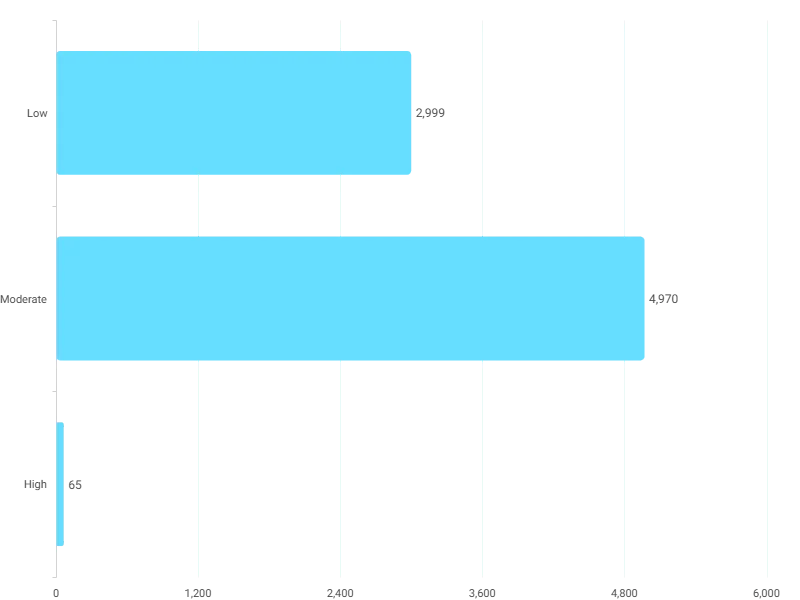
Action Score Distribution on the Action Clock tab: how many donors sit in each urgency band this week.
Action Score Distribution on the Action Clock tab: how many donors sit in each urgency band this week. Open full size

Sample charity: the people and numbers in these screens are made up, so the picture shows the tool, not a result.

The lesson

Instant Insights turns the Analyze part of this course into tabs you can act on. Each tab opens with a short text tile saying what it is for.

  • Overview: Critical This Week, Total Revenue At Stake, Donors Requiring Action This Week (Action Clock Score of 40 or more), by lifetime value band, with the priority contact list.
  • Action Clock: who to contact this week given everything known about them: This Week's Action Mix (what kind of contact), Revenue at Stake by Action Type, Action Score Distribution and the contact list.
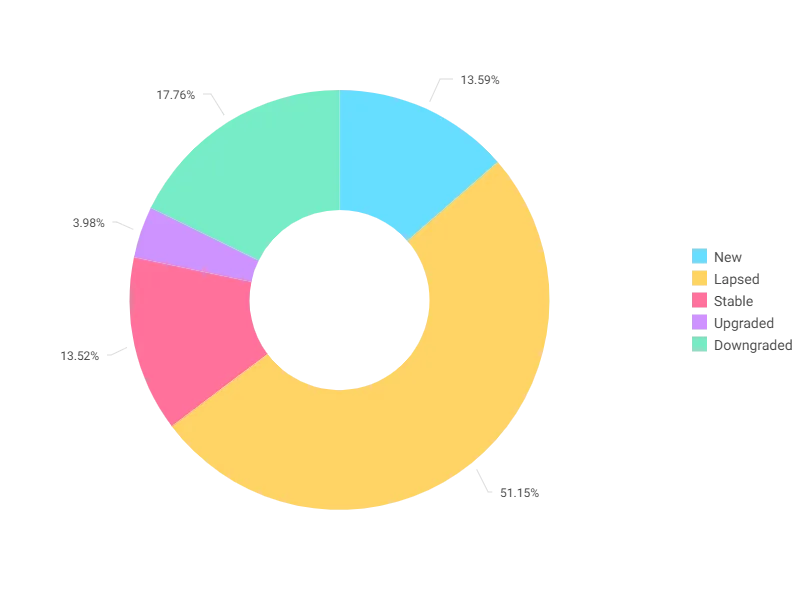
  • Waterfall: year-on-year movement between value bands: Upgraded, Downgraded, Lapsed and New donors, Revenue Impact By Value Movement against the full prior year and against the same period last year, Revenue Concentration By Value Band and the Major Tier share.
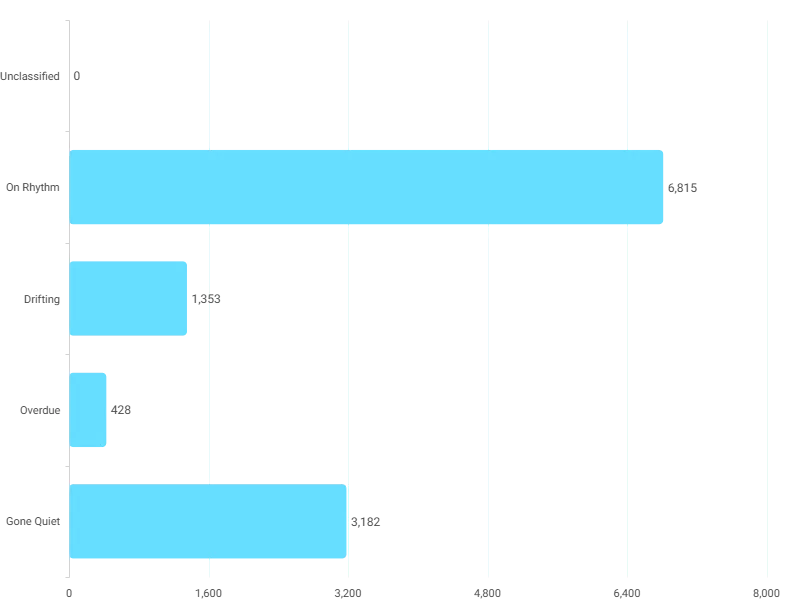
  • Rhythm Reader: each donor against their own giving gap: Drifting (1 to 1.5 times the usual gap), Overdue (1.5 to 2 times), Gone Quiet (over 2 times), with the action grid.
  • First 90: new supporters inside 90 days of their first gift, the historic 90-day conversion rate, which first-gift groups lead to monthly and long-term giving, and timing against the giving season.
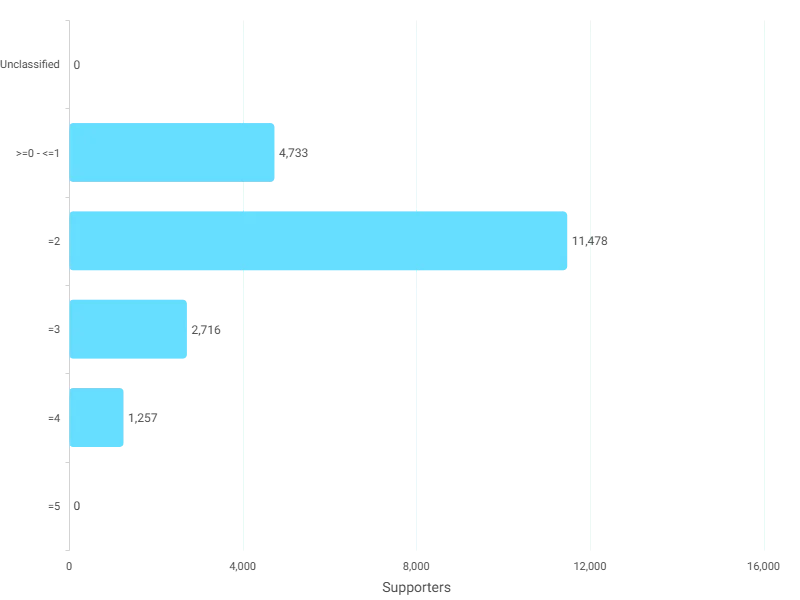
  • Sleeping Giant: donors scoring 3 of 5 signals or more, the segment's combined lifetime value, and the watch tier at score 2.

How to use it. Pick one tab a week. Read the three cards, look at the chart, then open the list under it and turn it into an audience (the Audiences part). Action Clock is for this week. The next stop covers the other six tabs.

Watch this stop · about a minute

More of it in Orbit

Donor Value Movement on the Waterfall tab: New, Lapsed, Stable, Upgraded and Downgraded, counted in donors.
Donor Value Movement on the Waterfall tab: New, Lapsed, Stable, Upgraded and Downgraded, counted in donors. Open full size
Rhythm Band Distribution on the Rhythm Reader tab: Drifting, Overdue and Gone Quiet, each against the person's own giving gap.
Rhythm Band Distribution on the Rhythm Reader tab: Drifting, Overdue and Gone Quiet, each against the person's own giving gap. Open full size
Sleeping Giant Score, 0 to 5. Everyone at 3 or more is a Sleeping Giant; 2 is the watch tier.
Sleeping Giant Score, 0 to 5. Everyone at 3 or more is a Sleeping Giant; 2 is the watch tier. Open full size

Your turn, in Orbit

  1. Open Instant Insights. Read the Overview cards.
  2. Open Action Clock. Read This Week's Action Mix.
  3. Open Rhythm Reader. Find the Drifting, Overdue and Gone Quiet groups.

Quick check

A donor usually gives every 6 months. It has been 11 months. Which Rhythm Reader band?
  • Drifting
  • Overdue
  • Gone Quiet

Answer: Overdue

Need a hint?

11 months is a little under twice a 6-month gap: between 1.5 and 2 times.

Why it matters

Six questions you used to answer by instinct, each with a list of names under it.

Read on

Read more in the Apteco Help Hub

Learn Mission is a free course. You read a little, do it yourself, then answer one quick check. Orin, the assistant in Orbit, walks with you. Your progress stays in your browser.

Do this stop yourself

It is stop 23 of 58. Open it in the course, or start from the beginning.

Open this stop in the course