Apteco Learn Mission Schedule Time with an Apteco Architect Play with a Live System

Volunteer Insights

Stop 28 of 58 · about 7 minutes

How many volunteers do we have, how many come back, and how many also give? Volunteer records often live in a separate app. In Mission they are a table beside donations and events, so a volunteer who gives shows up as both, and a volunteer who stops shows up as lapsed.

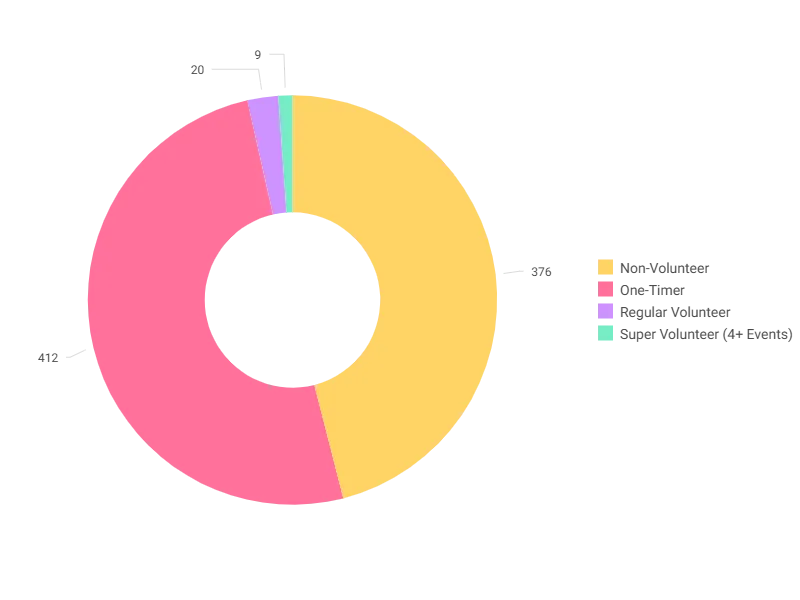
Engagement Segments on the Overview tab of Volunteer Insights: the all-time breakdown of volunteers by how often they take part.
Engagement Segments on the Overview tab of Volunteer Insights: the all-time breakdown of volunteers by how often they take part. Open full size

Sample charity: the people and numbers in these screens are made up, so the picture shows the tool, not a result.

The lesson

Volunteer Insights counts volunteers and their hours. A volunteer is a person with a timesheet, counted once however many shifts they work, and hours are the hours on their timesheets. Four tabs:

  • Overview: Unique Volunteers, Total Hours, Avg Volunteer Hours, Return Rate, Donor Conversion (the share of volunteers who become donors), Participants That Volunteer and Total Time Value Donated. Charts: the Volunteer Participation Trend by quarter and event type, Volunteer Age Distribution, Engagement Segments, and a Volunteer Activity table for the top 100 events.
  • This Year: active volunteers, hours and average hours this year, Retention Rate (last year's volunteers who came back this year), Recruitment Rate (this year's volunteers who are new), Volunteers Registered by Event, Volunteers to Attendees on upcoming events, Avg Days Registered before an event, Volunteer Hours by Event.
  • Historic: the same without this year: unique volunteers and hours from before this year, a Retention Rate (of the year before last's volunteers, the share who came back last year), the trend by quarter, Top Volunteer Events - Historic, Hours by Event Type, Volunteer Hours Last Year.
  • Volunteers: the people: One-Timers, Regular Volunteers, Super Volunteers, Lapsed Volunteer (last timesheet more than a year ago), Longest Serving Volunteer, Never Volunteered, Average Hours Per Volunteer over time, Age Band Distribution, Recruitment by first year, Top Volunteers by Hours, and the Volunteer vs Donor Overlap.

How to use it. Overview for the annual report (hours and time value). This Year, Volunteers to Attendees, when staffing an event. Volunteers, the overlap chart, every quarter: volunteers who have never given are the Field Guide's Volunteers Who Have Never Given audience, and the stop you did in Part 4 shows how to build it.

Watch this stop · about a minute

More of it in Orbit

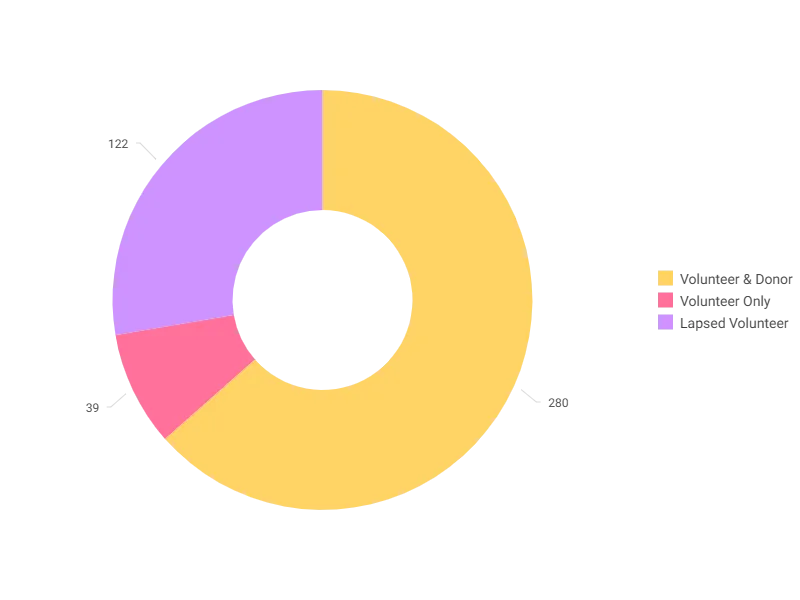
Volunteer vs Donor Overlap on the Volunteers tab: volunteers who give, volunteers who don't, and donors who have never volunteered.
Volunteer vs Donor Overlap on the Volunteers tab: volunteers who give, volunteers who don't, and donors who have never volunteered. Open full size

Your turn, in Orbit

  1. Open Volunteer Insights, Overview. Read Donor Conversion and Total Time Value Donated.
  2. Open Volunteers. Read One-Timers, Regular Volunteers and Super Volunteers. Which group is biggest?
  3. Find Volunteer vs Donor Overlap and read the three parts.
  4. Open This Year. In Volunteers to Attendees, is any upcoming event short of volunteers?

Quick check

A volunteer's last timesheet was 14 months ago. On this dashboard they count as...
  • A One-Timer
  • A Lapsed Volunteer
  • A Super Volunteer

Answer: A Lapsed Volunteer

Need a hint?

Lapsed is defined on the Volunteers tab: a last timesheet more than a year ago.

Why it matters

Volunteers give hours before they give money. This is where you see both on the same person.

Read on

Pathways on this stop

Read more in the Apteco Help Hub

Learn Mission is a free course. You read a little, do it yourself, then answer one quick check. Orin, the assistant in Orbit, walks with you. Your progress stays in your browser.

Do this stop yourself

It is stop 28 of 58. Open it in the course, or start from the beginning.

Open this stop in the course