Apteco Learn Mission Schedule Time with an Apteco Architect Play with a Live System

Event Insights

Stop 27 of 58 · about 7 minutes

Who comes to our events, do they come back, and do they ever give? Event lists live in the ticketing tool and the sign-in sheet. Once participants are a table in Mission, every event has an attendance rate, a no-show rate and a donor conversion rate, without a spreadsheet.

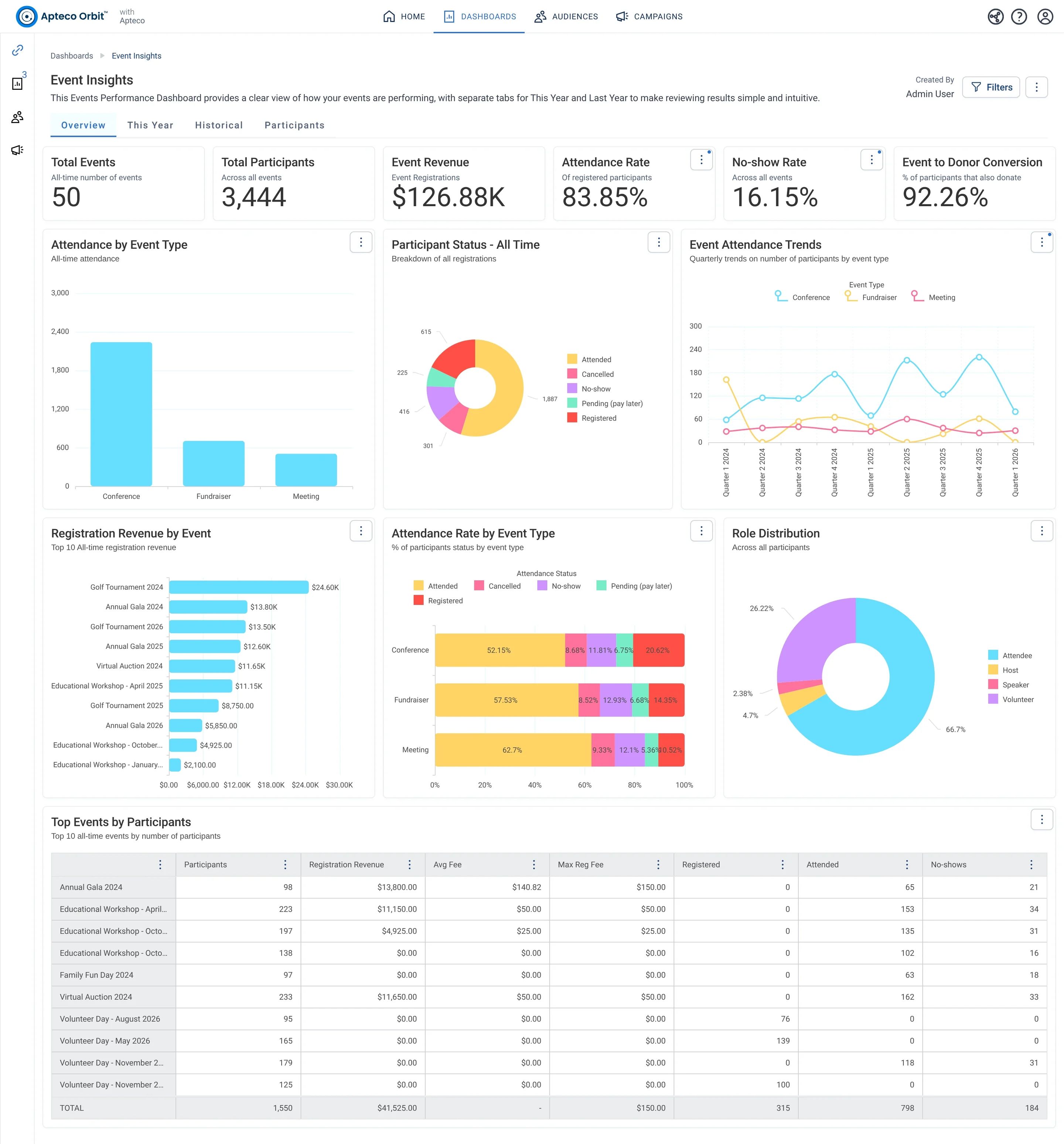
The Overview tab of Event Insights: participants, events, revenue, attendance and no-show rates, Event to Donor Conversion, then attendance trends by quarter and type, revenue by event, participant status and roles.
The Overview tab of Event Insights: participants, events, revenue, attendance and no-show rates, Event to Donor Conversion, then attendance trends by quarter and type, revenue by event, participant status and roles. Open full size

Sample charity: the people and numbers in these screens are made up, so the picture shows the tool, not a result.

The lesson

Event Insights counts participants. Four tabs:

  • Overview: Total Participants, Total Events, Event Revenue, Attendance Rate, No-show Rate and Event to Donor Conversion (the share of participants who become donors). Charts: Event Attendance Trends by quarter and type, Registration Revenue by Event (top 10), Participant Status - All Time, Attendance by Event Type, Attendance Rate by Event Type, Role Distribution and a Top Events by Participants table.
  • This Year: attendance, revenue, average fee and donor conversion this year, Participants Registered for Upcoming Events (next 12 months), the Event Attendance Status funnel, an Upcoming Events table, Registration Rate this year against previous, and Registered vs Maximum Capacity.
  • Historical: last year against the year before: participants not attended, revenue, average raised per participant, Participant to Donor Conversion, Monthly Participant Volume, Events Last Year, No-Show and Cancellation Rate by year, Avg Revenue Per Participant by Year, Revenue by Fee Level.
  • Participants: the people: speakers and hosts, volunteers, unique participants, repeat attendees, Attendance Frequency Distribution, Attendee Avg LTV, Fee Level Distribution, Role by Event Type, and the Participant / Donor Conversion Rate table.

How to use it. Two weeks before an event: This Year, Registered vs Maximum Capacity. The week after: Historical, No-Show and Cancellation Rate. Every quarter: Participants, the donor conversion table. Guests who came twice and never gave are the Field Guide's From Guest to Giver audience.

Watch this stop · about a minute

More of it in Orbit

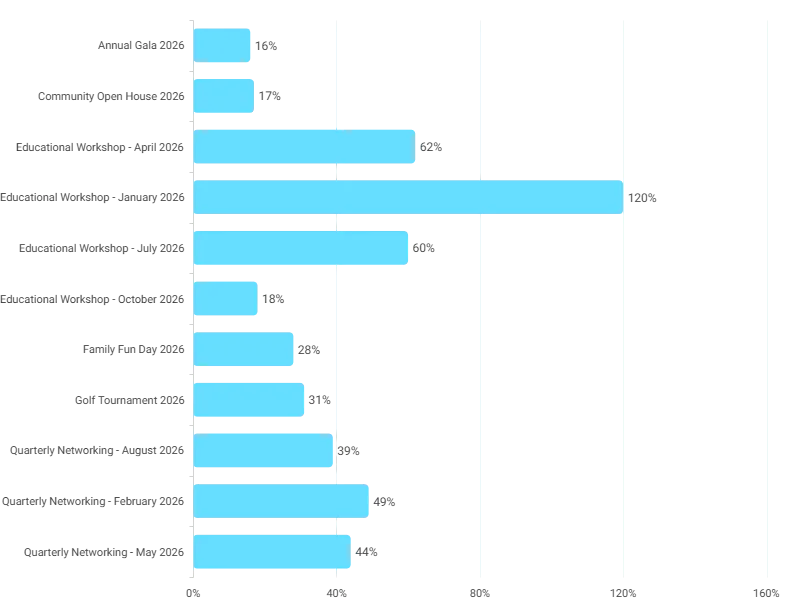
Registered vs Maximum Capacity on the This Year tab: how full each upcoming event is.
Registered vs Maximum Capacity on the This Year tab: how full each upcoming event is. Open full size

Your turn, in Orbit

  1. Open Event Insights, Overview. Read Event to Donor Conversion and Attendance Rate.
  2. Open This Year. In Registered vs Maximum Capacity, which upcoming event is fullest?
  3. Open Participants. Read Attendance Frequency Distribution: how many came to more than one event?
  4. Find the Participant / Donor Conversion Rate table and read the first row.

Quick check

Which tab shows whether an upcoming event is close to its capacity?
  • Overview
  • This Year
  • Historical

Answer: This Year

Need a hint?

Upcoming events are a this-year question.

Why it matters

An event is also a list of people who said yes once. This dashboard shows who said yes twice.

Read on

Audiences on this stop

Pathways on this stop

Read more in the Apteco Help Hub

Learn Mission is a free course. You read a little, do it yourself, then answer one quick check. Orin, the assistant in Orbit, walks with you. Your progress stays in your browser.

Do this stop yourself

It is stop 27 of 58. Open it in the course, or start from the beginning.

Open this stop in the course