Apteco Learn Mission Schedule Time with an Apteco Architect Play with a Live System

Campaign Performance

Stop 22 of 58 · about 7 minutes

Which appeals bring in the money, and are this year's on track? Campaign results often live in the email tool, the giving platform and a spreadsheet of goals. Campaign Performance joins them: every gift carries its campaign, so every campaign has a result.

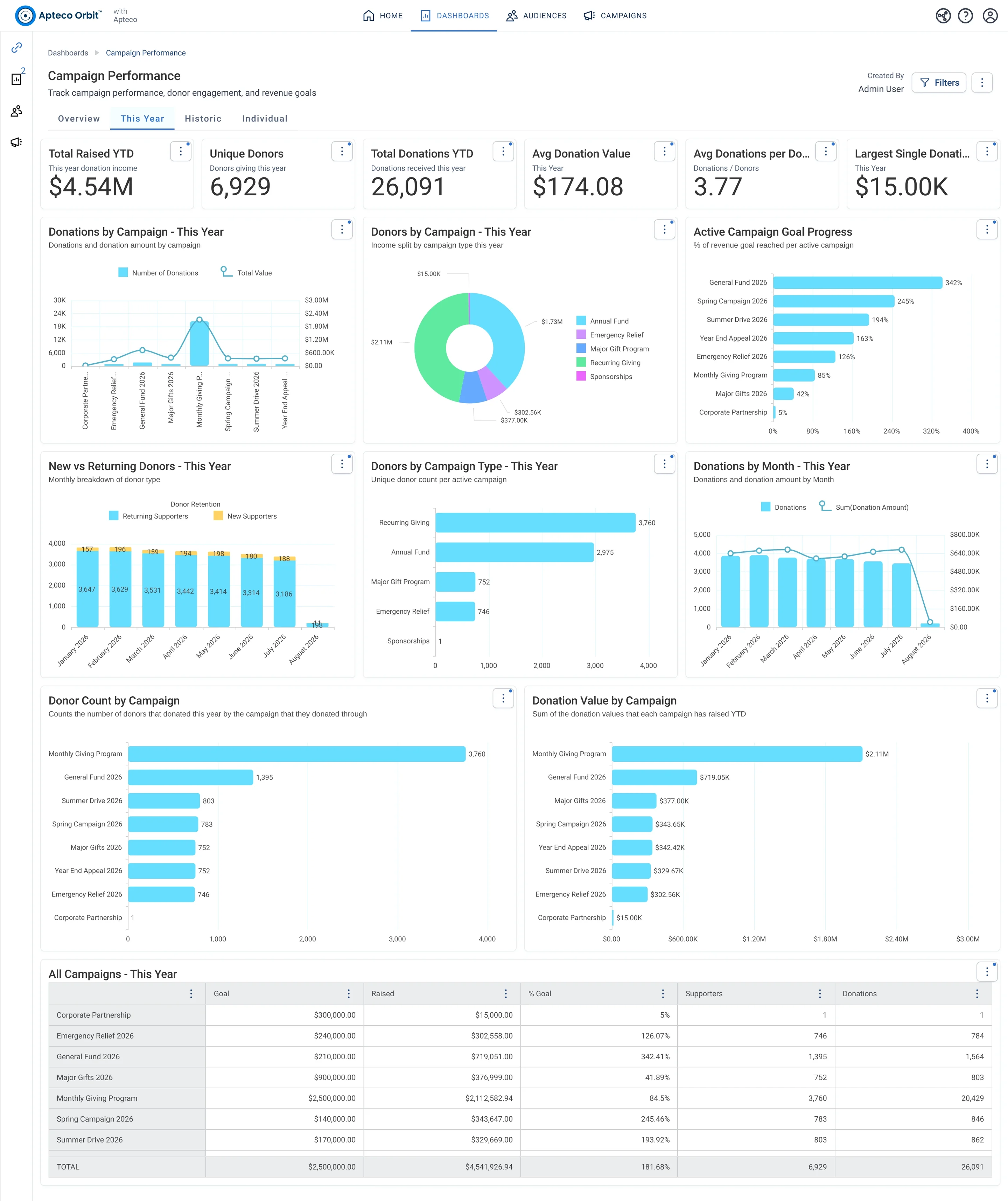
The This Year tab of Campaign Performance: cards for the year to date, Active Campaign Goal Progress, donations and donors by campaign, New vs Returning Donors by month, and the All Campaigns - This Year table.
The This Year tab of Campaign Performance: cards for the year to date, Active Campaign Goal Progress, donations and donors by campaign, New vs Returning Donors by month, and the All Campaigns - This Year table. Open full size

Sample charity: the people and numbers in these screens are made up, so the picture shows the tool, not a result.

The lesson

Campaign Performance has four tabs:

  • Overview: Total Raised, Unique Donors, Total Donations, Active Campaigns, Total Campaigns and the Largest Campaign Donation. Then Donation Income by Year by campaign type, Avg Donation Amount by Campaign Type, a Top Campaigns by Income table (top 10, all time), Total Raised by Campaign Type, Campaign Status Breakdown and Donors by Campaign Type.
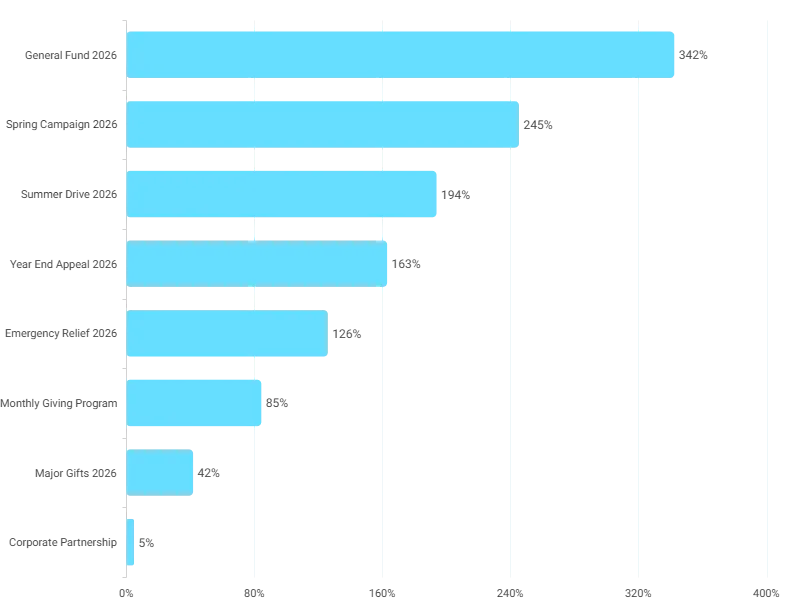
  • This Year: the year to date. Active Campaign Goal Progress shows the percent of each campaign's revenue goal reached. Donations by Campaign, Donor Count by Campaign and Donation Value by Campaign rank this year's campaigns. New vs Returning Donors by month shows whether a campaign is bringing in new people or asking the same ones again. All Campaigns - This Year is the table.
  • Historic: last year and the year before: Year-on-Year Donation Income by type, Donor Count by Year, Revenue by Campaign, Goal Achievement by Campaign, and each campaign ranked for last year and the year before.
  • Individual: one donor's campaign history, through the filter: campaigns donated in, donations per campaign, Donations Amount by Campaign, and the count of donors who gave to more than one campaign.

How to use it. Mid-year, open This Year and read Goal Progress: anything far behind gets attention now, not at year end. Before planning next year, open Historic and compare Goal Achievement by Campaign across two years. A campaign that wins twice is a keeper.

Watch this stop · about a minute

More of it in Orbit

Active Campaign Goal Progress: the percent of its revenue goal each active campaign has reached so far this year.
Active Campaign Goal Progress: the percent of its revenue goal each active campaign has reached so far this year. Open full size

Your turn, in Orbit

  1. Open Campaign Performance, This Year tab. In Active Campaign Goal Progress, find the campaign furthest from its goal.
  2. On the same tab, read New vs Returning Donors. Which month brought the most new donors?
  3. Open Overview. In Top Campaigns by Income, read the top three names.
  4. Open Historic. Does the top campaign of last year also top the year before?

Quick check

Where do you see how far each active campaign is from its revenue goal?
  • Overview, Campaign Status Breakdown
  • This Year, Active Campaign Goal Progress
  • Individual, Donations Amount by Campaign

Answer: This Year, Active Campaign Goal Progress

Need a hint?

Goal progress is a this-year question.

Why it matters

Find the appeal that is falling behind in June, not in the December post-mortem.

Read on

Read more in the Apteco Help Hub

Learn Mission is a free course. You read a little, do it yourself, then answer one quick check. Orin, the assistant in Orbit, walks with you. Your progress stays in your browser.

Do this stop yourself

It is stop 22 of 58. Open it in the course, or start from the beginning.

Open this stop in the course