Apteco Learn Mission Schedule Time with an Apteco Architect Play with a Live System

How to use filters

Stop 10 of 58 · about 12 minutes

How do you look at just one slice of your data? A dashboard that shows everything is like a meeting that invites everyone: complete, and no use. A filter narrows it to what you need.

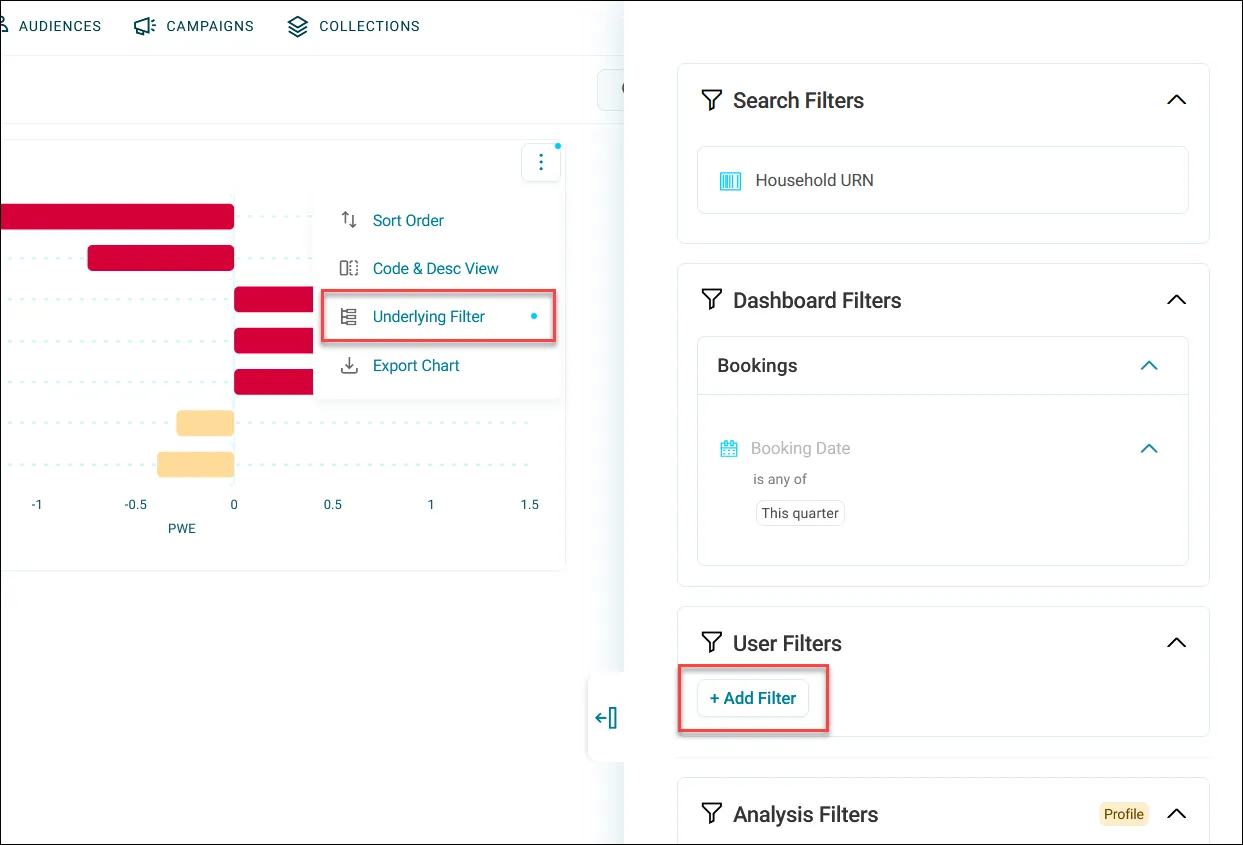
A tile's menu with Underlying Filter, and the filter panel with + Add Filter under User Filters.
A tile's menu with Underlying Filter, and the filter panel with + Add Filter under User Filters. Help Hub: Filtering

Sample charity: the people and numbers in these screens are made up, so the picture shows the tool, not a result.

The lesson

You can add a filter two ways.

From a chart: click a bar or slice to select it, open the menu in the small box that pops up, and click Add to Filter. Clicking alone only selects.

From the Filters button at the top of the dashboard: click + Add Filter, search for what you want, and click Apply. Use this when what you want isn't on a chart.

Your filters change only your view, and they apply across every tab. A blue dot on the Filters button means a filter is on, so check for it if your numbers look low. Reset All clears everything.

Some tiles have their own tile filter, set by whoever built the dashboard, and it always overrides yours. If one tile won't change, open its menu and click Underlying Filter.

Watch this stop · about a minute

Your turn, in Orbit

  1. Open Donation Analysis in view mode.
  2. Click a bar, open the menu in the box that pops up, and click Add to Filter.
  3. Find the blue dot on the Filters button and open the panel.
  4. Click + Add Filter, add a second filter, and click Apply.
  5. Click Reset All.

Quick check

You click a bar on a chart. What else do you need to do to filter the whole dashboard?
  • Nothing, clicking is enough
  • Click Add to Filter in the pop-up menu
  • Refresh the page

Answer: Click Add to Filter in the pop-up menu

You know you have about 900 volunteers, but your dashboard shows 300. What's the likely issue?
  • A filter is still on. Check for the blue dot on the Filters button
  • Someone deleted 600 volunteers
  • Orbit can only count to 300

Answer: A filter is still on. Check for the blue dot on the Filters button

Your filter changes every tile except one. Why?
  • That tile is broken
  • That tile has its own tile filter, which overrides yours
  • Filters only work on the first tab

Answer: That tile has its own tile filter, which overrides yours

Need a hint?

Clicking selects. Add to Filter filters. A blue dot means a filter is on.

Why it matters

When someone asks "what about just last year's gala guests?", you answer on the spot, before the meeting ends.

Read on

Read more in the Apteco Help Hub

Learn Mission is a free course. You read a little, do it yourself, then answer one quick check. Orin, the assistant in Orbit, walks with you. Your progress stays in your browser.

Do this stop yourself

It is stop 10 of 58. Open it in the course, or start from the beginning.

Open this stop in the course