Apteco Learn Mission Schedule Time with an Apteco Architect Play with a Live System

The lesson

Two tools keep a list tidy.

Excludes work like includes, but remove people. Think: anyone contacted last month, staff, anyone who asked not to be contacted, and anyone whose Cold Month Flag says they have never given in this month of the year.

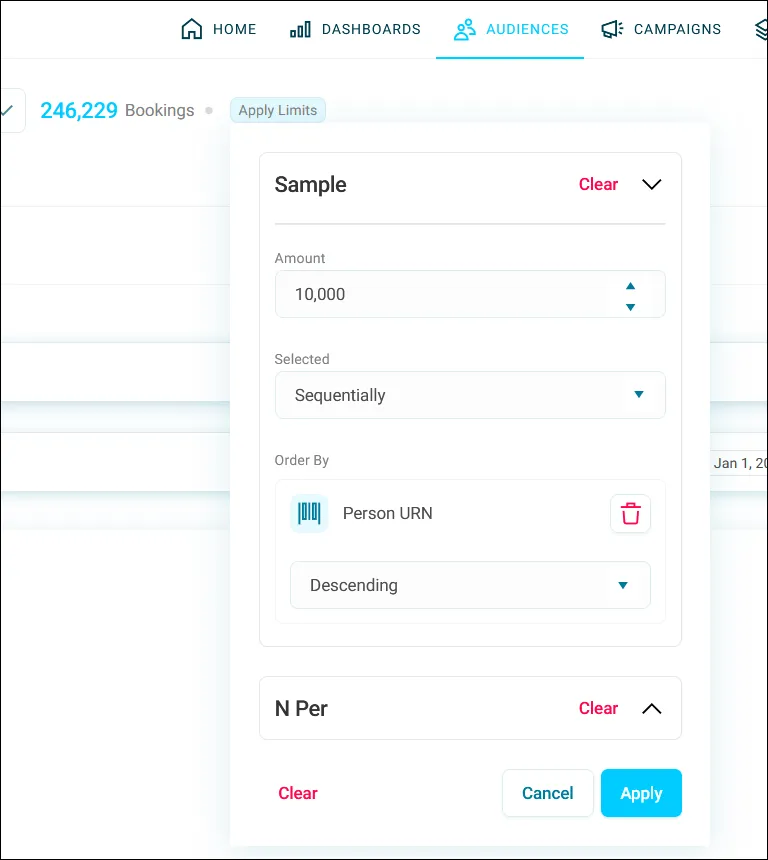
Limits, under Apply Limits, cap your list. A Sample limit picks a set number, randomly or in order, handy for a test send. An N Per limit caps people per group, like one per household.

Watch this stop · about a minute

Your turn, in Orbit

  1. Open your audience.
  2. In the excludes section, click Add Filter and remove one group.
  3. Check the new count.
  4. Click Apply Limits, open Sample, enter an amount and choose Randomly.
  5. Look at N Per and decide whether one per household makes sense for you.

Quick check

What's your count after the exclusion, before any sample limit?

Write your answer in the course; it stays in your browser.

Need a hint?

An exclusion makes a list smaller or keeps it the same. If yours grew, you added an include.

Why it matters

A tidy list tells supporters you know them, and feeling known is why people stay.

Read on

Read more in the Apteco Help Hub

Learn Mission is a free course. You read a little, do it yourself, then answer one quick check. Orin, the assistant in Orbit, walks with you. Your progress stays in your browser.

Do this stop yourself

It is stop 35 of 58. Open it in the course, or start from the beginning.

Open this stop in the course