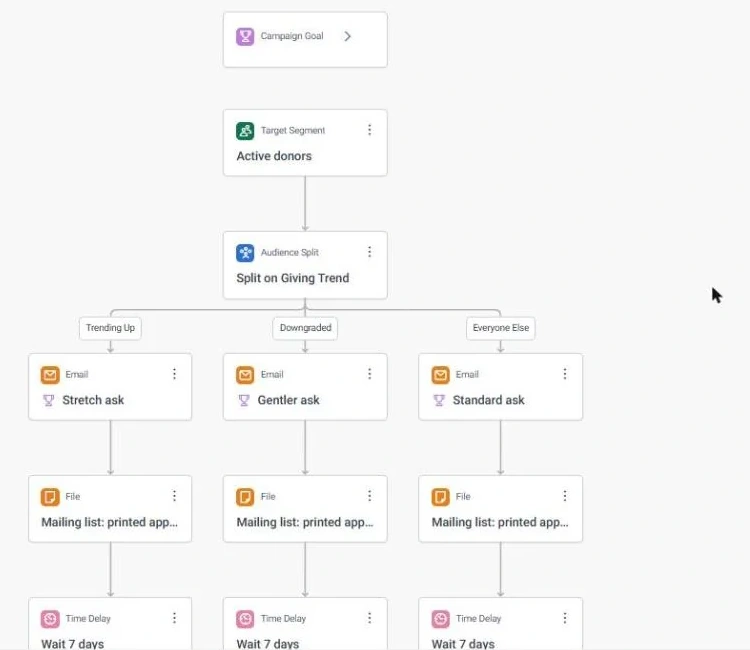
Apteco Mission builds each ask from the person's own giving history. In The Dynamic Ask Appeal, ask bands are set from each supporter's latest, average and largest gift. Each email shows a personal ask, filled in automatically, and printed appeals carry the same personal amounts. Supporters trending up get a stretch ask. Supporters who gave less than before get a gentler one.
The straight answer: set each person's ask from their own giving, not one amount for everyone. Start from their last gift. For steady donors you want to upgrade, start from their largest gift. Show a few amounts, with the first one close to that starting point. Then put the same amounts in the letter, the email and the donation page, filled in for each person.
This has been tested in the field. Researchers at ESSEC Business School mailed 50,208 past donors of a large European charity. Each reply form showed a ladder of amounts built from that donor's last gift. The first amount on the ladder mattered most. When it started above the last gift, fewer people gave, but those who gave gave more. People who had given only once reacted most. The researchers' advice: tailor the amounts to each donor's history.
How to set the amounts. First, gather every gift for each person: the CRM, each giving platform and any old database. Next, pick the starting point: the last gift for most people, the largest gift for steady donors. Then build a short ladder up from it, in plain round amounts. Give people who have given once a gentle ladder. Last, read a real letter with the amounts filled in before it prints.
Who needs a different ask. A monthly donor is best asked to raise the monthly amount, not for a one-off gift. Someone whose largest gift was a one-time tribute gift may not want that amount as their starting point. A donor who gives at a major gift level is better served by a call than a form. And anyone who asked not to be contacted stays off the list. For an urgent appeal, build the audience so people who just gave a large gift are not the first ones asked again.
Test it. Split the list at random. Half get the personal ask. Half get your usual ask. Compare how many gave and the average gift in each half. Run it again next appeal. What works for one charity's donors may not work for yours, so your own test is the answer that counts.
Many systems can help. Some CRMs set suggested amounts on a donation form from a donor's past gifts. For mail, an export of each person's last and largest gift can feed a mail merge. The common gap is the whole history. Gifts made on another giving platform, or before the current CRM, are missed, so the ask comes from part of the record.
That gap is where Mission starts. The pathway page says that when gifts come in through several giving platforms, or older gifts sit in the finance system, the ask is set from part of the record. Mission joins them into one record per person. Day 7 sends a thank-you to givers and a short text to everyone else. Day 14 adds ads for anyone still without a gift.