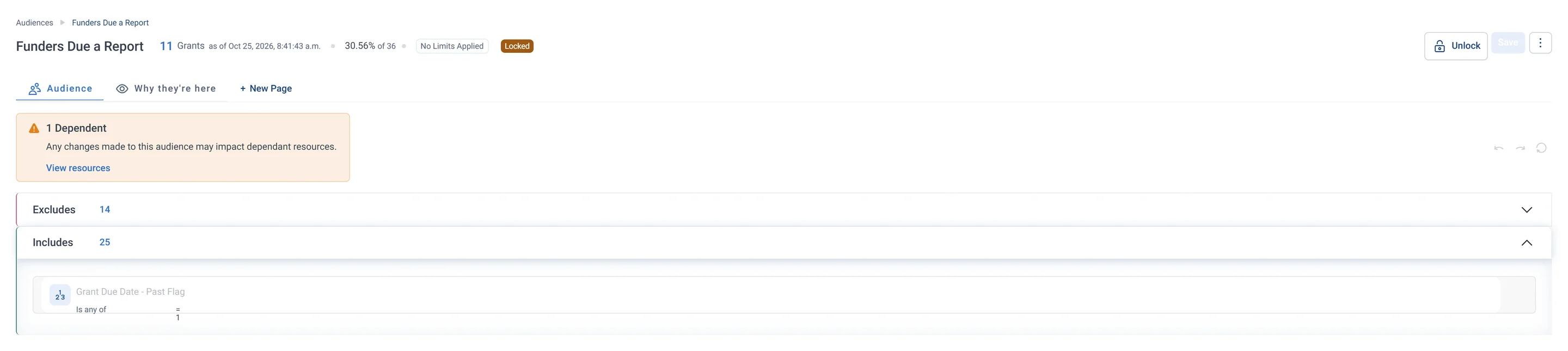
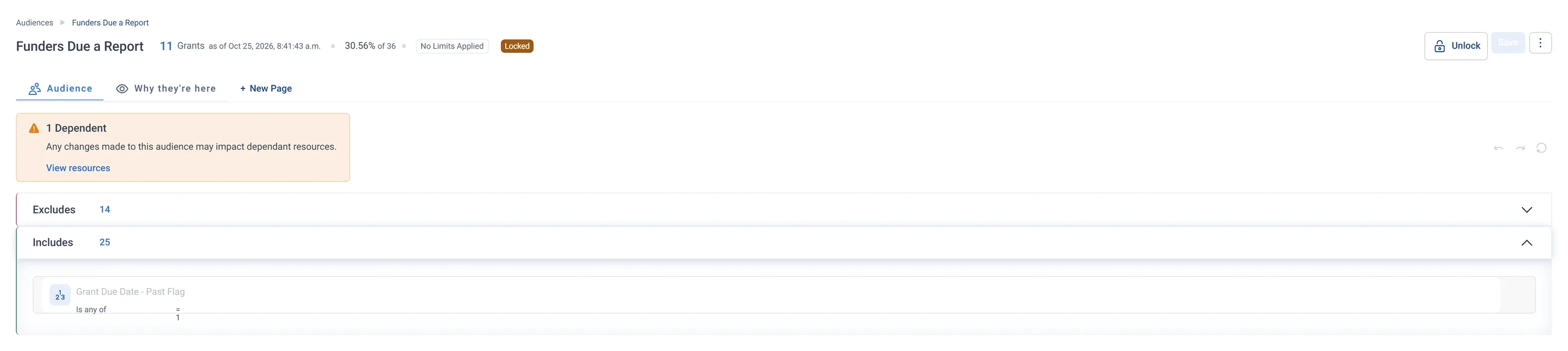
Funders Due a Report · Audience rules, part 1 of 2 The first half of the rules: the Includes box, which lets in every grant whose report due date has passed. The second half takes out grants whose report is already in, leaving a to-do list of overdue reports.Funders Due a Report · Audience rules, part 2 of 2 The second half of the rules: the Excludes box, which takes out grants where a report has been received. What is left is grants past their due date with no report yet, the overdue to-do list.
Field Guide Audiences · Funders The Funders tab, with audience tiles for grant work, Funders Due a Report and Returning Funders at Risk. A grants manager uses them to send reports on time and reach out to funders before they drift away.
Sample charity: the people and numbers in these screens are made up, so the picture shows the tool, not a result.
Who is in it
Grant staff use it as a to-do list of overdue funder reports.
4
insights it is built from
Funders
its tab on the Field Guide Audiences dashboard
1
pathway runs it
What to do next
Prioritise these reports this week, then follow each one with an impact update.
The Grants module lists every report coming due, and flags any that are past due without a report.
After a decision
Email
A thank-you to the funder and what the grant will make possible.
Mid-grant
Email
An impact update before the formal report is due.
Before reapplying
Call list
Returning funders at risk get a relationship call and an impact report from their last grant.
Ongoing
LinkedIn Ads
Staff at your funders see your impact stories on LinkedIn through company targeting.
Watch the pathway
Watch the pathway
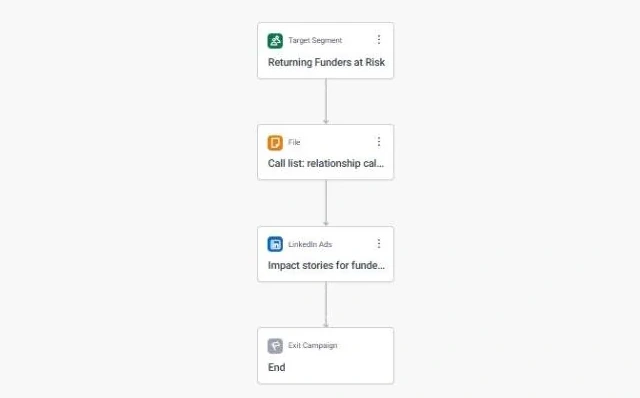
Funder Reporting and Stewardship · the whole journey The whole journey for the Returning Funders at Risk audience: a call list for a relationship call and impact report, then LinkedIn ads with impact stories. It keeps grant makers and other funders close so they renew their support.
What it is built from
Each insight below is worked out by Orbit for every supporter. Click one to read it in the Field Guide.
Grant Due Date - Past FlagIs this grant's report overdue? Pull a list of past-due grant reports for immediate follow-up.
Grant Report Received CountHas a report been sent in for this grant? Track which grants have reports in, and spot outstanding report deadlines.
Returning Funder FlagHas this funder given us more than one grant? Treat returning funders as your most reliable grant income.
Total Amount GrantedHow much has this funder granted us in total? Rank funders by total giving to decide where stewardship goes first.
Next to it on the Funders tab
Returning Funders at RiskFunders who have granted more than once but whose most recent application or decision was a long time ago.
Questions people ask
Who is in the Funders Due a Report audience?
Grants whose report due date has passed with no report received yet, alongside how often each funder has given before.
Grant staff use it as a to-do list of overdue funder reports.
What should I do with Funders Due a Report?
Prioritise these reports this week, then follow each one with an impact update.
Which data does Funders Due a Report use?
Grant Due Date - Past Flag, Grant Report Received Count, Returning Funder Flag, Total Amount Granted. Each is an insight Orbit works out for every supporter.
Open Audiences, start a new audience and add each rule: who to let in, then who to leave out. Build an audience by hand walks you through it, and Ask Orin to build it shows how Orin can draft it for you.
Learn Mission is a free course. Part 5 is all about audiences: you build one, read it tab by tab and tidy it before anyone gets a message.
Build it yourself
Start with the stops below, then read more in the Apteco Help Hub.