
Apteco Mission Field Guide Schedule Time with an Apteco Architect Play with a Live System

Monthly Giving Conversion

5 steps · Email, Forms, SMS, Phone

Some supporters already give like monthly donors, and some of them used to volunteer. Ask them to make it official.
Watch the pathway · about a minute
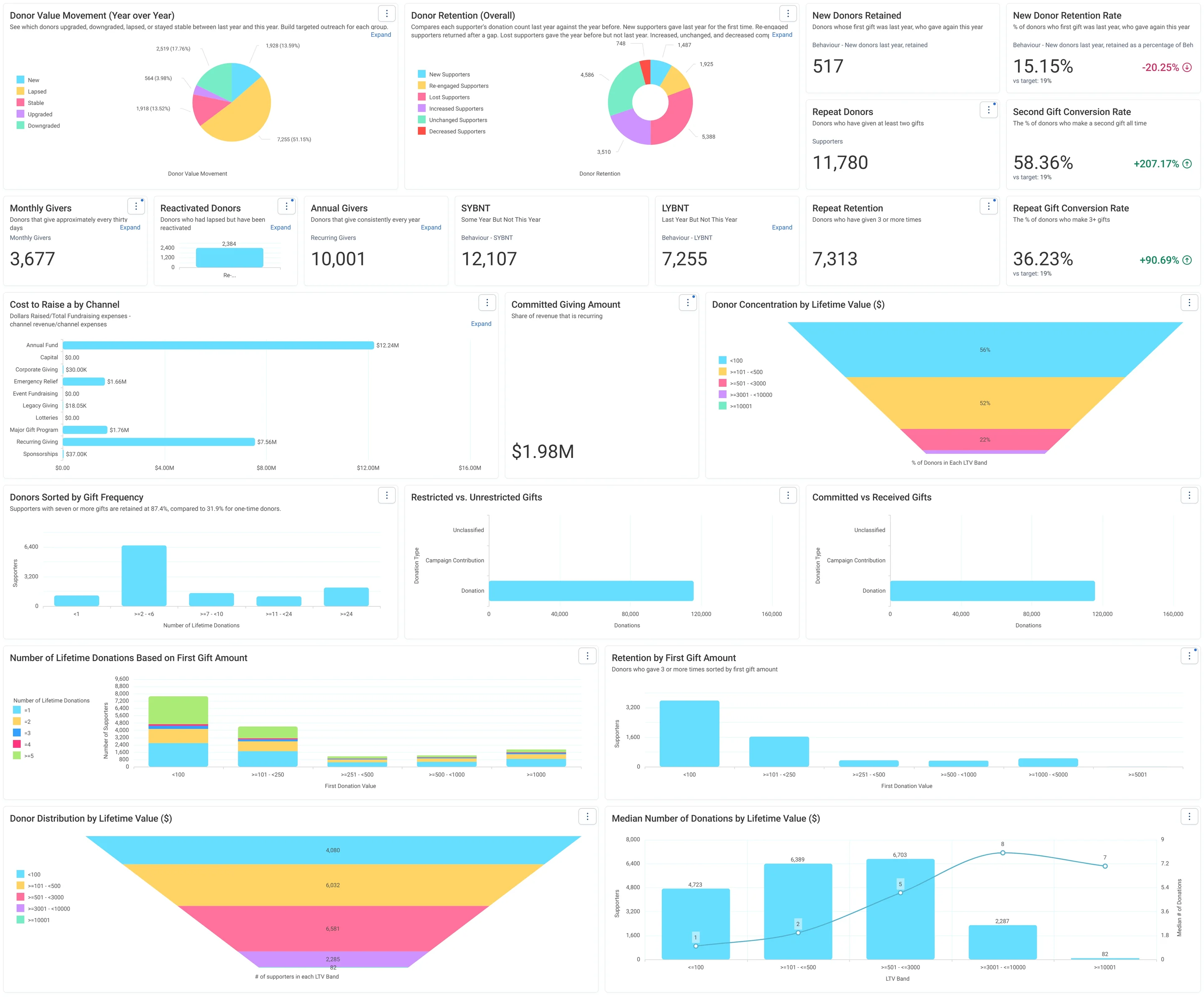
Jumping Off Metrics · Donor Health - Board Report, in Apteco Orbit: The Donor Health - Board Report tab, with cards on new, repeat and regular donors, charts of retention, value changes and cost to raise a dollar.
Jumping Off Metrics · Donor Health - Board Report The Donor Health - Board Report tab, with cards on new, repeat and regular donors, charts of retention, value changes and cost to raise a dollar. A board sees whether the charity is keeping its donors and where to focus.

Sample charity: the people and numbers in these screens are made up, so the picture shows the tool, not a result.
The problem it solves

Monthly donors found in your file.

Why your CRM misses this. A supporter who gives most months, sometimes by cheque and sometimes through an online platform, looks like an occasional giver in each system on its own.

Data

2 of its 2 sources usually sit outside the CRM

Signals

it reads 5 of them

Reach

4 channels: email, forms, sms and more

Journey

5 steps, start to finish

Connect: the data it draws on

Mission joins these into one record per person, beside your CRM.

Sources

Analyze: who it finds

  • Metronome Score Does this supporter already give like a monthly donor without signing up? Ask the highest scorers to make the monthly giving they already do official.
  • Metronome Band How ready is this supporter for a monthly giving ask? Put Priority donors first on your monthly giving conversion list.
  • Giving Regularity How predictable is the timing of this supporter's gifts? Lean on Highly Consistent donors for forecasts, and ask them first about monthly giving.
  • Donor Median Interval Band Does this supporter give monthly, quarterly, twice a year, or once a year? Group donors by giving cadence, from monthly through quarterly to annual.
  • Volunteer Flag Has this supporter ever volunteered? Build volunteer-specific messages and appeals for everyone who has volunteered at least once.

Audience: Monthly Giving Candidates

Who already gives like a monthly donor without being asked? Their gifts arrive on a steady rhythm at a steady amount. They just haven't been asked to make it official.

What to do: Invite them into your monthly giving program. Frame it as making official what they already do.

Read the audience, tab by tab

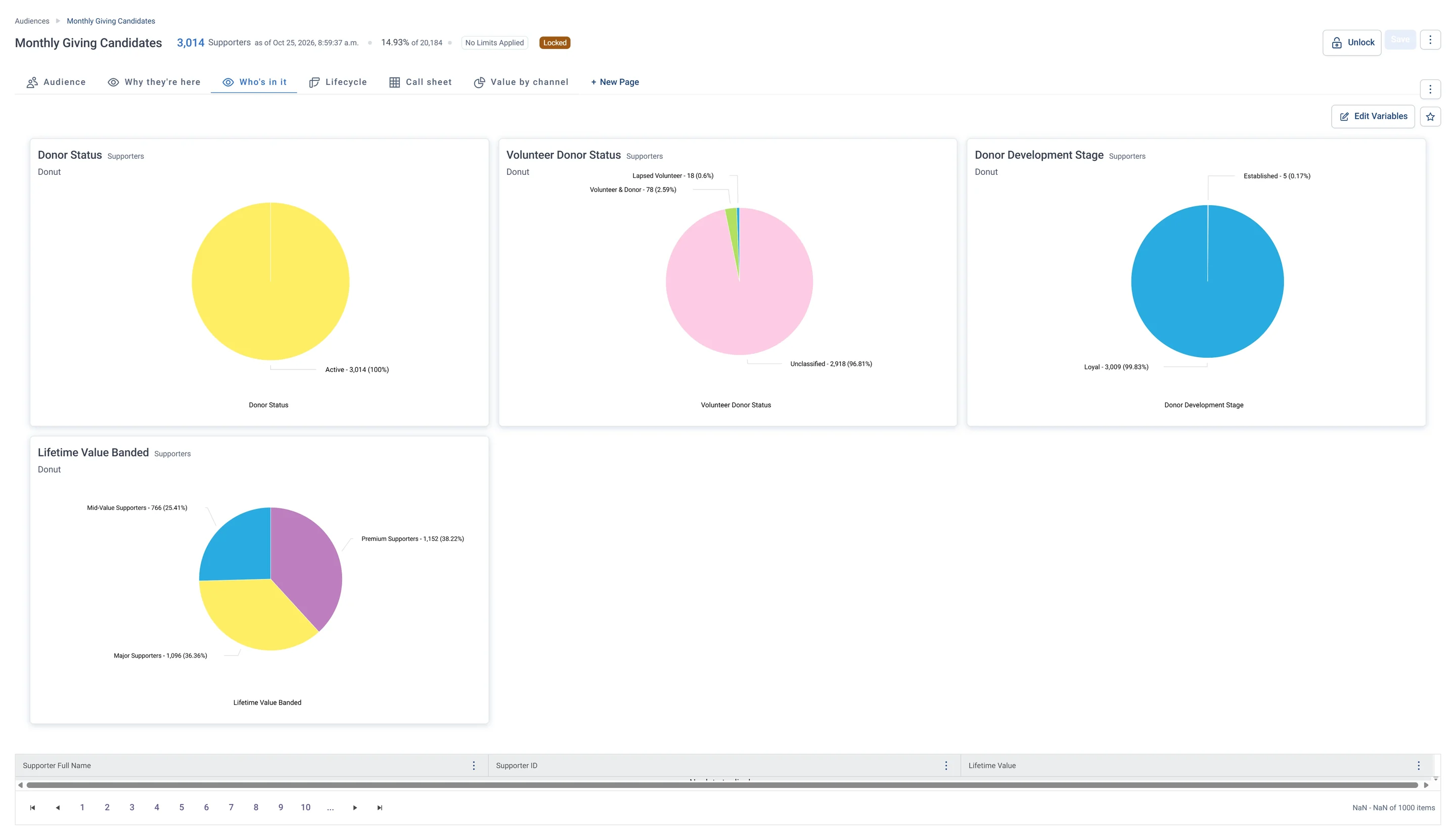
Monthly Giving Candidates · Who's in it, in Apteco Orbit: The Who's in it tab: four donuts of donor status, volunteering, stage and value band, all Active, nearly all Loyal and mostly Premium or Major.
Monthly Giving Candidates · Who's in it The Who's in it tab: four donuts of donor status, volunteering, stage and value band, all Active, nearly all Loyal and mostly Premium or Major. These loyal, valuable givers are a strong base for a monthly giving program.

Activate: the journey

Each step names when it happens and the channel it uses. Under the steps is the campaign as it is built in Orbit.

  1. Day 0

    Look-alike model

    Look-alikes of your Metronome Priority supporters widen the list beyond the obvious candidates.

  2. Day 0

    Email + form

    An email invitation to make it official, with a sign-up form. Former volunteers get a version that thanks them for their time first.

  3. Daily

    Journey logic

    Clicked but did not finish the form: a reminder, checked daily until they finish or the campaign ends.

  4. Day 7

    SMS

    Never opened: a short text nudge.

  5. Day 21

    Call list

    Priority tier who have not converted get a call.

  • Exit: a completed form ends the journey.

The campaign in Orbit

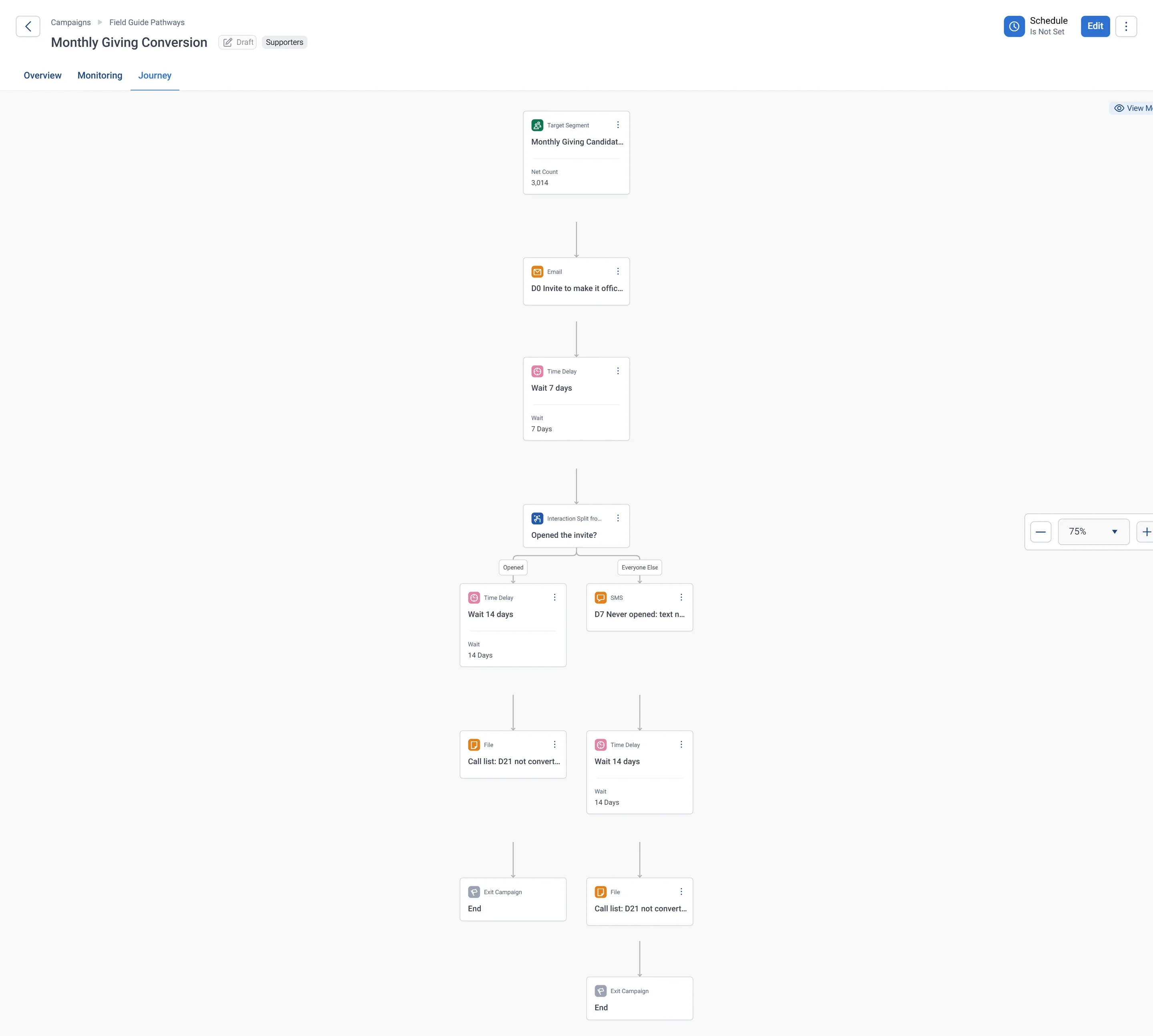
Monthly Giving Conversion · the whole journey, in Apteco Orbit: The whole journey for the Monthly Giving Candidates audience: an email invite, an open check, a text nudge for those who missed it, and a call list for anyone not converted.
Monthly Giving Conversion · the whole journey The whole journey for the Monthly Giving Candidates audience: an email invite, an open check, a text nudge for those who missed it, and a call list for anyone not converted. It turns frequent givers into steady monthly donors.

Learn: what flows back

Form completions come back into the journey as they happen. Metronome Score keeps surfacing the next candidates as new gifts arrive.

Results land on the same supporter record, so the next run starts from what just happened.

Where you see it in Orbit

Monthly Giving Candidates · Call sheet, in Apteco Orbit: The Call sheet tab: names, lifetime value, days since last gift, donor status and next step, Priority email sequence or Upgrade appeal.
Monthly Giving Candidates · Call sheet The Call sheet tab: names, lifetime value, days since last gift, donor status and next step, Priority email sequence or Upgrade appeal. Staff invite these donors to give monthly, skipping anyone who asked not to be contacted that way.

Questions people ask

What problem does Monthly Giving Conversion solve?

Monthly donors found in your file. Some supporters already give like monthly donors, and some of them used to volunteer. Ask them to make it official.

Who does Monthly Giving Conversion reach?

Monthly Giving Candidates: Who already gives like a monthly donor without being asked? Their gifts arrive on a steady rhythm at a steady amount. They just haven't been asked to make it official.

Which data does it need?

Donations: supporter ID, gift amount, gift date; Volunteer timesheets: past volunteering

Why can't my CRM do this on its own?

A supporter who gives most months, sometimes by cheque and sometimes through an online platform, looks like an occasional giver in each system on its own.

Which channels does it use?

Email, Forms, SMS, Phone. Day 0: Look-alike model Then Day 0: Email + form Then Daily: Journey logic Then Day 7: SMS.

Who runs it?

Fundraising.

Every pathway in the Field Guide runs on Apteco Mission, beside your CRM.

See it with your own data

An Apteco Architect walks you through this pathway on your own data.

Schedule Time with an Apteco Architect
