Apteco Mission Field Guide Schedule Time with an Apteco Architect Play with a Live System

Year-End Recovery

7 steps · Email, Direct mail, Google, Meta, SMS

Everyone who gave last year and hasn’t yet this year, ranked by value, timed to their own calendar, and seen in full.
Watch the pathway · about a minute
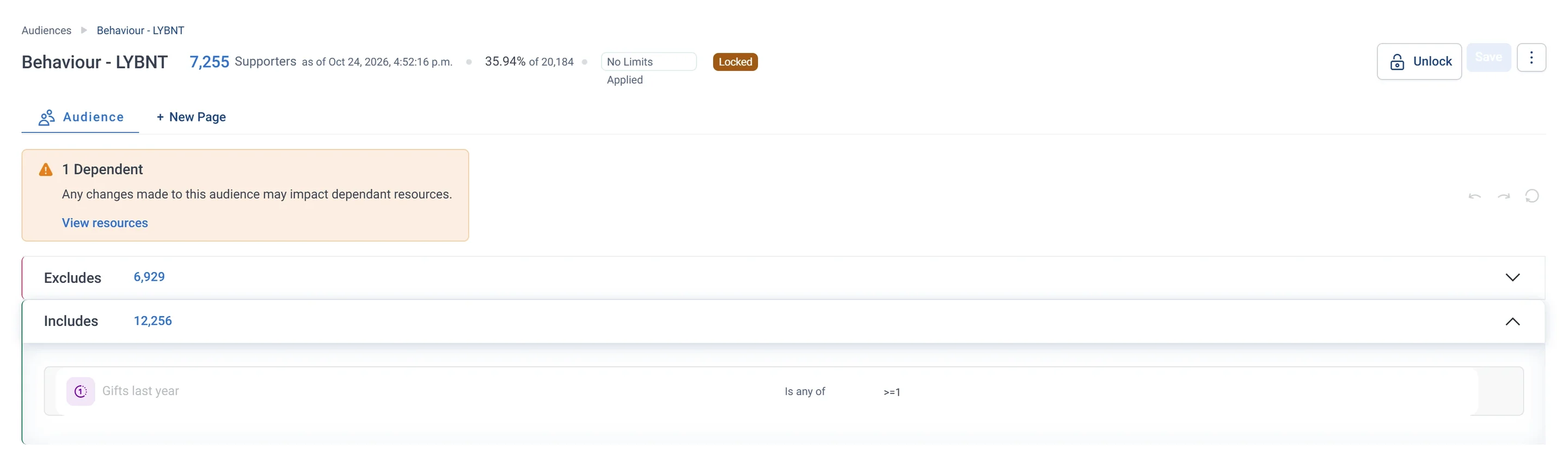
Behaviour - LYBNT · Audience rules, part 1 of 2, in Apteco Orbit: The first half of the rules: the Includes box, which lets in everyone with a gift last year.
Behaviour - LYBNT · Audience rules, part 1 of 2 The first half of the rules: the Includes box, which lets in everyone with a gift last year. The second half takes out this year's givers, leaving donors who have not yet given again.

Sample charity: the people and numbers in these screens are made up, so the picture shows the tool, not a result.
The problem it solves

A year-end list that builds itself.

Why your CRM misses this. LYBUNT reports only count gifts the CRM holds. A gift made on another platform, or a supporter who came to events this year, doesn’t show, so the list can chase people who already gave or never left.

Data

3 of its 5 sources usually sit outside the CRM

Signals

it reads 6 of them

Reach

5 channels: email, direct mail, google and more

Journey

7 steps, start to finish

Connect: the data it draws on

Mission joins these into one record per person, beside your CRM.

Sources

Analyze: who it finds

  • Gave Last Year But Not This Year (LYBUNT) Did this supporter give last year but not yet this year? Pull these supporters into your fall and year-end appeals before the year closes.
  • Gave Some Year But Not This Year (SYBUNT) Did this supporter give in some past year but not yet this year? Leave out the LYBUNT donors to find longer-lapsed supporters, then send them a softer re-introduction.
  • Last Year Value Band Which value tier was this supporter in for last year's giving? Compare it with This Year Value Band in any module to see who moved up, down, or stayed the same.
  • Contact Window Status Is right now a good time to reach out to this supporter? Check it before you reach out, since it reads each donor's own giving season.
  • Last Event When did this supporter last take part in an event? Pair it with Days Since Last Event Attended to find supporters whose event activity has gone cold.
  • Volunteer This Year Has this supporter volunteered this year? Pull this year's active volunteers for appreciation campaigns and year-end giving asks.

Activate: the journey

Each step names when it happens and the channel it uses. Under the steps is the campaign as it is built in Orbit, in 6 parts. Read them in order. Then how the 'A gift stops every step left' trigger is set up.

  1. October

    Goal and objectives

    The campaign goal is the total given by LYBUNT supporters from October to 31 December, against your target, with a progress bar showing On Track or At Risk.

  2. October

    Email

    LYBUNT supporters who are In Season go first, with an ask anchored to what they gave last year.

  3. October

    Email

    LYBUNT supporters who came to an event or volunteered this year are thanked for that first, with a gentler ask.

  4. November

    Direct mail

    Major and High Value supporters from last year get a printed appeal as well.

  5. November

    Google + Meta Ads

    LYBUNT uploads to Google and Meta as a matched audience. Anyone who has given is excluded.

  6. December

    SMS + email

    Those still flagged get a final-weeks reminder by text and email.

  7. Oct to Dec

    Email

    SYBUNT supporters who are not LYBUNT get a softer reintroduction built on impact, not a hard ask.

  • Exit: anyone who gives is removed from every remaining step, including the ad audiences.

The campaign in Orbit

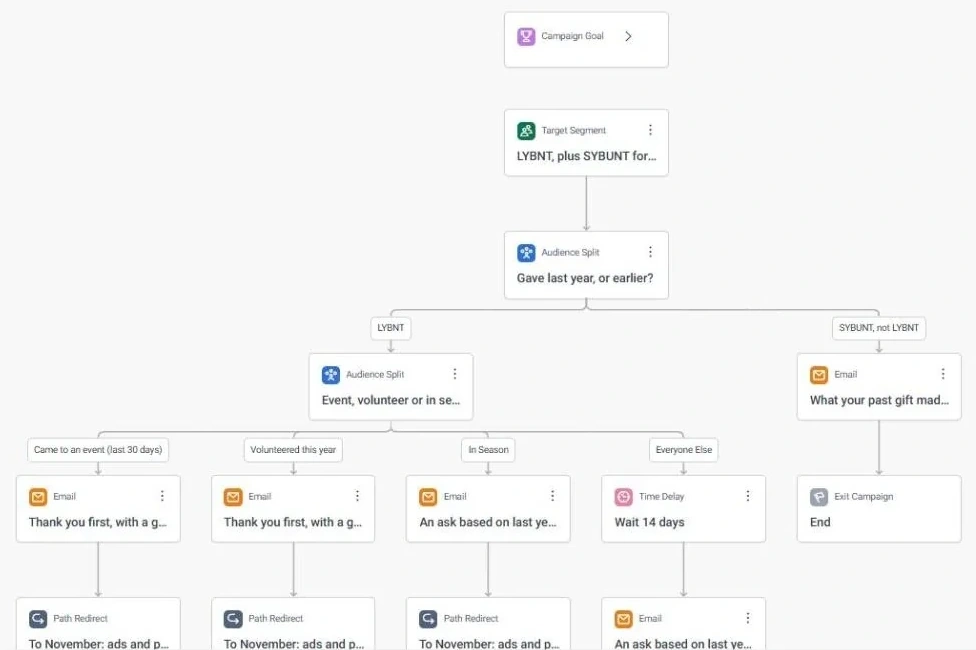
Year-End Recovery · journey, part 1 of 6, in Apteco Orbit: The top of the journey: the goal box, the LYBNT, plus SYBUNT for a soft touch list, and splits that sort people by when they last gave and what they did this year.
Year-End Recovery · journey, part 1 of 6 The top of the journey: the goal box, the LYBNT, plus SYBUNT for a soft touch list, and splits that sort people by when they last gave and what they did this year. Earlier givers get only a gentle email.
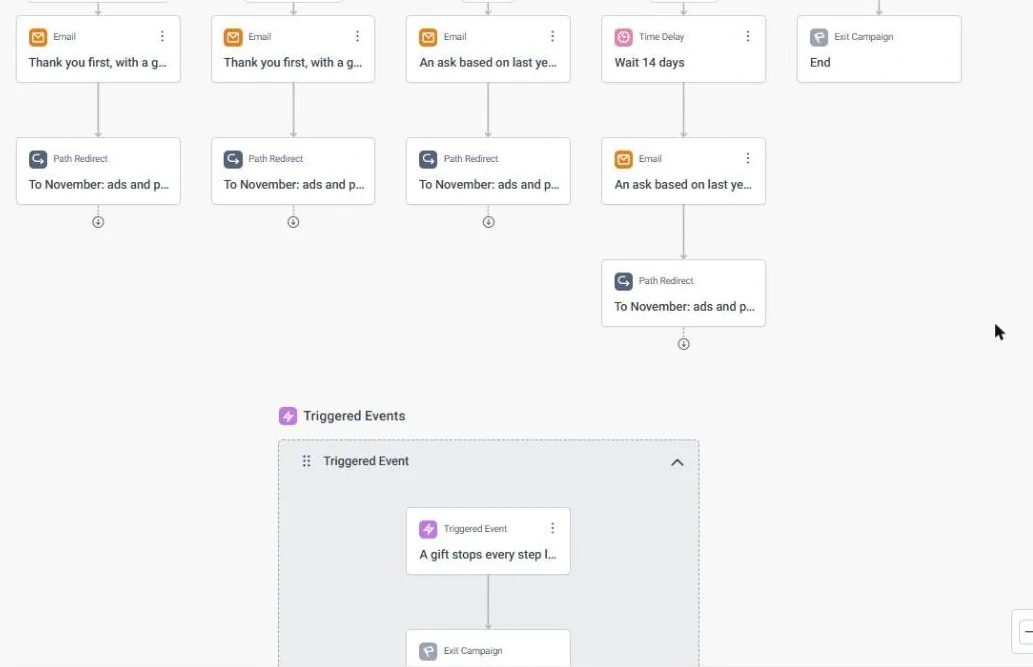
Year-End Recovery · journey, part 2 of 6, in Apteco Orbit: The second part of the journey: event and volunteer people get Thank you first, with a gentler ask, in-season people get An ask based on last year's gift, and the rest wait first.
Year-End Recovery · journey, part 2 of 6 The second part of the journey: event and volunteer people get Thank you first, with a gentler ask, in-season people get An ask based on last year's gift, and the rest wait first. Each path then jumps to November.
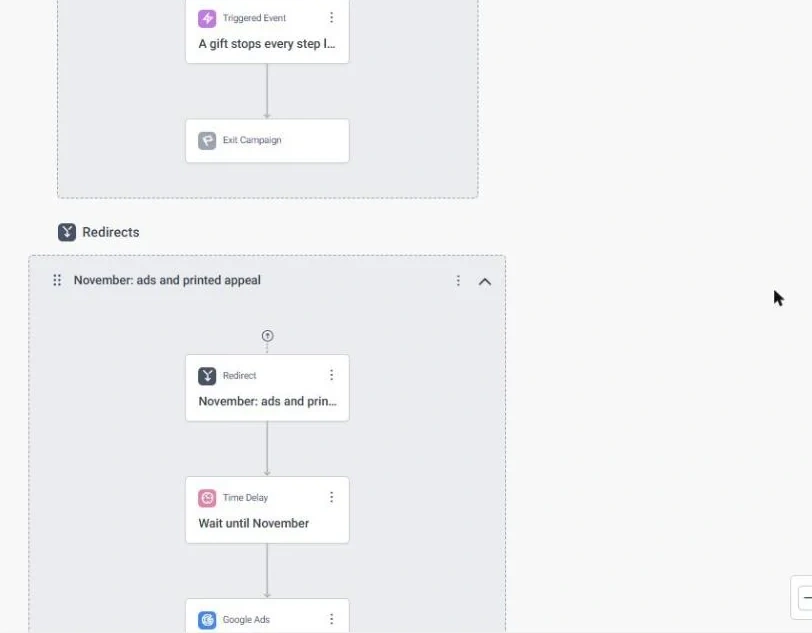
Year-End Recovery · journey, part 3 of 6, in Apteco Orbit: The third part of the journey: the A gift stops every step left section, where anyone who gives leaves the campaign, then the November section's redirect step and Wait until…
Year-End Recovery · journey, part 3 of 6 The third part of the journey: the A gift stops every step left section, where anyone who gives leaves the campaign, then the November section's redirect step and Wait until November. A gift ends the asking right away.
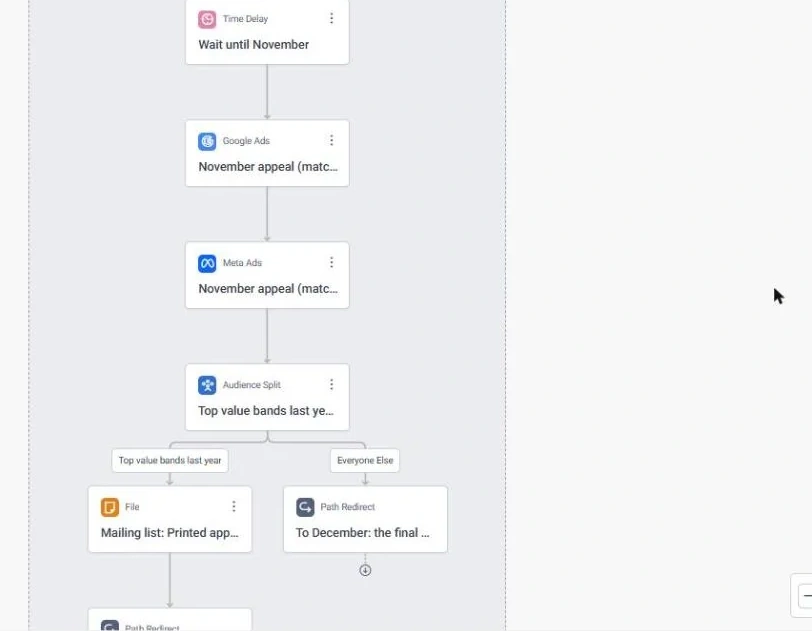
Year-End Recovery · journey, part 4 of 6, in Apteco Orbit: The November steps: a wait, Google Ads and Meta Ads steps called November appeal (matched audience), then a split that sends last year's top value bands to Mailing list: Printed…
Year-End Recovery · journey, part 4 of 6 The November steps: a wait, Google Ads and Meta Ads steps called November appeal (matched audience), then a split that sends last year's top value bands to Mailing list: Printed appeal. The best givers also get a printed letter.
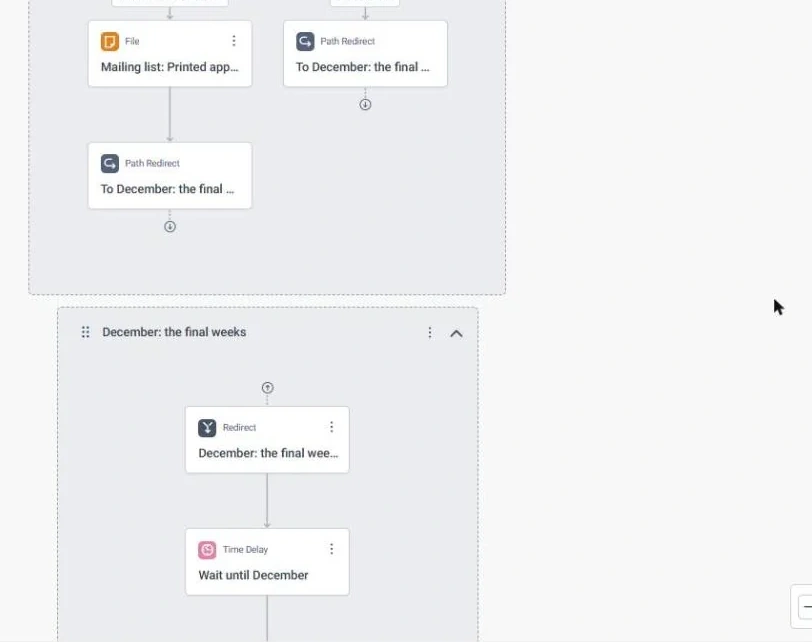
Year-End Recovery · journey, part 5 of 6, in Apteco Orbit: The fifth part of the journey: both November paths jump to the December section, which starts with its redirect step and Wait until December.
Year-End Recovery · journey, part 5 of 6 The fifth part of the journey: both November paths jump to the December section, which starts with its redirect step and Wait until December. Everyone meets up again for the final weeks of the year.
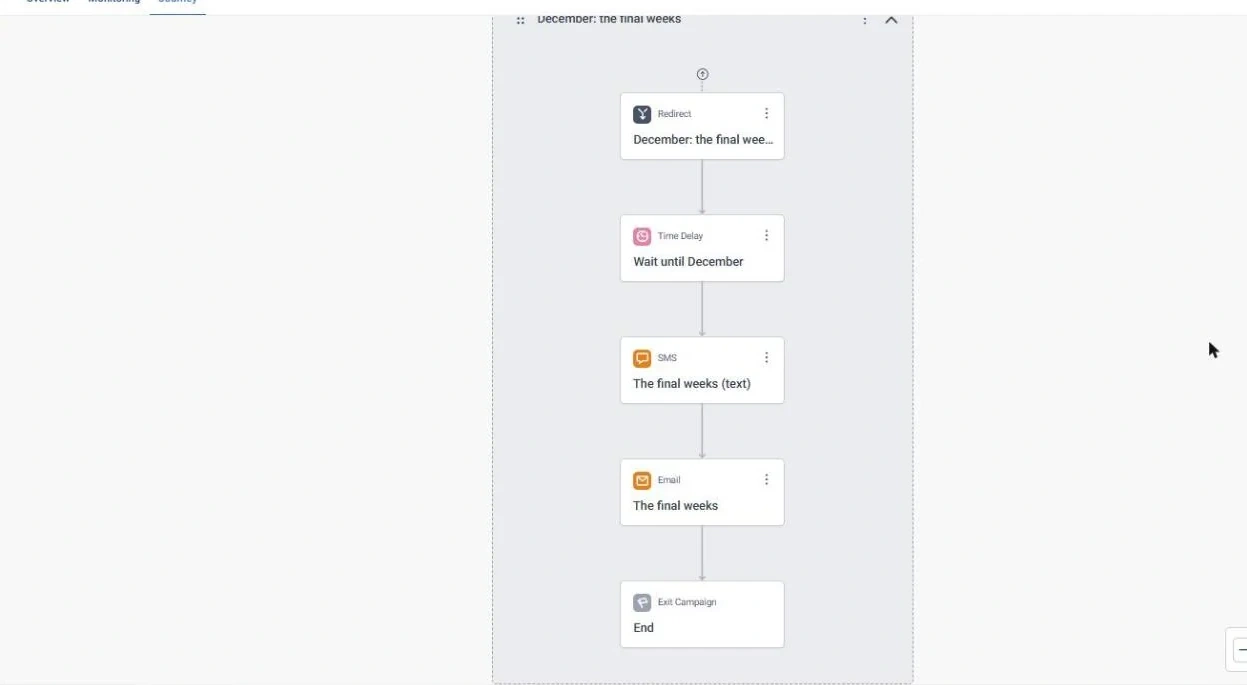
Year-End Recovery · journey, part 6 of 6, in Apteco Orbit: The December section, top to bottom: the redirect, Wait until December, The final weeks (text), The final weeks email, then the end.
Year-End Recovery · journey, part 6 of 6 The December section, top to bottom: the redirect, Wait until December, The final weeks (text), The final weeks email, then the end. One last text and email close out the year.
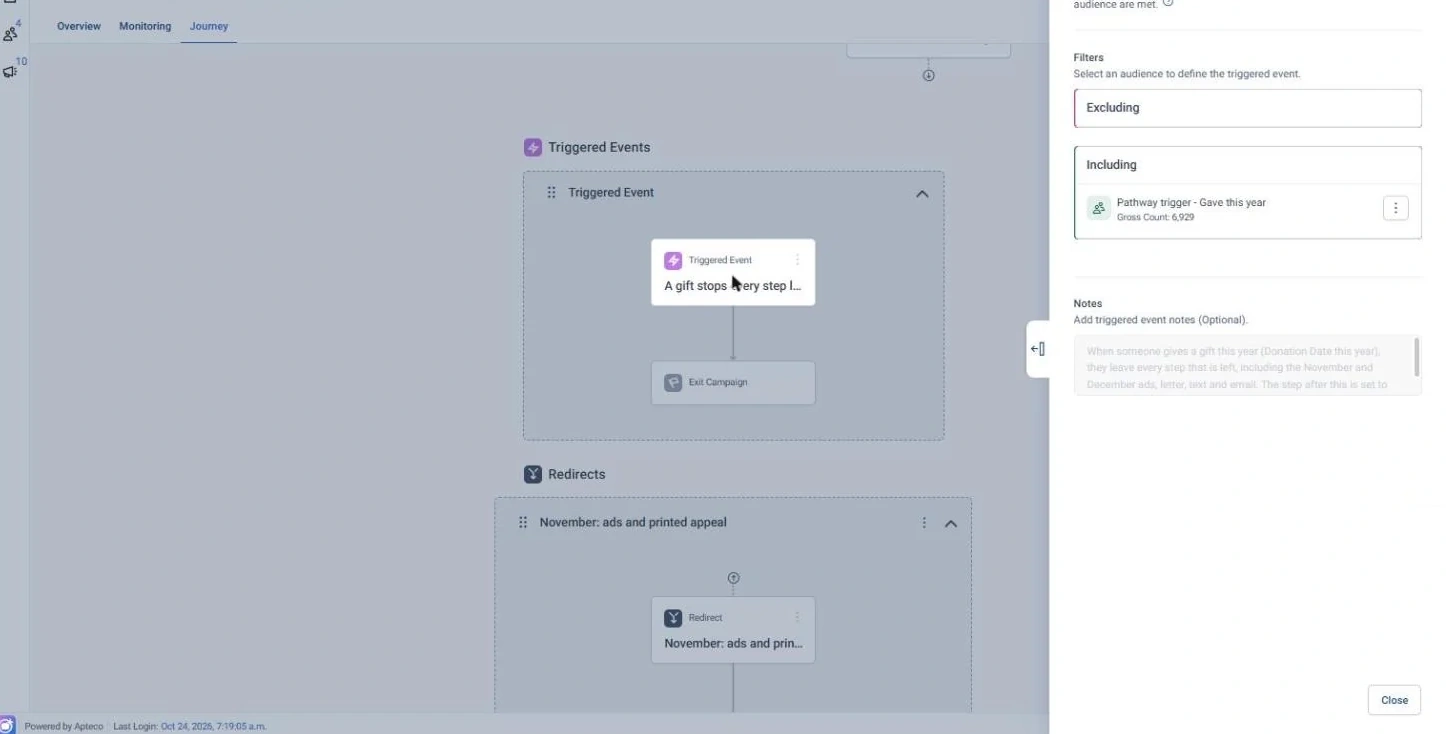
Year-End Recovery · 'A gift stops every step left' trigger, in Apteco Orbit: The settings for the A gift stops every step left trigger: it uses the Pathway trigger - Gave this year list.
Year-End Recovery · 'A gift stops every step left' trigger The settings for the A gift stops every step left trigger: it uses the Pathway trigger - Gave this year list. A gift this year takes a person out of every step left, ads included.

Learn: what flows back

LYBUNT flips to 0 when their gift arrives at the next refresh. Donor Value Movement shows who came back and at what level.

Results land on the same supporter record, so the next run starts from what just happened.

Proven. A Christmas appeal segmented by behaviour clusters brought 6% more response and income with 10% fewer mailings, saving £25,000. See a similar use case

Where you see it in Orbit

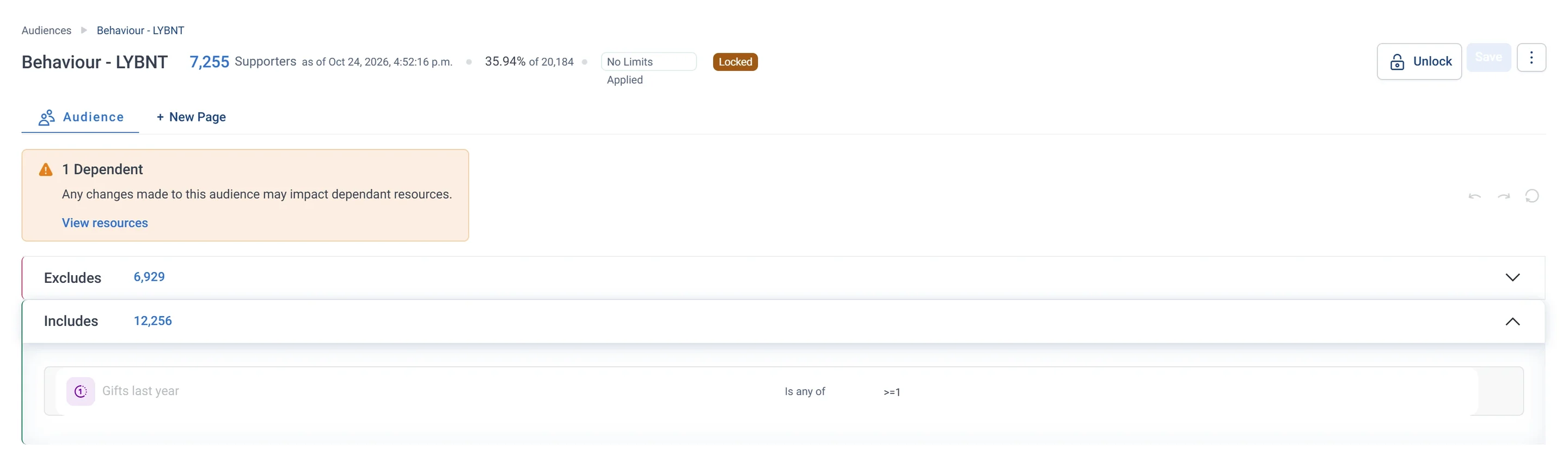
Behaviour - LYBNT · Audience rules, part 2 of 2, in Apteco Orbit: The second half of the rules: the Excludes box, which takes out anyone who gave this year.
Behaviour - LYBNT · Audience rules, part 2 of 2 The second half of the rules: the Excludes box, which takes out anyone who gave this year. What is left is last year's donors who have not given again, so an appeal reaches them before they lapse.
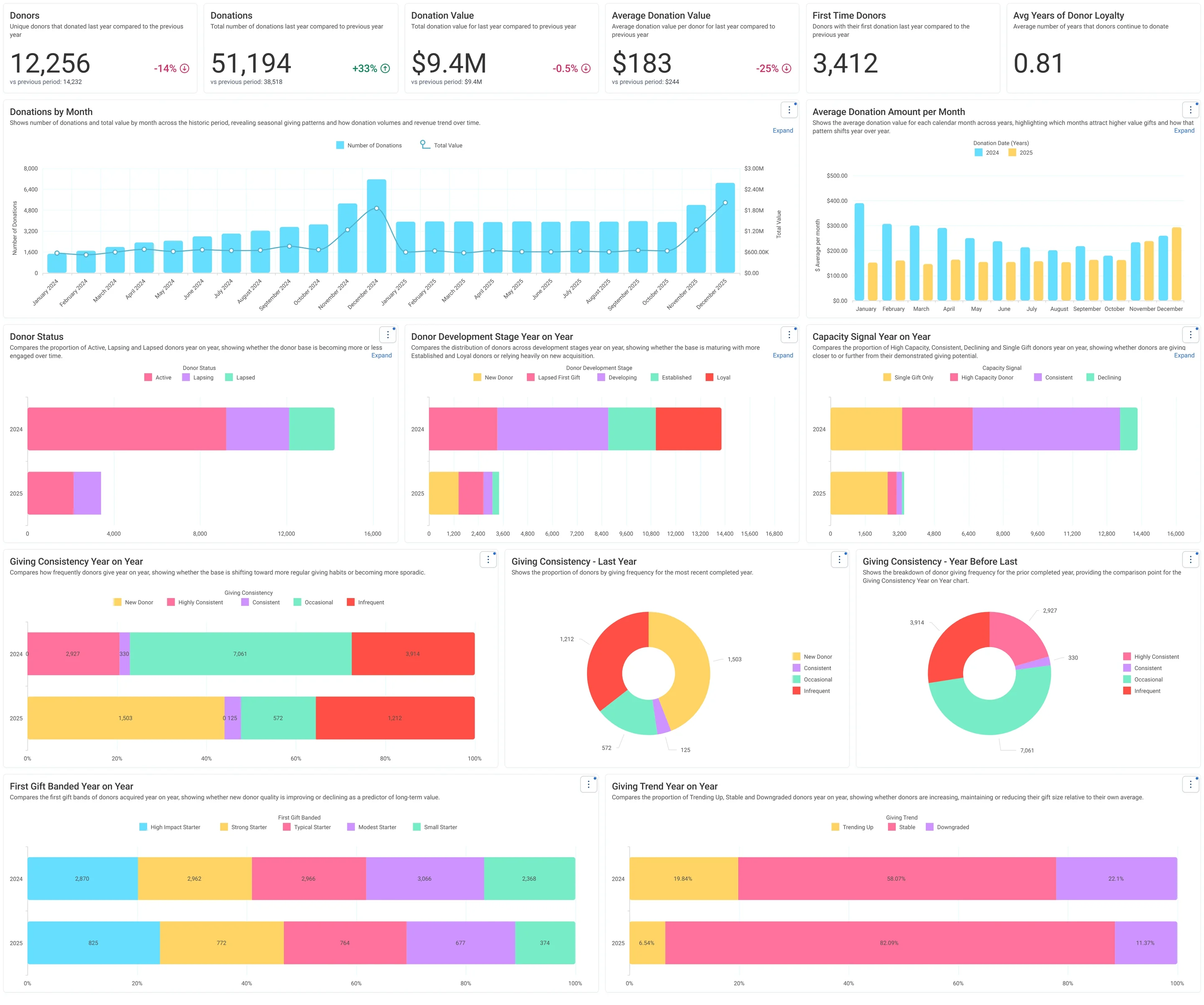
Donation Analysis · Historic, in Apteco Orbit: The Historic tab, with cards comparing last year with the year before, gifts by month, and paired bars for donor status, stages and giving habits.
Donation Analysis · Historic The Historic tab, with cards comparing last year with the year before, gifts by month, and paired bars for donor status, stages and giving habits. A fundraiser or board member sees how the donor base changed year on year.
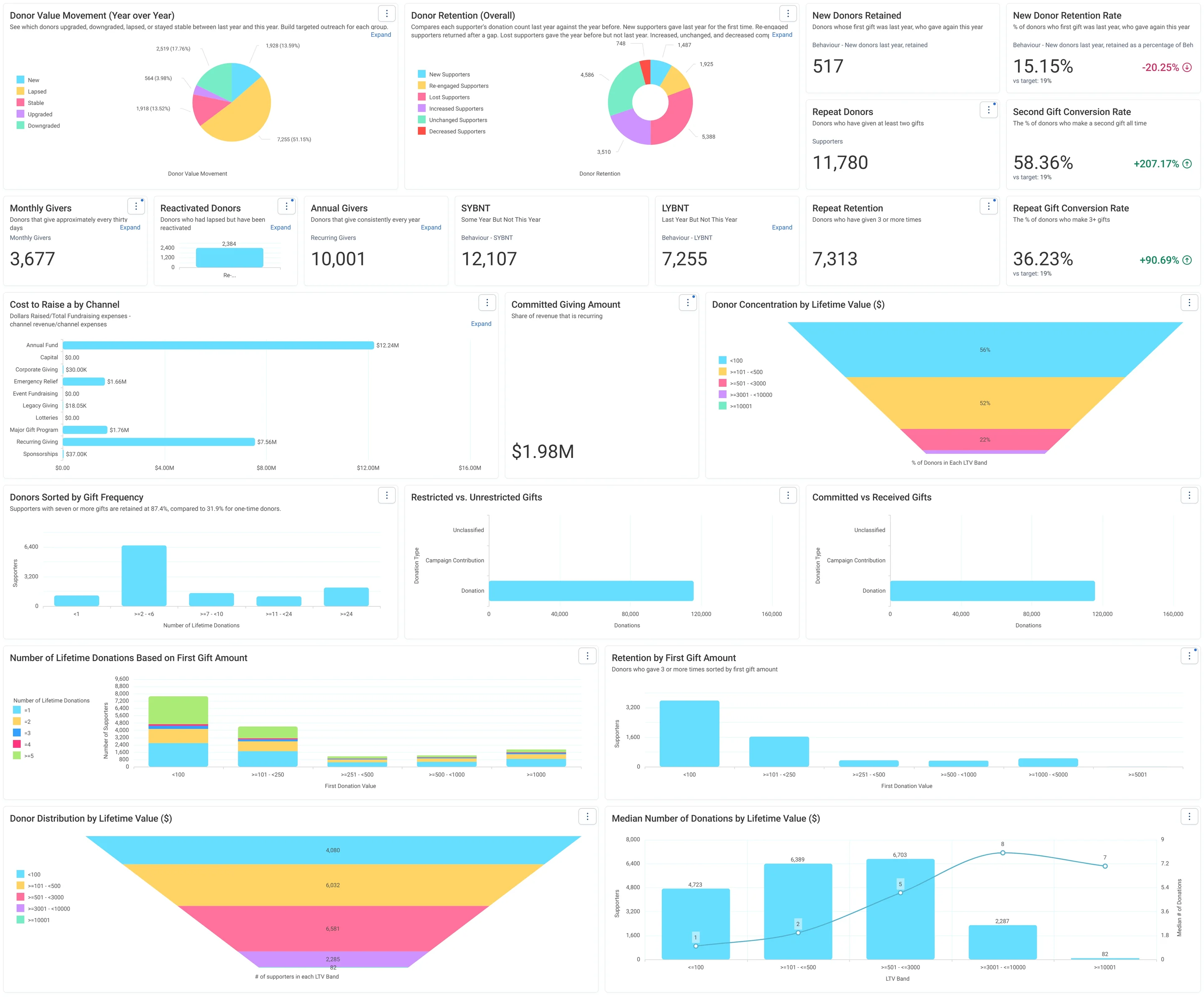
Jumping Off Metrics · Donor Health - Board Report, in Apteco Orbit: The Donor Health - Board Report tab, with cards on new, repeat and regular donors, charts of retention, value changes and cost to raise a dollar.
Jumping Off Metrics · Donor Health - Board Report The Donor Health - Board Report tab, with cards on new, repeat and regular donors, charts of retention, value changes and cost to raise a dollar. A board sees whether the charity is keeping its donors and where to focus.

Questions people ask

What problem does Year-End Recovery solve?

A year-end list that builds itself. Everyone who gave last year and hasn’t yet this year, ranked by value, timed to their own calendar, and seen in full.

Which data does it need?

Donations: supporter ID, gift amount, gift date; Participants: events this year; Volunteer timesheets: shifts this year; Addresses: postal address for mail; Supporters: contact preferences

Why can't my CRM do this on its own?

LYBUNT reports only count gifts the CRM holds. A gift made on another platform, or a supporter who came to events this year, doesn’t show, so the list can chase people who already gave or never left.

Which channels does it use?

Email, Direct mail, Google, Meta, SMS. October: Goal and objectives Then October: Email Then October: Email Then November: Direct mail.

Who runs it?

Fundraising.

Every pathway in the Field Guide runs on Apteco Mission, beside your CRM.

See it with your own data

An Apteco Architect walks you through this pathway on your own data.

Schedule Time with an Apteco Architect