Apteco Mission Field Guide Schedule Time with an Apteco Architect Play with a Live System

The Upgrade Ask

4 steps · Email, Direct mail, SMS

Ask for what they have already shown they can give.
Watch the pathway · about a minute
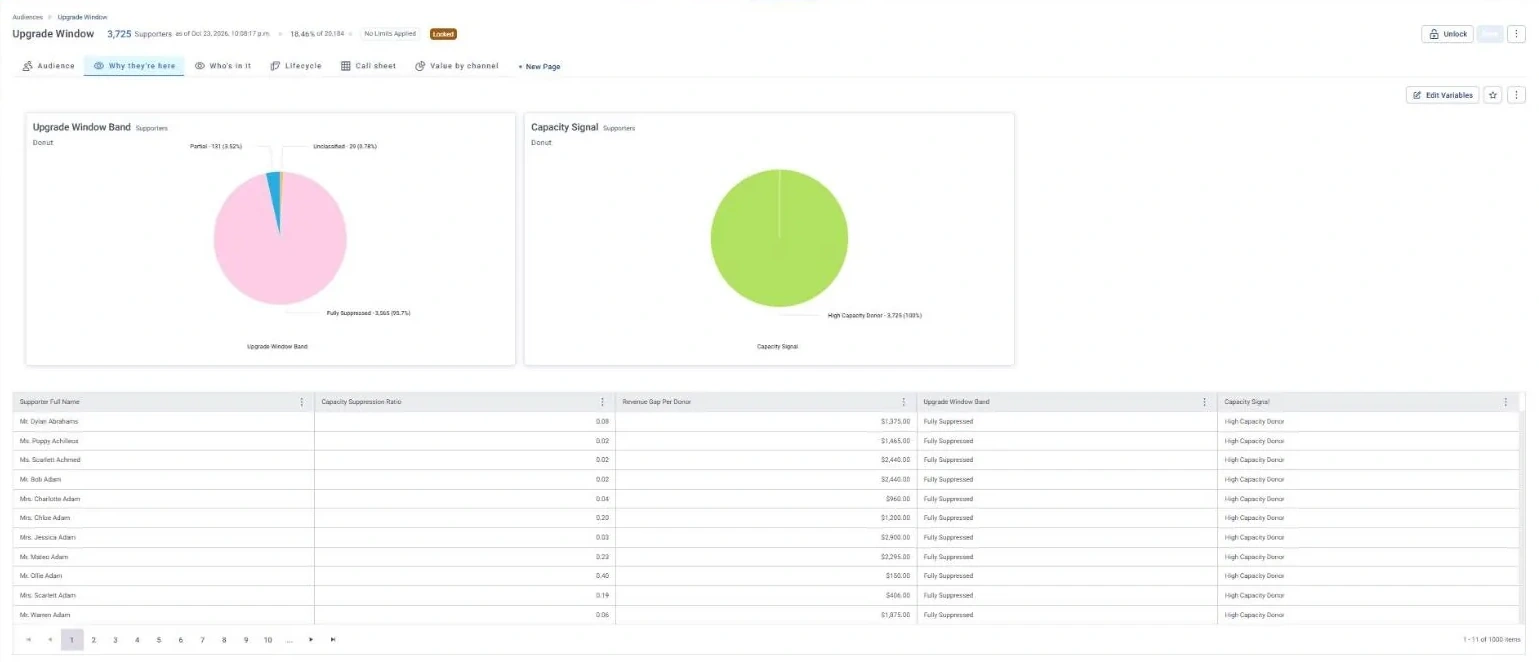
Upgrade Window · Why they're here, in Apteco Orbit: The Why they're here tab: donuts of Capacity Signal and Upgrade Window Band, with a table of Revenue Gap Per Donor.
Upgrade Window · Why they're here The Why they're here tab: donuts of Capacity Signal and Upgrade Window Band, with a table of Revenue Gap Per Donor. Most give far below what they could, so there is real room to ask for more.

Sample charity: the people and numbers in these screens are made up, so the picture shows the tool, not a result.

The problem it solves

Asks matched to what people can give.

Why your CRM misses this. To ask for more you need someone’s largest gift. When history is split between an old CRM, the finance system and today’s CRM, the peak can sit in a system nobody checks anymore.

Data

1 of its 2 sources usually sit outside the CRM

Signals

it reads 4 of them

Reach

3 channels: email, direct mail, sms

Journey

4 steps, start to finish

Connect: the data it draws on

Mission joins these into one record per person, beside your CRM.

Sources

Analyze: who it finds

  • Capacity Suppression Ratio How does this supporter's latest gift compare with the biggest they have ever made? Find donors giving well below their peak and build an upgrade ask around the gap.
  • Upgrade Window Band How much room is there between this supporter's latest gift and their biggest? Put the supporters with the biggest gap between last gift and best gift first in your upgrade list.
  • Revenue Gap Per Donor How much more would this supporter give if they returned to their peak gift? Add it up across your file to show leadership the total you could recover.
  • Giving Trend Is this supporter's latest gift bigger, smaller, or about the same as their usual gift? Talk upgrades with donors trending up, and call donors trending down before they lapse.

Audience: Upgrade Window

Who is giving less than they used to, and how much is that worth? These supporters have already shown they can give more: their largest gift is more than double their most recent one.

What to do: Make an upgrade ask anchored to their previous peak gift. Revenue Gap Per Donor shows what each one is worth.
Read the audience, tab by tab

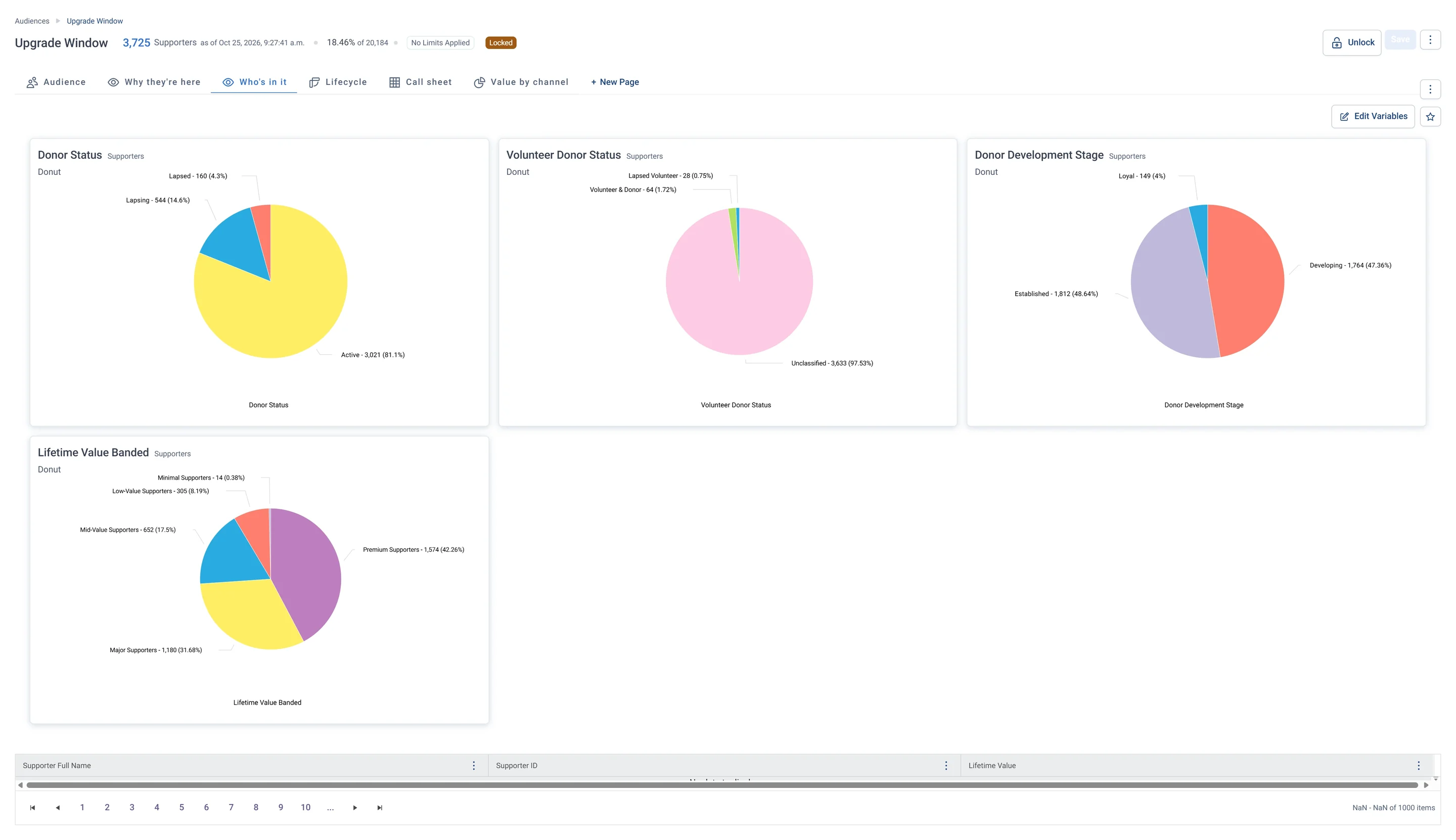
Upgrade Window · Who's in it, in Apteco Orbit: The Who's in it tab: four donuts of donor status, volunteer status, donor stage and lifetime value.
Upgrade Window · Who's in it The Who's in it tab: four donuts of donor status, volunteer status, donor stage and lifetime value. Most are active, already generous donors who could still give more.

Activate: the journey

Each step names when it happens and the channel it uses. Under the steps is the campaign as it is built in Orbit, in 2 parts. Read them in order.

  1. Day 0

    Email

    A personal ask anchored to their peak gift, with the amount filled in automatically.

  2. Day 0

    Direct mail

    Fully Suppressed supporters with the largest Revenue Gap get the same ask in print.

  3. Day 10

    Email

    Clicked but did not give: a reminder.

  4. Day 10

    SMS

    Did not open: a short text.
  • Exit: a gift ends the journey.

The campaign in Orbit

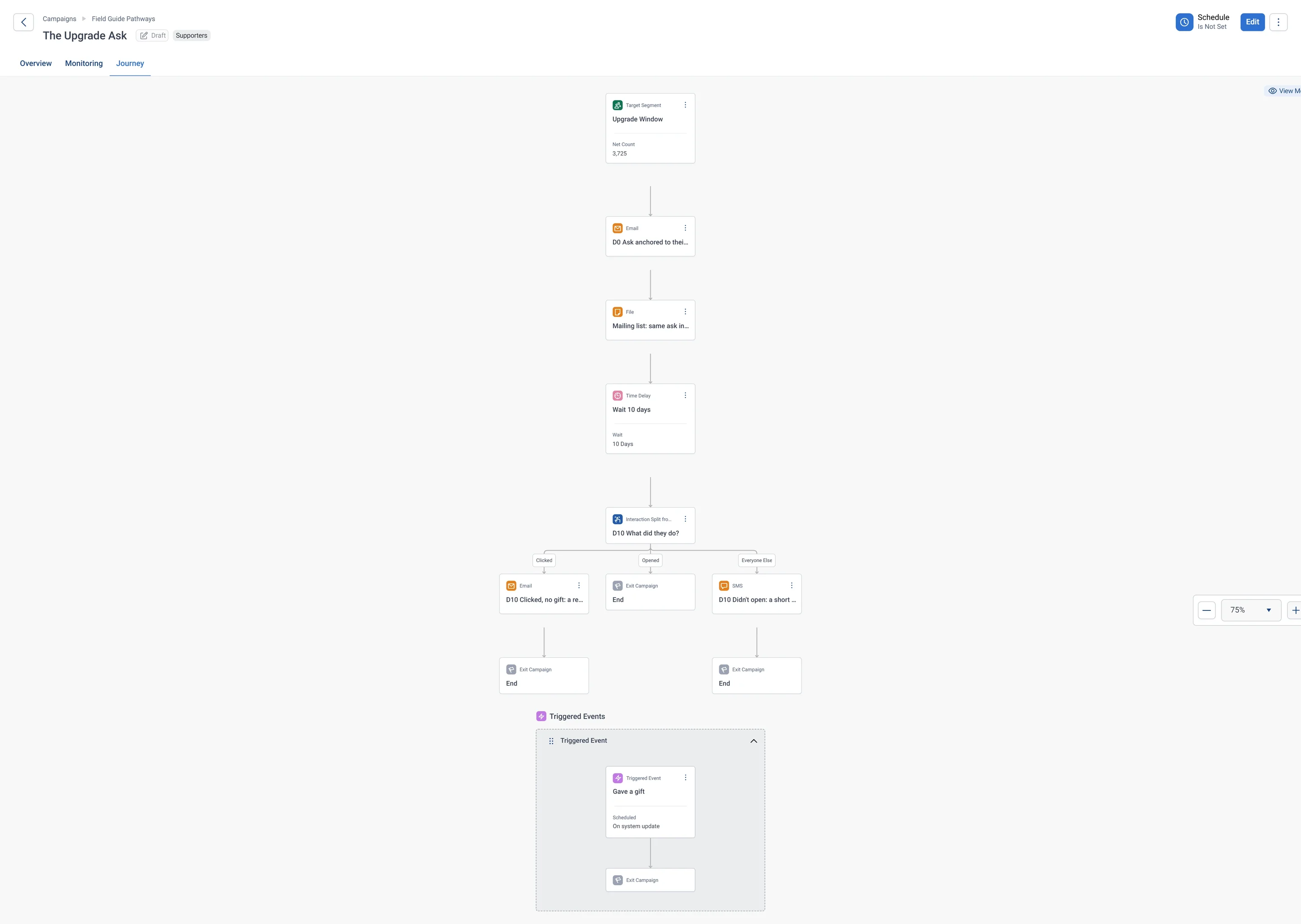
The Upgrade Ask · journey, part 1 of 2, in Apteco Orbit: The first half of the journey: the Upgrade Window audience gets an email ask and a printed ask, waits, then splits by what they did into Clicked, Opened and everyone else.
The Upgrade Ask · journey, part 1 of 2 The first half of the journey: the Upgrade Window audience gets an email ask and a printed ask, waits, then splits by what they did into Clicked, Opened and everyone else. One ask gets the follow-up that fits each person.
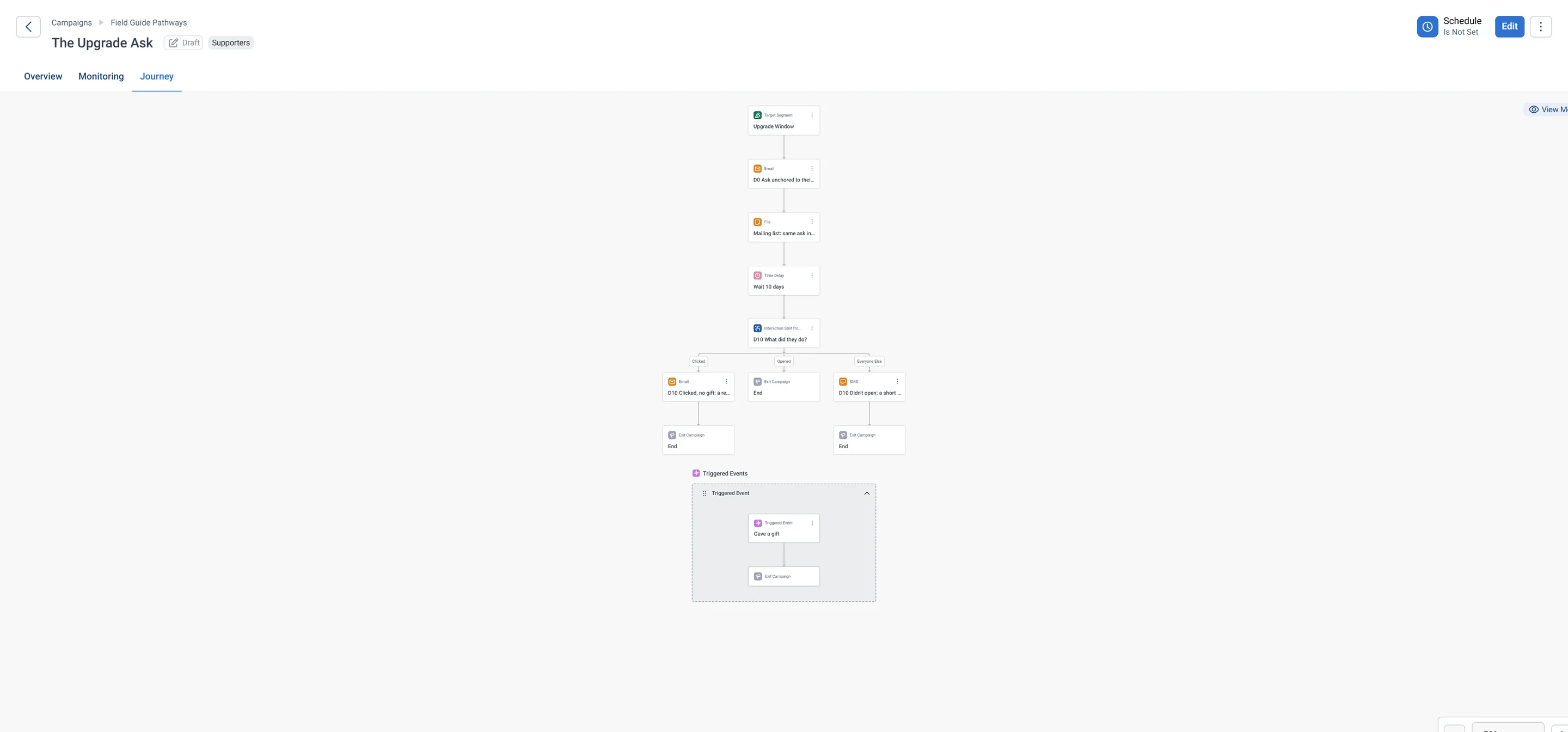
The Upgrade Ask · journey, part 2 of 2, in Apteco Orbit: The second half of the journey: the split into Clicked, Opened and everyone else, its endings, and the Triggered Event that removes anyone who gives.
The Upgrade Ask · journey, part 2 of 2 The second half of the journey: the split into Clicked, Opened and everyone else, its endings, and the Triggered Event that removes anyone who gives. The journey stops asking once a gift comes in.

Learn: what flows back

A bigger gift lifts the Capacity Suppression Ratio and can move them to Upgraded in Donor Value Movement.

Results land on the same supporter record, so the next run starts from what just happened.
Where you see it in Orbit

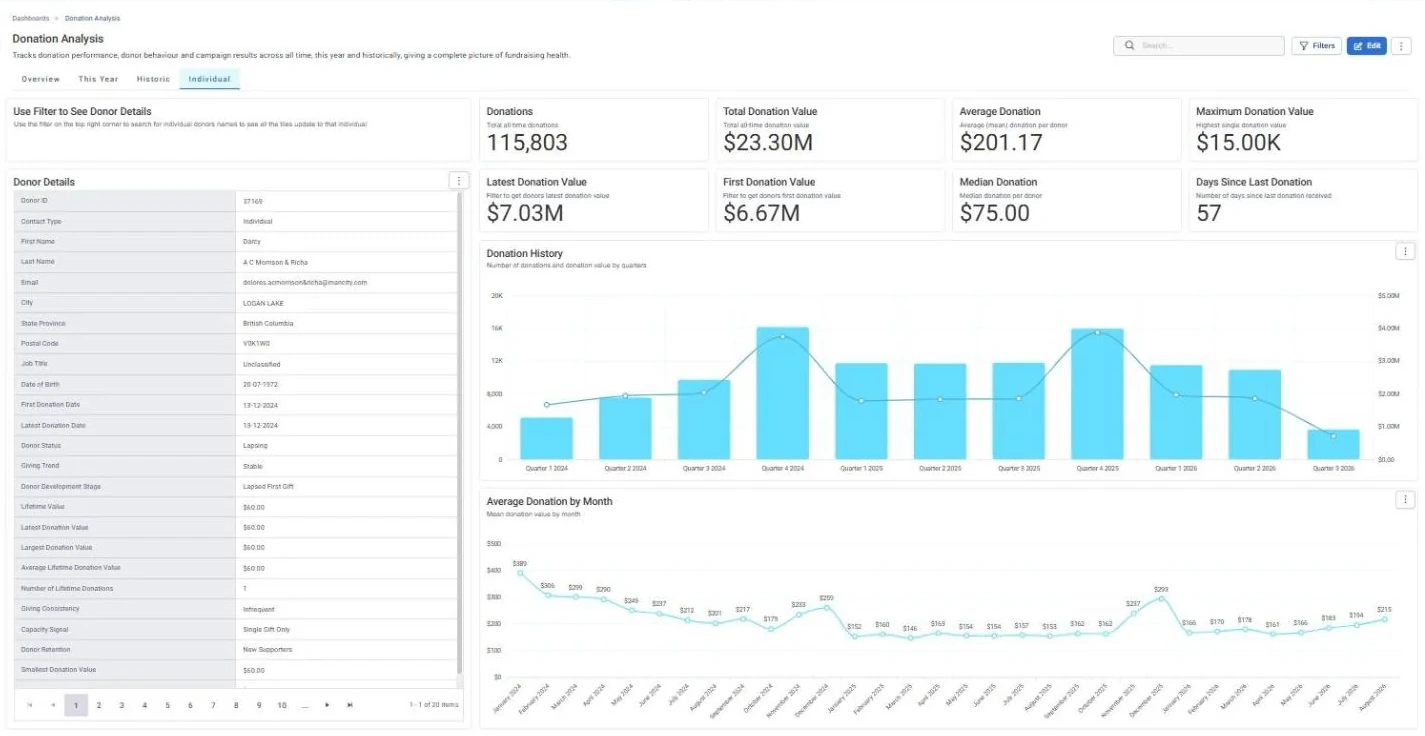
Donation Analysis · Individual, in Apteco Orbit: The Individual tab, with a Donor Details card for one supporter beside totals for all giving, gifts by quarter and average gift by month.
Donation Analysis · Individual The Individual tab, with a Donor Details card for one supporter beside totals for all giving, gifts by quarter and average gift by month. A fundraiser filters to one donor and reads their giving story before a call or visit.

Questions people ask

What problem does The Upgrade Ask solve?

Asks matched to what people can give. Ask for what they have already shown they can give.

Who does The Upgrade Ask reach?

Upgrade Window: Who is giving less than they used to, and how much is that worth? These supporters have already shown they can give more: their largest gift is more than double their most recent one.

Which data does it need?

Donations: supporter ID, gift amount, gift date; Addresses: postal address for mail

Why can't my CRM do this on its own?

To ask for more you need someone’s largest gift. When history is split between an old CRM, the finance system and today’s CRM, the peak can sit in a system nobody checks anymore.

Which channels does it use?

Email, Direct mail, SMS. Day 0: Email Then Day 0: Direct mail Then Day 10: Email Then Day 10: SMS.

Who runs it?

Fundraising.

Every pathway in the Field Guide runs on Apteco Mission, beside your CRM.

See it with your own data

An Apteco Architect walks you through this pathway on your own data.

Schedule Time with an Apteco Architect