Apteco Mission Field Guide Schedule Time with an Apteco Architect Play with a Live System

Upgrade Window

Audience on the Grow tab

Who is giving less than they used to, and how much is that worth? These supporters have already shown they can give more: their largest gift is more than double their most recent one.

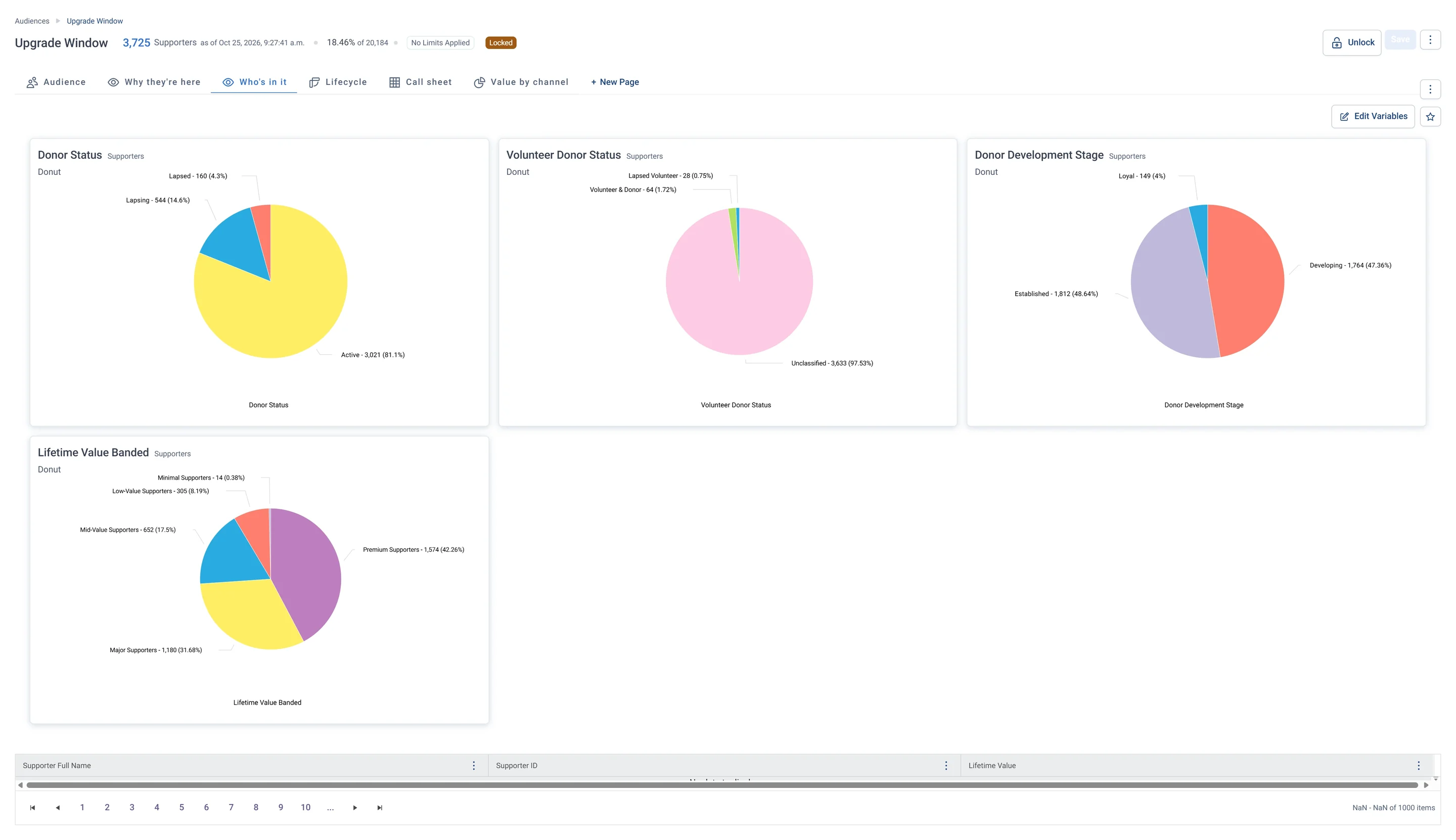
Upgrade Window · Who's in it, in Apteco Orbit: The Who's in it tab: four donuts of donor status, volunteer status, donor stage and lifetime value.
Upgrade Window · Who's in it The Who's in it tab: four donuts of donor status, volunteer status, donor stage and lifetime value. Most are active, already generous donors who could still give more.
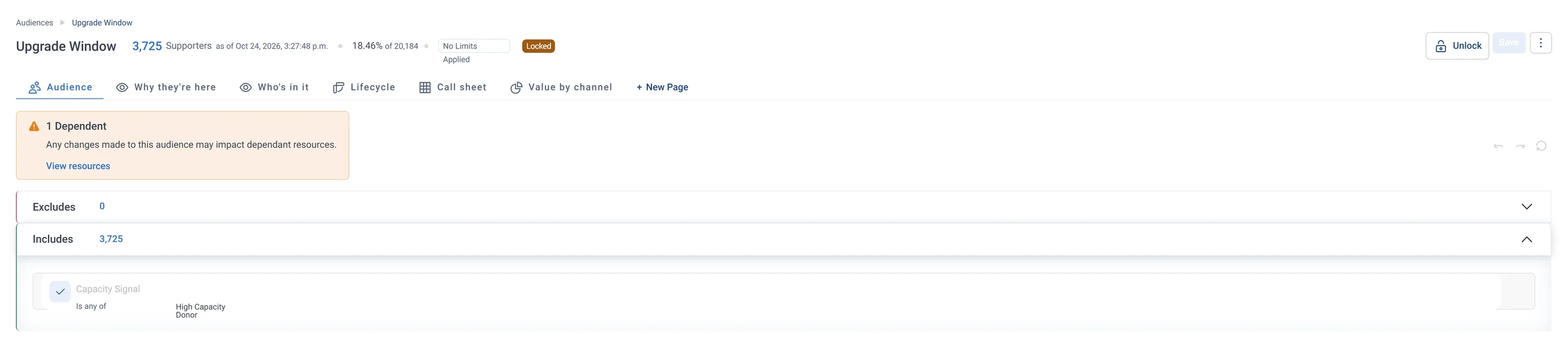
Upgrade Window · Audience rules, in Apteco Orbit: The rules tab: one rule under Includes, Capacity Signal is High Capacity Donor, and nothing under Excludes.
Upgrade Window · Audience rules The rules tab: one rule under Includes, Capacity Signal is High Capacity Donor, and nothing under Excludes. It gathers people who could afford to give more, ready for an ask for a bigger or more regular gift.
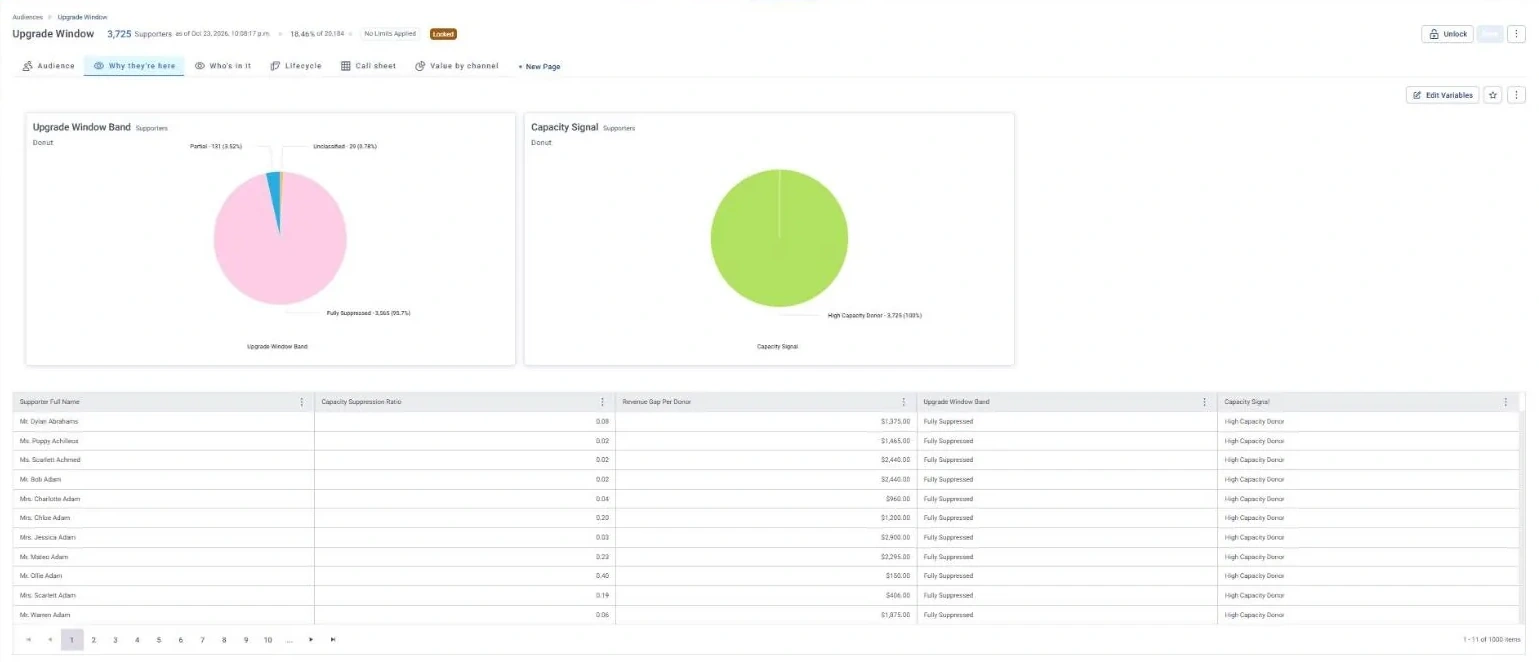
Upgrade Window · Why they're here, in Apteco Orbit: The Why they're here tab: donuts of Capacity Signal and Upgrade Window Band, with a table of Revenue Gap Per Donor.
Upgrade Window · Why they're here The Why they're here tab: donuts of Capacity Signal and Upgrade Window Band, with a table of Revenue Gap Per Donor. Most give far below what they could, so there is real room to ask for more.
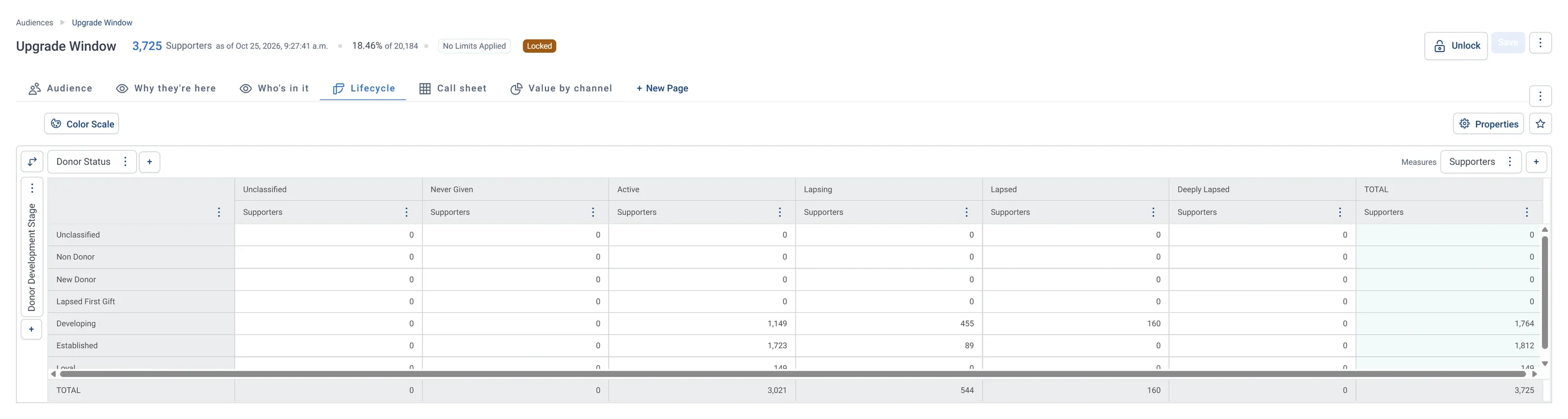
Upgrade Window · Lifecycle, in Apteco Orbit: The Lifecycle tab: a grid of donor stage against donor status.
Upgrade Window · Lifecycle The Lifecycle tab: a grid of donor stage against donor status. Established and Developing donors make up almost everyone, so a fundraiser asks the active ones to upgrade and wins back the lapsing ones first.
Upgrade Window · Call sheet, in Apteco Orbit: The Call sheet tab: names, lifetime value, days since last gift, a suggested next step and contact flags.
Upgrade Window · Call sheet The Call sheet tab: names, lifetime value, days since last gift, a suggested next step and contact flags. Most next steps are Major gift cultivation, so major-gift staff can work down the list.
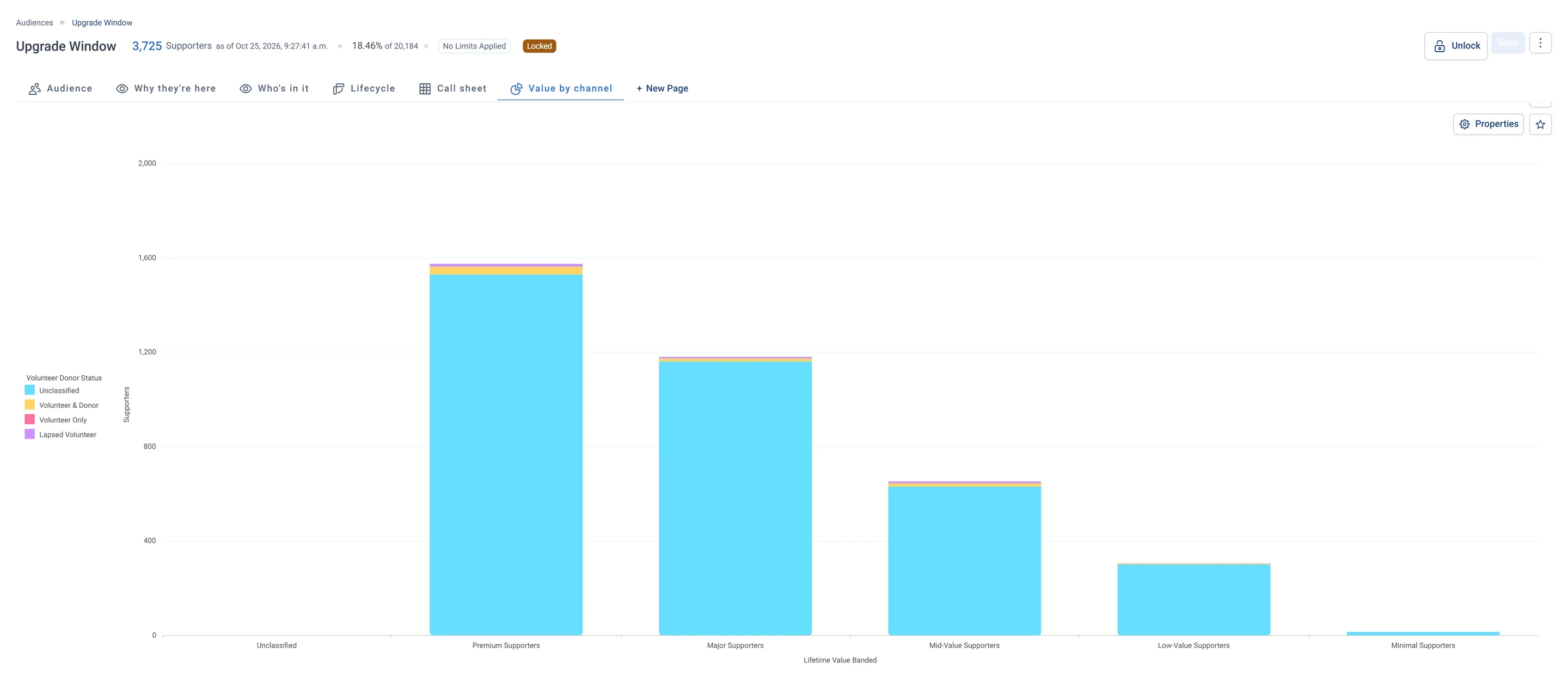
Upgrade Window · Value by channel, in Apteco Orbit: The Value by channel tab: stacked bars of lifetime value band, coloured by volunteer status.
Upgrade Window · Value by channel The Value by channel tab: stacked bars of lifetime value band, coloured by volunteer status. Premium is the tallest bar, so the upgrade list is led by people who already give the most.

Sample charity: the people and numbers in these screens are made up, so the picture shows the tool, not a result. The Audience tab is Orbit's own. The other tabs are views added to this audience's workbook; Get to know the list shows how to add them.
Who is in it

This is the list for upgrade asks, such as inviting a bigger or more regular gift. The audience is locked because 1 other item depends on it.

4

insights it is built from

Grow

its tab on the Field Guide Audiences dashboard

1

pathway runs it

Upgrade Window · Audience rules, in Apteco Orbit: The rules tab: one rule under Includes, Capacity Signal is High Capacity Donor, and nothing under Excludes.
Upgrade Window · Audience rules The rules tab: one rule under Includes, Capacity Signal is High Capacity Donor, and nothing under Excludes. It gathers people who could afford to give more, ready for an ask for a bigger or more regular gift.
Upgrade Window · Why they're here, in Apteco Orbit: The Why they're here tab: donuts of Capacity Signal and Upgrade Window Band, with a table of Revenue Gap Per Donor.
Upgrade Window · Why they're here The Why they're here tab: donuts of Capacity Signal and Upgrade Window Band, with a table of Revenue Gap Per Donor. Most give far below what they could, so there is real room to ask for more.

What to do next

Make an upgrade ask anchored to their previous peak gift. Revenue Gap Per Donor shows what each one is worth.

The The Upgrade Ask pathway runs this list. Here is each step, then the journey as it is built in Orbit.

  1. Day 0

    Email

    A personal ask anchored to their peak gift, with the amount filled in automatically.

  2. Day 0

    Direct mail

    Fully Suppressed supporters with the largest Revenue Gap get the same ask in print.

  3. Day 10

    Email

    Clicked but did not give: a reminder.

  4. Day 10

    SMS

    Did not open: a short text.

Watch the pathway
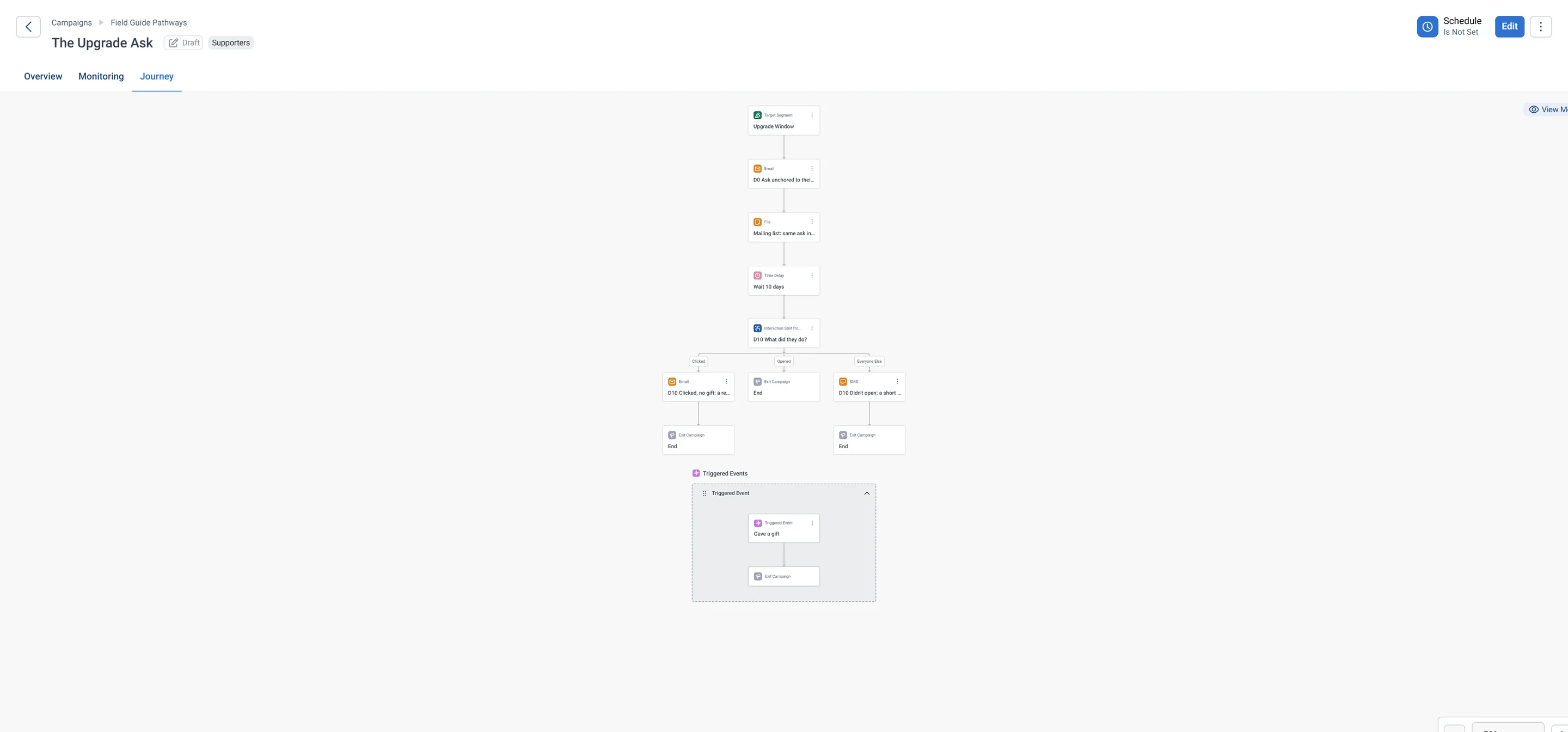
The Upgrade Ask · journey, part 1 of 2, in Apteco Orbit: The first half of the journey: the Upgrade Window audience gets an email ask and a printed ask, waits, then splits by what they did into Clicked, Opened and everyone else.
The Upgrade Ask · journey, part 1 of 2 The first half of the journey: the Upgrade Window audience gets an email ask and a printed ask, waits, then splits by what they did into Clicked, Opened and everyone else. One ask gets the follow-up that fits each person.
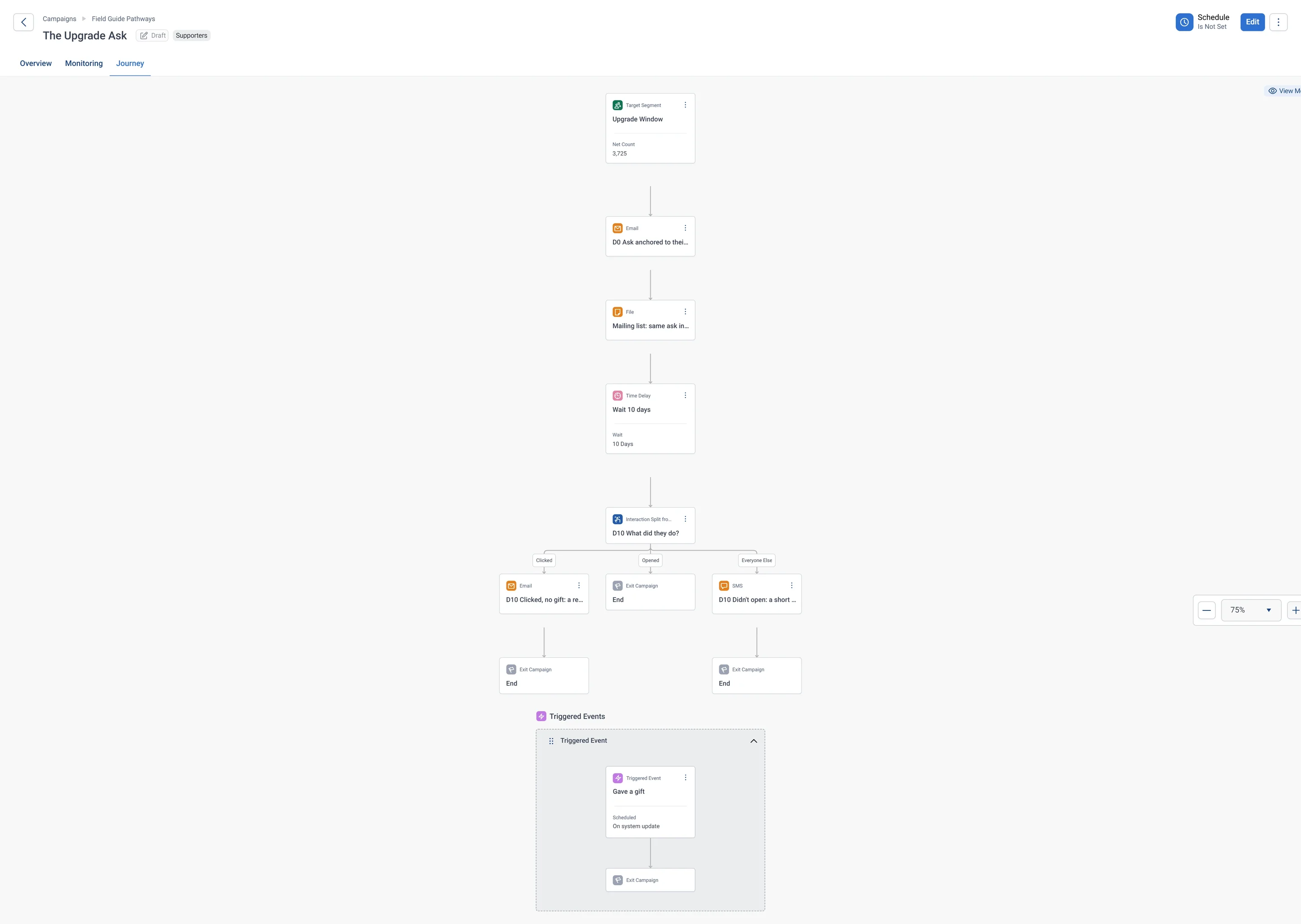
The Upgrade Ask · journey, part 2 of 2, in Apteco Orbit: The second half of the journey: the split into Clicked, Opened and everyone else, its endings, and the Triggered Event that removes anyone who gives.
The Upgrade Ask · journey, part 2 of 2 The second half of the journey: the split into Clicked, Opened and everyone else, its endings, and the Triggered Event that removes anyone who gives. The journey stops asking once a gift comes in.

What it is built from

Each insight below is worked out by Orbit for every supporter. Click one to read it in the Field Guide.

All 25+ audiences

Insights

Next to it on the Grow tab

Questions people ask

Who is in the Upgrade Window audience?

Who is giving less than they used to, and how much is that worth? These supporters have already shown they can give more: their largest gift is more than double their most recent one.

This is the list for upgrade asks, such as inviting a bigger or more regular gift. The audience is locked because 1 other item depends on it.

What should I do with Upgrade Window?

Make an upgrade ask anchored to their previous peak gift. Revenue Gap Per Donor shows what each one is worth.

Which data does Upgrade Window use?

Capacity Suppression Ratio, Revenue Gap Per Donor, Upgrade Window Band, Capacity Signal. Each is an insight Orbit works out for every supporter.

Which pathway uses Upgrade Window?

The Upgrade Ask: Ask for what they have already shown they can give.

How do I build it in Apteco Orbit?

Open Audiences, start a new audience and add each rule: who to let in, then who to leave out. Build an audience by hand walks you through it, and Ask Orin to build it shows how Orin can draft it for you.

Learn Mission is a free course. Part 5 is all about audiences: you build one, read it tab by tab and tidy it before anyone gets a message.