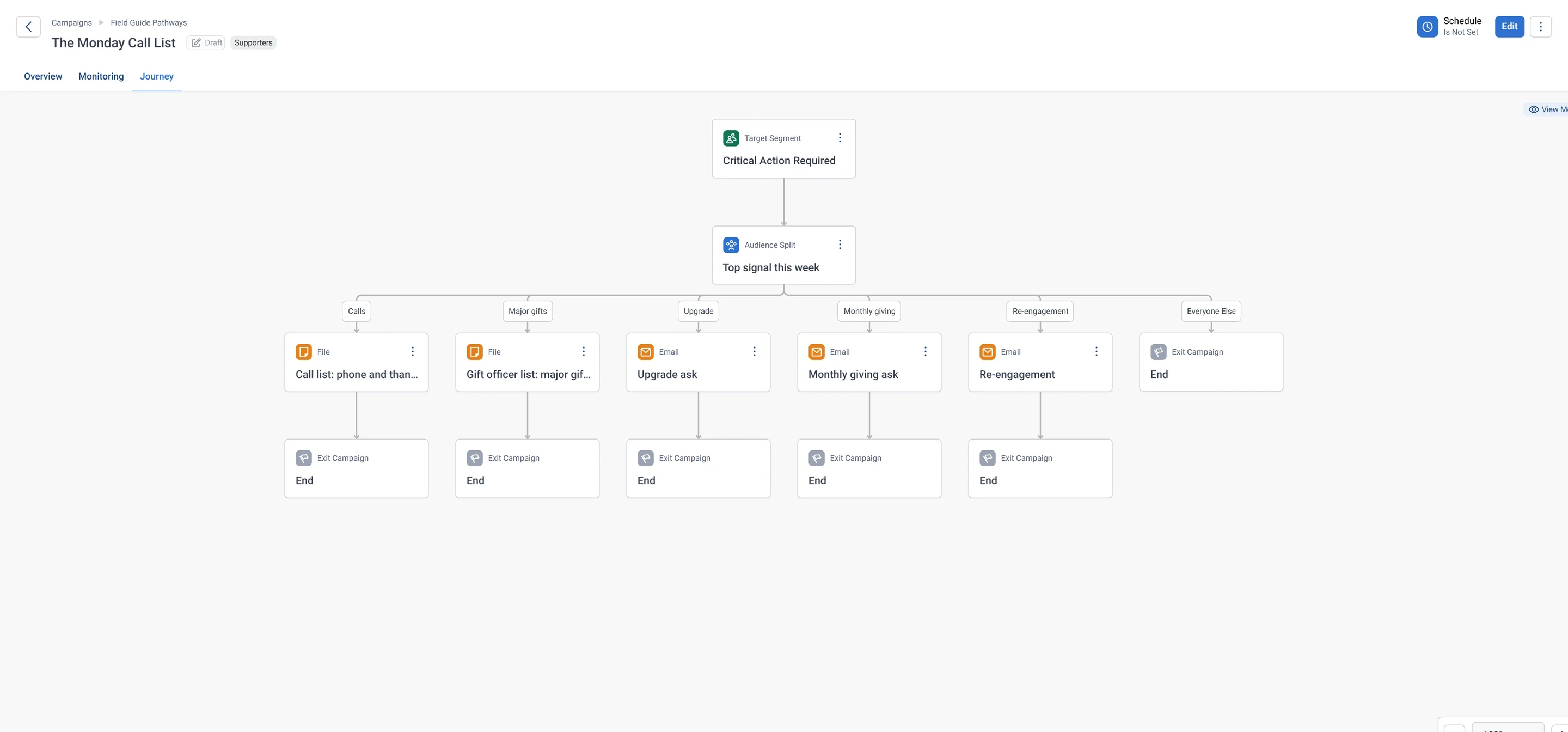
Apteco Mission answers the question behind the question: who should each person call this week? Its Monday Call List pathway ranks this week's calls, with events, volunteer hours and campaigns on the same line. It says the signals that say call this person this week are split up, with gifts in the CRM, attendance in ticketing and hours in a spreadsheet, so the list often comes from someone's memory.
What a task list cannot do. A task list shows what someone already planned. In the Monday Call List, phone and thank-you call paths become this week's call list. Major gift conversations go to your gift officer, and what came of them is written back onto the record. Mission is built to respect do not phone, email and SMS preferences on every path.
Where to find a home page. Many donor systems give each user a home page with a tasks tile. In CiviCRM, the home page is a dashboard of dashlets, any report can be made into one, and an Activities dashlet comes with it. Apteco hosts CiviCRM for charities that want it run for them.
Give every task an owner. A task with no one assigned never shows on anyone's home page. Make the owner field required. When someone leaves, move their open tasks to a colleague the same week.
Build it once, then copy it. Set up one good home page for each role, such as gift officer, events or data entry. Then walk each person through adding the same tiles. Keep it short: overdue tasks, tasks due this week, their own recent activities, and the supporters they look after. A home page with too many tiles gets ignored.
Get the work into the CRM. A home page only shows what is recorded. If thank-you calls sit in a spreadsheet and event follow-ups in the email tool, the page looks empty and people stop opening it. Agree what counts as an activity, and log it where it belongs.
Pair the two. Use the home page for what is due. Use Mission's Monday list for who to call. The Monday Call List pathway runs every Monday, so each person starts the week with names, not only tasks.