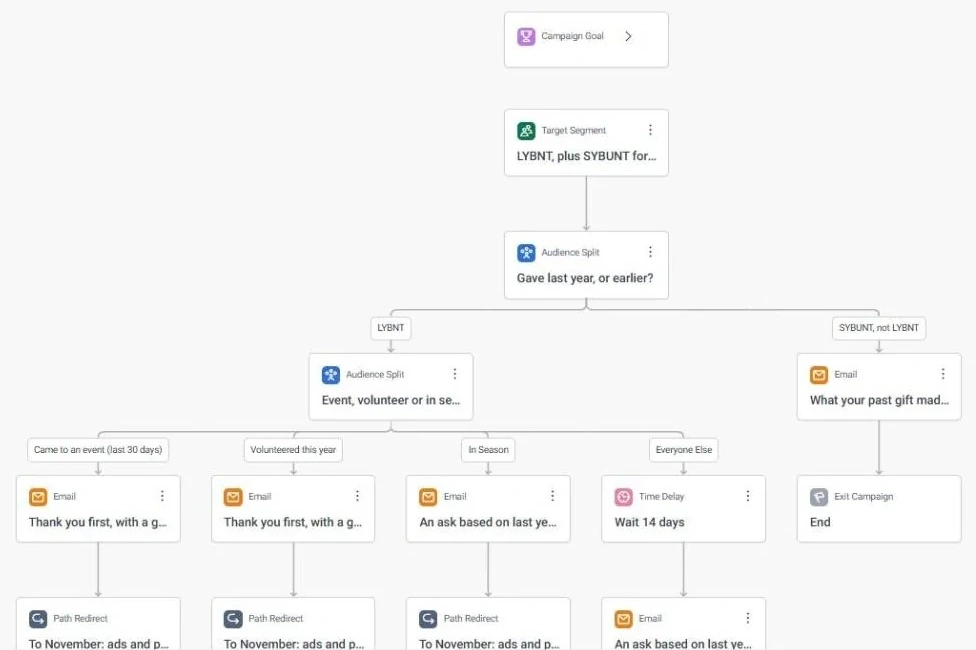
Apteco Mission joins your CRM, giving platforms and event tools into one record per person (Does Mission replace my CRM?), the record a combined statement needs. The Year-End Recovery pathway shows why: LYBUNT reports only count gifts the CRM holds, so a gift made on another platform does not show. Mission does not print the statement. Your CRM does that.
Get every gift onto one record per donor first, then run the statement from that one place. Bring in gifts from online forms, events, peer-to-peer pages and monthly giving. Merge duplicate records. Decide which gifts belong on a tax statement and which don't, such as soft credits, donor-advised fund grants and the value of a gala dinner. Match each platform's payouts to your CRM. Then check a sample of statements by hand before anything goes out.
One statement is allowed. In the US, IRS Publication 1771 says one acknowledgment, such as an annual summary, can cover several gifts of $250 or more. It must show your charity's name, the amount given, and whether the donor got goods or services in return. The IRS adds that charities typically send these by January 31 of the next year. In Canada, the CRA says a charity may issue one cumulative receipt for the year for cash gifts, but each non-cash gift needs its own receipt. It suggests issuing receipts by February 28.
Why statements go wrong. Gifts arrive through many doors. An online form, a gala ticket, a peer-to-peer page and a monthly card can each land in a different system, or on a second copy of the same person. Then the statement misses a gift, or one donor gets two statements that each tell half the story. The fix starts well before the new year: one record per person, with every source feeding it.
Decide what counts. Not every gift on a record belongs on a tax statement. Count money under the person who paid it, and leave soft credits off. Donor-advised fund grants may need a note that the letter is not a tax receipt. Where a gift came with a dinner or a ticket, the IRS asks for a good faith estimate of what the donor received. Write these rules down once.
Couples and joint gifts. Decide whose name goes on the statement when a couple gives from a joint account. Canada's tax agency says a receipt must be in the name of the true donor, and a cheque from a joint account can be receipted to either name or both. Keep one record per person, linked as a household, so a joint gift can go on one statement without losing who gave what.
Steps, in order. In the fall, list every place gifts came in this year, and connect or import each one into your CRM. Merge duplicates, starting with donors who gave through more than one channel. In early January, close the year: match every payout from every platform to gifts in the CRM. Run the statements. Check twenty by hand, including a couple, a monthly donor and a gala guest. Then send.
Mission in the steps. In the fall, the list of every place gifts came in is what Mission joins. Mission reads those places by file or a direct connection, and your CRM keeps the receipts it holds today (Where does my supporters' data live?). If you would rather keep every gift in one CRM, Apteco hosts CiviCRM (Can Apteco host our CRM?). Its Canada Tax Receipts extension can send a receipt for one gift, receipts in bulk, or a yearly receipt. Its makers say each charity must check its own receipts meet CRA rules, so ask your finance lead (Can CiviCRM send CRA tax receipts?).