
Apteco Mission Field Guide Schedule Time with an Apteco Architect Play with a Live System

Rebate Program Application

Campaign journey in Apteco Orbit

What happens to the people who never open the email? Can the journey try another channel? Email reaches the people who read email. The rest of your supporters are still there, and a journey can reach them too.
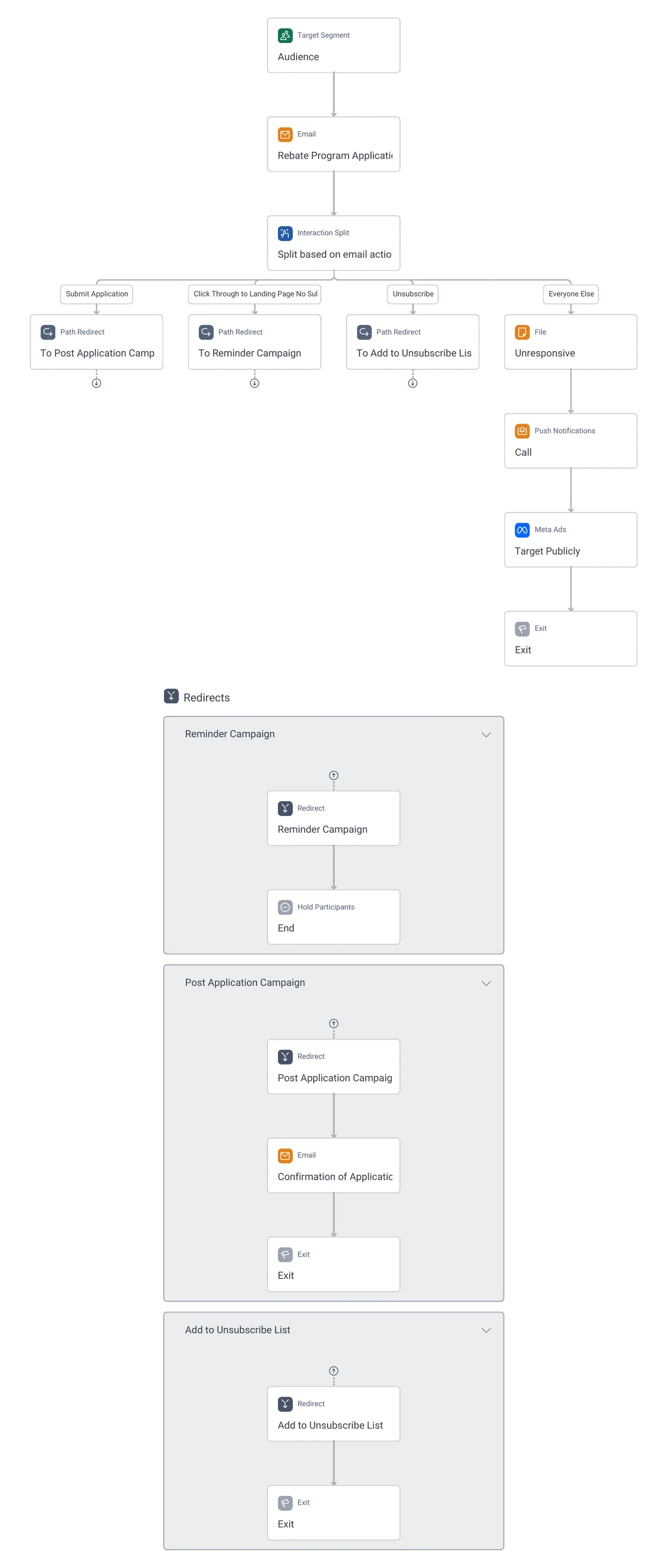
Rebate Program Application · the whole journey, in Apteco Orbit: Application invitation email, an interaction split on the email action, a reminder path, a confirmation on submission, and Meta Ads plus push notifications for the…
Rebate Program Application · the whole journey Application invitation email, an interaction split on the email action, a reminder path, a confirmation on submission, and Meta Ads plus push notifications for the unresponsive.

Sample charity: the people and numbers in these screens are made up, so the picture shows the tool, not a result. Scroll inside the journey to read it all.

What it does

Most journeys are email all the way down. This one adds ads, push notifications and a call list for people who did not respond, and a confirmation for those who did.

Rebate Program Application starts from an Audience and sends the Rebate Program Application Invitation email.

  1. Submit Application goes to the Post Application Campaign: a Confirmation of Application Submission email, then exit.
  2. Click Through to Landing Page No Submit goes to the Reminder Campaign, with a Hold Participants step before the end.
  3. Unsubscribe goes to Add to Unsubscribe List and exits.
  4. Everyone Else (unresponsive) gets three more channels: Meta Ads (Target Publicly), Push Notifications, and a File called Unresponsive for a Call.

Where it fits

The audiences and pathways this journey works with, and how to build journeys like it.

Learn to build it

Use this shape whenever the goal is an action with a form: an application, a registration, a survey. The interaction split needs a landing page the email links to, so the journey can tell a click from a submission. The ads and push steps need those channels set up in Orbit; if you don't have them, the Unresponsive file alone, printed as a call list, does most of the work.

Learn Mission: Rebate Program Application: beyond email

Watch the lesson · about a minute

Questions people ask

What is the Rebate Program Application campaign?

Most journeys are email all the way down. This one adds ads, push notifications and a call list for people who did not respond, and a confirmation for those who did. Email reaches the people who read email. The rest of your supporters are still there, and a journey can reach them too.

Who enters it?

Rebate Program Application starts from an Audience and sends the Rebate Program Application Invitation email.

What are its steps?

Submit Application goes to the Post Application Campaign: a Confirmation of Application Submission email, then exit. Click Through to Landing Page No Submit goes to the Reminder Campaign, with a Hold Participants step before the end. Unsubscribe goes to Add to Unsubscribe List and exits. Everyone Else (unresponsive) gets three more channels: Meta Ads (Target Publicly), Push Notifications, and a File called Unresponsive for a Call.

How do I adapt it to my charity?

Use this shape whenever the goal is an action with a form: an application, a registration, a survey. The interaction split needs a landing page the email links to, so the journey can tell a click from a submission. The ads and push steps need those channels set up in Orbit; if you don't have them, the Unresponsive file alone, printed as a call list, does most of the work.

How do I get the Rebate Program Application campaign?

Send a request with the form on this page. An Apteco Architect gets in touch to set it up with you. To learn it first, open the course stop.

Request this campaign

Tell us who you are and what you need. An Apteco Architect gets your request and gets in touch to set it up with you.

Clients, partners and Apteco offices are all welcome.

We use what you send only to reply to you. Privacy