
Apteco Mission Field Guide Schedule Time with an Apteco Architect Play with a Live System

Volunteering push

Campaign journey in Apteco Orbit

How do you invite supporters to volunteer, thank the ones who do, and nudge the ones who stopped? The same invitation to a stranger, a regular and a lapsed volunteer lands three different ways. The split fixes that.
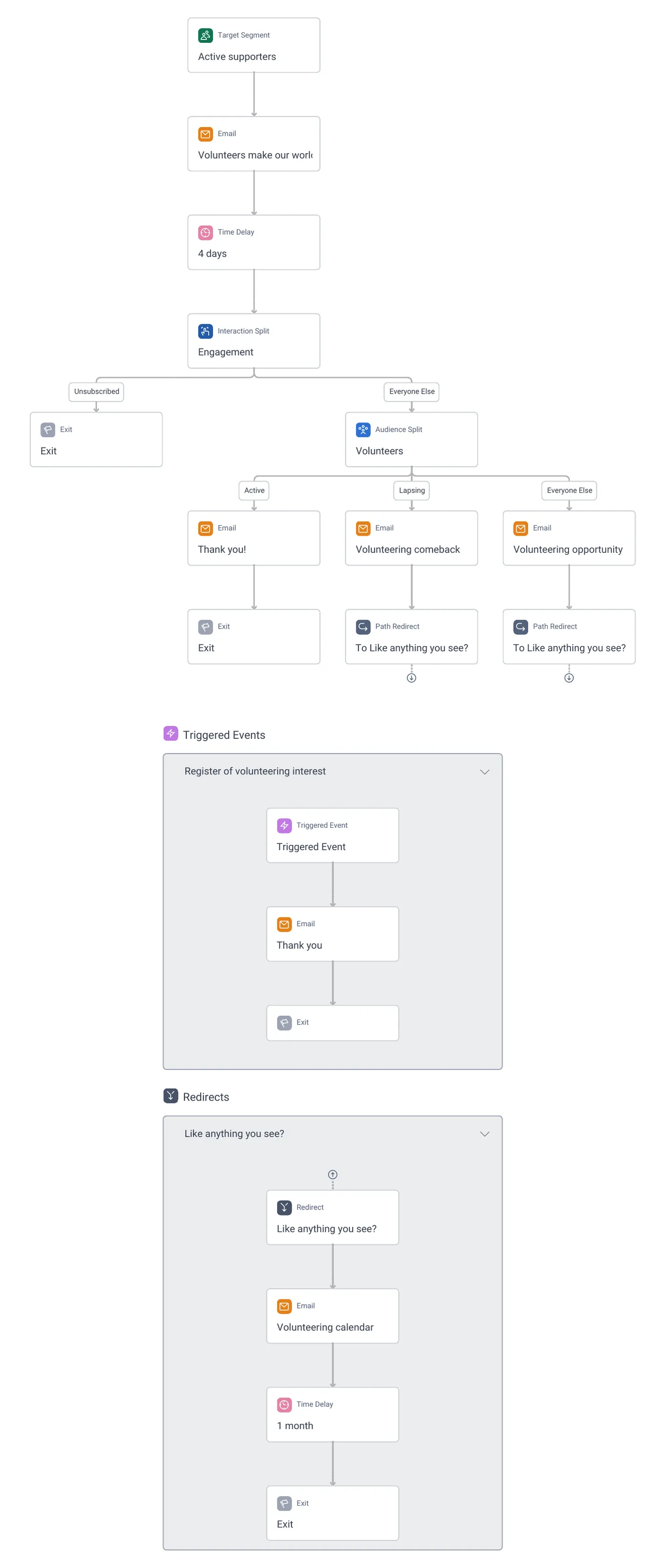
Volunteering push · the whole journey, in Apteco Orbit: Active supporters: Volunteers make our world go round, an engagement split, Volunteering calendar, a thank-you on registered interest, and Volunteering comeback for lapsing volunteers.
Volunteering push · the whole journey Active supporters: Volunteers make our world go round, an engagement split, Volunteering calendar, a thank-you on registered interest, and Volunteering comeback for lapsing volunteers.

Sample charity: the people and numbers in these screens are made up, so the picture shows the tool, not a result. Scroll inside the journey to read it all.

What it does

Volunteer recruitment is usually one email before each event. This journey keeps the invitation open all year and treats a lapsing volunteer differently from a new one.

Volunteering push starts from Active supporters.

  1. Volunteers make our world go round email, then 4 days.
  2. An Interaction Split, Engagement: the engaged go on; Unsubscribed and Bounced exit.
  3. An Audience Split, Volunteers: Active volunteers get Thank you!; Lapsing volunteers get Volunteering comeback; Everyone Else gets Volunteering opportunity.
  4. All paths redirect to Like anything you see?: the Volunteering calendar email, a 1 month wait, then exit.

Where it fits

The audiences and pathways this journey works with, and how to build journeys like it.

Pathways

Learn to build it

The Volunteers split needs the volunteer status you saw on Volunteer Insights: active, lapsing, never. That is the Field Guide's Volunteers Who Have Never Given logic turned around: here it finds donors who have never volunteered. Run it monthly so the calendar email always has the next events in it.

Learn Mission: Volunteering push

Watch the lesson · about a minute

Questions people ask

What is the Volunteering push campaign?

Volunteer recruitment is usually one email before each event. This journey keeps the invitation open all year and treats a lapsing volunteer differently from a new one. The same invitation to a stranger, a regular and a lapsed volunteer lands three different ways. The split fixes that.

Who enters it?

Volunteering push starts from Active supporters.

What are its steps?

Volunteers make our world go round email, then 4 days. An Interaction Split, Engagement: the engaged go on; Unsubscribed and Bounced exit. An Audience Split, Volunteers: Active volunteers get Thank you!; Lapsing volunteers get Volunteering comeback; Everyone Else gets Volunteering opportunity. All paths redirect to Like anything you see?: the Volunteering calendar email, a 1 month wait, then exit.

How do I adapt it to my charity?

The Volunteers split needs the volunteer status you saw on Volunteer Insights: active, lapsing, never. That is the Field Guide's Volunteers Who Have Never Given logic turned around: here it finds donors who have never volunteered. Run it monthly so the calendar email always has the next events in it.

How do I get the Volunteering push campaign?

Send a request with the form on this page. An Apteco Architect gets in touch to set it up with you. To learn it first, open the course stop.

Request this campaign

Tell us who you are and what you need. An Apteco Architect gets your request and gets in touch to set it up with you.

Clients, partners and Apteco offices are all welcome.

We use what you send only to reply to you. Privacy