
Apteco Mission Field Guide Schedule Time with an Apteco Architect Play with a Live System

Welcome

Campaign journey in Apteco Orbit

Someone just joined. What happens in their first month, without anyone remembering to do it? The first month decides the second gift. This journey runs it the same way for every new supporter, every day.
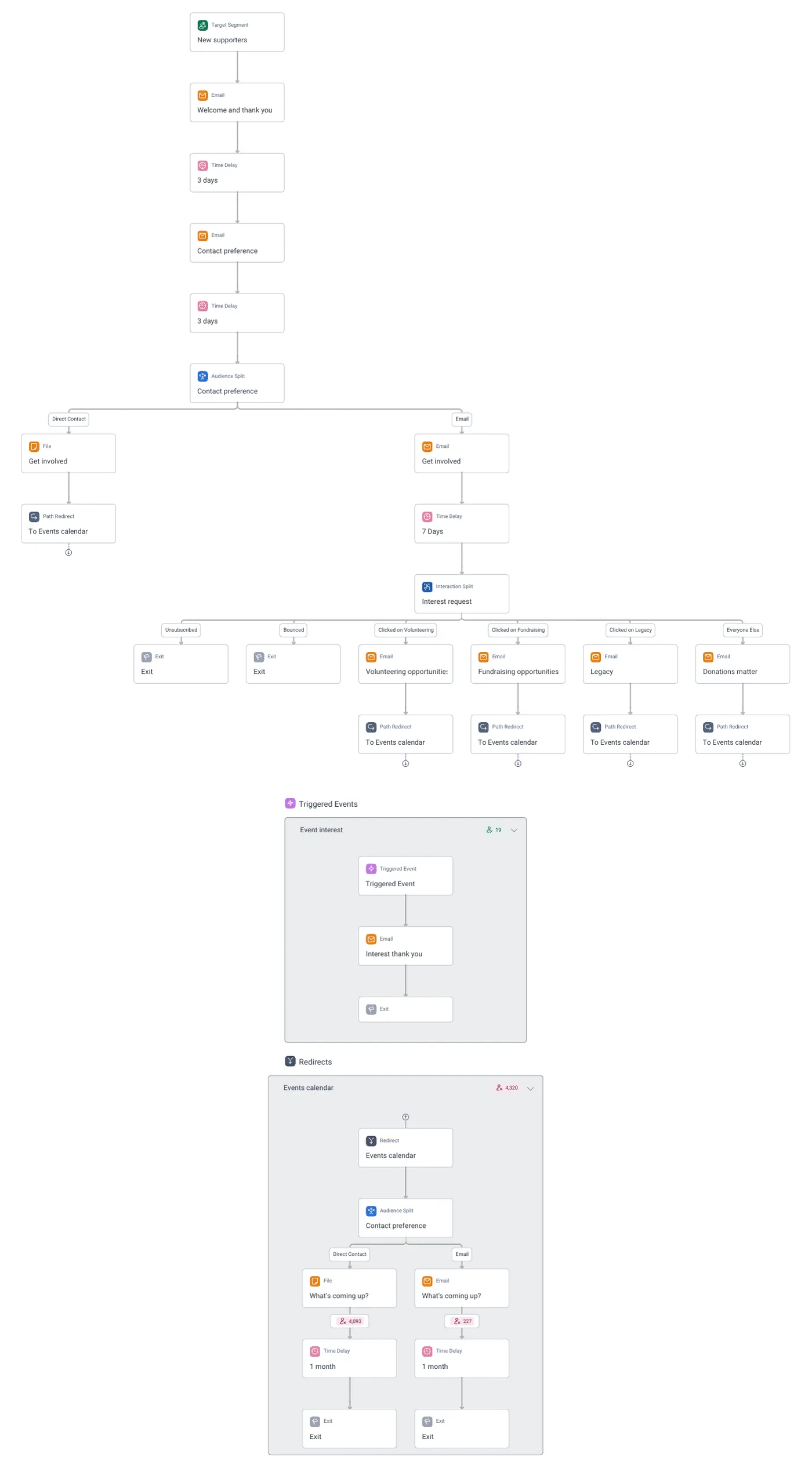
Welcome · the whole journey, in Apteco Orbit: New supporters: Welcome and thank you, contact preference, then interest splits into events (calendar loop), volunteering, fundraising, legacy and Donations matter emails.
Welcome · the whole journey New supporters: Welcome and thank you, contact preference, then interest splits into events (calendar loop), volunteering, fundraising, legacy and Donations matter emails.

Sample charity: the people and numbers in these screens are made up, so the picture shows the tool, not a result. Scroll inside the journey to read it all.

What it does

A new supporter usually gets one email, if that, and then silence until the next appeal. The Welcome journey fills the first weeks on its own and learns what each person cares about.

The Welcome journey starts from the New supporters audience.

  1. Welcome and thank you email, straight away.
  2. A 3 day wait, then the Contact preference email.
  3. Another 3 days, then an Audience Split on contact preference: people who prefer Direct Contact go to a file (a call or letter list) and on to the events calendar; people who prefer Email get the Get involved email.
  4. After 7 days, an Interaction Split called Interest request reads what they clicked: Volunteering, Fundraising, Legacy, or Everyone Else (who get Donations matter). Unsubscribed and Bounced exit.
  5. Each interest branch sends its own email, then a Path Redirect to the Events calendar loop: a What's coming up? message (file or email, by preference), a 1 month wait, then exit.

Where it fits

The audiences and pathways this journey works with, and how to build journeys like it.

Learn to build it

Point the Target Segment at your own new-supporter audience (first gift or sign-up in the last 30 days, like the Field Guide's First 90 Days). Replace the five emails with your templates: keep the order, keep the 3-day gaps. The Interaction Split is the clever part: the link each person clicks decides the next email, so write the Get involved email with one clear link per interest. Run it on a schedule so each day's new supporters enter on their own.

Learn Mission: Welcome: the first 30 days

Watch the lesson · about a minute

Questions people ask

What is the Welcome campaign?

A new supporter usually gets one email, if that, and then silence until the next appeal. The Welcome journey fills the first weeks on its own and learns what each person cares about. The first month decides the second gift. This journey runs it the same way for every new supporter, every day.

Who enters it?

The Welcome journey starts from the New supporters audience.

What are its steps?

Welcome and thank you email, straight away. A 3 day wait, then the Contact preference email. Another 3 days, then an Audience Split on contact preference: people who prefer Direct Contact go to a file (a call or letter list) and on to the events calendar; people who prefer Email get the Get involved email. After 7 days, an Interaction Split called Interest request reads what they clicked: Volunteering, Fundraising, Legacy, or Everyone Else (who get Donations matter). Unsubscribed and Bounced exit. Each interest branch sends its own email, then a Path Redirect to the Events calendar loop: a What's coming up? message (file or email, by preference), a 1 month wait, then exit.

How do I adapt it to my charity?

Point the Target Segment at your own new-supporter audience (first gift or sign-up in the last 30 days, like the Field Guide's First 90 Days). Replace the five emails with your templates: keep the order, keep the 3-day gaps. The Interaction Split is the clever part: the link each person clicks decides the next email, so write the Get involved email with one clear link per interest. Run it on a schedule so each day's new supporters enter on their own.

How do I get the Welcome campaign?

Send a request with the form on this page. An Apteco Architect gets in touch to set it up with you. To learn it first, open the course stop.

Request this campaign

Tell us who you are and what you need. An Apteco Architect gets your request and gets in touch to set it up with you.

Clients, partners and Apteco offices are all welcome.

We use what you send only to reply to you. Privacy