Apteco Learn Mission Schedule Time with an Apteco Architect Play with a Live System

Emergency appeal

Stop 48 of 58 · about 6 minutes

When something happens tomorrow morning, how fast can the ask go out, and what stops it going out twice? An emergency appeal is built in a hurry and sent to everyone. This journey is built in advance, with the thank-you, the progress update and the channel split already in place.

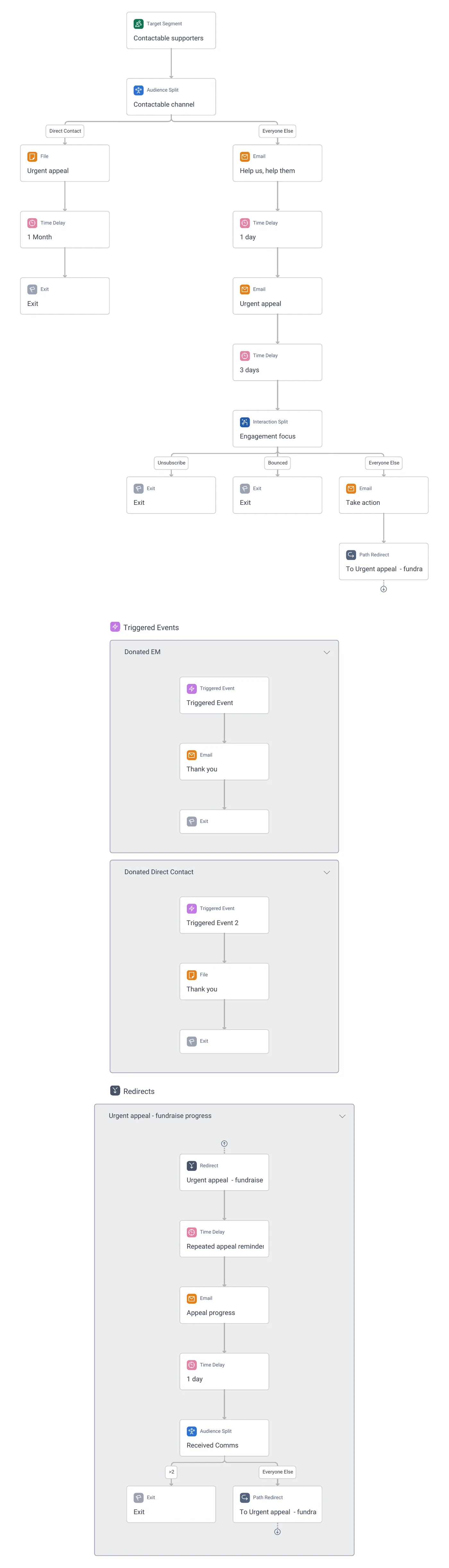
Emergency appeal: a channel split, the Urgent appeal email, an engagement split, the fundraise progress loop with its Received Comms cap, and two Donated triggered events that send the thank-you.
Emergency appeal: a channel split, the Urgent appeal email, an engagement split, the fundraise progress loop with its Received Comms cap, and two Donated triggered events that send the thank-you. Open full size

Sample charity: the people and numbers in these screens are made up, so the picture shows the tool, not a result.

The lesson

Emergency appeal starts from Contactable supporters and splits at once by Contactable channel: a File for people reached by direct contact, the Urgent appeal email for the rest.

  1. Urgent appeal email, then 3 days.
  2. An Interaction Split, Engagement focus: the engaged get Help us, help them and a day later Take action; Everyone Else and Bounced exit.
  3. Everyone who stays goes into the Urgent appeal - fundraise progress redirect: an Appeal progress email, a Repeated appeal reminder wait, and a Received Comms split so nobody gets more than the cap (the >2 branch exits).

Two Triggered Events handle the gift: Donated EM sends a Thank you email; Donated Direct Contact adds the person to a Thank you file. Giving is what moves someone out of the appeal and into thanks.

How to use it. Keep this journey in draft with your templates ready and a placeholder for the story. On the day, change the text, set the Target Segment to your contactable audience, check the volume constraint (Part 5), and go live. The triggered thank-you means nobody who gives on day one gets the reminder on day three.

Watch this stop · about a minute

Your turn, in Orbit

  1. Open Emergency appeal.
  2. Find the first Audience Split. What decides the two branches?
  3. Follow the email branch to the Interaction Split and read its branches.
  4. Find the Received Comms split in the progress loop. What happens at more than 2?

Quick check

A supporter gives on day one of the appeal. What moves them out of the reminders?
  • Nothing, they get every email
  • The Donated triggered event, which sends a thank-you
  • The 3-day wait

Answer: The Donated triggered event, which sends a thank-you

Need a hint?

Look at the triggered events beside the main path.

Why it matters

An appeal that thanks on the day and stops reminding is one supporters forgive, and give to again.

Read on

Read more in the Apteco Help Hub

Learn Mission is a free course. You read a little, do it yourself, then answer one quick check. Orin, the assistant in Orbit, walks with you. Your progress stays in your browser.

Do this stop yourself

It is stop 48 of 58. Open it in the course, or start from the beginning.

Open this stop in the course